April 1, 2026Dan Rodney/8 min read

Symbols: Nested Layer Styles & Nested Symbols

Master Advanced Symbol Management in Sketch Design

Core Concepts You'll Master

Layer Styles in Symbols

Learn to create reusable visual styles that can be applied selectively to symbol instances without affecting all copies.

Symbol Nesting

Discover how to embed symbols within other symbols to create flexible, modular design components.

Topics Covered in This Sketch Tutorial:

Using Layer Styles in Symbols, Nesting Symbols

Exercise Preview

preview nested symbols

Exercise Overview

In this comprehensive exercise, you'll master two advanced Sketch techniques that separate professional designers from beginners: leveraging layer styles within symbols and creating nested symbol hierarchies. These powerful workflows enable you to build scalable design systems that maintain consistency while providing the flexibility essential for complex projects. By the end of this tutorial, you'll understand how to create dynamic components that can adapt their appearance across multiple instances without breaking your design system's integrity.

Exercise Files Required

This tutorial uses the Symbol Nesting.sketch file located in Desktop > Class Files > Sketch Class > Pulse. Make sure you have access to these files before starting.

Using Layer Styles in Symbols

Layer styles in symbols unlock unprecedented flexibility by allowing individual symbol instances to display different visual states while maintaining their core structure. This technique is particularly valuable for interactive elements like buttons, icons, and status indicators that need to communicate different states across your design.

  1. In Sketch, go to File > Open Local Document.
  2. Navigate into Desktop > Class Files > Sketch Class > Pulse and double–click on Symbol Nesting.sketch to open it.
  3. On the Autumn Collection artboard, select the top left product Distressed Denim Jacket.
  4. This is a carefully constructed symbol that demonstrates best practices in component design. It contains the following elements:

    • Product photography with proper aspect ratio constraints
    • Typography hierarchy with product name and pricing
    • Interactive "Add to Bag" call-to-action button
    • Favoriting heart icon positioned at the bottom right of the photo
  5. The heart icon represents a common UX pattern—allowing users to favorite products. We want to demonstrate both selected and unselected states. Simply editing the symbol directly would affect all instances globally, which breaks the principle of flexible, reusable components. Layer styles solve this challenge elegantly by enabling state variations within individual instances.
  6. Double–click on the Distressed Denim Jacket product to enter symbol editing mode.
  7. Click on a blank area of the canvas to ensure nothing is selected.
  8. Select the heart icon at the bottom right of the photo.
  9. We'll create two distinct layer styles representing the heart's possible states. This approach mirrors real-world application development where UI elements must respond to user interactions. In the Inspector on the right, locate the dropdown menu that currently reads No Layer Style.
  10. Below that menu, click the Create button layer style new to create your first style.
  11. Name it favorite/deselected and hit Return to apply.

    NOTE: The favorite/ prefix automatically creates a favorite folder, demonstrating Sketch's organizational capabilities for large-scale design systems!

  12. Now we'll craft the selected state, which should provide clear visual feedback to users. In the Inspector, under Fills, set Hex to #FF0000 and hit Return to apply the distinctive red color.
  13. In the Inspector, above the Fills section, change the overall Opacity to 100%. Note that this controls the entire layer's opacity, not just the fill—a crucial distinction for maintaining visual hierarchy.
  14. In the Inspector, click the Create button layer style new below the style menu to save this selected appearance.
  15. Name it favorite/selected and hit Return to apply.
  16. Establish the default state by setting the deselected style as the symbol's baseline appearance. In the Inspector, click on the style dropdown (currently showing selected) and choose deselected. This ensures new instances start in the appropriate default state.
  17. At the top left of the canvas, click the Back to Instance button to return to your main artboard.
  18. Select the top right product Ivory Loose Knit Sweater to test your layer style implementation.
  19. In the Inspector, you'll now see a powerful new Favorite override option—this is the magic of layer styles in action!
  20. Click on the dropdown menu below Favorite and choose selected.
  21. The heart should immediately transform to red, demonstrating how layer styles enable instance-level customization without affecting the master symbol or other instances.

Creating the Favorite Heart States

1

Set Up Deselected State

Select the heart icon and create a layer style named 'favorite/deselected' to save the current appearance as the default state.

2

Create Selected State

Change the heart fill to red (#FF0000), set opacity to 100%, then create a new layer style named 'favorite/selected'.

3

Apply Override

Return to the instance and use the Favorite override menu to switch between selected and deselected states on individual products.

Folder Organization

Adding 'favorite/' at the beginning of your style names automatically creates a favorite folder in your styles panel, keeping your workspace organized.

Nesting Symbols

Symbol nesting represents advanced component architecture, allowing you to build complex, maintainable design systems. When you nest symbols within other symbols, you create modular hierarchies that mirror modern development frameworks—each component manages its own responsibilities while contributing to larger compositions. This approach dramatically improves design consistency and reduces maintenance overhead as your projects scale.

  1. In the Sidebar, select the Nav Menu artboard to shift our focus to navigation design patterns.
  2. Choose View > Zoom To > Selection to make the Nav Menu artboard fill your workspace, optimizing your view for detailed work.
  3. Click somewhere outside the artboard to clear any selections and reset your focus.
  4. In the artboard's center, notice the empty space with an icon adjacent to the word Text.

    This setup demonstrates a common navigation pattern where links combine iconography with text labels. We'll create three distinct links, each featuring different icons. The key insight here is that the existing icon is already a symbol—by nesting this symbol within another symbol, we unlock sophisticated override capabilities that mirror component prop systems in modern development frameworks.

  5. Click once on the icon to the left of Text to select it precisely.
  6. In the Sidebar, rename the selected element from nav-icon/person to Icon. This simplified name will appear in the Inspector's Override options, making your interface cleaner and more intuitive for team collaboration.
  7. Drag the Icon layer above the Text layer in the layer hierarchy. This seemingly minor adjustment ensures logical ordering in the overrides list, reflecting professional organization practices.
  8. Hold Shift and click once on the word Text so both the icon and text elements are selected simultaneously.
  9. In the Toolbar, click the Create Symbol button symbol button (or choose Layer > Create Symbol for keyboard-driven workflows).
  10. In the symbol creation dialog, configure the following settings with precision:

    • Name: link with icon (descriptive naming improves team collaboration)
    • Layout setting: No Layout (maintains manual control over positioning)
    • Enable: Send Symbol to "Symbols" Page (essential for symbol library organization)
    • Click Create to finalize your nested symbol structure.
  11. Since navigation menus typically feature multiple links, we'll create three instances using Sketch's grid functionality. With the symbol still selected, go to Arrange > Make Grid.
  12. In the Inspector, configure the grid with these professional spacing standards:

    • Cells: 1 column and 3 rows
    • Spacing: 0 horizontal and 20 vertical (providing comfortable touch targets)

    Click Finish when your configuration is complete.

  13. The top link should remain selected. In the Inspector's Overrides section, below Text, type Sign In and hit Return to apply this authentication-focused label.
  14. On the artboard, double–click on the second link's text and type Saved Items, representing a personalization feature common in e-commerce applications.
  15. On the artboard, double–click on the third link's text and type Your Store, completing our navigation trio with a store locator function.
  16. Click once on the second link Saved Items to demonstrate icon override capabilities.
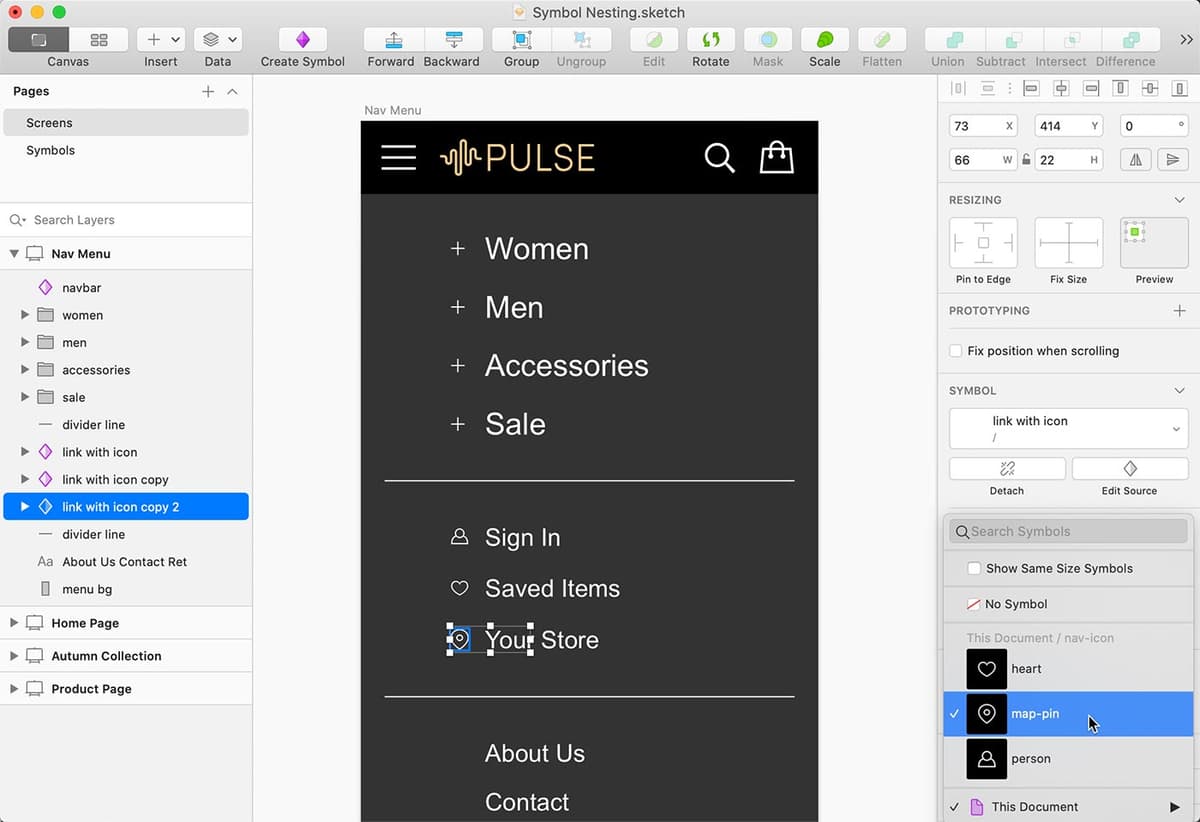
  17. In the Inspector's Overrides section, click on the dropdown below Icon and:

    • Observe the three prepared icons (heart, map-pin, and person)—each optimized for their respective functions
    • Choose heart to visually reinforce the "saved items" concept.
  18. Notice the heart appears distorted on the artboard. This visual inconsistency occurs because symbol artboards have different dimensions, highlighting the importance of standardized component sizing in design systems.
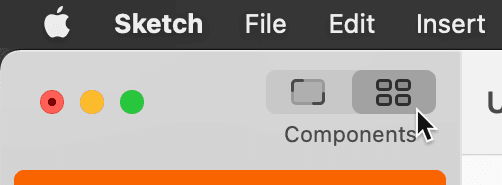
  19. At the top-left of the Toolbar, click on the Components button show components button to access your symbol library.

    show components location

  20. In the Toolbar's center section, click on Symbols show symbols to view all available symbols.
  21. Double–click on the person symbol to edit it directly.
  22. You're now on the Symbols page with the person symbol selected. In the Inspector, note the dimensions: W (width) is 16 and H (height) is 18. These measurements will serve as our baseline for consistency.
  23. Zoom in and scroll down to locate the nav-icon/heart symbol artboard below.
  24. Click on the artboard name nav-icon/heart to select the entire artboard.
  25. Notice the width matches at 16 pixels, but the height differs, causing the distortion we observed earlier.
  26. Change H to 18 to match the person icon's dimensions, ensuring visual consistency across all navigation icons.

    The nav-icon/map-pin symbol already maintains the correct 16×18 dimensions, demonstrating the importance of establishing sizing standards early in your design process.

  27. At the top-left of the Sidebar, under the Pages section, click on Screens to return to your main design workspace.
  28. Notice the heart icon for Saved Items now displays correctly without distortion—a testament to the power of systematic approach to component design.
  29. Select the Your Store link to complete our navigation system.
  30. In the Inspector, change the Icon to map-pin, which perfectly communicates the store locator functionality.
  31. Click somewhere outside the artboard to deselect all elements and view your completed nested symbol system.
  32. Save the file using Command+S and close it, having successfully mastered both layer styles in symbols and symbol nesting—two fundamental techniques for building professional, scalable design systems.

Building the Navigation Link Symbol

1

Prepare Components

Rename the nav-icon to 'Icon' and position it above the Text layer for proper override ordering in the Inspector.

2

Create Parent Symbol

Select both icon and text elements, then create a symbol named 'link with icon' with No Layout setting enabled.

3

Generate Multiple Instances

Use Arrange > Make Grid to create 1x3 grid with 20px spacing, giving you three link instances to customize.

Icon Symbol Dimensions

FeaturePerson IconHeart IconMap-Pin Icon
Width16px16px16px
Height18px18px18px
Recommended: Consistent dimensions prevent distortion when swapping nested symbols

Symbol Override Configuration

0/3
Artboard Size Consistency

When nesting symbols, ensure all nested symbol artboards have consistent dimensions. Mismatched sizes cause visual distortion when symbols are swapped via overrides.

Key Takeaways

1Layer styles in symbols enable selective visual changes to individual instances without affecting all symbol copies
2Creating organized style folders using naming conventions like 'favorite/selected' improves workflow efficiency
3Symbol nesting allows for modular design components where child symbols can be swapped independently
4Consistent artboard dimensions across nested symbols prevent visual distortion during symbol overrides
5The Inspector's Override section provides centralized control for customizing symbol instances
6Grid arrangement tools can quickly generate multiple symbol instances for batch customization
7Proper layer ordering affects the appearance sequence in the Inspector's override options
8The 'No Layout' setting for symbols provides maximum flexibility for responsive design adjustments

RELATED ARTICLES