March 23, 2026/9 min read

Python vs. Excel for Data Analytics

Choosing the right tool for data analytics success

Data Analytics Tool Landscape

750+
Excel users worldwide
#1
Most popular programming language rank
2,016
Year Python became most popular

Python Vs. Excel for Data Analytics

In the modern data landscape, two tools dominate the conversation: Excel and Python. While Excel remains the cornerstone of business analytics due to its intuitive interface and widespread adoption, Python has emerged as the powerhouse for serious data science and advanced analytics. Each serves distinct purposes in today's data-driven economy, but understanding their strengths and limitations is crucial for making informed decisions about your analytical toolkit. Let's examine how these platforms stack up across the dimensions that matter most to data professionals.

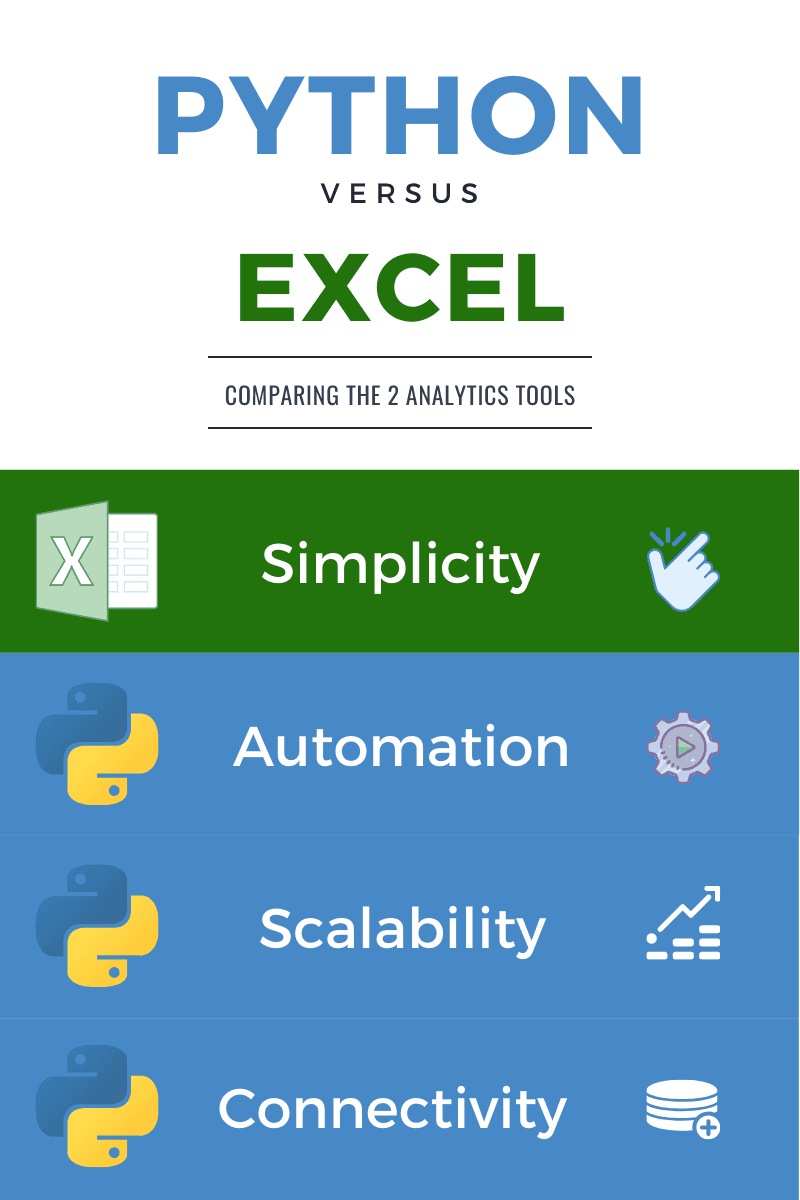
Python vs. Excel Infographic

1. Ease of Use

Excel's dominance in the business world stems largely from its remarkable accessibility. Most professionals can open Excel and begin productive work within minutes, leveraging an interface that feels familiar and intuitive. The tool excels at immediate tasks: managing contact databases, building project timelines, performing quick calculations, and creating instant visualizations. This low barrier to entry explains why millions of business users can progress from basic formulas to sophisticated pivot tables in just days—a transformation we see regularly in our intensive Excel Bootcamp programs.

The beauty of Excel lies in its visual, point-and-click environment. You can download the application, watch a brief tutorial, and immediately start calculating sums, averages, and creating charts. For professionals who need quick insights or occasional data analytics without deep technical investment, Excel provides an unmatched combination of power and simplicity.

Python presents a fundamentally different learning paradigm. For newcomers to programming, the initial setup alone can feel overwhelming: installing Python distributions, configuring development environments, managing package dependencies through pip installations, and navigating command-line interfaces. Unlike Excel's friendly graphical interface, Python requires you to express your analytical intentions through code, which demands a completely different mental model.

However, the landscape has evolved significantly since 2020. The proliferation of cloud-based platforms like Amazon Web Services, Google Cloud Platform, and modern big data infrastructures has made Python literacy increasingly essential for career advancement. Companies are investing heavily in employee upskilling programs, recognizing that data fluency—including basic programming skills—has become a competitive necessity rather than a luxury.

Modern learning platforms have dramatically lowered Python's barriers to entry. Interactive environments like Google Colab, DataCamp, and specialized platforms eliminate setup friction, allowing beginners to write and execute Python code immediately. Resources like www.learnpython.org provide sandbox environments where you can experiment with data manipulation and see results instantly, bridging the gap between Excel's immediacy and Python's power.

Despite these improvements, Excel maintains its advantage for rapid onboarding and casual use. However, the investment in learning Python increasingly pays dividends as organizations modernize their data operations.

Winner: Excel

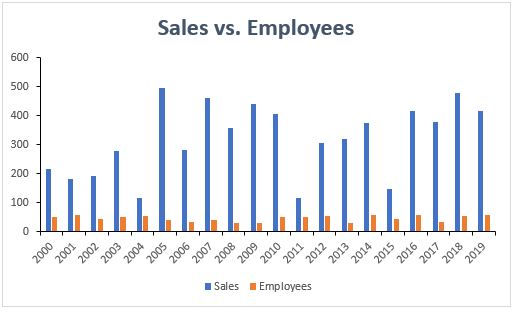
Excel Chart

Learning Curve Comparison

FeatureExcelPython
Setup TimeMinutesHours
Basic TasksClick & GoCode Required
Time to IntermediateDaysWeeks/Months
User InterfaceGUICommand Line
Recommended: Excel wins for immediate productivity and ease of use

Excel Ease of Use

Pros
Intuitive graphical user interface
Minimal setup required
Quick learning curve for basic tasks
Familiar to most business users
Cons
Limited advanced analytical capabilities
Not suitable for complex data manipulation
Difficult to scale for large datasets

2. Scalability & Big Data

When your analytical needs scale beyond basic reporting, the limitations of Excel become glaringly apparent, while Python's architectural advantages shine. Excel operates under fundamental constraints: it can handle approximately one million rows per worksheet, and performance degrades significantly as you approach these limits. Complex workbooks with multiple sheets, extensive formulas, and large datasets frequently crash, potentially destroying hours of unsaved work. These limitations become even more pronounced when collaborating through cloud platforms like SharePoint, where file synchronization can introduce additional instability.

Excel was designed for desktop financial modeling, not as a data warehouse or analytical engine for modern datasets. When you're working with millions of records, real-time data streams, or complex multi-table relationships, Excel simply wasn't built for the task. The tool's row-by-row interface becomes unmanageable at scale, and its formula-based approach creates performance bottlenecks that compound with data volume.

Python, by contrast, was architected for computational scalability. By separating data storage from analytical code, Python environments handle massive datasets with remarkable efficiency. Libraries like Pandas can process millions of rows in seconds, while tools like Dask and Apache Spark (accessible through PySpark) enable analysis of datasets that exceed your computer's memory capacity. This separation also provides stability—your analytical logic remains intact even when working with volatile or streaming data sources.

Modern Python environments like Jupyter Notebook offer containerized computing that maintains a complete record of your analytical workflow. Unlike Excel, where formulas can overwrite data and mistakes can be difficult to trace, Jupyter preserves every step of your analysis. This transparency proves invaluable when debugging complex analyses or when regulatory compliance requires complete analytical documentation.

Python's integration capabilities extend far beyond Excel's range. You can seamlessly combine SQL database queries with Python data manipulation, machine learning algorithms, and advanced visualizations—all within a single environment. This integration becomes essential when working across multiple data sources, whether you're joining customer databases with web analytics, financial records with market data, or any other complex data ecosystem.

For organizations dealing with enterprise-scale data, Python isn't just advantageous—it's often the only viable solution. The ability to process, analyze, and model massive datasets while maintaining performance and stability makes Python indispensable for serious analytical work.

Winner: Python

Excel Performance Limitations

Excel becomes slower and crash-prone with large datasets, especially when sharing files through SharePoint. The program struggles with millions of entries and multiple tables.

Python's Big Data Advantages

Containerized Environments

Jupyter Notebook handles large datasets efficiently with better computational speeds and stability. Work is preserved in containers for easy error tracking.

Database Integration

Seamless SQL query execution and database connectivity. Python can interact with MySQL, PostgreSQL, and other databases directly from notebooks.

Data Merging Capabilities

Easily merge and join data from multiple tables and sources. Handle millions of rows without interface limitations.

3. Automation Capabilities

In today's efficiency-focused business environment, the ability to automate repetitive analytical tasks has become a critical competitive advantage. This is where Python's programming foundation delivers transformative value, while Excel's manual nature becomes a significant limitation.

Consider a typical business scenario: monthly sales performance reports requiring data from multiple sources, complex calculations, trend analyses, and formatted visualizations for executive presentation. In Excel, this process demands manual data import, pivot table creation, chart formatting, and copy-paste operations into PowerPoint. Each month, analysts spend hours recreating essentially identical reports, introducing opportunities for human error and consuming valuable time that could be spent on strategic analysis.

Python transforms this workflow entirely. A well-designed Python script can automatically connect to your databases, execute complex queries, perform statistical analyses, generate publication-ready visualizations using libraries like Matplotlib and Seaborn, and even compile results into formatted reports. More importantly, these scripts can be scheduled to run automatically, ensuring stakeholders receive up-to-date insights without manual intervention.

The productivity gains are substantial. What might require 4-6 hours of manual Excel work can be reduced to minutes of automated execution. Python's data visualization libraries offer sophisticated charting capabilities that surpass Excel's built-in options, while maintaining consistency across all reports.

Beyond time savings, Python automation enables analytical sophistication that would be impractical manually. You can implement statistical models, perform A/B testing analysis, generate predictive forecasts, and create interactive dashboards—all automatically updated as new data becomes available. This capability allows analysts to focus on interpretation and strategic recommendations rather than data preparation and formatting.

Python's collaborative advantages extend through platforms like GitHub, where analytical scripts become shared organizational assets. Teams can version-control their analyses, peer-review analytical methods, and ensure business continuity even when key personnel change roles. This knowledge management approach transforms individual analytical skills into institutional capabilities.

For organizations serious about data-driven decision-making, Python automation isn't just convenient—it's essential for maintaining competitive analytical capabilities.

Winner: Python

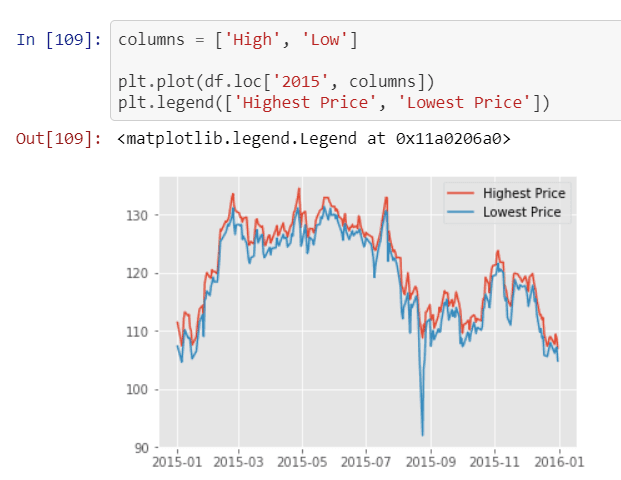
Matplotlib Python

Monthly Report Process: Excel vs Python

1

Excel Manual Process

Pull data, create 10 pivot tables/charts, copy to PowerPoint presentation - repeat monthly with high error potential

2

Python Automated Process

Write queries once, connect to database, create visualizations with Matplotlib/Seaborn, schedule automatic updates

3

One-Click Execution

Hit 'Run' to automatically generate entire notebook with updated data and charts, saving hours of manual work

Knowledge Continuity Advantage

Python scripts can be shared on GitHub for easy team collaboration, version tracking, and knowledge transfer even when team members leave or are unavailable.

4. Data Connectivity

The value of any analytical tool ultimately depends on its ability to access and integrate the data you need. As organizations increasingly adopt cloud-first data strategies and complex data ecosystems, connectivity capabilities have become a decisive factor in platform selection.

Python excels in the modern data landscape through its extensive ecosystem of connectivity libraries and APIs. Whether you're working with cloud databases (AWS RDS, Google BigQuery, Azure SQL), data warehouses (Snowflake, Redshift), streaming platforms (Kafka, Kinesis), or web APIs, Python provides robust, well-maintained libraries for seamless integration. The ability to programmatically connect, query, and transform data from multiple sources within a single analytical environment represents a fundamental advantage for complex analytical workflows.

Python's Pandas library deserves special recognition for its data integration capabilities. It can natively read and merge datasets from diverse formats—Excel spreadsheets, CSV files, JSON APIs, SQL databases, and even web scraping—into unified analytical frameworks. This flexibility proves invaluable when dealing with the heterogeneous data sources common in modern organizations.

Excel has made significant strides in data connectivity, particularly with Power Query and direct database connections. Modern Excel can connect to cloud databases, web services, and various file formats. However, these connections often require manual configuration and don't integrate seamlessly with complex analytical workflows. Excel remains excellent for quick analysis of standard data exports—the CSV files from your CRM, the Excel reports from your e-commerce platform, or the formatted outputs from business applications.

The critical difference lies in scalability and integration depth. While Excel can connect to modern data sources, it wasn't architecturally designed for the volume, velocity, and variety characteristics of contemporary data ecosystems. Excel connections often require data to be pulled into the spreadsheet environment, creating storage and performance constraints. Python, conversely, can process data where it lives, enabling analysis of datasets that would overwhelm Excel's memory limitations.

For organizations with simple, structured data needs, Excel's connectivity may suffice. However, as data complexity grows—multiple sources, real-time requirements, large volumes—Python's connectivity advantages become essential for effective analytical operations.

Winner: Python

Data Source Connectivity

FeatureExcelPython
Cloud DataLimitedExcellent
Large Data StreamsStrugglesOptimized
Basic ExportsNativeImportable
Multiple SourcesManualAutomated
Recommended: Python excels for modern cloud-based data infrastructure

Python Data Integration Benefits

Pandas Library

Open-source library reads and merges datasets from Excel, CSV, JSON into unified format. Transforms raw data into valuable insights.

Scheduled Data Access

Automate data retrieval from databases at scheduled times. Always work with the most up-to-date information for analysis.

Key Takeaways

The Excel versus Python decision ultimately reflects your analytical ambitions and organizational data maturity. Excel's enduring strength lies in its democracy—it empowers millions of professionals to perform meaningful analysis without technical barriers. For quick insights, ad-hoc analysis, and straightforward business reporting, Excel remains unmatched in its combination of power and accessibility.

Python represents the professional evolution of data analysis. It demands greater initial investment but delivers exponentially greater capabilities for serious analytical work. As organizations increasingly compete on data insights, Python's advantages in automation, scalability, and integration become competitive necessities rather than technical luxuries. The language's consistent ranking as the most popular programming language since 2016 reflects its robust ecosystem of libraries, active community support, and versatility across analytical domains.

To guide your platform selection, consider these strategic frameworks:

  • Choose Excel when: You need immediate results from structured data, your analyses are primarily one-time or simple recurring reports, your team lacks programming experience, or you're working with standard business data formats. Excel excels at financial modeling, basic statistical analysis, and quick visualizations that inform immediate business decisions.
  • Choose Python when: You're working with large datasets, need automated or repeatable analytical workflows, require advanced statistical modeling or machine learning capabilities, or must integrate multiple data sources. Python becomes essential for predictive analytics, complex data transformations, and analytical operations that scale with business growth.

The most sophisticated analytical teams often employ both tools strategically—Excel for rapid exploration and stakeholder communication, Python for robust analytical infrastructure and advanced modeling. As data volumes and analytical complexity continue growing, Python literacy increasingly represents a career-defining skill for data professionals.

Ready to advance your analytical capabilities? Explore our comprehensive Python courses and certificates for serious data science training, or begin with our foundational Excel classes through NYIM Training to build essential business analytics skills.

When to Choose Each Tool

Small One-time Analysis
90
Basic Visualizations
85
Big Data Processing
95
Automation & Reporting
90
Database Connectivity
88
Python's Rising Popularity

Python has been consistently ranked as the most popular programming language since 2016, driven by its extensive open-source statistical libraries and active community support.

Key Takeaways

1Excel excels in ease of use with its intuitive GUI and minimal learning curve, making it accessible to most business users within days
2Python requires steeper initial learning but provides superior scalability for big data processing and analysis
3Automation capabilities strongly favor Python, enabling one-click report generation and scheduled data updates that save hours of manual work
4Cloud-based data connectivity and integration is significantly better with Python through libraries like Pandas and containerized environments
5Excel remains the better choice for small, one-time analyses and basic visualizations where simplicity is prioritized
6Python is essential for data-driven companies working with large datasets, multiple data sources, and requiring repeatable analytical processes
7Knowledge continuity and team collaboration are enhanced with Python through version control systems like GitHub
8The choice between tools depends on data size, automation needs, and the technical skill level of the user base

RELATED ARTICLES