Tip Calculator App
What This Tutorial Covers
UI Layout
Build a clean tip calculator interface with constraints.
User Input
Capture and validate text field input.
Calculation Logic
Tip percentages, totals, and per-person split math.
Noble Desktop's Full-Stack Web Development Certificate teaches programming fundamentals that transfer across mobile, web, and desktop development.
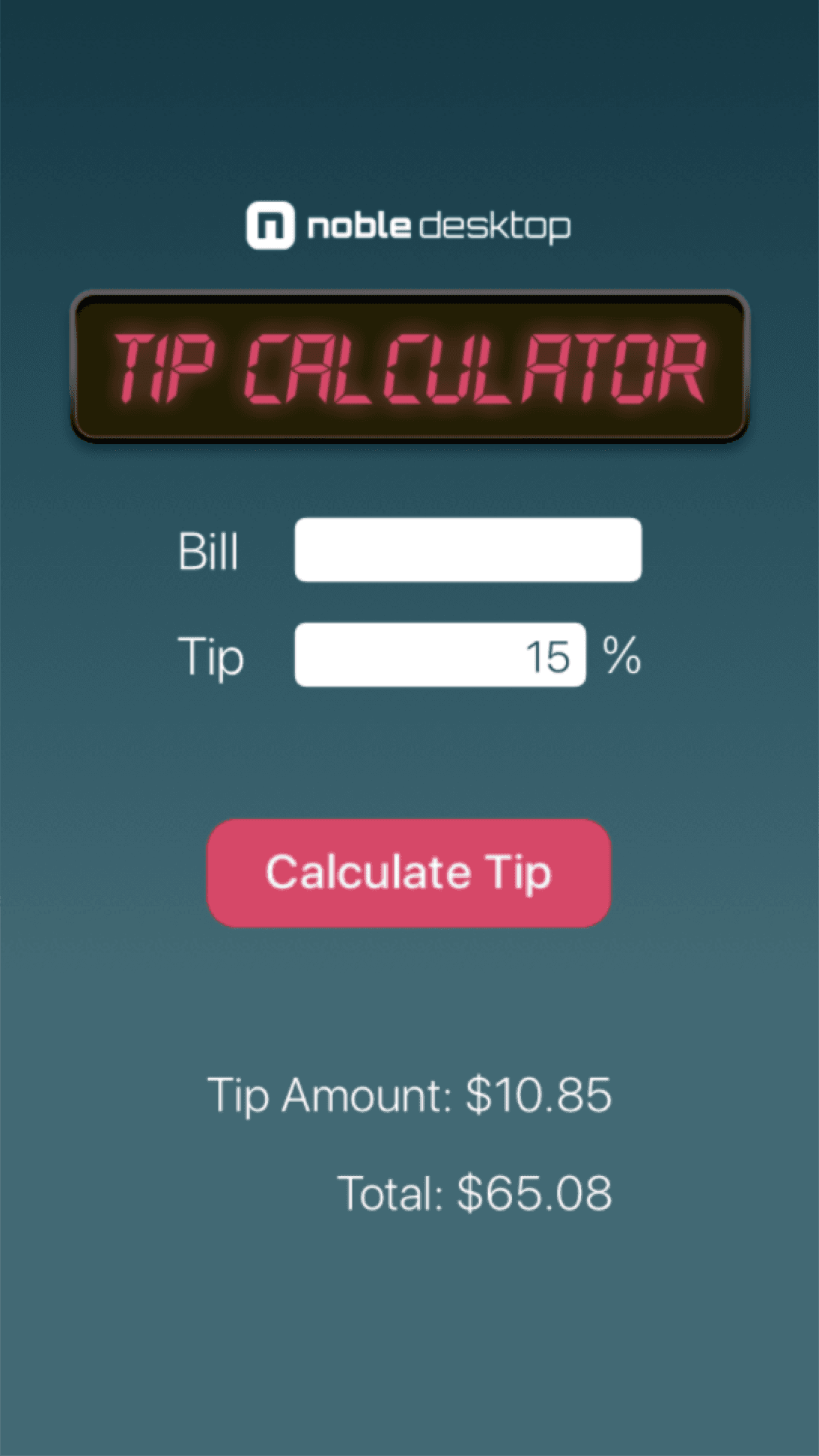
Dive into this detailed iOS Development tutorial, which shows you step-by-step instructions on how to create a stylish and simple tip calculator app, right from launching Xcode to laying out the UI.
Exercise Preview
Laying Out the UI
- We need three images for our design. In the Project navigator
 , click on Assets so we can add them to our assets catalog.
 - Switch to the Desktop and navigate to yourname–iOS App Dev 1 Class > Tip Calculator Images.
- Select the three images within the folder.
- With Xcode visible, drag the three images to either column in the Editor.
- In the Project navigator, select Main.
- At the bottom of the Editor, make sure the view is set to iPhone 13 Pro.
Using the screenshot at the beginning as a guide, we’ll drag in the objects we need.
In the Object library search field, type image. Drag an Image View anywhere on the view.
- In the Attributes inspector
 next to Image, type bg-gradient and press Return.
 - Drag out the image so that it fills the entire screen size.
- From the Object library, drag in another Image View.
- In the Attributes inspector, set the Image to top-graphic.
- As a default, Xcode is going to scale your graphic to fit the box. Chances are the image is looking a little warped. In the Attributes inspector, under View, set Content Mode to Aspect Fit. This should make your image look proportionally correct.
- However this image does have some transparent pixels, and Xcode can have trouble displaying it correctly. We’re going to put a constraint on it to keep it under control. CTRL–drag the image to itself in the Document Outline, and choose Aspect Ratio.
In the Size inspector edit the constraint to make the Multiplier 720:268. These are the exact pixel dimensions of the image. Don’t worry if you get errors about missing constraints—we’ll position it later on.
NOTE: If you ever want to get the exact pixel dimensions of an image, drag the image into Google Chrome. Mouse over the name of the file in the tab, and it will show the pixel dimensions.
- Resize the Tip Calculator graphic to be approximately the size in our layout.
- In the Object library search field, type Button. Drag a Button to the center of the view.
- In the Attributes inspector, delete the Button text under Title.
- Set the Image to button-calculate-tip.
- In the Object library search field, type Label. Drag in three labels. These will be for the Bill, Tip, and %.
- In the Attributes inspector , change the default Label text to each of the appropriate labels: Bill, Tip, and %
- Select all three labels you just created using Shift–Click, and set the Color to White.
Next to Font click the
 button and set the following:
- Font: System
- Style: Light
- Size: 24
- Set Alignment to Left. You may need to resize some of the text boxes to fit the text.
Arrange the labels roughly to match the screenshot at the beginning of the exercise.
- In the Object library, search Text Field and drag out two of them. These will be the input fields for the bill and tip percentage.
- Select both text fields.
- In the Attributes inspector, set the Font to System Light and Size to 20.
Set Alignment to Right.
- Make sure Border Style is set to the last rounded edges option.
- In the Editor, select the top text field.
- Open the Size inspector
 , and set the Width to 101.
 - Select the bottom text field and set the Width to 70.
- Back in the Attributes inspector, add the text: 15. We’d like there to be an initial value for the tip when the app is launched.
- Select both text fields.
- Let’s change the font color. Click on the Color bar to open the Colors panel.
- Along the top, click the second button to view the Color Sliders.
- From the menu, choose RGB Sliders.
- Below the sliders, set the Hex Color # to 003945. Hit Return to apply the color.
- Close the window.
- Arrange the text fields roughly to match the screenshot at the beginning of the exercise.
- Next, from the Object library add two more labels to the bottom for the tip and bill totals.
- Even though we’ll be updating these values with our code, we’ll add text so that we can visually align the labels. Select the top label and in the Attributes inspector, add the text: Tip Amount: $10.85
- Resize as needed.
- Select the bottom label, set the text to: Total: $65.08 and resize if needed.
Select both of these labels, and set the following attributes:
Font: System Style: Light Size: 22 Alignment: Right Color: White Align all of the objects so they look similar to the screenshot above.
Connecting the Interface to the ViewController
- Select the Adjust Editor Options Show the Assistant editor
 icon and select Assistant.
 First, we’ll add our connections. Hold the Control key and drag from the top text field (next to Bill) to the ViewController.swift code underneath this line:
class ViewController: UIViewController {In the prompt that opens, name it billPrice and hit Return.
You should see the new line of code: @IBOutlet weak var billPrice: UITextField!
NOTE: The IB in IBOutlet stands for Interface Builder. For now try not to be intimidated by the syntax—in time (and with practice) it will make sense.
Control–drag from the bottom text field (next to Tip) and in the prompt that opens, name the outlet tipPercent.
Create an outlet for the Tip Amount label and name it tipLabel.
Create an outlet for the Total label and name it totalLabel.
So far, your code should look like this:
@IBOutlet weak var billPrice: UITextField!
@IBOutlet weak var tipPercent: UITextField!
@IBOutlet weak var tipLabel: UILabel!
@IBOutlet weak var totalLabel: UILabel!
We’ll set the Calculate Tip button to an action, since we need to create a function which will hold our calculation code. Control–drag the Calculate Tip button to the View Controller file and in the prompt that opens, set the following:
Connection: Action (don’t forget this setting!) Name: calculate Type: UIButton Event: Touch Up Inside NOTE: When programming a method, all the executable code gets placed between the opening and closing curly braces {}. When the user taps the button, the method is called and each line within the method’s curly braces gets executed sequentially.
Click Connect.
Adding the Calculator Logic
Firstly, we need to get the value of the text field. We’re going to convert it to a Double. Type the following line of code, shown below in bold, between the { } of the method:
@IBAction func calculate(_ sender: Any) {
   let price = Double(billPrice.text!)
}
We’ve set price to a constant so we can use it later.
We’ll do the same for the tip input field. Add the following bold code:
let price = Double(billPrice.text!)
let tip = Double(tipPercent.text!)
NOTE: You can ignore any yellow errors for now.
To calculate the tip amount we can use some pretty simple math using the constants we just defined. Add the following bold code:
let tip = Double(tipPercent.text!)
let tipTotal = price! * tip!/100.0
Now that we’ve used the two values from the input fields to create a tip amount, we need to display the new value in the label we created. Add the following bold code to set the tipLabel (a text field) to the tipTotal we calculated.
let tipTotal = price! * tip!/100.0
tipLabel.text = String(format: "$%.2f", tipTotal)
NOTE: We are setting the format to “$%.2f” so that the price is displayed with two decimal places.
Let’s CONCATENATE text at the beginning so the user knows what the value is that they are seeing. Add the bold code shown below:
tipLabel.text = "Tip Amount: " + String(format: "$%.2f", tipTotal)We’d like to also display the total bill amount by adding the tip to the original bill price. Add the following bold code:
tipLabel.text = "Tip Amount: " + String(format: "$%.2f", tipTotal) totalLabel.text = "Total: " + String(format: "$%.2f", price! + tipTotal)- In the top left corner, set the active scheme to iPhone 8.
Click the Run button
 to compile the code and open the app in the simulator.
Whoa! The top-graphic comes out wonky! There is something else we have to do to constrain it.
- Back in Xcode, CTRL–drag the top-graphic onto itself, and choose Width.
- In the Size inspector, edit this constraint to have a Constant of ≤ 323. This will limit the size to only 323 pixels wide or less. The position may still be off, but we will fix that later with another constraint.
Run the simulator again.
Add a value to the Bill field and hit the Calculate Tip button. It should calculate a 15% tip!
Try changing both the Bill and Tip fields to see that it can calculate any tip amount you like!
You may have noticed that the two total labels at the bottom were showing when we initially opened the app. It would be a little nicer if they only showed when there were actual values calculated. Let’s keep them hidden until a user presses the Calculate Tip button.
Return to Xcode.
We’ll add code to the viewDidLoad function that will set both the tipLabel and totalLabel text to empty strings. Delete the default comment and add the following bold code shown below:
override func viewDidLoad() {
   super.viewDidLoad()
   tipLabel.text = ""
   totalLabel.text = ""
}
Click Run to open the app in the simulator.
Notice that now when the app is loaded only the text fields and calculate tip button are showing.
Let’s do one more test of our app’s functionality. Leave the Bill field empty and hit the Calculate Tip button.
The app will crash and take you back to Xcode. Not so user-friendly. Casting a string to a double is an operation that can fail. Let’s see how we can fix this.
We need to add some code to make sure the bill input can always be converted to a number, and stop any code from running if the field is empty. We’ll use a guard statement, which is similar to the conditional statements we’ve already seen. It will check if a condition is true, and if not it will run an else block. We’ll set the statement to call return if it fails, and stop the execution of our calculate function.
Add the following bold code:
@IBAction func calculate(_ sender: Any) {

   guard let price = Double(billPrice.text!)
   else { return }

   let tip = Double(tipPercent.text!)
You’ll probably see some errors telling you the ! is no longer needed next to price. Delete the exclamation points after price in the let tipTotal and totalLabel.text lines, as shown below:
let tipTotal = price * tip!/100.0 tipLabel.text = "Tip Amount: " + String(format: "$%.2f", tipTotal) totalLabel.text = "Total: " + String(format: "$%.2f", price + tipTotal)- Click Stop then Run.
Leave the Bill field empty and hit Calculate Tip. You should no longer get any crashes! You can now sit back and admire your functioning tip calculator.
Adding Constraints
You may have noticed that we told you to set the active scheme and View as: to an iPhone 8. So far, we only designed our UI for this one device. If you switch to another device it will not look nearly as good!
Now that we have the basic functionality down, let’s tweak this so it looks good on all iPhones from the 4 on up.
- Back in Xcode, click on Main.
- We no longer need the Assistant editor so feel free to click the X in the top-left corner to close it.
- In the Document Outline, select bg–gradient.
- At the bottom right of the Editor, click the Add new constraints button
 .
. - Make sure all four constraint values are set to 0.
- Click on all four red dotted lines.
- Click the arrow
 next to each of the four constraints to select View (current distance = 0).
 - At the bottom, click Add 4 Constraints.
- View the storyboard as an iPhone 13 Pro Max to see the background now covers all the background. Then bring it back to the iPhone 13 Pro.
Creating the First Horizontal Stack
Stacking is a great way to constrain elements and keep them looking good on different-sized devices. Let’s use some stacking techniques to get this calculator looking good and tight on all iPhones.
With stacks we want to work from the inside out, and align things logically. In this case, we’ll start with the Tip Percentage text field and the % text.
- Select the text field to the right of Tip, and the %.
- Click on the Embed in button
 and choose Stack View. It’s going to smoosh the elements together. No worries! We are going to work a little magic.
 - Name the Stack View in the Document Outline Tip Percentage Stack.
- In the Attributes inspector, make Spacing 7. That gives us 7 pixels between the text field and the %.
- Cmd–click to select the Tip Percentage Stack and Bill Round Style Text Field.
- Click the Embed in Stack button.
- Name the stack Text Fields Stack.
In the Attributes inspector, set Alignment to Fill, Distribution to Fill and make Spacing 18.
You will see things change and get the idea of what we are trying to accomplish. These fields will stretch out when we constrain them within wider stacks.
- Select the Bill and Tip labels.
- Click the Embed in Stack button.
- Name it Bill-Tip Stack.
- In the Attributes inspector, make Spacing 18.
- While the Bill-Tip Stack is selected, Cmd–click on the Text Fields Stack.
- Click Embed in Stack.
- Name the stack Bill & Tip Complete Stack.
- In the Attributes inspector, make Distribution Fill Proportionally (we are doing this so that when the stack expands, the text field will expand).
In the Document Outline, CTRL–drag from the Text Fields Stack to its parent Bill & Tip Complete Stack. Choose Equal Widths.
Yes this looks terrible. That’s because we haven’t set up the overall main stack yet. Once we do, things will stack up nicely!- In the Size inspector, under Equal Width to: click Edit. Make the Multiplier 0.75.
- Select the Tip Label in the Document Outline (the tip label that holds the Tip Amount).
- CTRL–drag onto itself and choose Height.
- In the Size inspector, under Height Equals: click Edit and make Constant 27.
Do the same thing to the Total Label:
- CTRL–drag onto itself
- Choose Height
- Edit the constraint to say 27
This will keep the height of the labels 27 no matter what, and therefore the text from getting any smaller than it is.
- Select the Tip Label and Total Label.
- Embed in Stack.
- Name it Tip Calc Stack.
- In the Attributes inspector, make Alignment Trailing (this is because it is aligned right), and Spacing 18.
- In the Document Outline rename the Button to be Calculate Button.
Select all four of these in the Document Outline:
- Calculate Button
- Bill & Tip Complete Stack
- Tip Calc Stack
- top-graphic
- Embed in Stack.
Yikes! But that’s ok, everything is going to be all right. - Name the stack Master Stack.
Control–drag the Master Stack to the View four times and choose these options:
- Leading Space to Safe Area
- Trailing Space to Safe Area
- Center Vertically in Safe Area
- Equal Heights
Change the constraints to the following:
- Align Center Y should have a Multiplier of 0.95
- Align Trailing to: should have a Constant of 5
- Align Leading to: should have a Constant of 5
- Now change Equal Height to ≥ 0, with a Multiplier of 0.7.
In the Attributes inspector, make:
- Alignment: Center
- Distribution: Equal Centering
- Spacing: 15
- Now to get the Bill and Tip text fields finally looking normal! CTRL–drag Bill & Tip Complete Stack to Master Stack. Choose Equal Widths.
In the Size inspector, edit the Equal Width constraint to have a Multiplier of 0.6.
You may now get an error message near the top of the View Controller Scene in the Document Outline. Click on the error to see what it says. There is a good chance it says to change the vertical hugging priority for the Bill and Tip labels. For Bill it says to make that priority 250, and Tip 252. These numbers basically just say that Tip gets precedence over Bill if there is not enough room to give them the same spacing. This won’t affect us as we have tested the app on all size devices. However it’s a precaution that Xcode wants us to take, so why not.
- Select the Bill label, and in the Size inspector, under Content Hugging Priority and Vertical, make the number 250.
Select the Tip label, and in the Size inspector, under Content Hugging Priority and Vertical, make the number 252.
Now if you preview this on different phone sizes (by clicking on View As: iPhone 8), you should see the layout look good on every size iPhone, including the 4.