April 1, 2026Noble Desktop Publishing Team/9 min read

Creating Simple Cells & Managing Retina Images

Master iOS table views and retina image management

Core iOS Development Skills You'll Master

Single View Applications

Learn to create and configure basic iOS app architecture using Xcode's built-in templates and navigation systems.

Table View Management

Master static and dynamic cell creation, customization, and layout management for data presentation.

Retina Image Optimization

Implement proper image scaling and resolution management for modern high-density iOS displays.

Topics Covered in This iOS Development Tutorial:

Creating a Single View Application, Adding Cells, Adding Images to an App, Retina Images

Exercise Preview

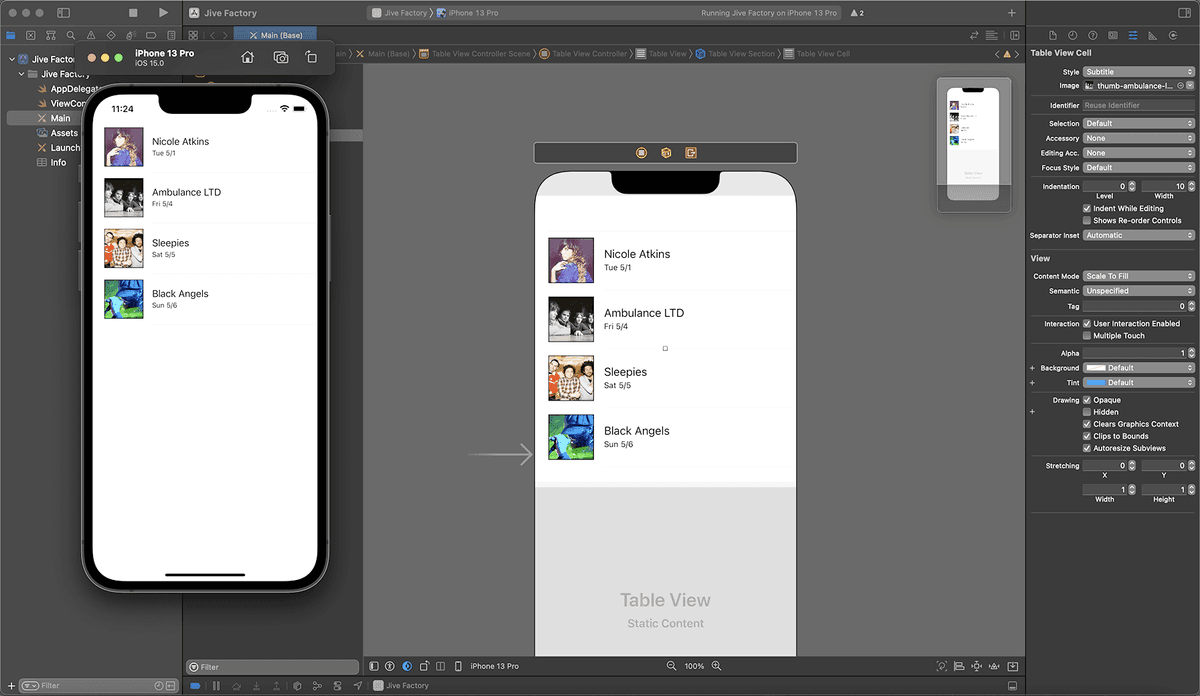
ex prev band app images

Jive Factory App Development Progress

Step 1

Project Setup

Create single view application with proper configuration

Step 2

Table View Implementation

Replace default controller with table view functionality

Step 3

Static Cell Creation

Add and customize cells with titles and subtitles

Step 4

Retina Image Integration

Implement multi-resolution image support

Exercise Overview

In this comprehensive exercise series, we'll build a professional-grade iOS app for the Jive Factory, a music venue showcasing upcoming performances. This hands-on project will teach you essential iOS development fundamentals while creating a real-world application that venue owners and music enthusiasts would actually use.

You'll master the critical skill of optimizing images for Apple's high-resolution Retina displays—a requirement for any app targeting today's iOS ecosystem. By the end of this tutorial, you'll have created a polished interface that demonstrates industry best practices for mobile app development.

Getting Started

We'll begin by setting up your development environment and creating the foundation for your music venue app. Follow these steps to establish your project structure:

  1. Launch Xcode if it isn't already open.

  2. Go to File > New > Project or use the shortcut Cmd–Shift–N.

  3. Under Application, double–click App to choose this versatile starter template that provides the essential framework for iOS applications.

  4. Configure your project settings with the following specifications:
    • Product Name: Jive Factory
    • Team: None (maintain this setting for now)
    • Organization Name: Your Name
    • Organization Identifier: com. YourName
    • Interface: Storyboard
    • Language: Swift
    • Ensure both options at the bottom (Use Core Data and Include Tests) remain unchecked. These advanced features aren't necessary for this foundational exercise.
  5. Click Next to proceed to the save location dialog.

  6. Navigate to your designated project folder: Desktop > Class Files > yourname-iOS App Dev 2 Class. Maintaining organized file structures is crucial for professional development workflows.

  7. Verify that Create Git repository on My Mac is checked. Version control is an industry standard that will protect your work and enable collaboration.

  8. Click Create to finalize your new Xcode project setup.

  9. Since we're targeting iPhone users specifically, navigate to Deployment Info and set the Devices menu to iPhone. This optimization ensures your app performs optimally on its intended platform.

Xcode Project Configuration Checklist

0/5

Creating a Single View App

Now we'll transform the basic template into a more sophisticated interface using Apple's powerful Table View Controller. This component is ideal for displaying lists of information—perfect for our venue's show listings:

  1. In the Project navigator, examine the Jive Factory folder. Notice that Xcode automatically generated several essential files, including a View Controller and AppDelegate.swift. While these provide a solid foundation, we'll implement a more specialized Table View Controller that better suits our app's requirements.
  2. Click on Main to open your storyboard—the visual interface design canvas.
  3. Ensure the Document Outline is visible for easier navigation. If it's hidden, click the Show Document Outline button show hide document outline icon at the bottom left of the Editor area.
  4. In the Document Outline, expand View Controller Scene and select View Controller.

    The default View Controller, while functional, lacks the specialized features we need for displaying lists of concerts. Let's replace it with a Table View Controller that's specifically designed for presenting structured data.

  5. With the View Controller selected, press Delete to remove it.
  6. In the Object library object library icon (located at the top right above the Editor panel), locate the Table View Controller object.
  7. Drag the Table View Controller onto the Editor canvas.
  8. In the Document Outline, select the newly added Table View Controller.
  9. In the Attributes inspector attributes inspector icon, locate the View Controller section and check Is Initial View Controller. This designates your Table View Controller as the app's entry point—the first screen users will see when launching the app.

Replacing Default View Controller

1

Open Main Storyboard

Navigate to Main.storyboard and ensure Document Outline is visible for easy component management

2

Delete Default Controller

Select and delete the automatically created View Controller to make room for table functionality

3

Add Table View Controller

Drag Table View Controller from Object library onto the Editor canvas

4

Set Initial View Controller

Check 'Is Initial View Controller' in Attributes inspector to restore Storyboard Entry Point

Adding Cells

With our Table View Controller in place, we'll configure the individual cells that will display each concert's information. This involves setting up the structure that will showcase band names, dates, and images:

  1. In the Document Outline, expand Table View Controller to reveal its components.
  2. Click on Table View to select the main container for your content.
  3. Navigate to the Attributes inspector tab attributes inspector icon in the Utilities area.
  4. Under Table View, change the Content menu from "Dynamic Prototypes" to Static Cells.

    Professional Note: Static cells are perfect for prototyping and apps with fixed content structures. In production applications with dynamic data (like real-time concert listings), you'd typically use Dynamic Prototype cells populated programmatically. We'll explore this advanced technique in subsequent exercises.

  5. In the Document Outline, expand both Table View and Table View Section to access the individual cells.
  6. You'll notice three Table View Cells are created by default. Since we're starting with a single prototype that we'll replicate later, let's remove the extras. Click on the second Table View Cell.
  7. Hold Shift and click the third Table View Cell to select both extra cells.
  8. Press Delete to remove them, leaving us with one clean starting point.
  9. Select the remaining Table View Cell.
  10. In the Attributes inspector attributes inspector icon, change the Style menu to Subtitle. This built-in style provides the perfect layout for displaying band names with supporting information like dates.
  11. In the Document Outline, expand Table View Cell and then Content View to access the individual text elements.
  12. Notice the two pre-configured labels: Title and Subtitle. Click on Title to begin customizing your first entry.
  13. In the Attributes inspector attributes inspector icon, locate the Text field containing "Title". Replace this placeholder text with: Nicole Atkins

  14. Click on the Subtitle label.
  15. Replace the "Subtitle" placeholder text with: Tue 5/1

Static vs Dynamic Cells

FeatureStatic CellsDynamic Cells
Use CaseFixed mockup contentCode-driven data
Setup ComplexityInterface Builder onlyRequires coding
Content FlexibilityPredetermined layoutRuntime customization
Best for TutorialPerfect for learningAdvanced technique
Recommended: Static cells are ideal for this tutorial's mockup approach and learning fundamentals
Cell Style Configuration

The Subtitle style provides both Title and Subtitle labels automatically, perfect for displaying band names and show dates in a structured format.

Adding Images to an App

Visual elements significantly enhance user engagement in mobile apps. We'll add professional band thumbnails to each cell, while implementing Apple's sophisticated image management system that automatically optimizes display quality across different device types:

  1. In the Project navigator, click on Assets.xcassets—Apple's modern image management system that automatically handles multiple resolution variants.
  2. Navigate to your image resources: Desktop > Class Files > yourname-iOS Dev Level 2 Class > Band Images > thumbnails

    Understanding Retina Display Optimization: Notice each image exists in three versions with specific naming conventions. This isn't redundancy—it's professional optimization. Standard displays show images at their base resolution, while Retina displays (introduced in 2010 and now standard across Apple's lineup) require double or triple resolution images to maintain crisp, professional appearance. An image that appears as 30x30 points on screen actually displays as 60x60 pixels on Retina devices and 90x90 pixels on Retina HD displays.

  3. Press Cmd–A to select all images in the thumbnails folder.

  4. With Xcode visible, drag the entire selection into the Editor area of the Assets catalog.

  5. Observe how Xcode intelligently recognizes the @1x, @2x, and @3x naming conventions and automatically organizes them into the appropriate resolution slots. This automation saves significant development time while ensuring professional image quality across all devices.

    Current Best Practices (2026): With Apple's continued emphasis on high-quality displays and the proliferation of devices with varying pixel densities, providing @1x, @2x, and @3x versions remains essential. For example, a base image at 29x29 points requires @2x versions at 58x58 pixels and @3x versions at 87x87 pixels for optimal display across iPhone, iPad, and future device categories.

  6. To verify the file management, CTRL–click (or Right–click) on Assets.xcassets in the Project navigator and select Show in Finder. This reveals how Xcode organizes your project resources.

  7. Examine the Assets.xcassets folder structure. Notice how all thumbnail images are systematically organized and copied into your project. This centralized approach ensures efficient app bundling and runtime performance.

  8. Return to Xcode and click on Main.storyboard to continue interface development.

  9. In the Document Outline, select your Table View Cell.

  10. In the Attributes inspector attributes inspector icon, locate the Image dropdown menu and select thumb-nicole-atkins.

  11. Notice how the interface automatically allocates space for the thumbnail image alongside the text content. While Xcode's design canvas doesn't display images in storyboard view, we can preview the complete interface by running the app.

  12. Configure the active scheme (top-left corner) to Jive Factory > iPhone 8 to preview your app on a representative device.

    Technical Note: The iOS runtime automatically selects the appropriate image resolution based on the target device's display characteristics. This seamless optimization happens behind the scenes, ensuring your app always looks professional regardless of the user's hardware.

  13. Click the Run button run icon to launch the iOS Simulator.

  14. Once the Simulator loads your app, evaluate the image presentation. You'll likely notice the thumbnail appears compressed because the default cell height is insufficient for optimal display.

  15. Return to Xcode and ensure Table View Cell remains selected.

  16. Switch to the Size inspector tab size inspector icon in the Utilities panel.

  17. Modify the Row Height value to 88 and press Return. This height provides optimal balance between image clarity and efficient screen space utilization.

  18. Click Run again to preview the improved cell layout. The increased height should now properly showcase the band thumbnail while maintaining clean, professional proportions.

iOS Display Resolution Requirements

Standard (@1x)
30
Retina (@2x)
60
Retina HD (@3x)
90
Retina Image Naming Convention

iOS automatically detects higher-resolution images using the @2x and @3x naming suffixes, ensuring crisp display across all device types without additional code.

Adding More Cells

Now we'll expand our single prototype cell into a complete concert listing, demonstrating how to efficiently scale interface elements while maintaining consistency:

  1. Return to Xcode's interface builder.
  2. In the Document Outline, click on Table View Section to select the container for all cells.
  3. Navigate to the Attributes inspector tab attributes inspector icon.
  4. Change the Rows value from 1 to 4 and press Return. Xcode will automatically duplicate your configured cell, maintaining all formatting, dimensions, and styling. This efficient approach ensures interface consistency across all entries.
  5. Click on the second cell in the Editor to begin customizing it for a different band.
  6. In the Attributes inspector attributes inspector icon, change the Image selection to thumb-ambulance-ltd.

    Remember that image changes won't be visible in the storyboard editor—you'll need to run the app to see the complete visual result.

  7. Double–click the Nicole Atkins text in the second cell and replace it with: Ambulance LTD
  8. Double–click the date text and change it to: Fri 5/4
  9. Complete the remaining cells using the information below, creating a diverse lineup that showcases different musical acts:

    Band Date Image Filename
    Sleepies Sat 5/5 thumb-sleepies
    Black Angels Sun 5/6 thumb-black-angels
  10. Test your completed interface by clicking the Run button. You should now see a professional-looking concert listing with four different bands, each displaying appropriate images and show dates.
  11. After reviewing your work in the Simulator, return to Xcode.
  12. Click the Stop button to halt the Simulator session.
  13. In the Project navigator, click on Main to return to your storyboard.
  14. Keep your project open and properly saved. In the next exercise, we'll enhance this foundation by adding interactive functionality, navigation capabilities, and dynamic content management—transforming your static prototype into a fully functional iOS application.

Jive Factory Show Lineup

Nicole Atkins - Tue 5/1

Opening act featuring thumb-nicole-atkins image with customized cell height of 88 points for optimal display.

Ambulance LTD - Fri 5/4

Second show using thumb-ambulance-ltd image demonstrating cell duplication and content modification techniques.

Sleepies & Black Angels

Weekend shows on Sat 5/5 and Sun 5/6 completing the four-cell mockup with unique images and dates.

Cell Height Optimization

Setting row height to 88 points prevents image resizing issues and provides optimal visual balance for thumbnail images in table cells.

Key Takeaways

1iOS projects require careful configuration of interface type, language selection, and device targeting for optimal development workflow
2Table View Controllers provide more functionality than standard View Controllers for data-driven applications and list interfaces
3Static cells are perfect for mockups and learning, while dynamic cells offer runtime flexibility for production applications
4Retina image support requires @1x, @2x, and @3x versions with proper naming conventions for automatic device detection
5Assets.xcassets automatically organizes multi-resolution images and copies them to the project folder for efficient management
6Cell height adjustment is crucial for proper image display and preventing unwanted resizing in table view layouts
7The Subtitle cell style provides structured layout with both title and subtitle labels for hierarchical information display
8Xcode's Interface Builder allows rapid prototyping through drag-and-drop components and attribute modification without coding

RELATED ARTICLES