Building a Table View Controller
What This Tutorial Covers
UITableViewController
Apple's specialized controller for table-based UIs.
Data Source Methods
numberOfRows and cellForRow protocol methods.
Cell Reuse
dequeueReusableCell for memory-efficient scrolling.
Noble Desktop's Full-Stack Web Development Certificate teaches programming fundamentals that transfer across mobile, web, and desktop development.
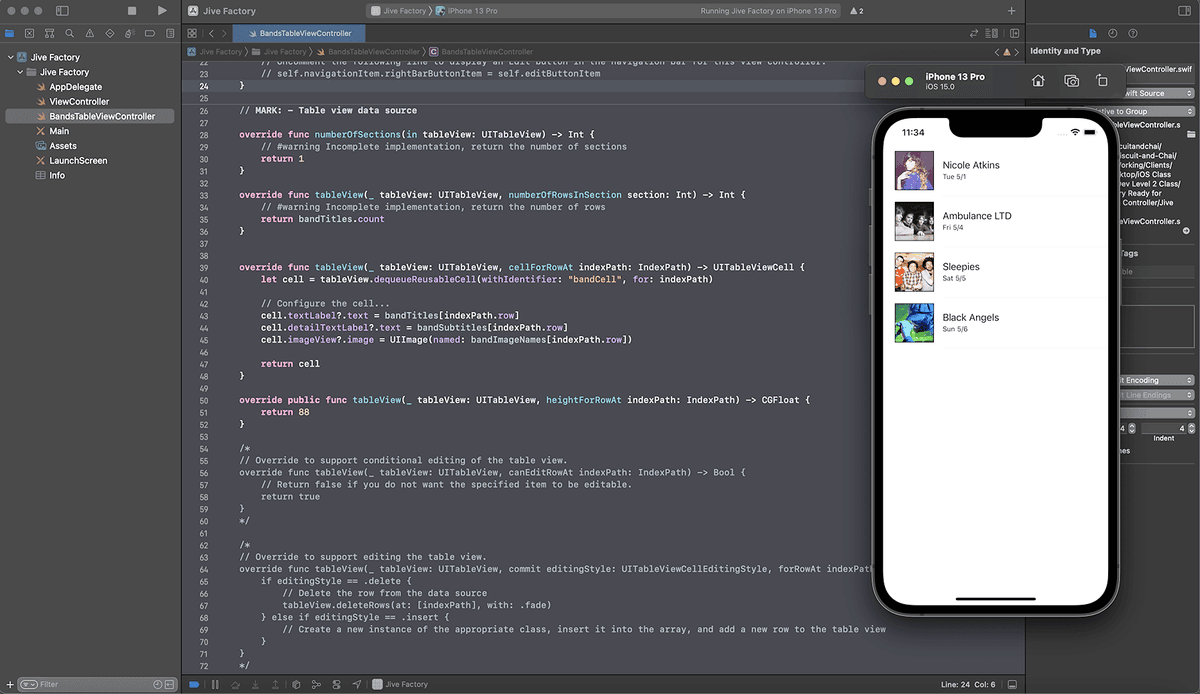
Discover how to successfully build a dynamic list of shows in iOS with this tutorial guiding you through the steps of connecting a class to the storyboard, adding properties, editing the datasource protocol methods, and crafting code to populate the table.
Exercise Preview
Getting Started
If you completed the previous exercise you can skip the following sidebar. We recommend you finish the previous exercise (1B) before starting this one.
If you completed the previous exercise, Jive Factory.xcodeproj should still be open. If you closed it, re-open it (from yourname-iOS Dev Level 2 Class > Jive Factory).
If You Did Not Complete the Previous Exercise (1B)
- Close any files you may have open and switch to the Desktop.
- Navigate to Class Files > yourname-iOS Dev Level 2 Class.
- Duplicate the Jive Factory Ready for Table View Controller folder.
- Rename the folder to Jive Factory.
- Open Jive Factory > Jive Factory.xcodeproj.
We want to keep the look and feel of the cells we built in the previous exercise. We’ll use the first cell as a template, but we don’t need the rest of them.
In the Document Outline, click the second Ambulance LTD cell to select it.
- Shift–click on the last Black Angels cell to select the two others.
- Hit Delete.
- In the Document Outline, click Table View to select it.
- In the Attributes inspector
 , from the Content menu, choose Dynamic Prototypes.
 - In the Document Outline, select Table View Cell.
In the Attributes inspector
, next to Identifier, type bandCell and hit Return. This defines a name we can use to programmatically refer to later.
Connecting the Class to the Storyboard
Now we need to connect our Table View Controller to the class we just created.
- In the Project navigator, click on Main.
- In the Document Outline, click Table View. (You might have to open Table View Controller Scene and Table View Controller to see it.)
- In the Utilities area on the right, click on the Connections inspector tab
 .
. Notice there are two outlets that are assigned to the Table View Controller: dataSource and delegate.
The dataSource and delegate are two protocols that need to be defined to populate a Table View. Protocols are agreements between one class and another that a class is going to conform to or implement certain methods. For example, the dataSource protocol defines methods that will provide data to our table view. When you create a table view controller by dragging it from the Object library as we did in the previous exercise, it defaults to itself being the dataSource and delegate for the table view. Once we connect our new class to this view, the new class will be used as the dataSource and delegate and therefore we can control the flow of data to the table view.
- Let’s connect the view we have in the storyboard to our new class. In the Document Outline, click Table View Controller.
- In the Utilities area on the right, click the Identity inspector tab
 .
. Next to Class, type B and Xcode should autocomplete to: BandsTableViewController
NOTE: Sometimes Xcode takes a while to recognize a new class, so if you do not see any autocomplete suggestions, you will just have to type it in manually.
- Hit Return to apply the change.
- In the Document Outline, click Table View.
- In the Utilities area on the right, click the Connections inspector tab .
- Notice that dataSource and delegate are now connected to the Bands Table View Controller. Awesome! Now we can start adding the code we need to populate the cells.
Go to File > Save or hit Cmd–S.