April 1, 2026Dan Rodney/3 min read

Importing Word Documents

Master Word to InCopy document import workflows

Import Workflow Overview

Successfully importing Word documents into InCopy requires understanding formatting preservation options and proper file placement techniques to maintain document integrity.

Importing Word Documents

Microsoft Word documents remain a cornerstone of professional workflows, making seamless integration with InCopy essential for editorial teams. Whether you're working with manuscripts from freelance writers or importing content from other departments, InCopy's placement feature offers sophisticated control over how Word formatting translates into your publication layout. Understanding these import options upfront can save significant time during the production process.

Placing a Word File into InCopy

  1. With your InCopy document open, position the text cursor type cursor edit text precisely where you want the imported content to begin. This placement point determines the flow of your imported text within the existing layout.

  2. Navigate to File > Place to access InCopy's import dialog.

  3. Select your target Word file with a single click. The dialog will display file details and format information to confirm you're importing the correct document.

  4. To maintain control over formatting decisions, check Show Import Options at the bottom of the dialog window. Note that you may need to click the Options button to reveal this crucial setting. This step is essential for professional workflows where formatting consistency matters.

  5. Click Open to proceed with the import process.

  6. If you enabled Show Import Options, InCopy will present a comprehensive dialog for managing Word formatting. Your choice here directly impacts how the imported content integrates with your existing publication styles. The following sections detail the optimal approach for different scenarios.

The import options you choose depend largely on your publication's style guide requirements and whether the Word document follows established formatting conventions. Consider your downstream production needs before making these decisions.

Basic Word Document Import Process

1

Position Text Cursor

Open your InCopy document and place the text cursor at the exact location where you want the imported Word content to appear.

2

Access Place Command

Navigate to File menu and select Place to open the file selection dialog for importing external documents.

3

Select Word File

Click once on your target Word file to select it, then optionally check Show Import Options for formatting control.

4

Execute Import

Click Open to import the file, which will display formatting options if Show Import Options was enabled.

Import Options Access

The Show Import Options checkbox may be hidden behind an Options button at the bottom of the Place dialog window. Click Options if you don't see it immediately.

To Remove Word Formatting

word import remove styling

This approach works best when importing content that will be completely restyled according to your publication's design standards, or when Word documents contain inconsistent or problematic formatting:

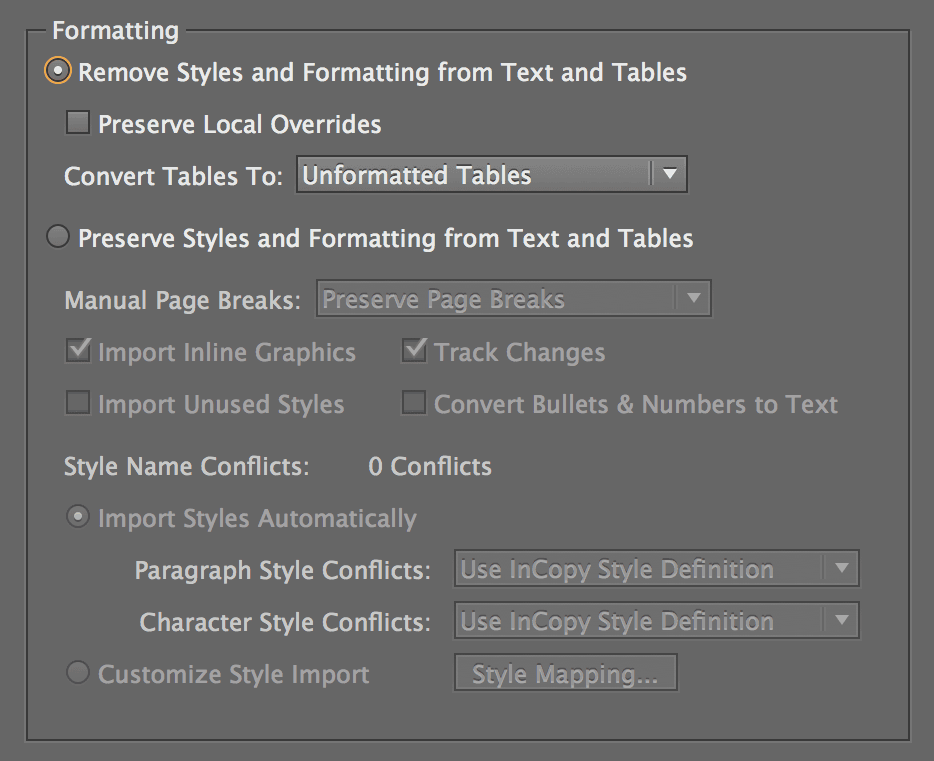
  1. Select Remove Styles and Formatting to strip away all Word-specific styling. This creates a clean slate for applying your publication's established paragraph and character styles.

  2. Click OK to complete the import process.

    Professional Tip: Enable Preserve Local Overrides to maintain essential character formatting such as italics, bold text, and manual emphasis that carries editorial meaning. This setting strikes an optimal balance between clean import and preserving author intent.

Removing formatting is particularly valuable when working with content from multiple contributors who may have applied inconsistent styling, or when importing drafts that need to conform to strict publication guidelines.

Formatting Removal Options

Remove Styles and Formatting

Strips all Word formatting and styles from imported content. Creates clean text that adopts your InCopy document's default formatting rules.

Preserve Local Overrides

Optional setting that maintains basic character formatting like bold and italic text while removing paragraph styles and complex formatting.

Removing Word Formatting

Pros
Ensures consistent document styling
Eliminates formatting conflicts
Reduces file complexity
Maintains InCopy style standards
Cons
Loses original document design
Requires manual reformatting
May remove intentional emphasis

To Maintain the Formatting from Word

word import preserve styling

Choose this method when the Word document already follows your style conventions or when you need to preserve the author's original formatting intentions:

  1. Select Preserve Styles and Formatting to maintain the document's original appearance and structure.

  2. For documents with established style systems that need integration with your InCopy workflow, utilize the advanced mapping feature:
    • Select Customize Style Import to access granular control over style translation.
    • Click the Style Mapping button to open the comprehensive mapping interface.
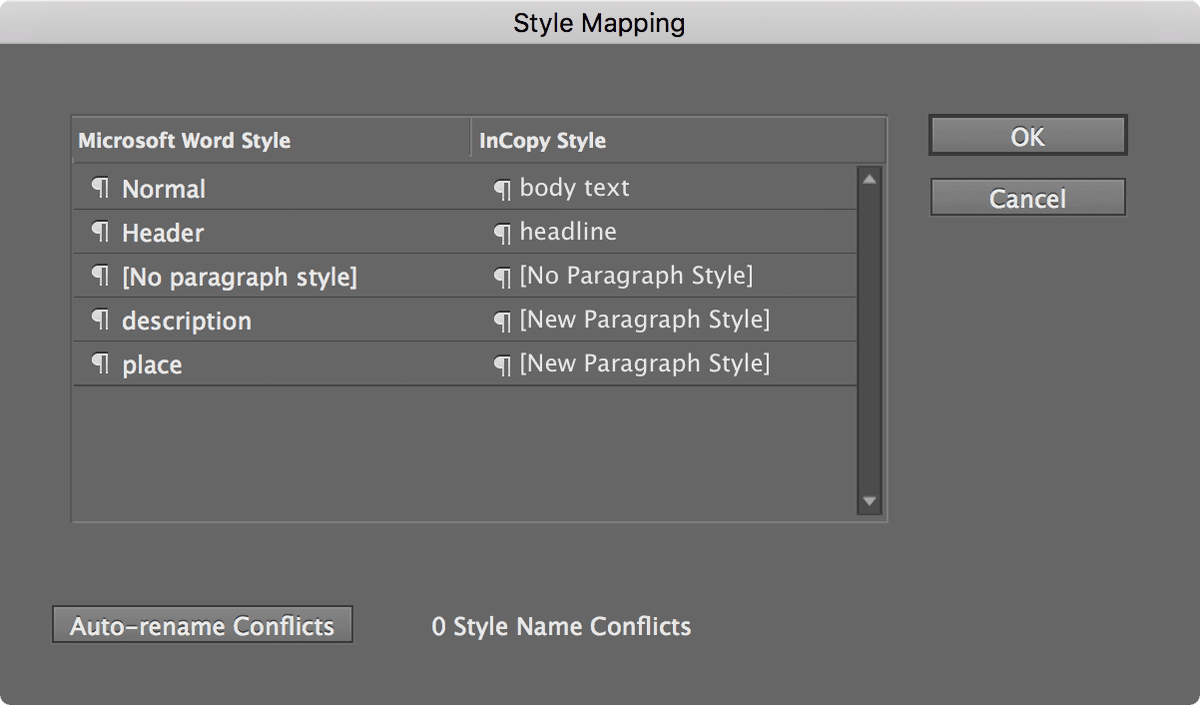
    • In the mapping dialog shown below, systematically match each Word style (left column) with its corresponding InCopy style (right column). This creates a reusable template for future imports from the same source or style system.

    word import style mapping

Style mapping proves invaluable for publications that regularly receive content from the same contributors or when working with standardized document templates. The time invested in proper mapping pays dividends across multiple import cycles, ensuring consistency while preserving the editorial workflow's efficiency.

Preserving Word Formatting Process

1

Select Preserve Option

Choose Preserve Styles and Formatting to maintain the original Word document's styling and paragraph formatting.

2

Enable Style Customization

Select Customize Style Import to gain control over how Word styles are converted into InCopy equivalents.

3

Map Styles

Click Style Mapping button to open the style correspondence interface for precise formatting control.

4

Configure Mappings

Match Word styles in the left column with corresponding InCopy styles in the right column for seamless integration.

Formatting Approach Comparison

FeatureRemove FormattingPreserve Formatting
Style ConsistencyHighVariable
Setup TimeMinimalModerate
Design FidelityLowHigh
Manual Work RequiredExtensiveLimited
Recommended: Choose based on whether design fidelity or style consistency is your priority.
Style Mapping Strategy

When mapping styles, focus on matching similar paragraph types first, such as headings to headings and body text to body text, to maintain document hierarchy.

Key Takeaways

1Position your text cursor precisely before importing to control where Word content appears in your InCopy document
2Enable Show Import Options in the Place dialog to access formatting control settings during the import process
3Remove Styles and Formatting option creates clean text that adopts your InCopy document's styling standards
4Preserve Local Overrides maintains basic character formatting like bold and italic while removing complex styles
5Preserve Styles and Formatting maintains original Word document design but may create formatting inconsistencies
6Use Customize Style Import and Style Mapping for precise control over how Word styles convert to InCopy equivalents
7Style mapping requires matching Word styles in the left column with corresponding InCopy styles in the right column
8Choose formatting approach based on whether design fidelity or style consistency is more important for your project

RELATED ARTICLES