Quote with SplitText

Master text animations with GSAP SplitText utility

Core Animation Concepts

SplitText Utility

Break text into individual characters, words, or lines for granular animation control. Part of Club GreenSock's premium features.

3D Perspective Effects

Create depth and dimension using perspective properties and transformOrigin settings for professional animations.

Timeline Management

Chain animations together using TimelineLite for synchronized, sequential text effects with precise timing control.

What You'll Master in This GreenSock Tutorial:

Club GreenSock membership benefits, accessing premium Club GreenSock resources, leveraging GSAP's powerful SplitText utility, creating sophisticated quote animations, implementing character-by-character name reveals, and utilizing the revert() method for clean DOM management

Exercise Preview

bonus1 exercisepreview

Exercise Overview

In this comprehensive exercise, you'll dive deep into one of GSAP's most powerful premium utilities: SplitText. This sophisticated tool revolutionizes text animation by intelligently breaking apart HTML text elements into individual characters, words, and lines—each wrapped in its own div element for granular animation control. The result? Professional-grade text effects that would otherwise require complex manual DOM manipulation and extensive custom code.

SplitText's true power lies in its seamless integration with GSAP's animation ecosystem, enabling you to create everything from subtle fade-ins to dramatic 3D text reveals that capture attention and enhance user experience across modern web applications.

Understanding Club GreenSock

SplitText represents just one gem in Club GreenSock's extensive collection of premium utilities, plugins, and exclusive features available to Shockingly Green members. This professional membership tier ensures you're always at the cutting edge of web animation technology, with early access to new features, critical bug fixes, beta releases, and comprehensive demo source code that accelerates your development workflow.

Your Shockingly Green membership unlocks SplitText alongside GSAP's complete suite of advanced animation tools:

DrawSVGPlugin: Delivers precise control over SVG stroke animations, enabling everything from signature effects to complex path reveals that bring vector graphics to life.
Physics plugins: Physics2DPlugin and PhysicsPropsPlugin revolutionize animation by letting you define motion through real-world physics properties—velocity, acceleration, friction—rather than static end values, creating naturally fluid movement.
ThrowPropsPlugin: Simulates realistic thrown object behavior with momentum-based animations that smoothly decelerate to a natural stop. Essential for touch interfaces and interactive elements that respond to user gestures.
ScrambleTextPlugin: Creates that coveted "digital decoding" effect where text appears to decrypt character by character—perfect for tech-forward interfaces, hover states, and cyberpunk-inspired designs.

Noble Desktop students receive automatic enrollment as Shockingly Green Club GreenSock members for one full year—a significant value-add to your educational investment. Your instructor will provide your personalized Club GreenSock credentials, ensuring immediate access to the premium resources required for this lesson and beyond.

Independent learners can secure their Shockingly Green Club membership at greensock.com/club for $99 annually—a modest investment considering the professional-grade tools and ongoing updates you'll receive. Once enrolled, your credentials unlock immediate access to all premium files and resources needed for this advanced exercise.

Club GreenSock Membership Benefits

$99
Annual membership cost
1 year
Year free access for Noble Desktop students

Accessing Your Members-Only Club GreenSock Resources

Follow this streamlined process to download your premium Club GreenSock files and get started with professional-grade animation development:

  1. Navigate to greensock.com in your preferred browser

  2. Click Login/Sign Up in the top-right corner

  3. Enter your Email Address and Password, then click Login

  4. Once authenticated, locate and click the prominent green Download GSAP button

  5. In the modal dialog, select Download zip with bonus content to access premium features

  6. After download completion, extract the .zip file to reveal your GreenSock-ShockinglyGreen-js folder

  7. Navigate to GreenSock-ShockinglyGreen-jssrcuncompressed

  8. Select and copy all files within the uncompressed folder (ensure you're copying contents, not the parent folder)

  9. Navigate to your project directory: Class Filesyourname-GSAP ClassQuote with SplitTextjs

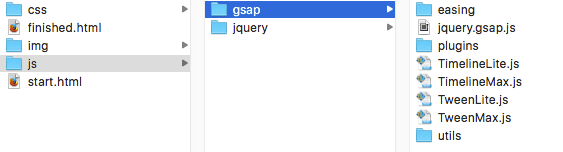
  10. Paste the copied files into the empty gsap folder. Your properly configured gsap directory should contain:

    bonus gsap folder

Club GreenSock Membership Benefits

$99
Annual membership cost
1 year
Year free access for Noble Desktop students

Analyzing the Completed Animation

Before diving into development, let's examine the sophisticated animation we'll be building to understand the visual goals and technical requirements:

  1. Launch Google Chrome for optimal GSAP performance and debugging capabilities

  2. Open the file browser with Cmd–O (Mac) or CTRL–O (Windows), navigate to DesktopClass Filesyourname-GSAP ClassQuote with SplitText, and launch finished.html

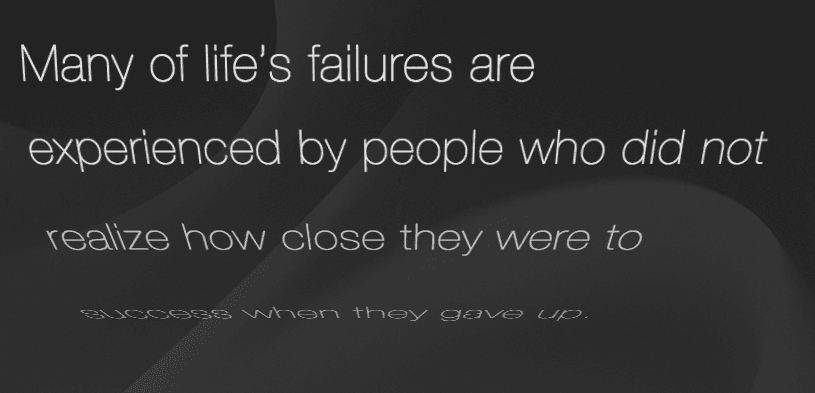
    Observe how the quotation elegantly animates line-by-line with 3D perspective effects, followed by "THOMAS EDISON" revealing character-by-character with sophisticated rotational transforms. These professional-grade animations demonstrate SplitText's power when combined with GSAP's 3D capabilities.

  3. Refresh the page multiple times to analyze the animation's timing, easing, and visual hierarchy. If animations fail to appear, verify your Shockingly Green Club GreenSock membership status and confirm proper file installation.

Deconstructing the DOM Architecture & JavaScript Foundation

Understanding the underlying structure is crucial for building scalable, maintainable animations. Let's examine how clean HTML combines with powerful JavaScript to create complex effects:

  1. Open your preferred code editor and load yourname-GSAP ClassQuote with SplitTextstart.html (or import the entire Quote with SplitText directory for project-based editors)

  2. Preview start.html in Chrome. Notice the static presentation—all visual elements are positioned correctly, but animations remain dormant until we implement them

  3. Return to your editor and examine the elegantly simple HTML structure on lines 44–47:

    <div class="wrapper">
       <div id="quote">Many of life's failures are experienced by people who did not realize how close they were to success when they gave up.</div>
       <div id="author">THOMAS EDISON</div>
    </div>

    This minimal markup demonstrates best practices: semantic HTML that's animation-ready without unnecessary complexity. The quote and author IDs provide precise targeting for our SplitText operations.

  4. Examine our foundational JavaScript variables on line 56:

    $(document).ready(function(){
        var quote, author, tl;

    These variables will hold our SplitText objects for the quote and author elements, plus tl for our master TimelineLite instance that orchestrates the entire animation sequence.

  5. Note the critical 3D setup on line 59:

    TweenLite.set(["#quote", "#author"], {perspective:400});

    This establishes shared 3D space for both elements. By applying perspective to the parent containers, all child elements (created by SplitText) will share the same vanishing point, ensuring visual consistency across the animation sequence.

Perspective Vs. TransformPerspective: A Critical Distinction

perspective applies to parent elements, creating a shared 3D environment where all children reference the same vanishing point—ideal for cohesive animation sequences.

transformPerspective applies to individual elements, giving each its own vanishing point—perfect when you need elements to behave independently in 3D space.

This fundamental difference dramatically impacts visual outcomes. For comprehensive examples and technical details, reference the complete guide at greensock.com/CSS3

Perspective Property Comparison

FeatureperspectivetransformPerspective
Applied ToParent elementIndividual elements
Vanishing PointShared among childrenUnique for each element
Use CaseUnified 3D spaceIndependent 3D effects
Recommended: Use perspective for coordinated animations like our quote example where all lines should share the same 3D space.

Mastering GreenSock's SplitText Utility

SplitText operates as a standalone utility rather than a traditional plugin, meaning it functions independently of GSAP's animation components while integrating seamlessly when needed. This architecture makes it incredibly versatile for both animated and static text manipulation tasks.

  1. Around line 50, import the SplitText utility with proper script tag placement:

    <script src="js/gsap/TweenMax.js"></script>
    <script src="js/gsap/utils/SplitText.js"></script>
    <script src="js/jquery/jquery-1.10.1.min.js"></script>
  2. Around line 61, instantiate your first SplitText object using default behavior:

    TweenLite.set(["#quote", "#author"], {perspective:400});
    
    quote = new SplitText("#quote");
  3. Save and preview in Chrome to witness SplitText's immediate DOM transformation

  4. Right-click the quotation and select Inspect Element. Examine the generated markup structure:

    bonus1 code1

  5. Expand the nested divs and hover over individual elements. Watch as SplitText's generated containers highlight corresponding text segments on the page, revealing how default behavior creates character, word, and line divisions simultaneously.

    While comprehensive, this default approach generates unnecessary DOM elements for our specific use case. We need line-based splitting exclusively.

  6. Return to your editor and refine the SplitText configuration for optimal performance:

    quote = new SplitText("#quote", {type:"lines"});

SplitText Configuration Options

Master these three fundamental splitting modes:
{type:"chars"}   // Character-level splitting
{type:"words"}   // Word-level splitting  
{type:"lines"}   // Line-level splitting
Combine multiple modes for complex layouts:
{type:"chars, words, lines"}
  • Save and preview. Re-inspect the quotation element to confirm clean line-only splitting

  • Add debugging code to examine SplitText's generated data structure:

    quote = new SplitText("#quote", {type:"lines"});
    console.log(quote.lines);

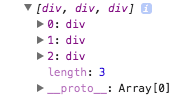
    This console output reveals the lines array containing DOM references to each generated line element—the foundation for our staggered animations.

    Arrays store multiple values with zero-based indexing (0, 1, 2, etc.), making them perfect for iterative animations where each element receives slightly different timing or properties.

  • Save and preview in Chrome

  • Open Chrome DevTools with Cmd–Opt–J (Mac) or CTRL–Shift–J (Windows)

  • Reload and expand the console array output:

    bonus1 code2

    Each array element represents a line div, providing direct DOM access for individual animation control. The array length corresponds to visible lines, which varies based on browser width and text reflow.

  • Remove the debugging code and create the author SplitText object:

    quote = new SplitText("#quote", {type:"lines"});
    author = new SplitText("#author", {type:"chars"});

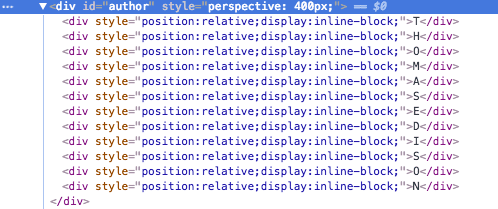
    Character-level splitting enables the sophisticated letter-by-letter reveal effect for Edison's name.

  • Save, preview, and inspect the author element to confirm character-level DOM structure:

    bonus1 code3

  • Orchestrating the Quote Animation Sequence

    With our SplitText objects properly configured, we'll now build a sophisticated animation timeline that brings the quote to life with professional 3D effects and precise timing control.

    1. Create your master timeline controller:

      quote = new SplitText("#quote", {type:"lines"});
      author = new SplitText("#author", {type:"chars"});
      
      tl = new TimelineLite();
    2. Implement the core staggered animation targeting our lines array:

      tl = new TimelineLite();
      tl.staggerFrom(quote.lines, 0.6, {opacity:0}, 0.1)

      By targeting quote.lines, we're animating every element in the generated array with 0.6-second duration and 0.1-second stagger delay between elements.

    3. Save and preview to observe the foundational fade-in effect. Now let's elevate it with 3D transformation:

    4. Add rotational dynamics for visual impact:

      tl.staggerFrom(quote.lines, 0.6, {opacity:0, rotationX:-90}, 0.1)
    5. Preview the enhanced animation. The 3D rotation creates depth, but the default transform origin needs refinement for optimal visual flow

    6. Optimize the rotation axis for natural movement:

      tl.staggerFrom(quote.lines, 0.6, {opacity:0, rotationX:-90, transformOrigin:"50% top"}, 0.1)
    7. Test the improved top-hinged rotation effect, then add z-axis depth for dramatic perspective:

      tl.staggerFrom(quote.lines, 0.6, {opacity:0, rotationX:-90, transformOrigin:"50% top -200"}, 0.1)

      The -200 z-axis value positions the rotation center 200 pixels behind each line element, creating a pronounced 3D carousel effect as lines swing into view.

      In 3D space: X-axis controls left-right movement, Y-axis manages up-down motion, and Z-axis determines depth (forward-backward positioning relative to the viewer).

    8. Save and preview the final quote animation. Experiment with different z-axis values (try -100, -300, or -500) to understand how depth affects the visual drama of the rotation effect.

    Crafting the Author Name Reveal

    Now we'll create a complementary character-by-character animation that showcases Thomas Edison's name with equally impressive 3D effects, demonstrating SplitText's versatility across different splitting modes.

    1. Chain the author animation to your existing timeline:

      tl.staggerFrom(quote.lines, 0.6, {opacity:0, rotationX:-90, transformOrigin:"50% top -200"}, 0.1)
        .staggerFrom(author.chars, 0.6, {opacity:0}, 0.02)

      The chained method ensures sequential timing, while the faster 0.02 stagger creates rapid-fire character reveals. The author.chars array contains individual character elements for granular control.

    2. Save and preview to confirm proper timing and sequencing between quote and author animations

    3. Enhance with dramatic 3D character rotation:

      .staggerFrom(author.chars, 0.6, {opacity:0, rotationX:180}, 0.02)
    4. Save and preview the completed animation sequence. The 180-degree rotation creates a spectacular spinning effect as each character materializes, demonstrating how SplitText enables effects that would be nearly impossible with traditional CSS or vanilla JavaScript approaches.

    Implementing the Revert() Method for Clean DOM Management

    Professional web applications require clean DOM management. While SplitText creates powerful animation possibilities through DOM manipulation, you may want to restore original markup after animations complete—eliminating unnecessary elements and reducing memory overhead.

    1. Configure timeline completion callback around line 64:

      tl = new TimelineLite({onComplete:revert});
    2. Define the cleanup function after your animation sequence (around line 68):

      .staggerFrom(author.chars, 0.6, {opacity:0, rotationX:180}, 0.02)
      
      function revert() {
         quote.revert();
         author.revert();
      }

      This function executes automatically when the TimelineLite completes, restoring both elements to their original HTML structure while preserving visual appearance.

    3. Save and preview the complete experience

    4. After animation completion, inspect either text element to confirm DOM cleanup—all generated wrapper divs disappear, leaving clean, semantic markup that's identical to the original HTML structure.

    This professional approach ensures your animations perform beautifully without leaving technical debt in the DOM. For advanced SplitText techniques, configuration options, and integration patterns, consult the comprehensive documentation at greensock.com/docs/Utilities/SplitText

    Using the Revert Method

    Pros
    Cleans up DOM by removing generated divs after animation
    Restores original HTML structure for better performance
    Prevents DOM pollution with numerous child elements
    Maintains semantic HTML after visual effects complete
    Cons
    Cannot re-animate without recreating SplitText objects
    Requires additional callback function setup
    May complicate scenarios requiring persistent split structure

    Implementation Checklist

    0/3

    Key Takeaways

    1SplitText is a premium Club GreenSock utility that splits text into animatable characters, words, or lines
    2Club GreenSock membership costs $99/year and includes bonus plugins like DrawSVGPlugin, Physics plugins, and ThrowPropsPlugin
    3The perspective property creates shared 3D space for child elements, while transformPerspective gives each element its own vanishing point
    4StaggerFrom method enables sequential animation of text elements with customizable timing between each piece
    5Transform origin and z-axis values control the rotation point and depth of 3D text animations
    6The revert method cleans up the DOM by removing generated divs after animations complete, maintaining clean HTML structure
    7Smaller stagger values (0.02) work better for character-level animations compared to line-level animations (0.1)
    8SplitText works independently of GSAP animation tools and can be used as a standalone text manipulation utility

    RELATED ARTICLES