TweenMax: Free GreenSock Tutorial

Master Advanced Animation with TweenMax Library Features

TweenMax Core Features

Animation Repetition

Control how many times animations repeat with flexible options including infinite loops and yoyo effects for back-and-forth motion.

Advanced Callbacks

Utilize onStart, onRepeat, and onComplete callbacks to trigger functions at specific animation phases for dynamic content updates.

Timing Control

Implement delays and repeat delays to create sophisticated timing patterns between animation sequences.

Topics Covered in This GreenSock Tutorial:

Introduction to TweenMax, Advanced Repeat Controls (Repeat, RepeatDelay, & Yoyo), Callback Functions: OnStart, OnRepeat, & OnComplete

Exercise Preview

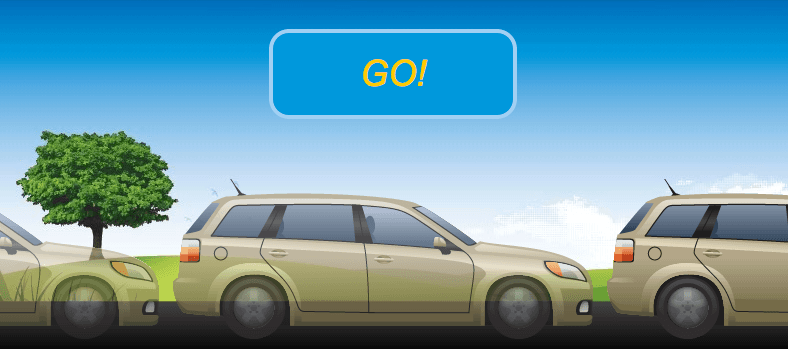
exercise preview tweenmax

Images courtesy of istockphoto: AtomA, Image #20846177; Jamie Farrant (enjoynz), Image #11822906

Exercise Overview

Having explored TweenLite's foundational capabilities, you're now ready to harness the full power of TweenMax. While TweenLite serves as GSAP's lightweight core, TweenMax extends it dramatically with advanced features, enhanced methods, and sophisticated callback systems that enable complex animation sequences.

TweenMax's standout feature is its comprehensive repeat system—the ability to loop animations a specific number of times or infinitely, complete with customizable delays between iterations. These repeating animations unlock powerful callback opportunities, particularly the onRepeat handler, which allows for dynamic content updates throughout the animation cycle. This exercise demonstrates these capabilities through a practical, engaging example that showcases real-world animation patterns you'll use in professional projects.

TweenLite vs TweenMax

FeatureTweenLiteTweenMax
File SizeLightweight Core~30kb Minified
Repeat FeaturesNot AvailableFull Support
Bundled PluginsMinimal9+ Plugins Included
Callback OptionsBasicAdvanced
Recommended: Use TweenMax when you need repeat functionality and advanced callbacks

Previewing the Finished Animation

  1. Launch Google Chrome to preview our target animation.

  2. Press Cmd–O (Mac) or Ctrl–O (Windows), navigate to Desktop > Class Files > yourname-GSAP Class > TweenMax, and open finished.html.

  3. Initially, you'll see only the background landscape. After a deliberate delay, a GO! message appears, followed by a tan station wagon that smoothly "drives" across the screen from left to right until it exits the viewport—exactly as shown in the exercise preview above.

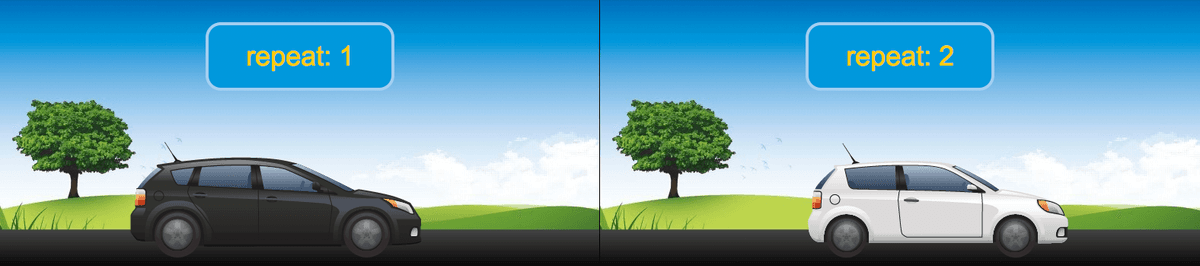
  4. The animation continues with a parade of different vehicles moving at consistent intervals across the screen. Notice how the message dynamically updates to display the current repeat count, as demonstrated in the screenshot below. This real-time feedback illustrates the power of TweenMax's callback system.

    repeat message display example

    Images courtesy of istockphoto: AtomA, Image #20846177; Jamie Farrant (enjoynz), Image #11822906

  5. When the animation sequence completes, a final The End message appears. Refresh the page multiple times to fully appreciate the smooth timing and professional polish of the complete animation sequence.

Examining the DOM Structure & JavaScript Foundation

Before diving into the animation code, let's understand the underlying structure that makes this example work.

  1. Open start.html from the TweenMax folder in your preferred code editor.

  2. Examine the streamlined DOM structure on lines 45–48:

    <div id="demo">
       <div id="message"><em>GO!</em></div>
       <div id="car"></div>
    </div>

    This minimal markup demonstrates efficient animation design. The demo container provides our animation stage, while the message element handles dynamic text updates throughout the animation lifecycle. The car element will serve as our moving sprite container, utilizing CSS background positioning to create the illusion of multiple vehicles.

  3. Review the JavaScript variables (lines 58–61) that control our animation logic:

    $(document).ready(function() {
    
       var $car = $("#car"), 
           $message = $("#message"), 
           count = 0, 
           tween;

    These variables create our animation control system: $message enables dynamic text updates via callback functions, count tracks animation iterations for display purposes, and tween will hold our primary TweenMax animation instance targeting the $car element.

  4. Preview start.html in your browser. You'll notice all cars appear as a vertical strip positioned to the left of the landscape—this is intentional and demonstrates the sprite-based approach we'll implement.

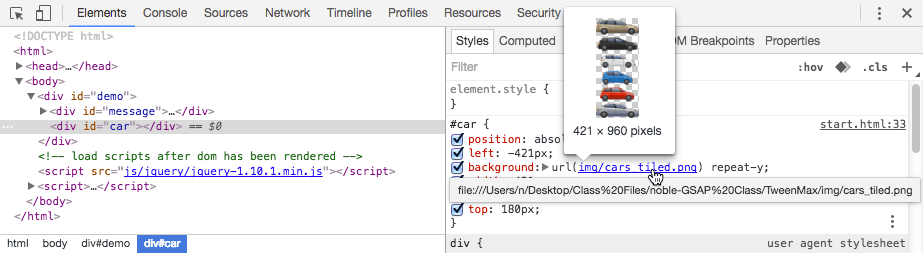
  5. Ctrl–click (Mac) or Right–click (Windows) on the car strip and select Inspect Element. In the DevTools, observe how the car strip is implemented as a background image within the car div—a technique that allows us to efficiently animate through multiple car designs without loading separate image files.

    tweenmax cars tiled

Setting Up the Animation Structure

1

Define Variables

Create jQuery objects for car and message elements, initialize count tracker, and prepare tween variable for animation assignment

2

Inspect DOM Elements

Examine the demo div containing message and car elements, noting the background image sprite technique for multiple car visuals

3

Preview Initial State

View the starting layout with cars displayed as a vertical strip before applying overflow hidden and animation effects

TweenMax Exclusive Features: Repeat, RepeatDelay, & Yoyo

Now we'll implement the core TweenMax functionality that sets it apart from TweenLite. Our approach uses CSS sprite animation—each time the tween repeats, we'll shift the car strip's vertical position to reveal the next vehicle, creating a seamless parade effect.

  1. Return to your code editor to begin implementing TweenMax.

  2. Locate the load scripts comment (around line 52) and add TweenMax:

    <!—load scripts after dom has been rendered—>
    <script src="js/gsap/TweenMax.js"></script>
    <script src="js/jquery/jquery-1.10.1.min.js"></script>

    Notice the streamlined approach: TweenMax includes TweenLite, CSSPlugin, and EasePack automatically. This all-in-one loading strategy reduces HTTP requests and simplifies dependency management in production environments.

TweenMax: The Complete Animation Toolkit

TweenMax bundles essential GSAP components: TweenLite, CSSPlugin, EasePack, BezierPlugin, DirectionalRotationPlugin, AttrPlugin, RoundPropsPlugin, TimelineLite, and TimelineMax. This comprehensive package delivers professional animation capabilities in a single ~30kb file (minified and gzipped).

For production deployment in 2026, leverage the CDN version from greensock.com for optimal loading performance and automatic updates. The consolidated approach often outperforms multiple smaller requests, especially with HTTP/2's multiplexing capabilities.

  • Create your foundational tween around line 63:

    $(document).ready(function() {
    
       var $car = $("#car"), 
           $message = $("#message"), 
           count = 0, 
           tween;
    
       tween = TweenMax.to($car, 1, {x:1250});
    
    });
  • Save and preview the file. The cars immediately animate across the screen over 1 second, reaching an x-position of 1250 pixels. While functional, this immediate start lacks the polished feel of professional animations.

  • Add a strategic delay to improve the user experience:

    tween = TweenMax.to($car, 1, {x:1250, delay:1});
  • Test the delay in your browser. The 1-second pause creates anticipation and allows users to register the initial state before animation begins.

    The default Power1.easeOut creates natural-feeling motion, but our car animation requires mechanical consistency. Linear motion better represents vehicle movement at steady speeds.

  • Implement linear easing for realistic vehicle motion:

    tween = TweenMax.to($car, 1, {x:1250, ease:Linear.easeNone, delay:1});

    Linear.easeNone provides constant velocity throughout the animation—perfect for simulating steady vehicle movement without acceleration or deceleration curves.

  • Preview the linear motion in your browser. The cars now move with consistent, mechanical precision.

  • Now let's explore TweenMax's signature repeat functionality:

    tween = TweenMax.to($car, 1, {x:1250, ease:Linear.easeNone, delay:1, repeat:-1});

    Setting repeat:-1 creates infinite looping—powerful for continuous animations, loading indicators, or ambient motion effects.

  • Test the infinite repeat. While impressive initially, infinite loops can overwhelm users, so use them judiciously in production work.

  • Experiment with TweenMax's yoyo feature, which creates pendulum-like motion:

    tween = TweenMax.to($car, 1, {x:1250, ease:Linear.easeNone, delay:1, repeat:-1, yoyo:true});
  • Observe the back-and-forth motion in your browser. The yoyo effect works beautifully for UI elements that need to draw attention or simulate physical pendulum behavior.

  • Let's create a more practical animation sequence. Remove the yoyo property and implement controlled repetition:

    tween = TweenMax.to($car, 1, {x:1250, ease:Linear.easeNone, delay:1, repeat:4, repeatDelay:0.5});

    repeatDelay adds breathing room between animation cycles, creating a more natural rhythm and preventing the jarring immediacy of continuous loops.

  • Test the refined animation. The 0.5-second delays create a professional cadence—the animation runs five total times (initial play plus four repeats) with comfortable pauses between each cycle.

  • Mastering Callbacks: OnStart, OnRepeat, & OnComplete

    Callbacks transform static animations into dynamic, responsive experiences. We'll implement a complete callback system that manages UI state throughout the animation lifecycle.

    1. First, hide the initial message to prevent premature display. Locate the #message CSS rule (around line 18) and add visibility control:

      border: solid 4px #A2D0F3;
         visibility: hidden;
      }
    2. Verify the hidden state in your browser—the GO! message should no longer appear immediately.

    3. Implement the onStart callback to reveal the message at the perfect moment:

      tween = TweenMax.to($car, 1, {x:1250, ease:Linear.easeNone, delay:1, repeat:4, repeatDelay:0.5, onStart:startHandler});

      The onStart callback—available in both TweenLite and TweenMax—provides precise control over when UI elements appear.

    4. Define the startHandler function below your tween definition:

      tween = TweenMax.to($car, 1, {x:1250, ease:Linear.easeNone, delay:1, repeat:4, repeatDelay:0.5, onStart:startHandler});
      
      function startHandler() {
         TweenLite.set($message, {visibility:"visible"});
      }

      Using TweenLite.set() for instantaneous property changes maintains consistency with GSAP's API while ensuring reliable cross-browser visibility control.

    5. Test the synchronized message appearance—the GO! text should now appear precisely when the cars begin moving.

    6. Add TweenMax's exclusive onRepeat callback for dynamic content updates:

      tween = TweenMax.to($car, 1, {x:1250, ease:Linear.easeNone, delay:1, repeat:4, repeatDelay:0.5, onStart:startHandler, onRepeat:repeatHandler});

      The onRepeat callback unlocks powerful possibilities—updating counters, changing colors, modifying content, or triggering complementary animations at each repeat cycle.

    7. Create the repeatHandler function with dynamic content management:

      function startHandler() {
         TweenLite.set($message, {visibility:"visible"});
      }
      function repeatHandler() {
         count++;
         $message.text("repeat: " + count);
      }

      This handler demonstrates real-time state management: count++ increments our tracking variable, while $message.text() provides immediate visual feedback to users about the animation progress.

    8. Test the dynamic counter functionality in your browser. The message should update with each repeat cycle, creating an engaging, informative user experience.

    9. Now implement the sprite animation technique that reveals different cars:

      function repeatHandler() {
         count++;
         $message.text("repeat: " + count);
         TweenLite.set($car, {backgroundPosition:"0px -=160px"});
      }

      The backgroundPosition adjustment uses relative values (note the -= operator) to shift the background image 160 pixels upward, revealing the next car in our sprite. This technique efficiently creates the illusion of different vehicles without loading multiple image files.

    10. Preview the multi-car effect—each repeat cycle should now display a different vehicle while updating the counter.

    11. Complete the callback system with onComplete for proper closure:

      tween = TweenMax.to($car, 1, {x:1250, ease:Linear.easeNone, delay:1, repeat:4, repeatDelay:0.5, onStart:startHandler, onRepeat:repeatHandler, onComplete:completeHandler});
    12. Define the completion handler for professional animation closure:

      function completeHandler() {
         $message.text("The End");
      }
    13. Test the complete animation sequence. The final "The End" message provides clear closure and prevents user confusion about animation state.

    Animation Callback Sequence

    Animation Start

    onStart Triggered

    startHandler makes GO message visible when animation begins

    Each Repeat

    onRepeat Executes

    repeatHandler updates counter, changes message text, and shifts background position

    Animation End

    onComplete Fires

    completeHandler displays final 'The End' message when all repeats finish

    CSS Sprite Technique

    Using backgroundPosition with relative values (-=160px) creates the illusion of different cars by shifting the sprite image vertically with each repeat cycle.

    Professional Polish: Cleaning Up the Visual Presentation

    With our animation logic complete, let's apply the finishing touches that distinguish professional work from amateur attempts.

    1. Return to your code editor for the final refinement.

    2. Locate the #demo CSS rule (around line 9) and add overflow control:

      #demo{
         position: relative;
         width: 788px;
         height: 340px;
         margin: 50px auto 0 auto;
         padding-top: 10px;
         background: url(img/landscape.jpg); 
         overflow: hidden;
      }

      The overflow: hidden property creates clean visual boundaries, hiding the car sprite strip and ensuring users see only the intended single vehicle at any moment.

    3. Preview the final result. You should now see a polished, professional animation with seamless car transitions, dynamic messaging, and clean visual presentation.

    This exercise demonstrates TweenMax's advanced capabilities in real-world scenarios. The combination of precise repeat controls, dynamic callbacks, and sprite-based animation creates engaging user experiences while maintaining efficient performance. For comprehensive TweenMax documentation and advanced techniques, visit: greensock.com/tweenmax

    Final Implementation Steps

    0/4

    Key Takeaways

    1TweenMax extends TweenLite with advanced features like repeat, repeatDelay, and yoyo properties for complex animation control
    2The library bundles 9+ essential plugins including CSSPlugin, EasePack, and timeline tools in a single 30kb minified file
    3Repeat values of -1 create infinite loops, while positive numbers specify exact repetition counts for precise animation control
    4Advanced callbacks (onStart, onRepeat, onComplete) enable dynamic content updates and state management throughout animation cycles
    5CSS sprite techniques combined with backgroundPosition relative values create seamless visual transitions between animation states
    6Linear.easeNone provides constant speed motion ideal for mechanical or steady movement effects in user interfaces
    7TweenLite.set() method offers zero-duration property changes perfect for immediate visual updates within callback functions
    8Proper DOM structure with overflow hidden containers ensures clean presentation by hiding unwanted visual elements during animation

    RELATED ARTICLES