How to Separate First & Last Names in Excel: Move Names to Individual Cells
Common Excel Functions
SUMIFS / COUNTIFS
Conditional sums and counts — multiple criteria.
INDEX/MATCH
More flexible than VLOOKUP — works any column direction.
IFERROR
Wrap formulas to suppress error displays.
TEXT
Format numbers as strings — TEXT(B1, "$#,##0.00") for currency.
Noble Desktop's Excel Bootcamp covers formulas, pivot tables, data analysis, and VBA.
Explore four methods to separate first and last names in Excel including using formulas, Text-to-Columns, Flash Fill, and new functions TEXTBEFORE and TEXTAFTER.
In this article, I will show you four ways to accomplish a task. Imagine you have this worksheet, where the name is in column A:
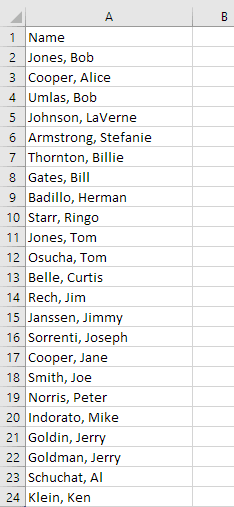
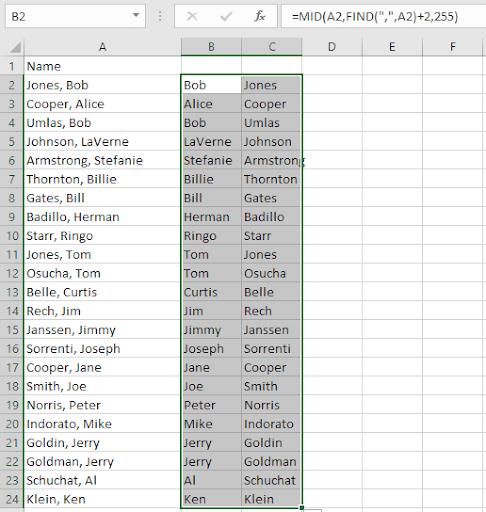
Your job is to separate the first and last names so you wind up with this:
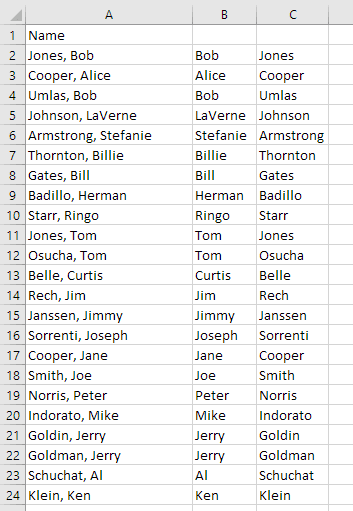
Then you can delete column A.
The 4 ways I’m going to explain here are:
- Formulas
- Text-to-Columns
- Flash Fill
- New functions TEXTBEFORE and TEXTAFTER
The formula way is the most difficult, but also perhaps most instructive. To do this, I’ll describe the use of some built-in functions, namely FIND, LEFT, and MID.
Let’s also assume that we know the format is always last name, comma, and first name. Let’s look at cell A2 in detail. If we know the position of the comma, we can determine the location of the first name (the last name always begins the cell).
The FIND function does this job. The syntax (rule) is =FIND(what you’re looking for, in what string): If we put this formula in cell B2: =FIND(", ", A2), we’ll see 6:
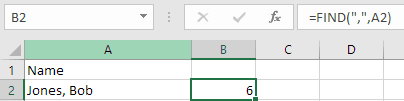
This is because the comma is in the 6th position of “Jones, Bob”.
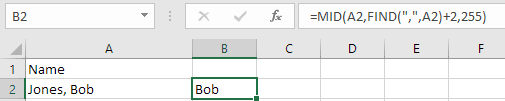
Since the comma is always followed by a space, we then know that the first name is 2 characters after the comma. The MID function takes characters from the “middle” of a string of characters, and the syntax is =MID(cell, start, length). If in cell C2 we put =MID(A2, B2+2,255), we’ll see Bob:
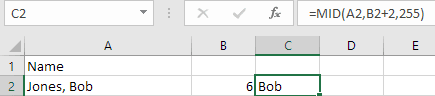
Notice that we added 2 to the value in B2. The 255 is arbitrary but certainly large enough for the largest first name, and also the maximum number allowed in the MID function!
We can combine these last 2 cells’ solution into 1. Instead of using B2, we can put what’s in B2 (the FIND function) and substitute it:

We are no longer using cell B2! We can delete column B:
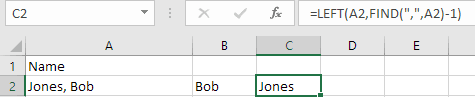
OK, now we need the last name, and put it in cell C2. We know that we want all the characters to the left of the comma. That’s =FIND(", ", A2)-1. Note the “-1”. We don’t want to include the comma. This is where we need to use the LEFT function. It takes this syntax: =LEFT(cell, length). Well, we know the length is that FIND function with the -1:
Practically done! Select cells B2:C2, and double-click the fill handle (that’s the cursor when it sits on top of the little square at the bottom right of the selection):

It will copy that formula down to the bottom:
OK, we’re ready for the 2nd technique, Text-to-Columns.
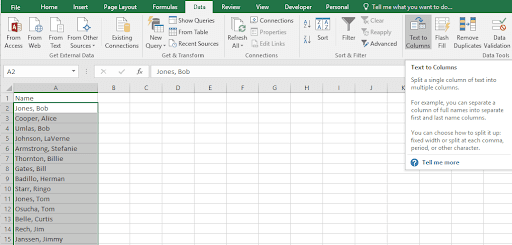
First you select the names in A (from A2:A24), then invoke the Text-to-columns command found on the Data tab:
That will bring up a dialog box from which you can choose delimited or fixed width:
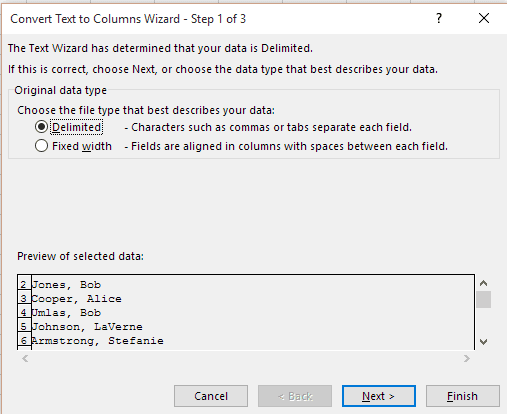
In this case, it’s delimited (by a comma). So click the Next button to see step 2 of 3:

You have to click the Comma checkbox, as it isn’t checked initially. Now click Finish. (You could click Next, but there’s nothing on step 3 that applies to this situation). Text-to-columns can be used in many other situations as well.
When you click Finish, you’ll see this:
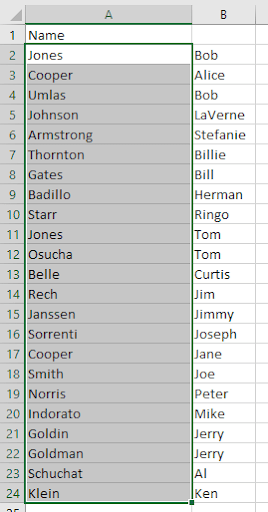
You have the names split, but you have last then first, not first then last. You can select B2:B24, click Cut (or CTRL/X), then click on A2 (which contains “Jones”), then use a right mouse click and select Insert Cut Cells:

And then you’re done.
The third technique is called Flash Fill. You start by typing the first result you want to see (Bob) in cell B2, and continue typing the 2nd result in B3. As you do, you’ll see Excel suggest the rest in a light gray color, because it recognizes the pattern:
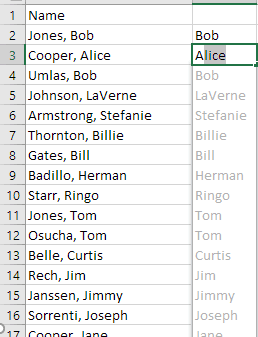
All you need do is press ENTER, and you’re done.
Then go to cell C2 and type the first 2 last names in C2 and C3:
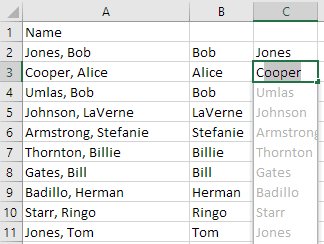
All there is to do is delete column A!
The only disadvantage to the latter 2 techniques is that they’re not dynamic. That is, if you change A2 to Williams, Jared, the data in cells B2 and C2 won’t change. But the formula-based version will change.
Lastly, we’ll look at 2 new functions, TEXTBEFORE and TEXTAFTER. These are available in Office 365 version of Excel.
The syntax for both functions (showing TEXTAFTER for the example) is:

In this case, we are not using the 2 optional parameters, [instance_num] or [ignorecase]. So, to get the first name into cell B2, we want whatever comes after the space:
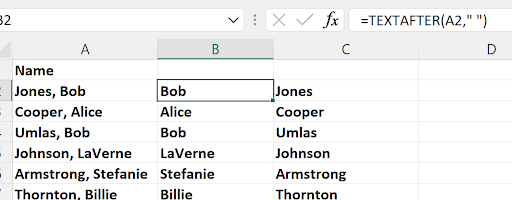
You see the space inside the formula: " "
The example shows B2 filled down to row 7. To get the last name into cell C2, we want whatever comes before the comma:
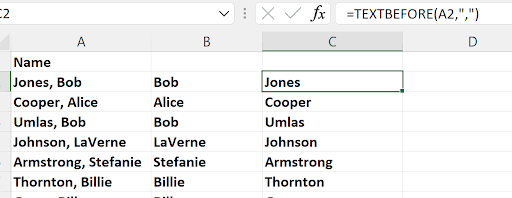
You see the comma inside the formula: ", "
I then selected B2:C2, double-clicked the fill handle, and before you delete column A (if you wanted to do that), you’d have to copy B2:C24 and paste special values in place (in B2). Then, you could delete column A.