April 1, 2026Bob Umlas/6 min read

Collection of Excel Tips and Tricks, Part 2

Advanced Excel Techniques for Professional Data Management

Excel Mastery Series

This is the second installment in our comprehensive Excel tips and tricks series. These advanced techniques will significantly reduce your workbook processing time and improve accuracy.

Traditional vs Advanced Totaling Methods

FeatureTraditional MethodAdvanced Method
Steps Required6-8 steps1 step
KeystrokesMultiple clicks + dragALT + =
Error RiskModerateMinimal
Time EfficiencyStandard5x faster
Recommended: Always select the extra row and column before using ALT + = for instant totaling

Grand Total Formula Options

Manual Selection

Clicking each subtotal individually. Works but error-prone and time-consuming for large datasets.

SUMIF Function

Tests range for 'Subtotal' text and sums corresponding values. More reliable than manual selection.

SUMPRODUCT Method

Uses arrays and N-function to convert TRUE/FALSE to 1/0. Advanced but powerful technique.

Division by 2

Most elegant solution: SUM entire range and divide by 2, since each value appears twice.

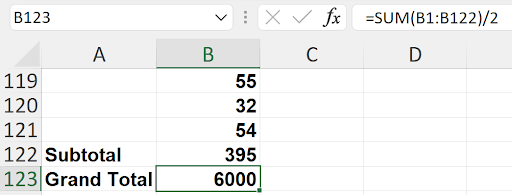
The best formula is SUM(B1:B122)/2 because each section's numbers appear twice - once as individual values and once in the subtotal
This elegant solution works because the data structure naturally doubles each value, making division by 2 the simplest calculation method.

Creating Multi-Column Text Boxes

1

Draw Text Box

Create your text box in the desired location on your worksheet

2

Access Format Options

Press CTRL+1 to open Format Shape dialog

3

Navigate to Text Options

Click Text Options and select the rightmost icon

4

Configure Columns

Click Columns and specify number of columns and spacing between them

Text Cleaning Methods Comparison

FeatureMethodComplexityBest Use Case
MID + FIND FormulaHighComplex data
TEXTAFTER FunctionLowSimple delimiters
Text-to-ColumnsMediumSingle delimiter
Flash FillLowPattern recognition
Find & ReplaceVery LowConsistent patterns
Recommended: Find & Replace with wildcards is the most efficient for consistent patterns like removing text before colons
Wildcard Power in Find & Replace

Use asterisk (*) as a wildcard in Find & Replace to remove variable-length text patterns. The pattern '*: ' removes any characters up to and including a colon and space.

This is the second installment in our Excel power user series. These advanced techniques will transform how you approach common spreadsheet challenges—let's explore the methods that separate Excel novices from true professionals.

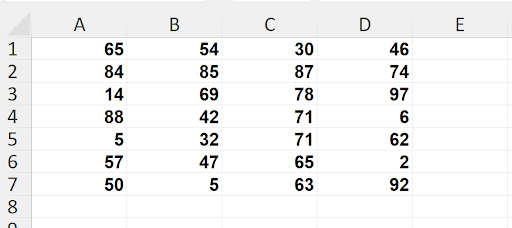
Consider this common scenario: How would you efficiently add totals to both E1:E7 and A8:E8 in the spreadsheet below?

1

The conventional approach involves multiple steps: clicking cell E1, pressing ALT/=, then Enter, followed by either dragging the fill handle down or double-clicking it to auto-fill. This intermediate result would appear as follows:

2 Next, you'd click cell A8, press ALT/= and Enter again, then drag the fill handle across to E8. While effective, this traditional method requires multiple actions and cell selections to achieve the final result:

3

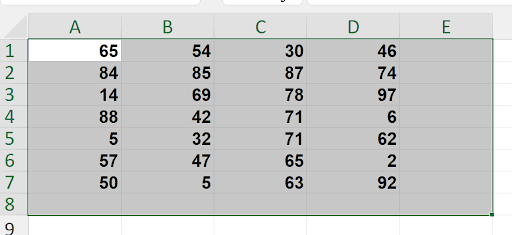
Here's the professional shortcut that will revolutionize your workflow. Instead of the multi-step process above, make this single selection that includes both your data range and the empty totals row and column:

4

By selecting the entire range including the extra row and column, then simply pressing ALT/=, Excel intelligently creates all totals simultaneously. One keystroke replaces what previously required multiple steps—this is the kind of efficiency that transforms daily productivity.

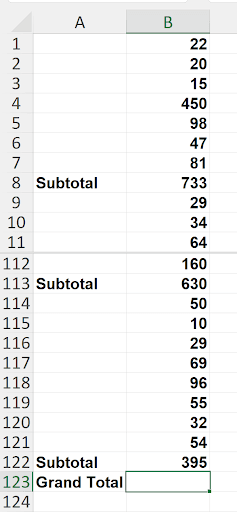
Now let's tackle a more complex challenge. Consider this worksheet structure with subtotals scattered throughout a large dataset:

5

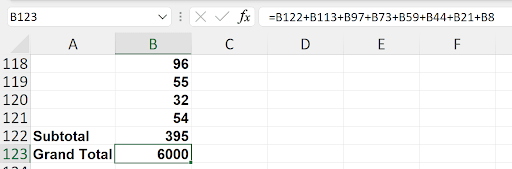
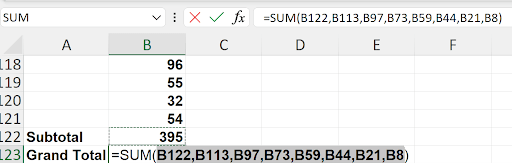
Note that rows 12-111 contain similar data structures with numbers and periodic subtotals throughout. The challenge: What's the most elegant formula for calculating the Grand Total in cell B123? Many users resort to manually selecting each subtotal cell, creating unwieldy formulas like this:

6

While this approach works, it's error-prone and maintenance-intensive. Missing a subtotal or clicking the wrong cell can throw off your entire calculation. I've encountered formulas using this method that span two lines in the formula bar—clearly not optimal for professional spreadsheet design.

Several more sophisticated alternatives exist. The SUMIF approach offers better reliability: =SUMIF(A1:A122, "Subtotal", B1:B122). This formula searches the range A1:A122 for cells containing "Subtotal" and sums the corresponding values from B1:B122—more robust and less prone to manual errors.

For those comfortable with array formulas, =SUMPRODUCT(N(A1:A122="Subtotal"), B1:B122) provides another solution. The SUMPRODUCT function multiplies arrays and sums the results. Here, A1:A122="Subtotal" creates a TRUE/FALSE array, which the N function converts to 1s and 0s. This creates a selective multiplier that isolates only the subtotal values for summation.

Excel's AutoSum feature offers a surprisingly elegant shortcut. Position your cursor in cell B123 and press ALT/=. Excel automatically detects and selects the subtotal cells for you:

7

However, my preferred solution demonstrates true Excel mastery: =SUM(B1:B122)/2. At first glance, this might seem counterintuitive, but the mathematical logic is brilliant.

8

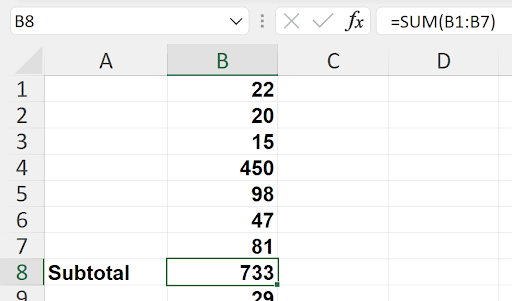
The elegance lies in understanding the data structure. Each section contains individual values plus their subtotal, as illustrated here:


9

When values B1:B7 total 733, the sum of B1:B8 becomes 733 + 733 = 1,466. Each data point appears twice in the total range—once as an individual value and again as part of its section's subtotal. Dividing by 2 gives us precisely the sum of subtotals. This approach is not only mathematically elegant but also completely immune to structural changes in your data.

Moving beyond calculations, let's explore Excel's advanced formatting capabilities. Did you know that text boxes can display content in multiple columns, similar to newspaper layout?

10

This professional presentation technique is invaluable for executive summaries and dashboard displays. After creating your text box, press CTRL/1 to access Format Shape. Navigate to Text Options, then click the rightmost icon under Text Options to reveal the Columns setting:

11

The Columns dialog provides precise control over your text layout:

12

Here you can specify both the number of columns and the spacing between them, creating professional layouts that enhance the visual impact of your presentations and reports.

Let's conclude with a comprehensive text manipulation challenge. Suppose you have data where you need to remove everything before the colon and its trailing space:

13

I'll demonstrate five distinct approaches, each with specific advantages. The first three involve formula-based solutions.

Method 1: FIND and MID Functions
First, locate the colon using the FIND function:

14

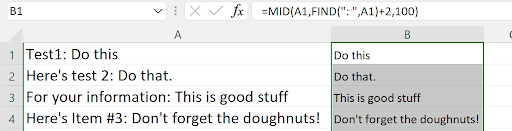
With the colon's position identified, extract the desired text using MID, starting two positions beyond the colon to skip both the colon and the space:

15

Replace the original data using Copy > Paste Special > Values, then clear the helper column:

16

Method 2: TEXTAFTER Function
Excel's newer TEXTAFTER function provides a more elegant solution:

17

For this task, only the first two parameters are necessary:

18

This approach is significantly cleaner than the FIND/MID combination and represents Excel's evolution toward more intuitive text manipulation functions.


Method 3: Text to Columns
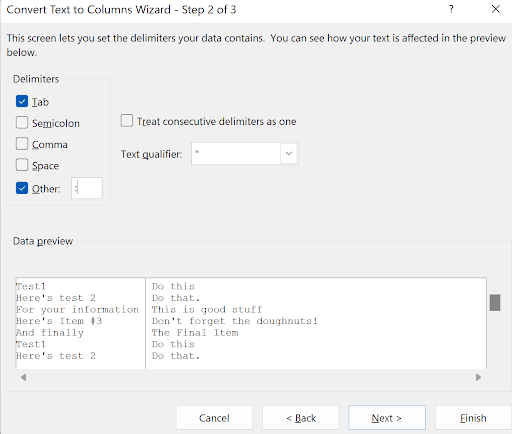
The Data > Text to Columns feature offers a non-formula approach:

19

Using the colon as delimiter works, though Excel's single-character limitation means we cannot simultaneously remove the trailing space. The result requires additional cleanup:

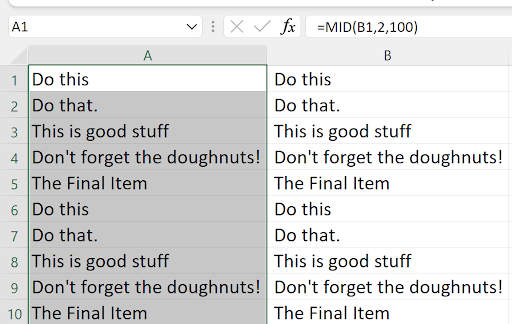
20

Notice that column B begins with spaces, requiring additional formula work: =MID(B1,2,100) to remove the leading space. You might as well apply this directly to column A:

21

Then simply delete the helper column B to complete the transformation.

Method 4: Flash Fill
Flash Fill represents one of Excel's most innovative features, using pattern recognition to automate data manipulation. Located on both the Home tab near AutoSum and in the Data tab's Data Tools group:

22

Flash Fill learns from examples you provide, making it incredibly powerful for irregular data patterns. Simply type your desired result for the first entry—in this case, "Do this":

23

Then execute Flash Fill using CTRL/E. Excel analyzes the pattern and applies it to the remaining data:

24

The beauty of Flash Fill lies in its intelligence—it handles variations and irregularities that might confound formula-based approaches. Simply delete the original column A when satisfied with the results.

Method 5: Find and Replace with Wildcards (The Professional's Choice)
My preferred approach leverages Excel's wildcard functionality for maximum efficiency. Select column A and open Find & Replace (CTRL/H):

25

In the "Find what" field, enter "*: " (asterisk, colon, space). The asterisk serves as a wildcard representing any characters, effectively matching everything up to and including the colon and space. Leave "Replace with" empty to delete the matched text. Click Replace All for instant transformation:

Screenshot of an Excel worksheet highlighting multiple rows of text entries (e.g., 'Do this, ' 'This is good stuff, ' 'Don't forget the doughnuts') while the 'Find and Replace' dialog box is open, showing a confirmation message indicating 15 replacements were made.

This method excels in both speed and reliability. It requires no formulas, no helper columns, and no multi-step processes. The wildcard approach handles variations in prefix length automatically and completes the entire operation in seconds. For professionals managing large datasets, this represents the optimal balance of efficiency, reliability, and simplicity.

Key Takeaways

1Select extra rows and columns before using ALT+= for instant totaling in both directions with a single keystroke
2For datasets with subtotals, SUM(range)/2 is often the most elegant formula since values appear twice in the data structure
3TEXTAFTER function provides simpler text manipulation than combining MID and FIND functions
4Text boxes can be formatted with multiple columns using CTRL+1 and accessing Text Options
5Flash Fill (CTRL+E) can automatically detect patterns and complete data transformations based on examples
6Find & Replace with wildcards (*) efficiently removes variable-length text patterns without formulas
7SUMPRODUCT with N-function converts TRUE/FALSE arrays to numeric for advanced conditional summing
8Text-to-Columns works best with single-character delimiters but may require additional cleanup for spaces

RELATED ARTICLES