March 23, 2026/3 min read

Location Targeting in Google Ads

Master geographic targeting for optimal campaign performance

Campaign-Level Targeting Only

Location targeting in Google Ads can only be configured at the campaign level, not at the ad group or keyword level. Plan your campaign structure accordingly.

What is Location Targeting in Google Ads?

Location targeting in Google Ads enables advertisers to precisely control where their campaigns appear by defining specific geographic parameters. This powerful feature allows you to include targeted regions, cities, or even radius-based areas around your business, while simultaneously excluding locations where your ads shouldn't appear. For instance, a Florida-based HVAC company can restrict their campaigns to service areas within a 50-mile radius of their locations, ensuring every click represents a potential customer they can actually serve.

Location Targeting Options

Include Locations

Target specific countries, states, cities, or custom radius areas where you want your ads to appear. Essential for local businesses.

Exclude Locations

Prevent ads from showing in certain areas where your business cannot serve customers or compete effectively.

Why is Location Targeting Important?

Effective location targeting serves as the foundation of campaign efficiency, directly impacting your return on ad spend and conversion quality. In today's competitive digital landscape, precision targeting isn't just beneficial—it's essential for campaign profitability. Strategic geographic targeting helps maximize your budget by focusing spend on high-intent prospects within your serviceable areas.

  • We would not want to show ads to searchers in regions where we cannot service (say if we only offer our services locally)
  • We may not want to show ads in locations where we already rank highly organically because we don't want to pay for our existing organic business

Beyond these fundamental use cases, sophisticated location targeting enables advanced strategies like dayparting by time zone, competitive conquest in specific markets, and budget allocation based on regional performance data. Smart advertisers also leverage location targeting to test market expansion opportunities with controlled spend before committing to broader geographic rollouts.

Running successful Google Ads campaigns is all about driving cost-efficient conversions which comes with good targeting.
Location targeting is a fundamental component of campaign optimization alongside keyword and audience targeting.

Benefits vs Challenges of Location Targeting

Pros
Prevents wasted spend on non-serviceable areas
Increases conversion rates by focusing on relevant audiences
Reduces competition with your own organic rankings
Enables budget allocation to high-performing regions
Cons
May limit overall reach and impression volume
Requires ongoing monitoring and optimization
Can be complex for businesses with multiple service areas

Key Location Targeting Scenarios

Service Area Limitations

Avoid showing ads to searchers in regions where you cannot provide services, preventing wasted clicks and budget.

Organic Ranking Protection

Exclude locations where you already rank highly organically to avoid paying for traffic you would get naturally.

How to Set up Location Targeting in Google Ads

Setting up location targeting requires careful consideration of your business objectives and customer geography. The process is straightforward, but the strategy behind your choices will determine campaign success.

Note: Location targeting can only be done at the campaign-level

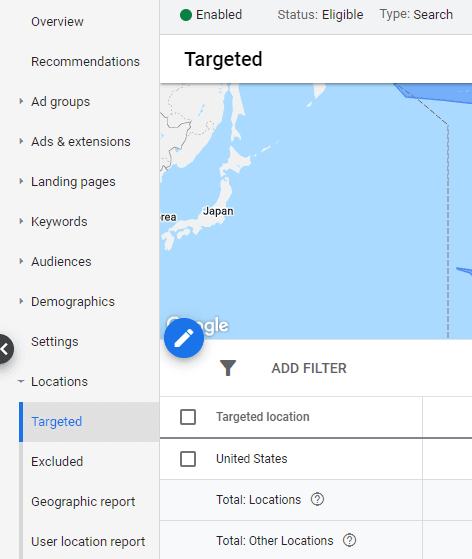
  • Go into your Ads account

  • Select the campaign that you'd like to set a location target for

  • Then click "Locations" in the left-hand menu

  • Click "Targeted" to choose any area or location you'd like to include in targeting

  • Click "Exclude" to choose areas or locations you'd like to exclude

Location Targeting

Pro tip: Always review your location reports regularly to identify underperforming areas that should be excluded and high-performing regions that warrant increased budget allocation. This ongoing optimization ensures your geographic targeting evolves with your business performance data.

Location Targeting Setup Process

1

Access Your Campaign

Navigate to your Google Ads account and select the specific campaign you want to configure for location targeting.

2

Open Locations Menu

Click on 'Locations' in the left-hand navigation menu to access the targeting settings for your selected campaign.

3

Set Target Locations

Click 'Targeted' to add specific areas, regions, or locations where you want your ads to be shown to potential customers.

4

Configure Exclusions

Click 'Exclude' to specify areas or locations where you do not want your ads to appear, optimizing your budget allocation.

Location Targeting Best Practices

0/4

More Google Ads and Digital Marketing Training

Ready to master advanced Google Ads strategies and build comprehensive digital marketing expertise? Our expert-led training programs provide the tactical knowledge and strategic frameworks you need to drive measurable results.

Continue Your Google Ads Education

Location targeting is just one component of successful Google Ads management. Explore comprehensive training courses and digital marketing certificates to master all aspects of campaign optimization.

Key Takeaways

1Location targeting in Google Ads allows advertisers to include or exclude specific geographic areas for ad display
2This targeting method operates exclusively at the campaign level, requiring strategic campaign structure planning
3Proper location targeting drives cost-efficient conversions by focusing budget on serviceable areas
4Businesses should exclude regions where they cannot provide services to prevent wasted ad spend
5Companies may want to exclude areas where they already rank highly organically to avoid competing with themselves
6Setup involves accessing campaign settings, navigating to Locations, and configuring both targeted and excluded areas
7Location targeting works alongside keyword and audience targeting to optimize overall campaign performance
8Regular monitoring and optimization of location performance data is essential for ongoing campaign success

RELATED ARTICLES