Creating a Page for Single Posts
What This Tutorial Covers
single.php
Template that renders individual posts.
The Loop
WordPress loop for post content rendering.
Template Hierarchy
single-{post-type}.php for custom post types.
Noble Desktop's WordPress Bootcamp teaches WordPress for site builders and developers.
Improve your WordPress skills with this comprehensive tutorial that includes instructions on creating a post template, adding a comment form, and customizing the comments' CSS, complete with detailed steps and visual aids.
Exercise Preview

Viewing & Styling the Comments
This is the default comments template, and we don’t have any styles for it. Since we can’t see the code until the page renders, we will use Chrome’s Developer Tools to inspect it to see what our styles should target.
- Open up Chrome and go to:
- Mac: localhost:8888/mrp
- Windows: localhost/mrp
Click the Hello world! post to take a look at the comments template.
CTRL–click (Mac) or Right–click (Windows) to the left of the comment’s bullet, and choose Inspect.
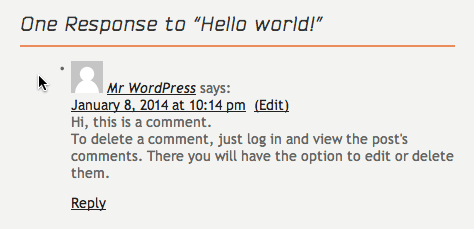
In the left-hand panel, the ordered list
<ol class="commentlist">should be highlighted. Hover over it to see the padding and margins highlighted above.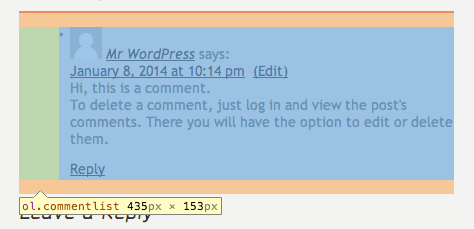
OK, we need to get rid of padding and margins on the.commentlist; we’ll remember that. Let’s figure out how to get rid of the bullet.
CTRL–click (Mac) or Right–click (Windows) on the bullet itself and choose Inspect.
In the left-hand panel, a list item
<li>should be highlighted.In the CSS section on the right, notice that we have a general li style that adds a bullet background image and some padding. That’s what we need to override.
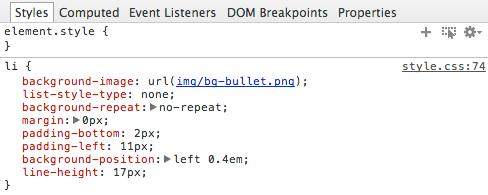
Let’s go make those changes. Leave Chrome open and switch to your code editor.
Open style.css from the mrpTheme folder.
At the very bottom, after the.prevPage rule (around line 447), add the following rules. (If you don’t have the.prevPage rule, add the new rules after.imgLeft around line 436):
.commentlist {
   padding: 0px;
   margin: 0px;
}.commentlist li {
   background-image: none;
   padding: 0px;
}
Save the file.
Switch back to Chrome. It should still be open to the MRP site. If not, go there now and click the Hello world! title.
Reload the page to see the new styles. Awesome!
Bonus: Finishing the Comment Styling
If you have extra time, you can continue to style the comments.
- If you closed Chrome, open it again and go to:
- Mac: localhost:8888/mrp
- Windows: localhost/mrp
Click the Hello world! post to see the comments.
Leave a new comment so that we have a couple to look at.
CTRL–click (Mac) or Right–click (Windows) one of the comments’ text and choose Inspect.
Note that the entire comment is in a div with the class comment-body.
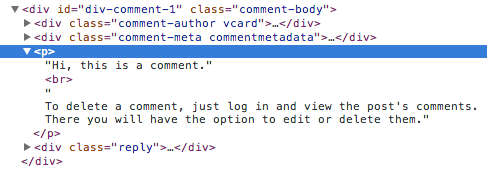
Above the paragraph, hover over the
<div class="comment-meta commentmetadata">. Above, you can see that .comment-meta styles the date and time of the comment.Below the paragraph, hover over the
<div class="reply">. Above, you can see that .reply styles the reply link below the comment.Let’s make styles for these. Switch back to your code editor.
Open style.css from the mrpTheme folder.
We’ll start with the comment-body div. We want some padding, a background color, and some space between comments. After the.commentlist li rule, add the following rule (around line 455):
.comment-body {
   background-color: #f9f9f9;
   padding: 10px;
   margin-bottom: 10px;
}
Next, we’ll style the comment time and date to be a little smaller. After the.comment-body rule, add the following rule:
.comment-meta {
   font-size: 13px;
   font-style: italic;
   line-height: 15px;
   margin-bottom: 10px;
}
We want the reply link in the right corner. After the.comment-meta rule, add the following bold code:
.reply {
   float: right;
}
The comment paragraphs need to be a little smaller too. After the.reply rule, add the following rule:
.comment-body p {
   font-size: 13px;
}
Save the file.
Switch back to Chrome and reload the page to get the new styles.
Excellent, with one small problem. The floated Reply link is collapsing the div a bit. Switch back to your code editor.
Edit the .comment-body style around line 455 by adding the following bold code:
.comment-body {
   background-color: #f9f9f9;
   padding: 10px;
   margin-bottom: 10px;
   overflow: hidden;
}
Save the file.
Switch back to Chrome and reload the page to get the new styles.
Close the Developer Tools console.
Preview the page in Firefox.
Scroll down to the bottom and notice that the large comment text field extends beyond its containing div into the sidebar. Let’s fix this.
CTRL–click (Mac) or Right–click (Windows) the large text field, and choose Inspect.
Notice that the text field has an ID of comment and is inside a form that has an ID of commentform. This is how we will target our style.
Switch back to your code editor.
After the comment-body p rule, add the following rule (around line 473):
#commentform #comment {
   width: 100%;
}
Save the file.
Switch back to Firefox and reload the page to see that the text field no longer extends beyond its containing div. Sweet!