March 23, 2026/1 min read

SQL ORDER BY Tutorial

Master SQL sorting with ORDER BY clause

SQL ORDER BY Overview

ORDER BY is one of the most fundamental SQL clauses for organizing query results. It controls how data appears in your result set by sorting rows based on specified column values.

ORDER BY Key Concepts

Ascending Order

Default sorting behavior that arranges data from lowest to highest values. Numbers go from small to large, text goes alphabetically.

Descending Order

Reverse sorting using DESC keyword that arranges data from highest to lowest values. Essential for finding top performers or maximum values.

Multiple Columns

Sort by multiple criteria by listing columns in priority order. First column is primary sort, subsequent columns handle ties.

ORDER BY

  • The ORDER BY keyword is a fundamental SQL clause that enables you to sort query results from your database tables in a meaningful sequence.

  • ORDER BY organizes data based on one or more specified columns, arranging records in either ascending (ASC) or descending (DESC) order to meet your analytical needs.

  • Syntax: SELECT * FROM table ORDER BY column_1 DESC ;

ORDER BY Syntax Breakdown

1

Start with SELECT

Begin your query with SELECT statement to specify which columns you want to retrieve from the database table.

2

Add FROM clause

Specify the table name using FROM keyword to indicate which table contains the data you want to sort.

3

Include ORDER BY

Add ORDER BY followed by the column name you want to sort by. This determines the sorting criteria for your results.

4

Specify Direction

Add DESC for descending order or leave blank for ascending. DESC shows highest values first, which is useful for rankings.

Ascending vs Descending Order

FeatureASC (Default)DESC
SyntaxORDER BY columnORDER BY column DESC
Number Sort1, 2, 3, 4, 55, 4, 3, 2, 1
Text SortA, B, C, D, EZ, Y, X, W, V
Use CaseChronological listsTop performers, rankings
Recommended: Use DESC when you need to identify highest values or create rankings, like finding top performers in sports statistics.

Example

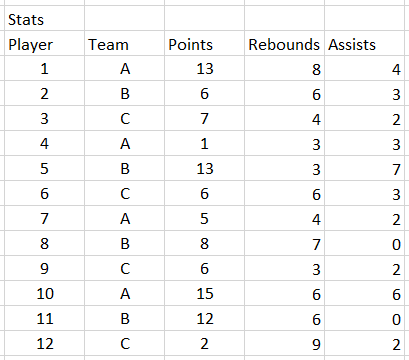
Understanding ORDER BY becomes clearer with a practical scenario. Consider you're managing a basketball league database that tracks player performance across multiple teams, including comprehensive statistics for strategic decision-making.

Stats Table

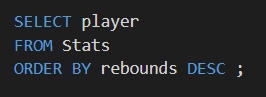
To identify your league's most dominant rebounders—crucial information for team managers and analysts—you'll need to query the database and sort by rebounding statistics. Here's how you structure that SQL query:

SQL ORDER BY

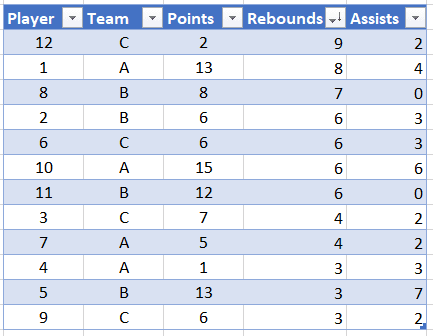
Executing this query transforms your raw data into actionable insights. The results clearly rank players by their rebounding performance:

SQL ORDER BY Result

Basketball Statistics Example

This example demonstrates using ORDER BY DESC to find top rebounders in a basketball league. The DESC keyword ensures players with the most rebounds appear first in the results.

Basketball Query Breakdown

1

Identify Goal

Determine that you want to find the top rebounders from player statistics in your basketball league database table.

2

Select Data

Use SELECT to choose all columns or specific columns like player name, team, and rebounding statistics from the players table.

3

Apply Sorting

Add ORDER BY with the rebounds column and DESC keyword to sort players from highest to lowest rebounding numbers.

4

Execute Query

Run the query to get results showing top rebounders first, making it easy to identify the best performers in this category.

ORDER BY Benefits and Considerations

Pros
Makes data analysis much easier by organizing results logically
Essential for creating rankings and identifying top or bottom performers
Works with all data types including numbers, text, and dates
Can sort by multiple columns for complex organizational needs
Cons
Can impact query performance on very large datasets without proper indexing
Results may vary with NULL values depending on database system
Multiple column sorting requires understanding of priority order

ORDER BY Best Practices

0/4

Key Takeaways

1ORDER BY keyword sorts database query results based on specified column values in ascending or descending order
2Default sorting is ascending order, use DESC keyword to sort from highest to lowest values
3ORDER BY clause comes after SELECT and FROM clauses in SQL query syntax structure
4Descending order with DESC is essential for finding top performers, maximum values, and creating rankings
5Multiple columns can be used in ORDER BY to create complex sorting hierarchies and handle tie situations
6ORDER BY works with all data types including numbers, text strings, and date values effectively
7Basketball league example demonstrates practical use of ORDER BY DESC to identify top rebounding players
8Performance considerations include using indexes on sorted columns and LIMIT clauses for large datasets

RELATED ARTICLES