April 1, 2026Dan Rodney/3 min read

Product Shot: Matching Colors

Master Professional Color Matching in Product Photography

Tutorial Focus

This advanced Photoshop technique specifically addresses color consistency in product photography, a critical skill for professional photographers and digital artists.

Topics Covered in This Photoshop Tutorial:

Matching Colors Using Curves

Core Tutorial Components

Curves Adjustment Mastery

Learn to manipulate RGB composite curves and individual color channels. Master the precise adjustments needed for professional color matching.

Layer Mask Techniques

Apply selective editing using brush tools and layer masks. Protect specific areas while adjusting others for natural results.

Color Theory Application

Understand how different lighting affects liquid appearance. Match colors across different surfaces and materials in product shots.

Exercise Preview

product matching colors

Curves Adjustment Layer Benefits

Pros
Non-destructive editing maintains original image quality
Precise control over individual color channels
Easy to modify or remove adjustments later
Works seamlessly with layer masks for selective editing
Cons
Requires understanding of color theory principles
May need multiple iterations to achieve perfect match
Can affect unintended areas without proper masking
Professional Workflow Tip

Always work with Adobe RGB color space for product photography to ensure maximum color accuracy and professional print compatibility.

Exercise Overview

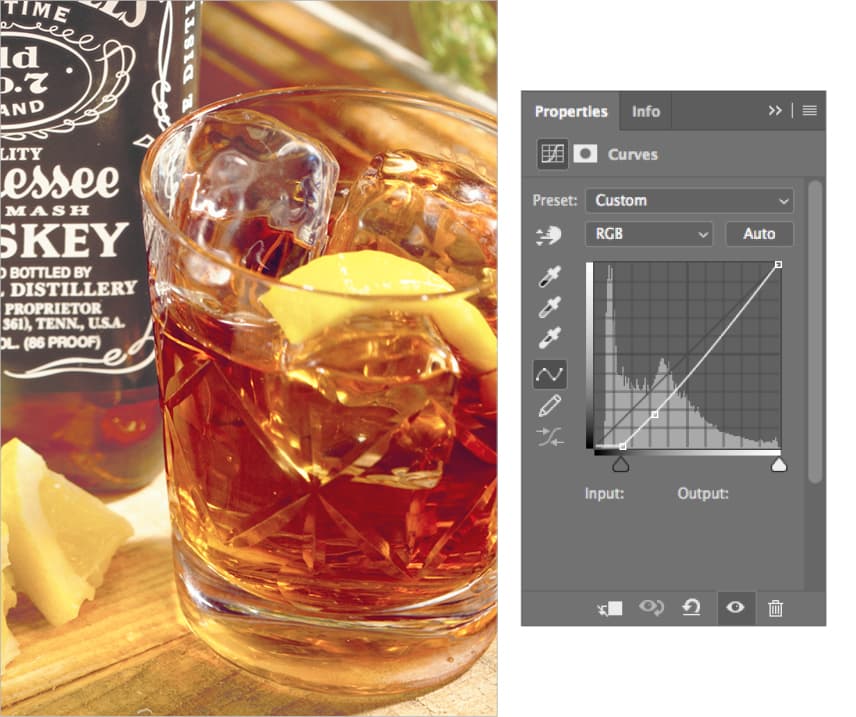
In this exercise, you'll tackle one of the most common challenges in product photography: color inconsistency across reflective surfaces. Notice how the whiskey appears distinctly different in the bottle compared to the glass—this discrepancy occurs frequently when lighting conditions vary across a composition. Using a targeted Curves adjustment layer, you'll learn to harmonize these color variations while maintaining the natural characteristics of each surface.

This technique is essential for e-commerce photography, advertising campaigns, and any scenario where color accuracy directly impacts brand perception and consumer trust.

Color Matching Workflow

1

Path Selection Setup

Load the tumbler glass path as an active selection using Cmd-click or Ctrl-click on the path thumbnail in the Paths panel.

2

Curves Layer Creation

Create a new Curves adjustment layer and name it appropriately for organized workflow and easy identification.

3

Color Analysis

Compare the bottle and glass liquor colors to identify the specific adjustments needed for accurate color matching.

4

Curve Adjustments

Modify RGB composite and individual color channels systematically to achieve the desired color match.

Matching the Color of the Liquor in the Glass to That in the Bottle

  1. If it's not still open, re-open yourname-product-Adobe RGB.psd.

  2. In the Paths panel, Cmd–click (Mac) or CTRL–click (Windows) on the tumbler glass path thumbnail to load it as a selection.

    This pre-made path ensures precise selection boundaries around the glass, which is crucial for maintaining clean edges when applying color adjustments to reflective surfaces.

  3. Navigate to the Layers panel and create a new Curves adjustment layer.

    Curves remain the gold standard for color matching because they provide granular control over tonal relationships while preserving the natural luminosity variations that give liquids their realistic appearance.

  4. Name this adjustment layer fix tumbler color.

    Your objective is to match the liquor's color in the glass to the reference color in the bottle. During the adjustment process, don't be concerned if other areas of the glass temporarily shift to undesirable colors—we'll selectively mask those areas in the final step. Focus exclusively on achieving color harmony between the two liquid surfaces.

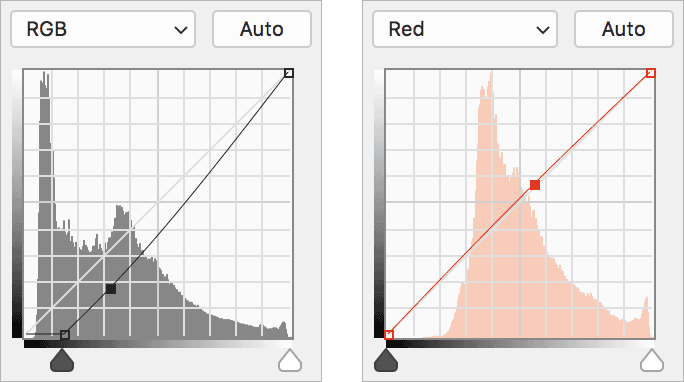
  5. In the Properties panel, darken the RGB composite curve and add a subtle amount of Red. Use the curves shown below as your baseline reference for matching the color temperature and saturation.

    product rgb&red

    The RGB composite adjustment controls overall luminosity, while the Red channel fine-tunes the warmth to match the bottle's amber characteristics.

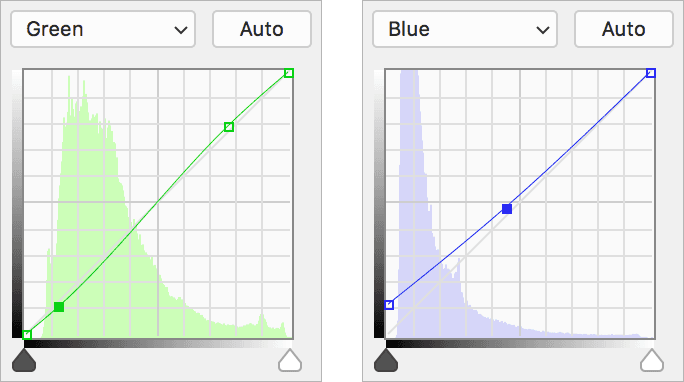
  6. Enhance the Green channel contrast and introduce Blue adjustments as demonstrated below:

    product green&blue

    These complementary adjustments refine the color balance, ensuring the glass liquid achieves the same rich, complex hue as the bottle reference while maintaining natural depth and translucency.

  7. You'll notice that certain areas of the glass now appear overcorrected or unnatural. Select the curves layer mask and use the Brush brush tool set to black to selectively remove the color adjustment from problematic areas. Focus on masking the upper rim of the glass, the lemon garnish, and any reflective highlights where the correction creates unwanted color shifts.

    This selective masking technique allows you to maintain the color correction only where it enhances realism while preserving the natural appearance of glass surfaces and garnish elements.

  8. Save your file and keep it open—you'll build upon this color-matching foundation in the next exercise.

RGB Channel Adjustment Strategy

FeatureAdjustment TypePurpose
RGB Composite DarkeningReduce overall brightnessMatch bottle liquor darkness
Red Channel AdditionAdd touch of warmthEnhance whiskey tone
Green Channel ContrastIncrease contrastImprove color definition
Blue Channel AdditionAdd subtle blue tonesBalance overall color cast
Recommended: Apply adjustments gradually and compare frequently with the reference bottle color for best results.

Quality Control Checklist

0/5
Common Mistake to Avoid

Don't worry if some glass areas look wrong initially. The key is focusing on the liquor color match first, then using layer masks to refine the affected areas.

Key Takeaways

1Curves adjustment layers provide non-destructive color matching capabilities essential for professional product photography editing
2Path selections combined with adjustment layers allow precise control over specific product areas without affecting the entire image
3RGB composite adjustments control overall brightness while individual color channels fine-tune specific color characteristics
4Layer masks with black brush strokes selectively remove unwanted adjustments from glass highlights, garnishes, and reflection areas
5Color matching requires systematic approach: darken RGB composite, add red warmth, increase green contrast, and balance with blue tones
6Professional workflow demands proper file organization with descriptive layer names and preservation of working files for future modifications
7Adobe RGB color space ensures maximum color accuracy and compatibility for professional product photography applications
8Quality control involves protecting natural elements like glass reflections and garnishes while achieving accurate liquor color consistency

RELATED ARTICLES