April 1, 2026Dan Rodney/3 min read

Lifestyle Shot: Adjusting Contrast

Master Professional Photo Contrast Without Compromising Color

Essential Photoshop Skills You'll Master

Curve Adjustments

Learn precise control over image contrast using advanced curve manipulation techniques. Master the S-curve methodology for professional results.

Blending Modes

Understand how different blending modes affect color and luminosity. Discover the power of Luminosity mode for contrast-only adjustments.

Channel Selections

Master targeted adjustments using channel-based selections. Learn to isolate specific tonal ranges for precise editing control.

Topics Covered in This Photoshop Tutorial:

Curve Adjustments & Blending Modes, Preventing Contrast Adjustments from Changing Saturation

Professional Workflow Insight

This technique is essential when clients have approved color grading but additional contrast adjustments are needed. It preserves approved aesthetics while enhancing image impact.

Exercise Preview

lifestyle contrast done

Exercise Overview

In this exercise, you'll master a sophisticated technique that's become essential in professional retouching workflows: adjusting contrast while preserving color integrity. This method is invaluable when clients have approved color grading but additional contrast refinements are needed—a common scenario in commercial photography and high-end retouching. By leveraging Photoshop's Luminosity blend mode, you'll gain precise control over tonal relationships without the unwanted color shifts that plague traditional contrast adjustments.

Complete Workflow Overview

1

Channel Selection

Access the Channels panel and load the skin channel as an active selection using keyboard shortcuts for precision targeting.

2

Create Curves Adjustment

Add a new Curves adjustment layer with Luminosity blending mode to ensure color preservation during contrast modifications.

3

Apply S-Curve

Create a subtle S-curve adjustment to increase contrast while maintaining natural skin tone appearance and color accuracy.

4

Compare Results

Toggle between Normal and Luminosity blend modes to observe the dramatic difference in color preservation techniques.

Adjusting Contrast in Skin Tones Without Changing Color

Now we'll implement this technique step-by-step, focusing on skin tone enhancement—one of the most critical applications in portrait and lifestyle photography.

  1. If it's not still open, re-open yourname-lifestyle.psd.

  2. With your skin tones properly balanced from the previous exercise, we can now enhance contrast without disturbing the color harmony. Navigate to the Channels panel to access the custom skin channel we created earlier.

  3. Hold Cmd (Mac) or CTRL (Windows) and click on the skin channel thumbnail to load it as an active selection. This targets our adjustment exclusively to skin areas, ensuring precision and avoiding unwanted effects on clothing, backgrounds, or other elements.

  4. Go to Layer > New Adjustment Layer > Curves to create a non-destructive adjustment layer.

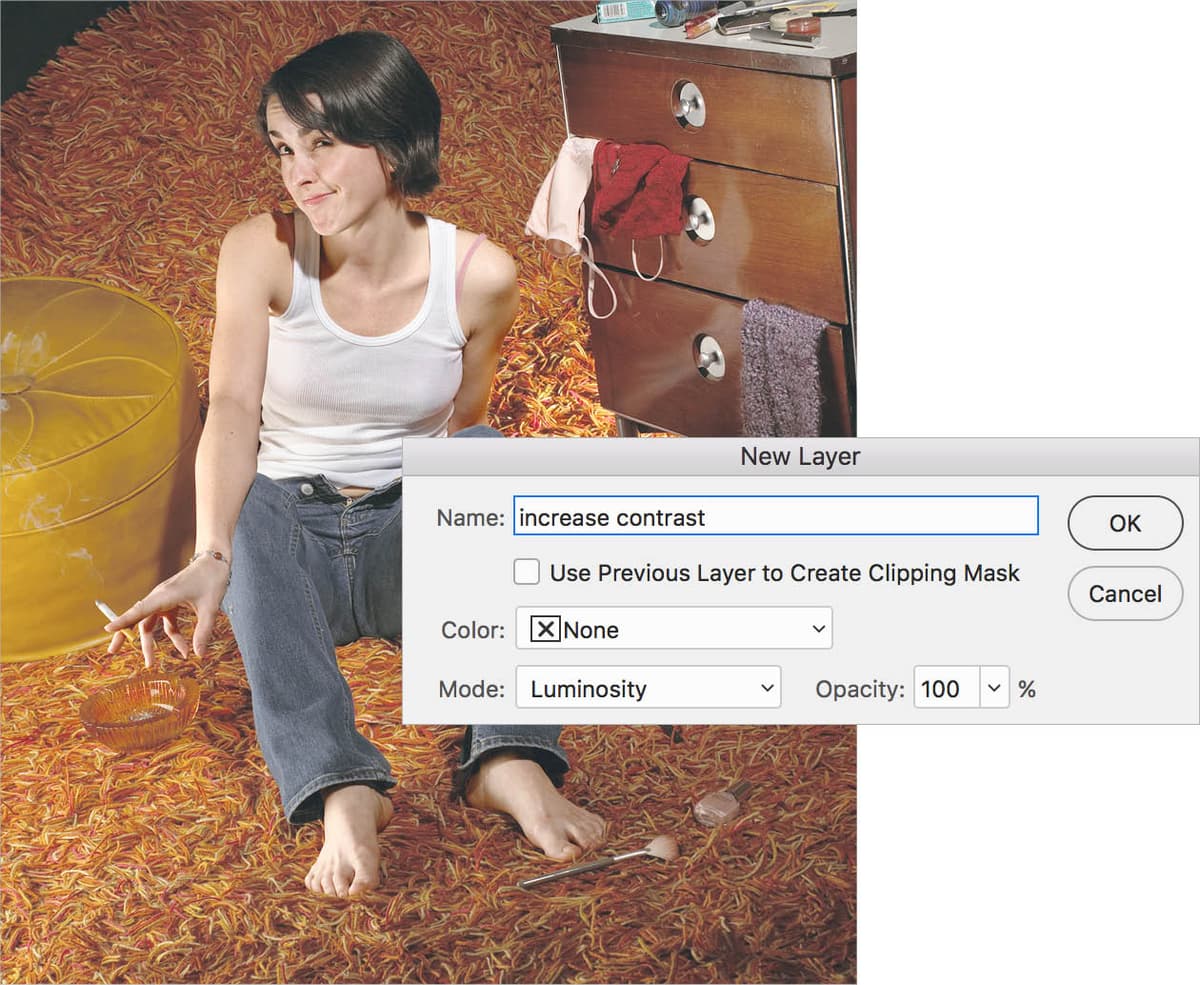
  5. In the dialog that appears, change the name to increase contrast for clear layer organization—essential in complex retouching workflows.

  6. Under Mode, choose Luminosity. This is the critical setting that separates luminance information from chrominance, allowing us to adjust brightness and contrast independently from color saturation and hue.

  7. Click OK to create the adjustment layer.

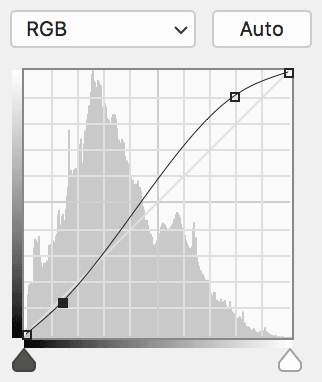
  8. In the Properties panel, create a gentle S-curve adjustment similar to the example below. The S-curve increases contrast by brightening highlights (upper portion of the curve) and deepening shadows (lower portion) while maintaining midtone integrity. Start subtle—skin requires delicate handling to maintain natural appearance.

    lifestyle contrast curves

Blending Mode Impact Comparison

FeatureNormal ModeLuminosity Mode
Contrast EffectIncreases contrastIncreases contrast
Color SaturationIncreases saturationPreserves saturation
Color AccuracyShifts colorsMaintains colors
Professional UseLimited applicationIdeal for client work
Recommended: Use Luminosity mode for professional contrast adjustments that preserve approved color grading.

Step-by-Step Execution Checklist

0/6

Seeing the Difference

Understanding why this technique works requires seeing the alternative. Let's compare the Luminosity blend mode against the default Normal mode to appreciate the difference.

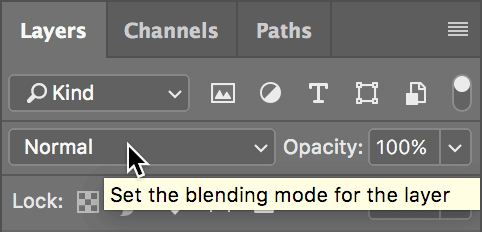
  1. Observe how the contrast enhancement has improved dimensional modeling in the skin without introducing color casts or oversaturation. This is the power of Luminosity blending—it isolates tonal adjustments from color information. To demonstrate what we've avoided, temporarily change the blend mode in the Layers panel from Luminosity to Normal (as shown below).

    lifestyle blending mode

  2. Switch the blending mode back to Luminosity and toggle between the two to see the dramatic difference. In Normal mode, contrast adjustments inevitably boost color saturation and can introduce unwanted color shifts—particularly problematic in skin tones where natural appearance is paramount. The Luminosity mode eliminates these issues entirely, giving you pure tonal control. This technique has become standard practice in professional retouching because it maintains the color relationships that clients approve while allowing unlimited contrast refinement.

  3. Save the file to preserve your work. This foundational technique will serve you throughout your retouching career—master it well.

Normal vs Luminosity Blending Analysis

Pros
Luminosity mode preserves original color accuracy completely
No unwanted saturation increase with contrast adjustments
Perfect for client-approved color schemes requiring contrast tweaks
Maintains natural skin tone appearance
Professional standard for portrait retouching workflows
Cons
Normal mode creates unwanted color shifts
Increased saturation can appear unnatural
May require color correction after contrast adjustments
Less control over final image appearance
Professional Technique Mastered

You have learned a fundamental professional retouching technique. The ability to adjust contrast without affecting color is essential for high-end portrait and lifestyle photography work.

Key Takeaways

1Luminosity blending mode allows contrast adjustments without changing color saturation or hue
2Channel selections enable precise targeting of specific tonal ranges like skin tones
3S-curve adjustments provide natural-looking contrast enhancement in portrait photography
4Normal blending mode increases both contrast and color saturation simultaneously
5This technique is essential for professional workflows where color approval precedes contrast adjustments
6Proper layer naming and organization maintains efficient project management
7The difference between blending modes is immediately visible when toggling between them
8This method preserves client-approved color grading while enhancing image impact

RELATED ARTICLES