April 1, 2026Dan Rodney/3 min read

Fashion Shot: Dodging/Burning Blemishes

Master Professional Photo Retouching with Dodge and Burn

Professional Retouching Technique

The dodge and burn method preserves original skin texture better than clone stamp or healing brush tools, making it the preferred technique for high-end fashion photography.

Topics Covered in This Photoshop Tutorial:

The Dodge & Burn Tools, Channels

Essential Tools for Fashion Retouching

Dodge Tool

Lightens specific areas of the image while maintaining natural texture. Perfect for reducing dark spots and blemishes.

Burn Tool

Darkens targeted areas to add depth and dimension. Essential for contouring and shadow work.

Channels Panel

Allows precise color correction by working on individual RGB channels. Critical for removing color casts.

Exercise Preview

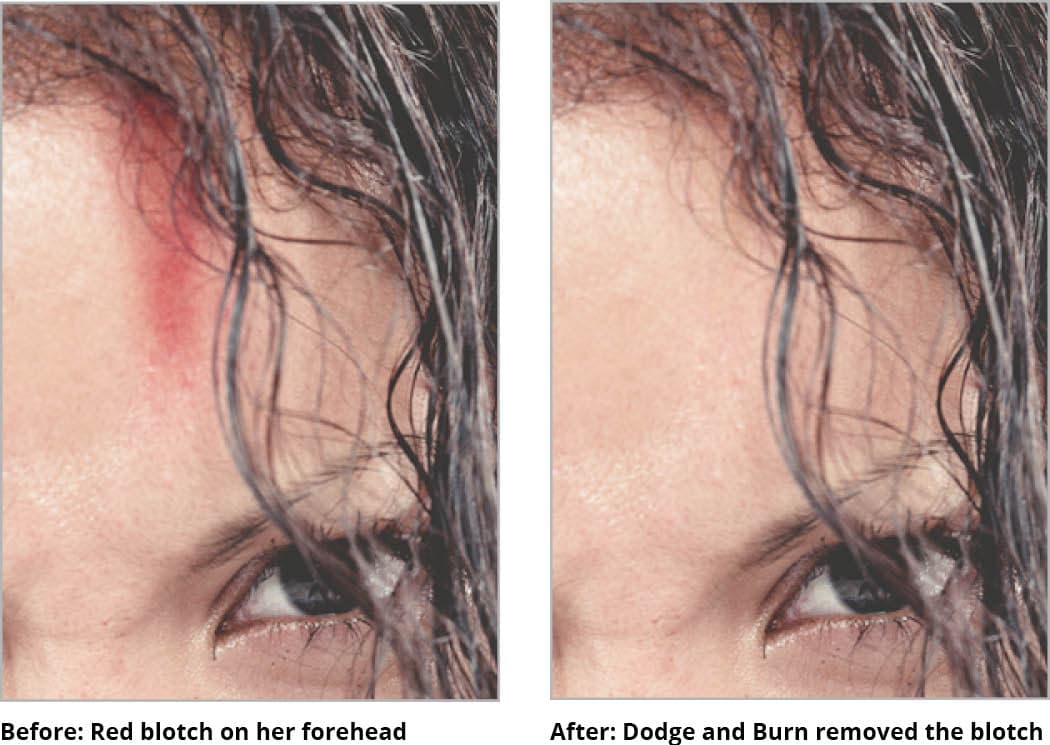
model dodgeburn before&after

Retouching Method Comparison

FeatureClone Stamp/HealingDodge & Burn
Texture PreservationModerateExcellent
Difficulty LevelBeginnerAdvanced
Natural ResultsGoodSuperior
Time RequiredQuickModerate
Recommended: Dodge and burn provides the most natural-looking results for professional fashion photography

Exercise Overview

While the Clone Stamp and Healing Brush are powerful tools for general retouching, the Dodge dodge tool and Burn burn tool tools offer a superior approach for addressing specific blemishes and color inconsistencies. This technique requires finesse and patience, but it's the gold standard for preserving natural skin texture while achieving seamless corrections. Professional retouchers rely on this method because it maintains the authentic quality that separates amateur work from polished, publication-ready images.

In this exercise, we'll demonstrate the precision of dodge and burn techniques by addressing subtle imperfections on the subject's forehead—an area where texture preservation is particularly critical for natural-looking results.

Key Advantage

This technique maintains the original skin texture while removing imperfections, creating results that look natural rather than obviously retouched.

Basic Workflow Overview

1

Tool Selection

Choose dodge tool and set exposure to 2-3% for maximum control

2

Channel Analysis

Open channels panel and identify which channel contains the blemish

3

Targeted Correction

Work on specific channel while viewing composite RGB result

Dodging & Burning to Touch up Blemishes

  1. If it's not already open, navigate to the Photoshop Adv Class folder and open yourname-model.psd.

  2. Select the Dodge tool dodge tool from the toolbar. This tool selectively lightens areas by reducing their exposure values.

  3. In the Options bar at the top of the screen, set an extremely conservative Exposure value. An Exposure of 2 or 3% provides optimal control for precision work. This low setting prevents over-correction and allows you to build up the effect gradually—a hallmark of professional retouching workflow. Higher exposure values often result in obvious, unnatural-looking corrections that immediately signal heavy editing.

  4. Open the Channels panel (Window > Channels). Understanding channel-based corrections is essential for advanced color and tone manipulation.

  5. When you encounter color casts—such as the red spot visible on the right side of the subject's forehead—examine each individual channel to identify where the discoloration is most pronounced. Color casts typically appear as unusually dark or light areas within specific channels. In this case, you'll notice the problematic area appears as a distinct dark spot in the Green channel, indicating an excess of magenta in that region.

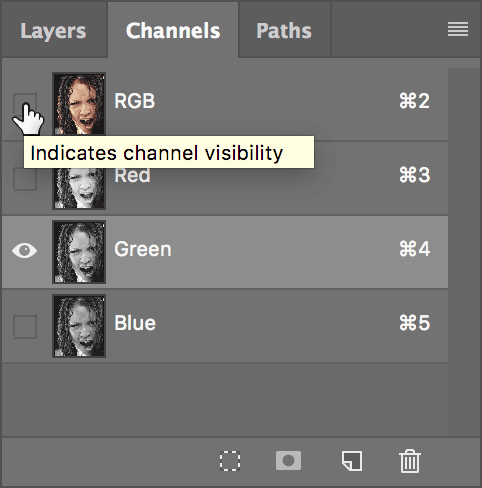
  6. Once you've identified the problematic channel, click on the Green channel to select it. This targets your corrections specifically to the channel containing the color imbalance.

  7. To maintain visual feedback while working on the isolated channel, click the Eye eye hide show icon icon next to the composite RGB channel, as shown below. This technique allows you to see the full-color result while making targeted adjustments to the selected channel.

    model show rgb

  8. You can now perform precise dodging or burning while observing the real-time color changes. Before switching to the Burn tool burn tool, ensure you maintain the same low Exposure setting for consistent control. Understanding the color relationships is crucial for effective corrections:

    • Dodging lightens the Green channel, increasing green values and reducing magenta cast in the affected area.
    • Burning darkens the Green channel, decreasing green values and intensifying magenta tones where needed.

    Work in small, deliberate strokes, building up the correction gradually. This methodical approach ensures natural-looking results that won't reveal themselves under scrutiny.

  9. Save your progress using Ctrl+S (Windows) or Cmd+S (Mac) and keep the file open—we'll build upon this foundation in the next exercise to explore additional advanced retouching techniques.

Critical Setting

Always use very low exposure settings (2-3%) to maintain control and avoid over-correction that can look unnatural.

Setup Checklist

0/5

Channel Color Theory

Green Channel Dodging

Lightening the green channel reduces magenta tones and increases green tones in the affected area.

Green Channel Burning

Darkening the green channel increases magenta tones and reduces green tones in the targeted region.

Pro Tip

Enable the RGB composite eye icon while working on individual channels to see your corrections in full color as you work.

Key Takeaways

1Dodge and burn tools preserve original skin texture better than clone stamp or healing brush methods
2Low exposure settings of 2-3% provide maximum control and prevent over-correction during retouching
3Working with individual color channels allows precise correction of color casts and blemishes
4The Green channel is particularly important for correcting red spots and magenta color casts
5Enabling RGB composite view while working on individual channels shows real-time color results
6Dodging lightens channels and reduces complementary colors, while burning darkens and enhances them
7This advanced technique requires practice but delivers the most professional and natural-looking results
8Proper file management and saving work at each step ensures progress is not lost during complex edits

RELATED ARTICLES