Embedding Animations in Smart Objects
What This Tutorial Covers
Smart Object Basics
Non-destructive containers for layered or animated content.
Nested Animation
Smart Objects can contain their own timeline animations.
Composition
Combine multiple Smart Object animations on a parent timeline.
Noble Desktop's Graphic Design Certificate covers Photoshop alongside Illustrator and InDesign.
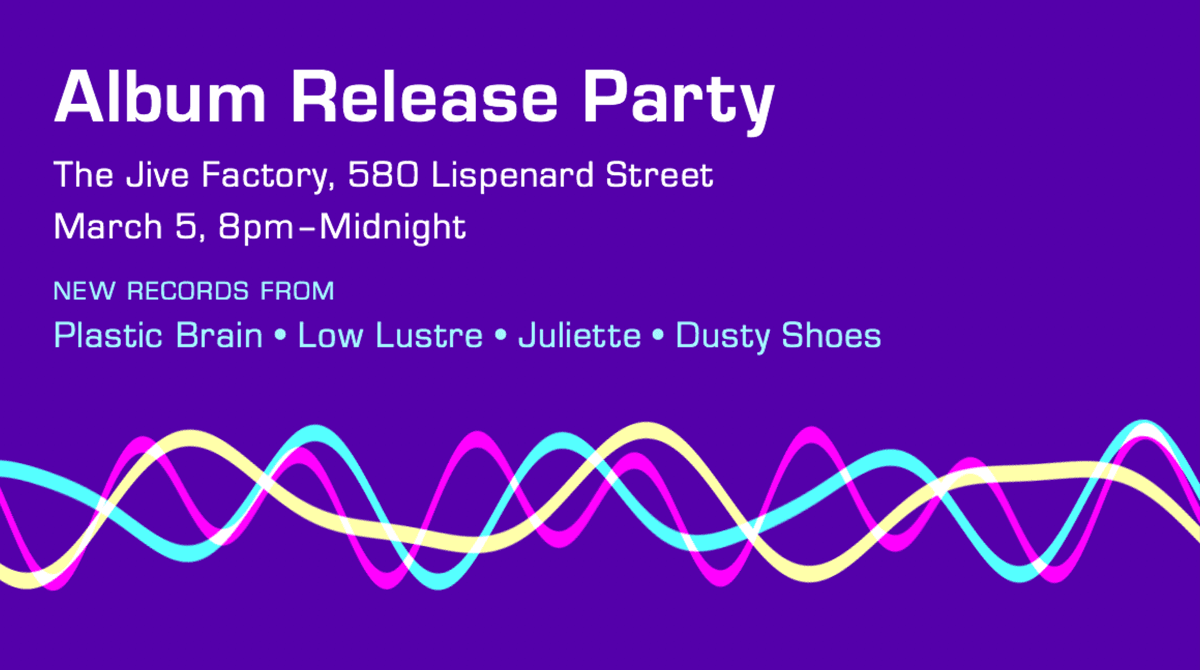
Dive into this detailed Photoshop tutorial to learn how to create an animated GIF for a party announcement, featuring topics such as embedding an animation within a Smart Object, adding filters, copying Smart Objects, and final positioning and blending modes.
Exercise Preview
Getting Started
In Photoshop, go to File > Open.
Navigate into Desktop > Class Files > Animated GIFs Class > Party Announcement and open party-announcement.psd.
Go to File > Save As.
Name the file yourname-party-announcement.psd and navigate into Class Files > Animated GIFs Class > Party Announcement.
Click Save.
We’ve already started a video timeline with the static text and background layers so make sure the Timeline panel is showing. (If not, go to Window > Timeline.)
Zoom to 100% if you’re not already.
If the bottom left of the Timeline panel doesn’t look like
 , change the time display and/or frame rate as follows:
- If you see a timecode (it looks like 0:00:00:00), hold Opt (Mac) or ALT (Windows) and click on the timecode to toggle it to frames (which look like 0).
- If it doesn’t say 30.00 fps, go into the Timeline panel menu
 and choose Set Timeline Frame Rate. Change it to 30 and click OK.
At the top left of the Timeline panel click the Gear icon
 .
.Make sure Resolution is set to 100%, and Loop Playback is checked on.
Click on the Timeline panel menu
and make sure Enable Timeline Shortcut Keys is unchecked. Although this can be a useful feature, it overrides Photoshop’s “nudge” keyboard shortcuts using the Left and Right Arrow keys, which we’d prefer to use in this exercise.We won’t be editing the text, so let’s hide the text layer for now. In the Layers panel, click the eye
 to the left of text content to hide it.
We want this animation to be 1 second long. At 30 frames per second, 1 second equals 30 frames. Drag the blue playhead
 to 30 or go to the bottom left of the Timeline panel and drag the frame number.
Drag the right handle (Set End of Work Area) to the playhead so the work area ends at frame 30.
Creating the First Wave
To create the first wave, we’ll create a colored rectangle shape and turn it into a smart object so that we can transform it and apply a wave filter. We’ll then duplicate it and adjust the settings slightly for each of the other waves.
Move the playhead to frame 0.
In the Tools panel, select the Rectangle tool
 .
.Click once anywhere on the purple background.
In the dialog that opens, set the Width to 1740px, and Height to 16px.
We are making our rectangle wider than our background (which is 1160px) so that we can move it both left and right without there being any gaps on either side of the wave.
Click OK.
We’ll start with the pink wave. In the Layers panel, double–click on the layer thumbnail for Rectangle 1.
In the Color Picker window that opens, set the color to #FF00FF and click OK.
To position the rectangle where we want it, hit Cmd–T (Mac) or CTRL–T (Windows) to do a Free Transform.
In the Options bar at the top, set the X value to 290px so that the right edge of the rectangle aligns with the right edge of the background.
Set the Y value to 326px so that it centers vertically.
Click the checkbox
 in the Options bar when you’re done.
Let’s go ahead and turn this into a wave! Go to Filter > Distort > Wave.
In the dialog that pops up, click Convert To Smart Object.
In the Wave settings window that opens, set the following:
- Number of Generators: 1
- Min. Wavelength: 80
- Max. Wavelength: 81
- Min. Amplitude: 67
- Max. Amplitude: 68
- Horiz. Scale: 1
- Vert. Scale: 100
Click OK and admire your new pink wave!
Embedding an Animation Within a Smart Object
We’re going to embed our animations within smart objects. This will allow us to then apply filters or effects to the embedded smart object while still keeping the animation inside it as is. This is a nice trick to create more interesting effects!
In the Layers panel, CTRL–click (Mac) or Right–click (Windows) on Rectangle 1 and select Convert to Smart Object.
Rename the Rectangle 1 layer to pink wave.
Double–click on the pink wave layer thumbnail to edit the Smart Object. This is where we will be creating the animation.
Move the playhead to frame 30.
Drag the Set End of Work Area handle to snap it to the playhead at frame 30, the duration of our animation.
We just want the wave to slide from left to right. To do so, go to the Timeline panel and expand
 the Rectangle 1 layer to view the list of properties that can be animated.
Move the playhead to 0 by clicking the Go to first frame button
 at the top of the Timeline panel.
Click the stopwatch
 next to Transform to add the first keyframe
  .
.Move the playhead to frame 30.
Select the Move tool
 .
.Hold Shift and drag the wave rightwards any amount. Notice that a second Transform keyframe
 is automatically added.
Press Spacebar to preview.
Notice how the wave jumps at each loop. Not quite the smooth movement we’re looking for.
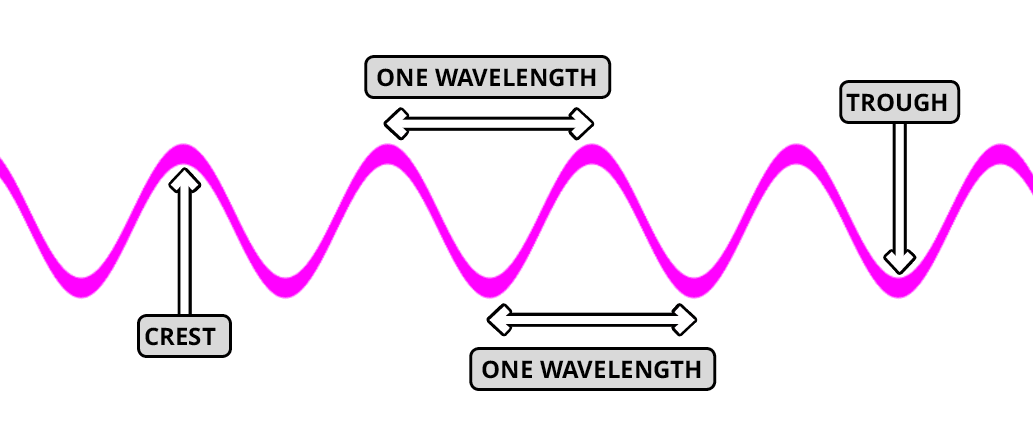
To create a more seamless movement, we’ll need to move the entire wave by a whole number of wavelengths. One wavelength is considered either the distance from one crest (the highest point) to the next crest, or from trough (the lowest point) to the next trough as shown below:
Select the second keyframe
, and press the Delete key.Make sure the playhead is at 30 frames and pay attention to where the end of the wave is currently hitting the edge of the canvas. We want to move the entire wave over by 3 whole wavelengths so that it ends up looking the same as it does at frame 0.
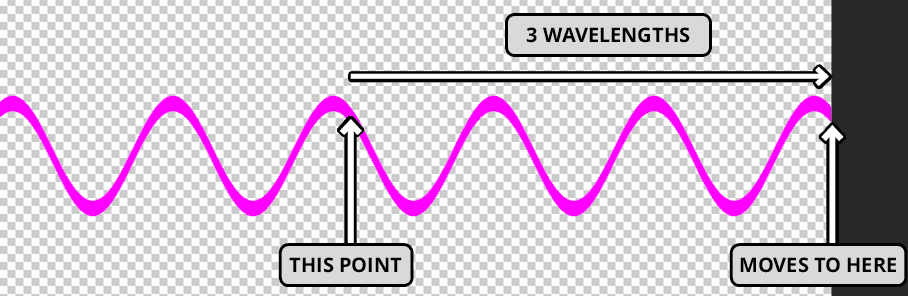
Hold Shift and drag to the right paying attention to each wavelength, until you’ve moved it over by 3 whole wavelengths.
Click the Go to first frame button
to move back to frame 0.To the left of Transform, use the arrows
 to move between the two keyframes.
It doesn’t have to be exact, but adjust the wave as needed so that it looks as similar as possible at both time frames. Feel free to use the Left and Right Arrow keys to nudge it into place (making sure the playhead is at frame 30).
Once you’re happy with positioning, press Spacebar to preview. The wave should be looping seamlessly!
Do a File > Save to save our Smart Object.
Close the Smart Object window so that you’re back in the main PSD file.
Adding a Filter to an Embedded Animation
In the Timeline, click the pink wave layer’s arrow
to expand the animation properties.Hmm, we don’t have any Transform keyframes here.
Press Spacebar to confirm that our animation is still working. The animation has remained as it’s actually being done inside the smart object. We can now apply an additional filter to this layer without the animation inside the smart object being changed at all. Nifty!
Make sure pink wave is selected and go to Filter > Distort > Wave.
In the dialog that opens change the following Wave settings:
- Number of Generators: 5
- Min. Wavelength: 155
- Max. Wavelength: 156
- Min. Amplitude: 12
- Max. Amplitude: 13
NOTE: We’ve worked out some values that we think look good but in your own projects you would experiment with the settings until you find values that you like.
Click OK to view the new distorted wave.
Press Spacebar to preview. Looking good!
Copying Smart Objects
To create the other two waves we’ll duplicate this pink wave, and change the wave settings slightly. Unfortunately, we can’t just duplicate this layer as then the layers would reference the same smart objects. This would mean that if we changed the smart objects inside of one layer, any layers that have been duplicated would also be affected. Not what we want! Luckily, Photoshop lets us copy smart objects so that we can subtly change each of the wave animations.
CTRL–click (Mac) or Right–click (Windows) on the pink wave layer and select New Smart Object via Copy.
Rename the new copied layer teal wave.
Temporarily hide the pink wave layer by clicking its eye
.Double–click on the teal wave layer thumbnail to open the smart object in a new window.
Double–click on Rectangle 1 to open it in a new window.
In the Layers panel, double–click on the Rectangle 1 layer thumbnail and set the color to #00FFFF.
Do a File > Save and close the window to return to the embedded wave.
We’ll need to change the settings for the Wave filter so it looks a little different from the pink wave. In the Layers panel, double–click the word Wave to open the filter settings.
- In the dialog that opens change the following values:
- Min. Wavelength: 135
- Max. Wavelength: 136
- Min. Amplitude: 67
- Max. Amplitude: 68
Click OK.
Notice that we’ve made the wavelengths slightly longer for this wave.
Press Spacebar to preview. The animation doesn’t quite loop as seamlessly anymore so we’ll need to adjust the Transform positioning at frame 30.
In the Timeline, select the last keyframe at frame 30 and hit the Delete key.
Move the playhead to frame 30 if it isn’t already.
This time we’ll only move the wave rightwards by 2 wavelengths. Using the Move tool
, take note of where the wave ends, hold Shift and drag the wave rightwards so that it ends up looking the same as at frame 0.Use the keyframe navigation
to click back and forth between the two keyframes.Use the Arrow keys to nudge the wave as needed. Just get it as close as you can. We know this is a slightly tedious process, but it will be worth it in the end!
Do a quick preview to confirm that it’s looking pretty good.
Once you’re happy with it, hit Cmd–S (Mac) or CTRL–S (Windows).
Hit Cmd–W (Mac) or CTRL–W (Windows) to close the window and return to the main PSD file.
Next, we’ll change the settings on the exterior wave filter. In the Layers panel, under the teal wave layer, double–click on the word Wave.
- Change the following values:
- Min. Wavelength: 97
- Max. Wavelength: 98
Click OK.
In the Layers panel, show the pink layer by clicking in the empty box where the eye
should be.Preview the animation so far.
Very cool! We’re almost there.
Creating the Last Wave
Let’s go ahead and create our last wave. CTRL–click (Mac) or Right–click (Windows) on teal wave and select New Smart Object via Copy.
Hide
both the pink wave and teal wave.Rename the new duplicate wave layer yellow wave.
Double–click on the yellow wave thumbnail.
Double–click on the Rectangle thumbnail.
Double–click on the Rectangle thumbnail and set the color to #FFFF00.
Click OK.
Save the yellow rectangle smart object so that it’s updated in the parent layer.
Close the window to return to the yellow wave smart object.
In the Layers panel, double–click on the Wave filter to adjust the settings.
- Change the following values:
- Min. Wavelength: 197
- Max. Wavelength: 198
Click OK.
Once again, select and Delete the last keyframe.
We only want this wave to move to the right by one wavelength. Move the playhead to frame 30.
Using the Move tool
, hold Shift and drag the entire wave rightwards by one wavelength.Jump back to the first frame to check that the wave is looking the same at both keyframes.
Once you’re satisfied, save and then close the window so that you’re back in the main PSD file.
In the Layers panel, double–click the word Wave (under yellow wave) to change the filter settings.
- Change the following:
- Min. Wavelength: 120
- Max. Wavelength: 121
Click OK.
Show all the wave layers by clicking the empty boxes where the eye
should be.Preview the animation so far. That’s one snazzy soundwave!
Final Positioning & Blending Modes
To finish things off, we need to show the text layer again. In the Layers panel, next to text content click in the empty box where the eye
should be.Currently, the waves are overlapping the text so let’s move them downwards. In the Layers panel, use Shift to select all 3 wave layers. (Make sure the text layer is not selected.)
Using the Move tool
, hold Shift and drag the waves downwards so that the waves sit centered in the empty space below the text.Lastly, we want to adjust the blending mode for each of the 3 layers. With the 3 layers selected, at the top of the Layers panel, click on the Normal menu and select the Screen blending mode.
This not only lightens the waves but helps them look like they aren’t stacked. It gives the illusion that they are all at the same depth, which we like.
Preview once more. Nice!
We’re done with this, so it’s time to export! Save the file.