Removing Dust Spots from Photos
Lightroom Editing Essentials
Library Module
Import, rate, keyword, and organize photos across the catalog.
Develop Module
Global and local adjustments — exposure, contrast, color, sharpening.
Presets
One-click looks — save your own or use the built-in presets.
Export
Output to JPG, TIFF, or PSD with size, sharpening, and metadata control.
Noble Desktop's Graphic Design Certificate covers Photoshop alongside the broader Adobe toolkit that complements Lightroom in any photography workflow.
Master the Spot Removal tool in Lightroom with this comprehensive tutorial, featuring step-by-step instructions to enhance your photo editing skills.
Exercise Preview
Spot Removal
- If you have not imported the photos that were imported in Exercise 2E:
- Go into the Library module.
- At the bottom left of the screen, click Import.
- In the dialog box that appears, on the left under Source, navigate to Desktop > Class Files > Lightroom Class and select the Develop folder.
- At the top, above the photos, make sure Add is selected (highlighted).
- On the bottom right, click Import.
In the Library module, select the photo of the U.S. Capitol dome (_CAS2423).
Press D to go into the Develop module.
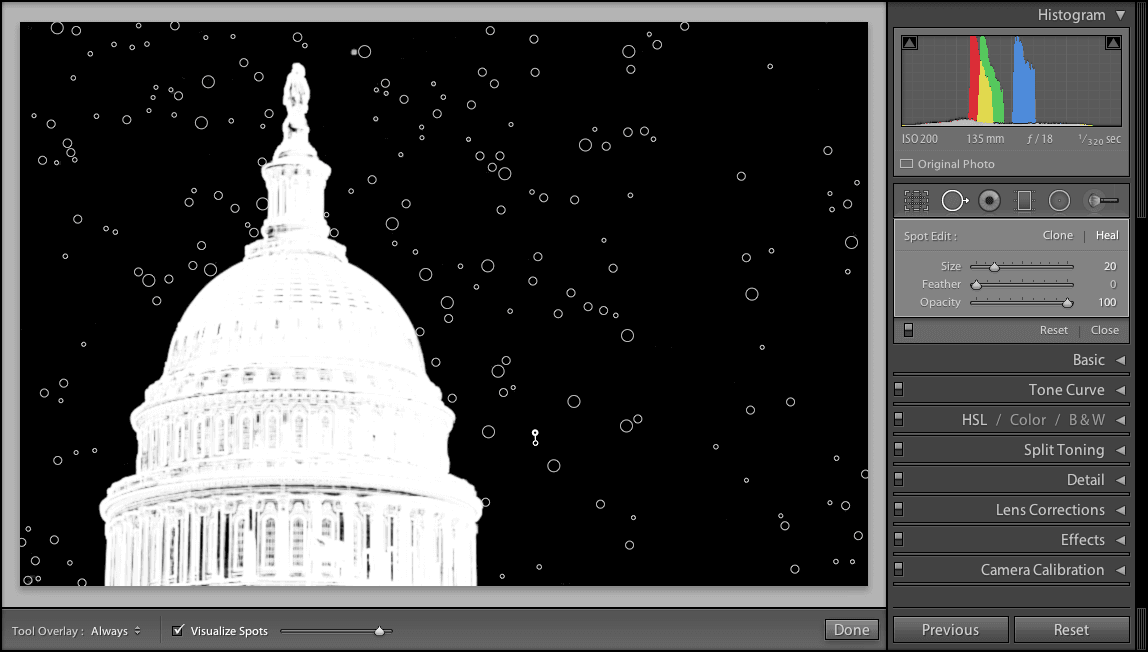
Notice all the dust spots? Dust occasionally falls onto the glass filter of cameras’ sensors; it’s a common photography problem. Let’s fix it.
In the side panel on the right, click the Spot Removal tool
 .
.In the Toolbar below the photo, check on Visualize Spots. This mode creates an overlay that makes it very easy to see all the imperfections in a photograph!
To the right of the Visualize Spots option, notice the slider. Try dragging this slider left and right and notice that it vastly changes the number of spots that are visible. Leave the slider around this position:

Hover over one dust spot.
Press the left bracket
[to make the Spot Removal tool smaller, and the right bracket]to make it bigger.NOTE: If your mouse has a scroll wheel, you can also use it to resize the Spot Removal tool.
Resize the Spot Removal target so that it matches the size of the dust spot.
Click on the dust spot to remove it.
Repeat the previous steps for the rest of the dust spots, adjusting the size of the Spot Removal tool
and zooming in/out as necessary.NOTE: If you make a mistake, select the circle and hit Delete on your keyboard.
When you’re done, click the Spot Removal tool
again. Whoa, so much better!Press G to return to the Library module.