April 1, 2026Dan Rodney/5 min read

Converting a Photo to Black & White

Master Professional Black and White Photography in Lightroom

Prerequisites Required

This tutorial assumes you have Lightroom installed and basic familiarity with importing photos. You'll need the exercise files from the Develop folder to follow along.

Topics Covered in This Lightroom Tutorial:

Converting to Black & White, Adjusting the Tone Curve, Adding a Vignette

Core Techniques You'll Learn

Color Channel Conversion

Learn how to convert color images by manipulating individual color levels to create stunning grayscale variations.

Tone Curve Mastery

Master the S-curve technique to add dramatic contrast and depth to your black and white photographs.

Professional Finishing

Apply vignetting and grain effects to give your images that classic, polished black and white aesthetic.

Exercise Preview

lightroom preview4A

Exercise Overview

Black and white photography remains one of the most powerful forms of visual storytelling, stripping away color distractions to reveal the essence of composition, light, and emotion. In this exercise, you'll master the art of converting color images to compelling black and white photographs by manipulating individual color channels and crafting precise tone curves. This approach gives you far greater control than simple desaturation, allowing you to create dramatic, publication-quality results that rival traditional darkroom techniques.

Workflow Overview

1

Import and Setup

Navigate to the Library module and import your exercise photos from the designated Develop folder

2

Initial Conversion

Use the HSL/Color/B&W panel to perform the basic black and white conversion

3

Targeted Adjustments

Fine-tune specific areas using the Targeted Adjustment tool to control individual color luminosity

4

Contrast Enhancement

Apply tone curve adjustments and add finishing effects like vignetting and grain

Converting to Black & White

  1. If you have not imported the photos that were imported in Exercise 2E:
    • Go into the Library module.
    • At the bottom left of the screen, click Import.
    • In the dialog box that appears, on the left under Source, navigate to Desktop > Class Files > Lightroom Class and select the Develop folder.
    • At the top, above the photos, make sure Add is selected (highlighted).
    • On the bottom right, click Import.
  2. In the Library module, locate the Catalog panel and click on All Photographs.

  3. Select the bridge photo (20120714_untitled_204) — an ideal candidate for black and white conversion due to its strong architectural lines and varied tonal ranges.

  4. Press D to enter the Develop module, where the real magic happens.

  5. Expand the HSL / Color / B & W panel on the right if it isn't already expanded. This panel is your command center for color-based adjustments.

  6. Click on B & W to convert this image to black and white. Notice how Lightroom intelligently interprets the color information into grayscale values.

  7. Here's where professional technique separates amateur from expert work. Although you're viewing a black and white image, the original color information remains active beneath the surface, represented by various shades of gray. By manipulating these "phantom" colors, you can dramatically reshape your image's tonal balance.

    At the top-left corner of the panel, click the Targeted Adjustment tool target adjustment tool. This precision tool allows you to click directly on image areas and adjust their underlying color channels.

  8. Near the bottom-right of the photo, click on the rocks. Watch as Lightroom identifies which color sliders control this area.

  9. Let's create more dramatic contrast by darkening them. Press the Down Arrow key about 6−8 times, observing how the rocks gain weight and presence in the composition.

  10. Click on the bridge's dark underside to target this shadow area specifically.

  11. Deepen these shadows for added drama. Press the Down Arrow key about 10 times. This technique mimics the dodging and burning techniques masters like Ansel Adams used in traditional darkrooms.

  12. Click the Switch switch icon off and on several times to compare your enhanced version with the original conversion. This before/after comparison is crucial for maintaining objective perspective on your edits.

Understanding Color in Black and White

Even after conversion, the original colors still influence your image through different gray tones. This gives you powerful control over the final appearance by adjusting how each color channel translates to grayscale.

Setup Checklist

0/4

Adjusting a B&W Photo's Tone Curve

Now we'll refine the image's contrast using the tone curve — a powerful tool that gives you surgical control over highlights, midtones, and shadows. The tone curve is often called the "secret weapon" of professional photo editing.

  1. Above the HSL / Color / B & W panel, expand the Tone Curve panel to reveal your contrast control center.

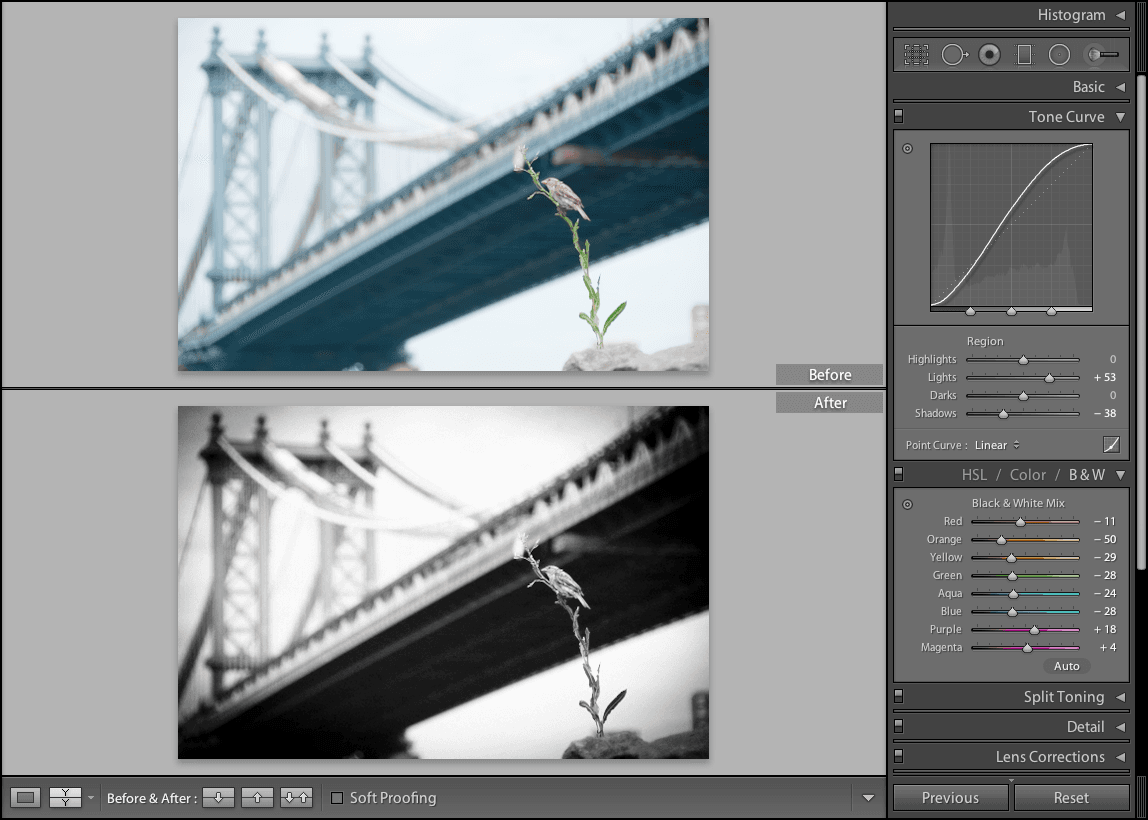
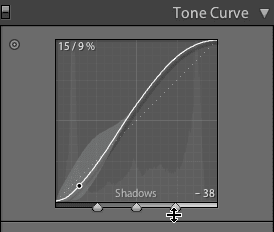
  2. On the graph, create a classic S curve to boost contrast and add visual punch:
    • Drag the top-right portion of the line upward to brighten highlights
    • Drag the bottom-left portion downward to deepen shadows

    This S-curve technique is fundamental to professional black and white photography, creating the rich tonal separation that makes images pop off the page.

    screenshot bridge1

  3. Use the Switch switch icon to toggle your tone curve adjustments and appreciate the dramatic difference proper contrast control makes.

Adding a Vignette to B&W Photos

The final touch involves adding subtle effects that draw the viewer's eye and enhance the image's emotional impact. Vignetting and grain, when applied judiciously, can transform a good black and white photo into a compelling work of art.

  1. On the right side panel, expand the Effects panel to access finishing touches that separate professional work from amateur attempts.

  2. Under Post-Crop Vignetting, drag the Amount slider left to − 55. This subtle darkening around the edges naturally guides the viewer's attention toward your subject while adding visual depth.

  3. Zoom in once on the bird to examine the fine details of your work.

  4. In the Effects panel under Grain, drag the Amount slider to 55. This adds a subtle film-like texture that evokes the classic black and white photography aesthetic that never goes out of style.

  5. Zoom out to see the complete composition in context.

  6. At the bottom of the screen, click the Before & After icon before after yy button for the final reveal.

    The transformation is remarkable — what began as a straightforward color photograph has evolved into an elegant, sophisticated black and white image with professional depth and visual impact. This systematic approach to black and white conversion demonstrates why Lightroom remains the industry standard for photographers who demand both creative control and technical precision.

Vignette Settings Comparison

FeatureSettingValueEffect
Post-Crop Vignetting Amount-55Darkens edges
Grain Amount55Adds texture
Recommended: These specific values create a professional film-like aesthetic that enhances the vintage appeal of black and white photography.
Professional Result

Converting a color photo into an elegant black and white image is quick and looks impressive when you apply these systematic techniques and finishing touches.

Key Takeaways

1Black and white conversion in Lightroom preserves original color information as different gray tones, allowing precise control over luminosity
2The Targeted Adjustment tool enables selective darkening or lightening of specific image areas by clicking directly on them
3Creating an S-curve in the tone curve panel dramatically increases contrast by lifting highlights and deepening shadows
4Post-crop vignetting at -55 creates professional edge darkening that draws focus to the center of your image
5Adding moderate grain (amount: 55) enhances the classic film photography aesthetic in black and white images
6The Before & After view helps evaluate your adjustments and ensures you're achieving the desired artistic effect
7Systematic workflow from basic conversion to targeted adjustments to finishing effects produces consistently professional results
8Understanding how individual colors translate to grayscale values is essential for creating compelling black and white photographs

RELATED ARTICLES