Simple Accordion with JavaScript
What This Tutorial Covers
Click Handlers
addEventListener for accordion section toggles.
CSS Transitions
Smooth expand/collapse animation in pure CSS.
Accessibility
ARIA attributes for screen reader support.
Noble Desktop's JavaScript Development Certificate teaches modern JavaScript and React.
Learn how to create an interactive accordion using JavaScript and jQuery with this comprehensive tutorial that covers topics such as how to hide and show elements, setting up an accordion, handling user clicks, and more.
Topics Covered in This JavaScript & JQuery Tutorial:
Hiding & Showing Elements with JavaScript, Setting up an Accordion
Exercise Preview
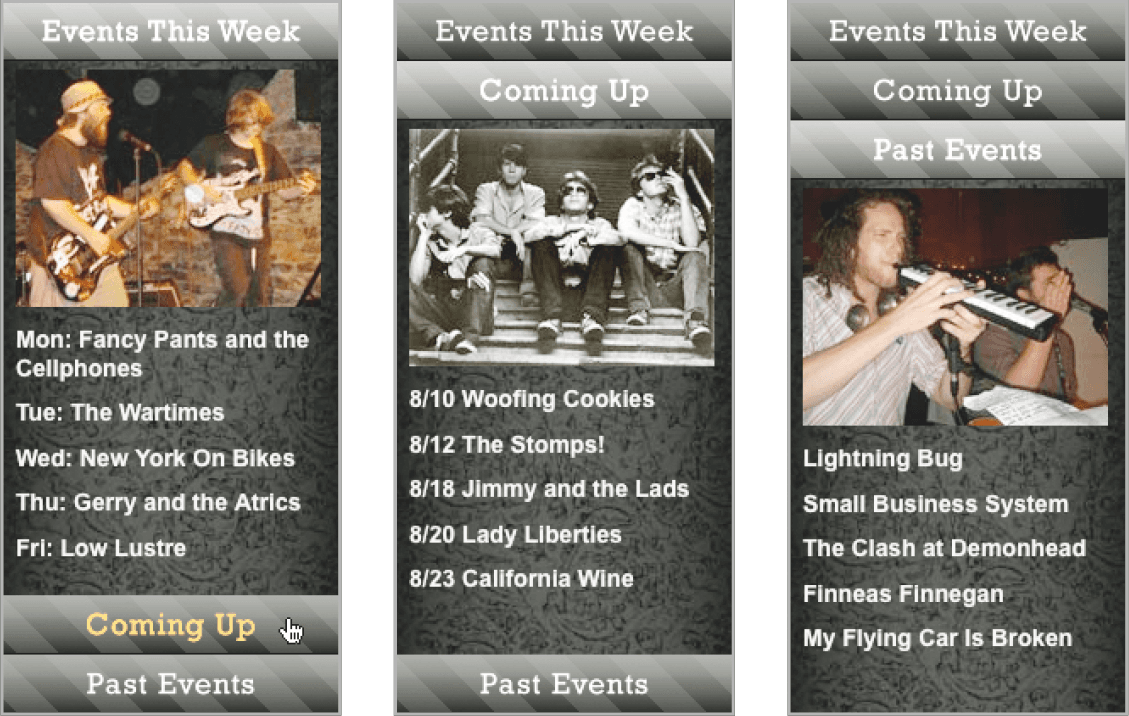
Exercise Overview
Accordions let you condense a lot of information into a small space by hiding some of it. One click and another section appears, covering over the previous section. In this exercise, you’re going to build a simple accordion using JavaScript to hide and show different elements.
Getting Started
- Open your code editor if it isn’t already open.
- Close any files you may have open.
- For this exercise we’ll be working with the Simple-Accordion folder located in Desktop > Class Files > yourname-JavaScript jQuery Class. You may want to open that folder in your code editor if it allows you to (like Visual Studio Code does).
- Open index.html from the Simple-Accordion folder.
- Preview the page in a browser.
- Notice that there is an accordion on the right side of the page. The accordion has three “panels” that list different types of events. Each panel is made up of a tab at the top and some content below. When the user clicks on one of the tabs we want to show that tab’s content and hide the other panels’ content.
- Click on one the accordion’s tabs (such as Coming Up) to see that the hiding/showing is not working yet.
- Leave the page open in the browser so we can come back to it later.
- Switch back to your code editor.
Add the following bold code before the closing
</head>tag (on line 7):<link rel="stylesheet" href="css/main.css"> <script> </script> </head>Let’s write some JavaScript to hide the two bottom panels. We want to hide the content portion of each panel. They are in divs called comingUpContent and pastEventsContent.
Let’s start by hiding comingUpContent. We need to target it so JavaScript knows which element to work on. Inside the script tag, type the following bold code:
<script>
   document.getElementById('comingUpContent');
</script>
We will access a CSS property for the element using JavaScript’s dot syntax. Type the following bold code:
<script>
   document.getElementById('comingUpContent').style;
</script>
Let’s continue to use dot syntax to specify which CSS style we wish to modify, and the new value we’d like to set:
<script>
   document.getElementById('comingUpContent').style.display = 'none';
</script>
The HTMLElement.style property allows us to access and modify the element’s style attribute. Since the style property has the same (and highest) priority in the CSS cascade as an inline style declaration, it is useful for modifying the style of one specific element and will allow us to override the external style sheet.
Save the file, switch to the browser, and reload index.html to see that nothing happens. We wanted to hide the Coming Up panel, but it’s still visible. Why?
Browsers read code from top to bottom. The HTML for the comingUpContent element is down in the
<body>. Because the JavaScript that references this object is at the top of the file (before the element has actually been created) our JavaScript code fails! To avoid this problem, it’s a best practice to put JavaScript at the bottom of the HTML instead of at the top. This ensures all elements have been created before the JavaScript is executed.- Switch back to your code editor.
- Cut the entire
<script>tag (and its contents) from the head. Paste it just above the closing
</body>tag (around line 86):</div> <script> document.getElementById('comingUpContent').style.display = 'none'; </script> </body>Now that our JavaScript code comes after the comingUpContent element has been created, it should work.
- Save the file, switch to the browser, and reload index.html.
Notice that the Coming Up panel’s content is hidden. Now that it’s in the proper place, our code is working!
NOTE: Our code is not inside a function and so it is executed immediately when the page loads.
- Switch back to your code editor.
Let’s hide the pastEventsContent div using the same technique. Inside the script tag, add the following bold code:
<script>
   document.getElementById('comingUpContent').style.display = 'none';
   document.getElementById('pastEventsContent').style.display = 'none';
</script>
Save the file, switch to the browser, and reload index.html. The content for the Coming Up and Past Events panels should both be hidden.
Hiding & Showing Content When the User Clicks
- Switch back to your code editor.
Let’s code the functionality to show the Coming Up panel. We don’t want this to happen until we click on the panel’s tab, so we must put this into a function. Add the following bold code:
document.getElementById('comingUpContent').style.display = 'none';
   document.getElementById('pastEventsContent').style.display = 'none';

   function showComingUp() {

   }
</script>
Let’s target the comingUpContent div and show it. Type the following bold code:
document.getElementById('comingUpContent').style.display = 'none';
   document.getElementById('pastEventsContent').style.display = 'none';

   function showComingUp() {
     document.getElementById('comingUpContent').style.display = 'block';
   }
</script>
This statement says to get the element that has the ID comingUpContent and set its display property to block, which will make the div visible when the showComingUp() function is triggered.
Now that we have written the function, we need to call it when the user clicks the Coming Up tab. Around line 39, add the following bold code to the comingUpTab div:
<div class="accordionPanelTab" id="comingUpTab" onclick="showComingUp();"> Coming Up</div>This will run the showComingUp() function we just created when the comingUpTab div is clicked.
Save the file, switch to the browser, and reload index.html.
Click the Coming Up tab. Notice that its content is shown.
This is good, but we also need to hide the other open panels. Because we will need to hide all the panels for every tab, we’ll create a separate function that we can reuse.
- Switch back to your code editor.
Make a function called hidePanels() that hides all of the content panels by adding the following bold code:
document.getElementById('comingUpContent').style.display = 'none';
document.getElementById('pastEventsContent').style.display = 'none';

function hidePanels() {
   document.getElementById('eventsWeekContent').style.display = 'none';
   document.getElementById('comingUpContent').style.display = 'none';
   document.getElementById('pastEventsContent').style.display = 'none';
}
function showComingUp() {
   document.getElementById('comingUpContent').style.display = 'block';
}
When the hidePanels() functions is triggered, all three content divs will have their display property set to none, which will make the divs invisible.
Now we need to set hidePanels() to run in the showComingUp() function. Add the following bold code:
function hidePanels() {Code Omitted To Save Space
}
function showComingUp() {
   hidePanels();
   document.getElementById('comingUpContent').style.display = 'block';
}
Now, when the showComingUp() function runs, it first hides all the open panels, then opens the comingUpContent div.
Save the file, switch to the browser, and reload index.html.
Click the Coming Up tab. The panel that’s currently open gets closed and the Coming Up panel opens. The other tabs don’t yet work though. Let’s write functions for them next.
Finishing the Other Panels
- Switch back to your code editor.
- Copy the showComingUp() function.
- Paste a copy directly above it.
Change the following bold code:
function hidePanels() {Code Omitted To Save Space
}
function showEventsWeek() {
   hidePanels();
   document.getElementById('eventsWeekContent').style.display = 'block';
}
function showComingUp() {
Now that we have the showEventsWeek() function coded, we need to call it when the user clicks the Events This Week tab. Around line 26, add the bold code to the eventsWeekTab div to tell JavaScript to run the function when the div is clicked:
<div class="accordionPanelTab" id="eventsWeekTab" onclick="showEventsWeek();">Events This Week</div>- Save the file, switch to the browser, and reload index.html.
- Click the Coming Up tab, then click the Events This Week tab. Excellent, they are both working! Let’s get the third tab working and we’ll be done.
- Switch back to your code editor.
- Copy the showComingUp() function.
- Paste a copy directly below it.
Change the following bold code:
function showComingUp() {
      hidePanels();
      document.getElementById('comingUpContent').style.display = 'block';
   }
   function showPastEvents() {
      hidePanels();
      document.getElementById('pastEventsContent').style.display = 'block';
   }
</script>
Let’s call the function when the user clicks the Past Events tab. Around line 52, add the following bold code to the pastEventsTab div so the function runs when the div is clicked:
<div class="accordionPanelTab" id="pastEventsTab" onclick="showPastEvents();">Past Events</div>Save the file, switch to the browser, and reload index.html.
Click all three events tabs to see the simple accordion works!
Optional Bonus: Adding a Highlight to the Current Open Panel
It would be nice to highlight the panel that’s currently open. We have already created a style for the highlight, we just need to add it with JavaScript.
Switch back to your code editor.
In the css folder, open main.css.
Scroll down to the bottom and notice the .highlight rule we created. This changes the color and background-color of elements it is applied to. We’ll use this rule to highlight the open panel’s tab.
- Return to index.html in your code editor.
- Around line 26, find the eventsWeekTab element.
Notice that this element already has the accordionPanelTab class.
Elements can have more than one class. We’ll use JavaScript to add the highlight class to this element when it’s open.
Find the opening script tag (around line 86) and add the following code shown in bold. Make sure you add a space between the two class names so it reads:
'accordionPanelTab highlight'<script> document.getElementById('comingUpContent').style.display = 'none'; document.getElementById('pastEventsContent').style.display = 'none'; document.getElementById('eventsWeekTab').className = 'accordionPanelTab highlight';NOTE: The eventsWeekTab element currently has the accordionPanelTab class, so we’re adding highlight as a second class.
- Save the file, switch to Chrome, and reload index.html.
- Notice that the Events This Week tab is now highlighted with a lighter gray background and gold text.
- Switch back to your code editor.
Let’s use our existing functions to turn this highlighting on for the tab that’s currently open, and turn it off for the other tabs. Add the following JavaScript shown in bold, remembering to add a space between the class names.
function showEventsWeek() { hidePanels(); document.getElementById('eventsWeekContent').style.display = 'block'; document.getElementById('eventsWeekTab').className = 'accordionPanelTab highlight'; } function showComingUp() { hidePanels(); document.getElementById('comingUpContent').style.display = 'block'; document.getElementById('comingUpTab').className = 'accordionPanelTab highlight'; } function showPastEvents() { hidePanels(); document.getElementById('pastEventsContent').style.display = 'block'; document.getElementById('pastEventsTab').className = 'accordionPanelTab highlight'; }- Save the file, switch to Chrome, and reload index.html.
- Click each of the tabs. The highlight gets applied, but it stays on. We need to also remove the highlights for the tabs that are not currently active.
- Switch back to your code editor.
- Find the hidePanels() function (around line 91).
We can add the code to remove all the highlights to this hidePanels() function. Remember that the hidePanels() function is triggered by the showEventsWeek(), showComingUp(), and showPastEvents() functions before they set their own highlight styles.
Add the following bold code:
function hidePanels() {
   document.getElementById('eventsWeekContent').style.display = 'none';
   document.getElementById('comingUpContent').style.display = 'none';
   document.getElementById('pastEventsContent').style.display = 'none';
   document.getElementById('eventsWeekTab').className = 'accordionPanelTab';
   document.getElementById('comingUpTab').className = 'accordionPanelTab';
   document.getElementById('pastEventsTab').className = 'accordionPanelTab';
}
NOTE: Highlighted panels have both the accordionPanelTab and highlight classes. Panels that are not highlighted should only have the accordionPanelTab class.
To recap what happens when a tab is clicked:
- All panels are hidden.
- All tabs have the highlight style removed.
- The specific panel that was clicked opens and its associated tab gets highlighted.
Save the file, switch to Chrome, and reload index.html.
Click each of the tabs. Awesome, now it works with the highlight!
NOTE: If you want to refer to our final code example, go to Desktop > Class Files > yourname-JavaScript jQuery Class > Done-Files > Simple-Accordion.