April 1, 2026Dan Rodney/11 min read

jQuery Cycle: A Simple Slideshow

Master Interactive Slideshows with jQuery Cycle Plugin

jQuery Cycle Key Features

Multiple Transitions

Support for fade, scroll horizontal, scroll vertical, and custom transition effects. Easy to implement and customize.

Automatic Cycling

Display multiple items in small spaces with time-based automation. No user interaction required for progression.

Flexible Content

Works with images, divs, and various HTML elements. Adaptable to different content types and structures.

Topics Covered in This JavaScript & JQuery Tutorial:

Initial Setup, Defining What Content Gets Cycled, Adding More Cycles & Exploring Options, Reversing the Animation

Exercise Preview

jQuery cycle example

Exercise Overview

In this hands-on exercise, you'll master the jQuery Cycle plugin to create sophisticated slideshows that enhance user experience without overwhelming your interface. This powerful plugin enables seamless content cycling with professional transitions including fades, pushes, and scrolls—perfect for showcasing multiple items within constrained spaces while maintaining visual hierarchy. The automated slideshow functionality keeps users engaged by revealing new content at customizable intervals, making it an essential tool for modern web development.

While newer CSS-based solutions and JavaScript frameworks have emerged, jQuery Cycle remains a robust choice for projects requiring extensive browser compatibility and fine-grained animation control. Understanding these foundational concepts will also prepare you for working with contemporary alternatives like CSS Grid animations or React-based carousel components.

Understanding FOUC

Flash of Unstyled Content occurs when multiple slideshow elements are visible during page load before the Cycle JS loads. Use CSS overflow:hidden and height restrictions to prevent this.

Getting Started

Before diving into the implementation, let's examine the existing structure and prepare our development environment for optimal workflow.

  1. Open your code editor if it isn't already open.

  2. Close any files you may have open to maintain focus on this exercise.

  3. For this exercise we'll be working with the Cycle-Simple-Slideshow folder located in Desktop > Class Files > yourname-JavaScript jQuery Class. Consider opening the entire folder in your code editor if it supports project-based workflows (like Visual Studio Code, Sublime Text, or Atom) for easier file navigation.

  4. Open index.html from the Cycle-Simple-Slideshow folder.

  5. Preview index.html in Chrome—we'll leverage its comprehensive DevTools for debugging and inspection throughout this exercise.

  6. Scroll to the bottom of the page and locate the Jive T-Shirts image. Ctrl+click (Mac) or Right-click (Windows) on this image and select Inspect from the context menu.

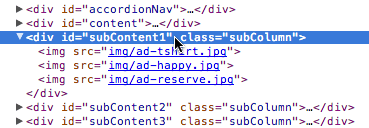
  7. The DevTools panel will appear at the bottom of your browser window. In the Elements panel, locate and select the subContent1 div as highlighted below. This div contains the content we'll be cycling through.

    select subContent1 div dev tools

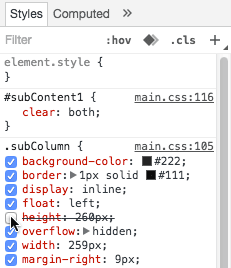
  8. Each of the three subContent sections at the bottom represents a cycling container with hidden content. These divs use CSS overflow properties to conceal additional content that we'll reveal through the Cycle plugin. Let's temporarily expose this hidden content to understand the structure. In the Styles panel on the right side of DevTools, locate the .subColumn style rule.

  9. Hover over the height property within .subColumn and uncheck it as shown below. This removes the height constraint temporarily.

    uncheck height dev tools

  10. Close the DevTools panel.

  11. Scroll through the page and observe the previously hidden content now visible, including Happy Hour, Private Jive, Our Philosophy, and other elements. This demonstrates the full content structure that our slideshow will cycle through.

    Professional Tip: When implementing slideshows with multiple elements, you may notice a brief flash of unstyled content (FOUC) when the page initially loads. This occurs because all elements are visible until the Cycle JavaScript executes and hides the excess content. Our current approach uses CSS height constraints and overflow: hidden to prevent this issue. In production environments, consider implementing skeleton loaders or CSS-based progressive disclosure techniques for enhanced user experience.

  12. Return to your code editor to begin the implementation phase.

Initial Setup

We've pre-configured the Cycle plugin files for this exercise. In production environments, you can access the latest version, comprehensive documentation, examples, and community support at jQuery.malsup.com/cycle2. While this plugin remains free and open-source, consider supporting its development through donations—a professional practice that sustains the tools we rely on.

Now that we've examined the content structure, let's implement the slideshow functionality by properly linking our JavaScript dependencies.

  1. Switch to index.html in your code editor to configure the necessary script dependencies.

  2. Locate line 93 and add the script links in the proper loading sequence. The optimal order for JavaScript dependencies is: jQuery core, third-party plugins, then your custom scripts. Add the following two script tags before the existing main.js link:

    </div>
    <script src="js/vendor/jquery-2.1.0.min.js"></script>
    <script src="js/vendor/cycle/jquery.cycle2.min.js"></script>
    <script src="js/main.js"></script>
    </body>
  3. Save the file to commit these changes.

Script Loading Order

1

jQuery Core

Load the main jQuery library first as the foundation for all jQuery plugins

2

Cycle Plugin

Add the jquery.cycle2.min.js file after jQuery core is loaded

3

Custom Scripts

Include your main.js file last to ensure all dependencies are available

Defining What Content Gets Cycled

With our dependencies properly configured, we'll now implement the core cycling functionality using jQuery's document-ready pattern to ensure our code executes after the DOM is fully loaded.

  1. From the js folder, open main.js.

  2. Examine line 30 where you'll find the existing jQuery document ready wrapper. This ensures our code executes only after the DOM is fully constructed—a critical practice for reliable JavaScript behavior.

  3. From the snippets folder, open cycle-example.js to access our template code.

  4. Select all the code in the snippets file.

  5. Copy the code and close the snippets file.

  6. In main.js, locate line 33 where you see the // Cycles comment within the document ready function. Paste the template code below this comment:

    // Cycles
       $('element').cycle({
          fx: 'effectName', 
          speed: 300, 
          timeout: 4000, 
          delay: 0
       });
    
    });
  7. Now we'll customize this template to target our first content section. Replace the generic selectors with our specific requirements:

    // Cycles
    $('#subContent1').cycle({
       fx: 'scrollHorz', 
       speed: 300, 
       timeout: 4000, 
       delay: 0
    });
  8. Save the file to preserve your changes.

  9. Preview index.html in your browser. You should now see smooth horizontal sliding animations in the first content section. This demonstrates the plugin's core functionality in action.

  10. Keep the browser tab open for continuous testing as we refine the animation parameters.

  11. The default timing feels too rapid for comfortable viewing. Return to main.js to adjust the cycling speed.

  12. Modify the timeout value to 4000 milliseconds, which creates a more comfortable 4-second interval between transitions.

    Technical Note: The timeout parameter controls the delay between transitions, measured in milliseconds. For reference: 1000ms = 1 second. Consider your content complexity and user reading speed when setting this value—typically 3-6 seconds works well for most applications.

  13. Save the file and refresh index.html in your browser.

  14. While the timing is improved, the transition itself feels abrupt. Let's create a smoother visual experience by adjusting the animation duration. Return to main.js.

  15. Change the speed parameter to 600, which extends the transition to 0.6 seconds for a more polished feel.

    Design Consideration: The speed parameter determines the transition duration. Faster animations (200-400ms) feel snappy but can be jarring, while slower transitions (600-1000ms) feel more elegant but may seem sluggish if overused. Match your timing to your brand's personality and user expectations.

  16. Save the file and refresh the browser to test the refined animation timing.

Cycle Timing Configuration

Speed (Animation Duration)
600
Timeout (Between Cycles)
4,000
Timing Best Practices

Speed controls animation duration (600ms = 0.6 seconds), while timeout controls delay between cycles (4000ms = 4 seconds). Balance these for smooth user experience.

Adding More Cycles & Exploring Options

Now that our first slideshow is functioning smoothly, we'll expand our implementation to include all three content sections, each with distinct transition effects that demonstrate the plugin's versatility.

  1. Return to main.js in your code editor.

  2. Select the entire cycle() configuration block:

    $('#subContent1').cycle({
       fx: 'scrollHorz', 
       speed: 600, 
       timeout: 4000, 
       delay: 0
    });
  3. Copy this block for reuse.

  4. Paste a duplicate directly below the original, ensuring it remains within the document ready function brackets and above the closing });.

  5. For our second slideshow, we'll implement a subtle fade transition. Since fade is the default effect, we can streamline our code by removing the fx parameter entirely:

    $('#subContent1').cycle({
       speed: 600, 
       timeout: 4000, 
       delay: 0
    });
  6. Update the selector to target the second content section:

    $('#subContent2').cycle({
       speed: 600, 
       timeout: 4000, 
       delay: 0
    });
  7. Save and refresh index.html in your browser.

  8. Observe both sections: Jive T-Shirts should animate horizontally, but What's The Jive? remains static. This illustrates an important concept about how the plugin interprets content structure.

    Technical Explanation: By default, Cycle targets img elements within the parent container. The subContent1 div contains nested image tags, which the plugin automatically detects. However, subContent2 uses nested div elements instead. We need to explicitly specify which child elements to cycle.

  9. Return to main.js to configure the proper content selector.

  10. Add a slides parameter to explicitly target div elements:

    $('#subContent2').cycle({
       slides: '> div', 
       speed: 600, 
       timeout: 4000, 
       delay: 0
    });

    CSS Selector Reference: The '> div' selector uses the direct child combinator, targeting only immediate div children of the parent container. This prevents the plugin from accidentally including deeply nested div elements that shouldn't be part of the slideshow sequence.

  11. Save the file and refresh your browser.

  12. Wait for the fade transition from What's The Jive? to Our Philosophy—a smooth, professional effect perfect for text-heavy content.

  13. Return to your code editor to implement the third slideshow.

  14. Copy the original subContent1 cycle configuration (the first one with horizontal scrolling).

  15. Paste it below the subContent2 configuration, maintaining proper nesting within the document ready function.

  16. Customize this final slideshow with a vertical scroll effect:

    $('#subContent3').cycle({ 
       fx: 'scrollVert', 
       speed: 600, 
       timeout: 4000, 
       delay: 0
    });
  17. Save the file. The vertical scroll transition requires an additional plugin module that extends the core functionality.

  18. Switch to index.html to include the vertical scroll transition module.

  19. Locate the existing Cycle plugin script tag around line 94 and add the additional transition module below it:

    <script src="js/vendor/jquery-2.1.0.min.js"></script>
    <script src="js/vendor/cycle/jquery.cycle2.min.js"></script>
    <script src="js/vendor/cycle/transitions/jquery.cycle2.scrollVert.min.js">
    </script>
    <script src="js/main.js"></script>
    </body>
  20. Save the file and refresh index.html. Watch for the vertical transition in the third column as Premium Jive changes to Battle of the Bands.

    Having all three slideshows synchronized creates visual chaos and divides user attention. Let's stagger the animations using delay parameters to create a more sophisticated, orchestrated experience.

  21. Return to main.js to implement staggered timing.

  22. In the subContent1 configuration, set the delay to 1000 milliseconds to create a one-second initial pause.

  23. Save the file and refresh the browser to observe how the staggered start creates visual hierarchy and reduces cognitive load.

  24. Return to your code editor to complete the staggered timing setup.

  25. Set the subContent2 delay to 2000 milliseconds and the subContent3 delay to 2500 milliseconds.

  26. Save the file, refresh the browser, and observe the elegant, choreographed animation sequence that now feels intentional and professional.

Content Type Requirements

FeatureImage ContentDiv Content
Default DetectionAutomaticRequires Configuration
Selector NeededNone> div
HTML Structure<img> tags<div> tags
Recommended: Use slides: '> div' option when cycling through div elements instead of images

Staggered Animation Delays

subContent1
1,000
subContent2
1,500
subContent3
2,500

Reversing the Animation

The Cycle plugin offers directional control over transitions, allowing you to customize the visual flow to match your design intentions. Let's explore how to reverse animation directions for enhanced visual variety.

  1. Return to your code editor to modify the animation direction.

  2. In the third cycle configuration (subContent3), add the reverse parameter:

    $('#subContent3').cycle({ 
       fx: 'scrollVert', 
       reverse: true, 
       speed: 600, 
       timeout: 4000, 
       delay: 2500
    });

    Implementation Note: The reverse option works with both scrollVert and scrollHorz transitions, providing flexibility for creating balanced visual compositions. Consider using reverse animations to create visual symmetry or to direct user attention toward specific areas of your layout.

  3. Save the file and refresh index.html. The right column should now animate from bottom to top, creating an interesting visual counterpoint to the other transitions.

Animation Direction Options

Pros
Reverse option works for both scrollHorz and scrollVert
Simple boolean setting to change direction
Provides visual variety across multiple cycles
Cons
Limited to reversing existing transitions
May not match all design requirements
Additional option increases complexity

Optional Bonus Challenge: Exploring Other Transitions

The Cycle plugin includes several additional transition effects that can add sophistication to your implementations. This challenge will test your ability to integrate new components independently—a crucial skill for professional development.

Your task is to implement a different transition effect using the available plugin modules. Here's your roadmap:

  1. Navigate to Cycle-Simple-Slideshow > js > vendor > cycle > transitions to examine the available transition modules, then link the appropriate .js file in your index.html using the same pattern we established for the vertical scroll transition.

  2. In main.js, experiment with the fx parameter using one of these professional transition options:
    • flipVert - Creates a vertical flip animation ideal for card-like content
    • flipHorz - Provides horizontal flip effects perfect for product showcases
    • tileSlide - Generates sliding tile effects for dynamic, modern presentations
    • tileBlind - Creates venetian blind-style transitions for elegant reveals

    For additional inspiration and implementation examples, reference the comprehensive demos at jQuery.malsup.com/cycle2/demo. These examples showcase real-world applications and advanced configuration options.

    Reference Implementation: If you need to compare your solution against our completed example, navigate to Desktop > Class Files > yourname-JavaScript jQuery Class > Done-Files > Cycle-Simple-Slideshow.

Available Transition Effects

FlipVert & FlipHorz

Creates 3D flip animations in vertical or horizontal directions. Requires separate transition files.

TileSlide & TileBlind

Advanced tile-based transitions for more complex visual effects. Great for image galleries.

Two Ways to Code Cycles

The jQuery Cycle plugin offers dual implementation approaches, each with distinct advantages depending on your project requirements and team expertise. This exercise focused on the programmatic JavaScript approach, but understanding both methods will make you a more versatile developer.

Method 1: JavaScript-Based Configuration (Our Approach)

This method centralizes slideshow logic in JavaScript files, providing maximum control and maintainability. You define selectors, configure options, and manage multiple slideshows programmatically within your document-ready functions.

Method 2: Declarative HTML Configuration

The alternative approach emphasizes HTML attributes and requires minimal JavaScript knowledge, which explains why Cycle's official documentation favors this method—it reduces support complexity and barriers to entry. This declarative approach involves:

  1. Linking only to the Cycle JavaScript files without writing custom JavaScript code—no script tags or document.ready functions required.

  2. Adding class="cycle-slideshow" to containers, which the plugin automatically discovers and initializes on page load.

  3. Configuring behavior through data-cycle-* attributes directly on HTML elements.

Professional Considerations for Method Selection

The JavaScript approach (demonstrated in this exercise) offers several professional advantages: it maintains clean, semantic HTML; enables easy option reuse across multiple elements and pages; provides superior debugging capabilities; and integrates seamlessly with build systems and version control workflows. This approach also facilitates dynamic configuration based on user preferences, screen sizes, or content types.

The declarative HTML method works well for simple implementations and teams with limited JavaScript expertise, but it can lead to cluttered markup and makes global changes more difficult to implement. It also provides less runtime control and fewer opportunities for conditional logic.

For enterprise applications and complex interactions—which we'll explore in subsequent exercises—the JavaScript approach provides the flexibility and maintainability required for professional web development standards.

JavaScript vs Declarative Approach

FeatureJavaScript MethodDeclarative Method
ImplementationCustom JS codeHTML classes/attributes
HTML CleanlinessClean HTMLAttributes in HTML
ReusabilityHighLimited
Control LevelFull controlBasic options
JavaScript SkillsRequiredNot needed
Recommended: Choose JavaScript method for complex projects requiring customization and reusability

Key Takeaways

1jQuery Cycle plugin enables automatic slideshow functionality with minimal JavaScript code and multiple transition effects
2Proper script loading order is critical: jQuery core first, then plugins, finally custom scripts
3Different content types require different configuration - images work automatically while divs need slides selector
4Timing controls include speed for animation duration and timeout for delays between cycles, both measured in milliseconds
5Staggered delays prevent all animations from starting simultaneously, creating more polished user experience
6The reverse option works with scroll transitions to change animation direction from default behavior
7Additional transition effects like FlipVert and TileSlide require separate JavaScript files to be loaded
8Two coding approaches exist: JavaScript method offers more control while declarative HTML method is beginner-friendly

RELATED ARTICLES