April 1, 2026Noble Desktop Publishing Team/8 min read

Nested Stack Views: Free iOS Development Tutorial

Master iOS Auto Layout with Nested Stack Views

Core iOS Auto Layout Concepts

Stack Views

Powerful container views that automatically arrange subviews in horizontal or vertical layouts. Essential for responsive iOS interfaces.

Constraints

Rules that define relationships between UI elements. They determine position, size, and spacing in your interface.

CHCR Priority

Content Hugging and Compression Resistance Priority controls how views resize when space is limited or abundant.

Topics Covered in This iOS Development Tutorial:

Nested Stack Views, Auto Layout Constraints, Content Hugging Priority, Compression Resistance Priority, Balancing Image and Text Field Priorities

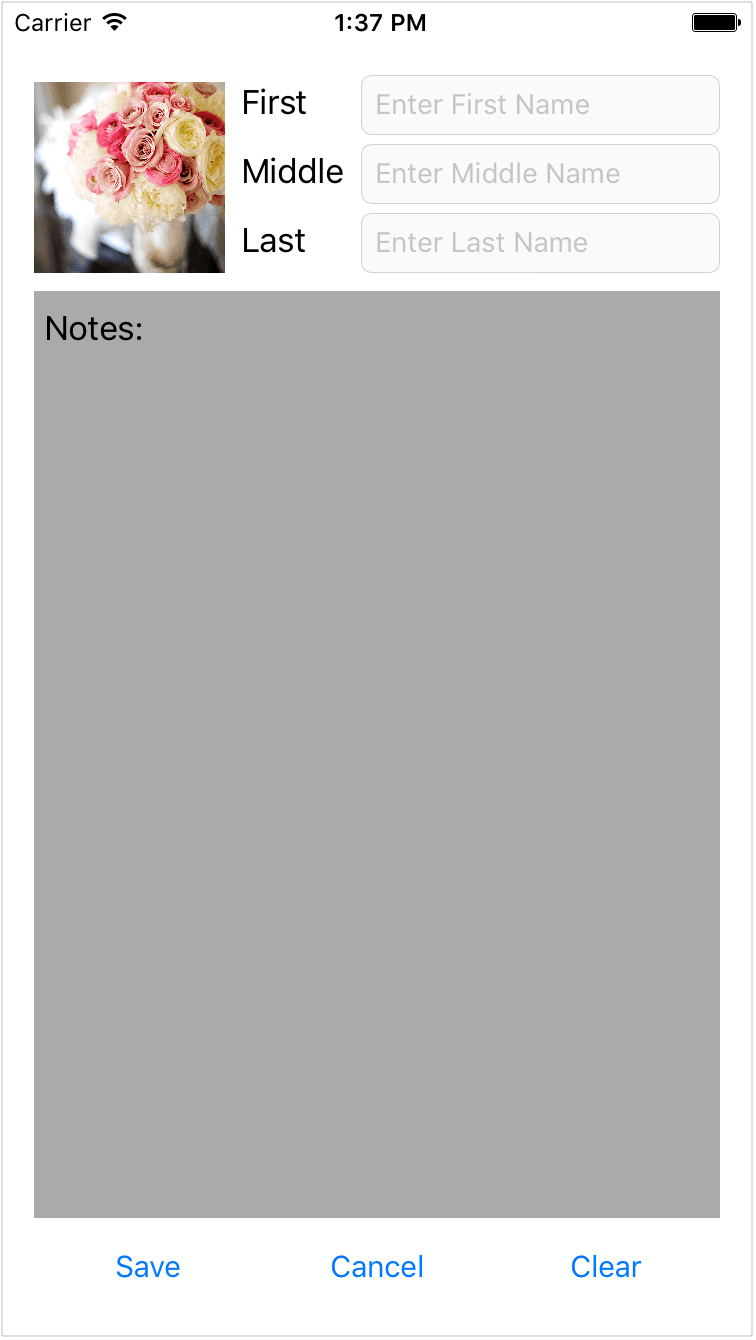
Exercise Preview

nested stacking preview

Project Setup Requirements

Create a new Xcode project named 'Nested Stacks' and ensure you have the Auto Layout Images folder with four image files ready for import into your Assets catalog.

Exercise Overview

Nested stack views are among the most powerful tools in iOS interface design—when you understand how to orchestrate them properly. This exercise demonstrates advanced Auto Layout techniques using multiple nested stacks containing images and text fields. Don't be alarmed if your interface appears chaotic during construction; stack views require complete constraint configurations before they settle into their intended layouts. This behavior is normal and expected in professional iOS development.

Layout Appearance During Development

Be aware that until you put all your constraints in, these stacks can look very out of control. This is normal behavior during the development process.

Laying Out the UI

We'll start by establishing our project foundation and assembling the raw interface elements before applying the sophisticated nesting structure that makes this layout both flexible and maintainable.

  1. In Xcode, create a new project and name it Nested Stacks. Save it into your class folder.
  2. In the Project navigator, select Assets.
  3. Import the required images by switching to the Desktop and navigating to yourname–iOS App Dev 1 Class > Auto Layout Images.
  4. Select all four images from the Auto Layout Images folder.
  5. With Xcode visible, drag the files directly into the Assets catalog to register them with your project.
  6. In the Project navigator, click on Main to open Interface Builder.
  7. At the bottom of the Editor, set the device view to iPhone 15 Pro for optimal modern development targeting.
  8. Using the layout preview as your guide, drag the following elements from the Object library:

    • One Image View
    • Three Labels (for form field identifiers)
    • Three Text Fields (for user input)
    • Three Buttons (for user actions)
    • One Text View for the expandable Notes section
  9. Configure the label text to read First, Middle, and Last respectively, establishing clear form hierarchy.
  10. Set the button titles to Save, Cancel, and Clear to provide standard form actions.
  11. Select the text view and navigate to the Attributes inspector. Replace the default Lorem Ipsum text with Notes:.
  12. Format the Notes: text with Bold styling and Size 17 to establish visual hierarchy.
  13. Select the Image View and assign it the square_flowers image from your assets.
  14. Click on the first text field (corresponding to First Name).
  15. In the Attributes inspector, set the placeholder text to Enter First Name.
  16. If the placeholder text is truncated, temporarily stretch the field to verify full text visibility.
  17. Apply corresponding placeholder text to the remaining fields: Enter Middle Name and Enter Last Name.
  18. Select all three text fields simultaneously using Command-click.
  19. In the Attributes inspector, locate the Color property and change it from Default to Light Gray Color for improved placeholder visibility.
  20. Scroll to the Background property in the View section.
  21. Click the blue arrow to access the color picker and select Other.
  22. In the Colors panel, choose RGB Sliders (second option from left).
  23. Switch the slider type to Gray Scale Slider from the dropdown menu.
  24. Set the Brightness value to 97% to create a subtle background tint, then close the panel.
  25. Select the Notes: text view.
  26. Apply the same Light Gray Color background treatment for visual consistency across input elements.

UI Elements Setup Checklist

0/6

Mastering Stack Architecture

Now we'll implement the nested stack structure that forms the backbone of responsive iOS layouts. Professional developers always work from the innermost containers outward, ensuring proper hierarchy and avoiding constraint conflicts.

  1. Select the First label and its corresponding Enter First Name text field. Use the Document Outline if visual selection proves difficult due to overlapping elements.
  2. Click the Embed in button embed in stack icon and select Stack View.
  3. In the Document Outline, rename this stack to First Name Stack for clarity in complex hierarchies.

    Resist the urge to adjust the chaotic appearance—stack views require complete nesting and constraint application before achieving their intended layout.

  4. Repeat this process to create Middle Name Stack and Last Name Stack with their respective label-field pairs.
  5. In the Document Outline, select all three name stacks you've just created.
  6. Choose Embed in Stack and name this parent container Name Rows Stack.
  7. Select both the flowers image and the Name Rows Stack.
  8. Embed these elements in a stack and name it Upper Stack. Ignore the dramatic image scaling—we'll address this through constraints.
  9. Select all three buttons and embed them in a stack.
  10. Name this container Button Stack for clear organizational structure.
  11. Select the Upper Stack, Notes: text view, and Button Stack.
  12. Create the final container by embedding these elements in a stack named Root Stack. This establishes our complete interface hierarchy.

Implementing Constraint Architecture

With our stack hierarchy established, we'll now define the constraint relationships that ensure consistent behavior across device sizes and orientations. We'll begin with the Root Stack to establish our layout boundaries.

  1. Create four constraints by CTRL-dragging from the Root Stack to the View, selecting:
    • Leading Space to Safe Area
    • Trailing Space to Safe Area
    • Top Space to Safe Area
    • Bottom Space to Safe Area
  2. With Root Stack selected, open the Size inspector. Click Edit next to Align Trailing to: and set the Constant to -10.
  3. For Align Leading to:, click Edit and change the Constant to 10.
  4. Set the Top Constant to 20 and Bottom Constant to -20. These values create appropriate margins while respecting the safe area.

    The layout boundaries are now visible, though the proportions clearly need refinement through additional constraints.

  5. Navigate to the square-flowers image in the Document Outline. Expand the Root Stack and Upper Stack hierarchies if necessary.
  6. CTRL-drag from the square-flowers image to itself in the Document Outline and select Aspect Ratio.
  7. In the Size inspector, edit this constraint to ensure the Multiplier reads 1:1. This maintains perfect square proportions regardless of scaling.
  8. Create width consistency by CTRL-dragging from the Enter First Name text field to Enter Middle Name and selecting Equal Widths.
  9. Repeat this process between Enter First Name and Enter Last Name to ensure uniform text field sizing across all device configurations.

Configuring Stack Attributes

Stack view attributes control how child elements are arranged, distributed, and aligned within their containers. These settings are crucial for achieving professional-grade layouts that adapt gracefully to content changes and device variations.

  1. Select the First Name Stack.
  2. In the Attributes inspector, configure:
    • Alignment: First Baseline (aligns label and field text baselines)
    • Spacing: 8 points for consistent element separation
  3. Apply identical settings to Middle Name Stack and Last Name Stack for visual consistency.
  4. Configure the Name Rows Stack with:
    • Alignment: Fill (stretches elements to container width)
    • Distribution: Fill (distributes space based on content priorities)
    • Spacing: 8 points
  5. Set the Upper Stack properties to:
    • Alignment: Fill
    • Distribution: Fill
    • Spacing: 8 points
  6. Configure the Button Stack for uniform button presentation:
    • Alignment: First Baseline (aligns button text)
    • Distribution: Fill Equally (creates equal-width buttons)
    • Spacing: 8 points
  7. Set the Root Stack as the primary container:
    • Alignment: Fill
    • Distribution: Fill
    • Spacing: 8 points for section separation

Advanced Priority Management (Content Hugging & Compression Resistance)

Content Hugging and Compression Resistance (CHCR) priorities determine which elements expand or contract when Auto Layout needs to resolve space conflicts. Think of Content Hugging as "resistance to growing" and Compression Resistance as "resistance to shrinking." Mastering these priorities separates professional iOS developers from amateurs—these settings control exactly how your interface adapts to different screen sizes and dynamic content.

  1. Select the flowers image.

  2. In the Size inspector, scroll to Content Hugging Priority and configure:
    • Horizontal: 250
    • Vertical: 250
  3. Set the Content Compression Resistance Priority to:
    • Horizontal: 48
    • Vertical: 48

    These low compression resistance values ensure the image sacrifices size before forcing text fields to compress, maintaining form usability across device sizes.

  4. Select the Notes: text view.

  5. Configure Content Hugging Priority:
    • Horizontal: 250
    • Vertical: 249 (lowest value—this element will expand first)
  6. Set Content Compression Resistance Priority:
    • Horizontal: 250
    • Vertical: 250

    The Notes text view's lowest vertical hugging priority (249) makes it the primary "flex zone"—it expands and contracts to accommodate screen size changes while keeping other interface elements stable.

  7. Select all three name labels (First, Middle, Last) using Command-click in the Document Outline.

  8. Verify or set their Content Hugging Priority:
    • Horizontal: 251
    • Vertical: 251
  9. Configure Content Compression Resistance Priority:
    • Horizontal: 750 (highest values—labels resist change)
    • Vertical: 750

    Labels receive the highest priority values because they should maintain their intended size and never truncate or expand inappropriately.

  10. Select all three name text fields.

  11. Set their Content Hugging Priority:
    • Horizontal: 48 (low value—text fields can expand horizontally)
    • Vertical: 250
  12. Configure Content Compression Resistance Priority:
    • Horizontal: 749 (slightly lower than labels)
    • Vertical: 750

    Text fields need horizontal flexibility to utilize available screen width effectively, but should maintain consistent height. The low horizontal hugging priority allows them to expand gracefully on larger devices.

    Interface Builder's constraint preview may not accurately reflect the final layout due to the complexity of nested priorities. This is expected behavior—the Simulator provides the definitive layout validation.

  13. Launch the Simulator to verify proper constraint resolution and responsive behavior across different device orientations.

Key Takeaways

1Always start creating nested stacks from the inside out, building the smallest logical groups first before combining them into larger container stacks.
2Establish Root Stack constraints to Safe Area boundaries first to define the overall layout boundaries before configuring individual element constraints.
3Use Aspect Ratio constraints on images to maintain proper proportions when the image needs to resize across different screen sizes.
4Equal Widths constraints between text fields ensure consistent sizing regardless of content length or screen orientation changes.
5Content Hugging Priority determines which elements expand first - lower values mean the element wants to grow to fill available space.
6Compression Resistance Priority controls which elements shrink first when space is limited - lower values mean the element is willing to compress.
7Set labels to highest CHCR values (750-751) to prevent them from changing size, maintaining consistent text appearance throughout the interface.
8Configure Notes text view with the lowest vertical content hugging priority (249) so it handles all vertical expansion and contraction, keeping other layout elements stable.

RELATED ARTICLES