April 1, 2026Noble Desktop Publishing Team/10 min read

Creating a Location Map

Master MapKit Integration for Professional iOS Applications

MapKit Framework Essentials

Framework Integration

Add MapKit.framework to enable map functionality including zooming and location pinpointing. Essential for location-based iOS applications.

Map View Components

Implement MK Map View with user location tracking and custom annotations. Provides interactive mapping interface for users.

Coordinate Systems

Define precise latitude and longitude coordinates with span control. Critical for accurate location representation and zoom levels.

Topics Covered in This iOS Development Tutorial:

Adding the MapKit Framework, Adding a Map View, Setting a Custom Location, Defining Location Coordinates, Adding Auto Layout

Exercise Preview

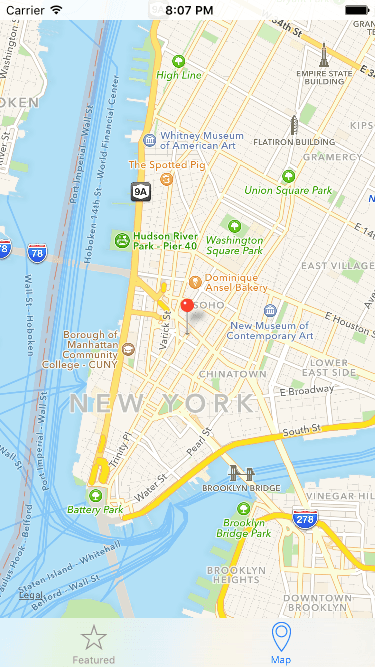
ex prev location map

Project Continuity

This exercise builds upon previous tutorials (1B-2C). Ensure you have completed the foundational exercises or use the provided starter project to maintain consistency in your development environment.

Exercise Overview

In this exercise, we'll integrate Apple's MapKit framework to display an interactive map showing the Jive Factory's location. This hands-on tutorial demonstrates essential skills for any iOS developer working with location-based features—a cornerstone of modern mobile applications. By the end of this exercise, you'll understand how to embed maps, configure custom locations, and implement proper Auto Layout constraints for responsive design across all iPhone screen sizes.

Getting Started

  1. If you completed the previous exercise, you can skip the following sidebar. We strongly recommend completing exercises 1B–2C sequentially to build upon established concepts and maintain project continuity.

    If you completed the previous exercise, Jive Factory.xcodeproj should remain open in Xcode. If you closed it, navigate to yourname-iOS Dev Level 2 Class > Jive Factory and reopen the project.

If You Did Not Complete the Previous Exercises (1B–2C)

  1. Close any open files and return to the Desktop.
  2. Navigate to Class Files > yourname-iOS Dev Level 2 Class.
  3. Duplicate the Jive Factory Ready for Location Map folder.
  4. Rename the duplicated folder to Jive Factory.
  5. Open Jive Factory > Jive Factory.xcodeproj in Xcode.

Project Setup Process

1

Navigate to Class Files

Close existing files and navigate to Desktop > Class Files > yourname-iOS Dev Level 2 Class directory

2

Duplicate Starter Project

Duplicate the 'Jive Factory Ready for Location Map' folder and rename it to 'Jive Factory'

3

Open Project File

Launch Jive Factory.xcodeproj to begin the MapKit integration exercise

Adding the MapKit Framework

MapKit represents one of Apple's most powerful and feature-rich frameworks for location services. To incorporate mapping functionality into our application, we must first add Apple's MapKit.framework to our project dependencies. This framework provides comprehensive mapping capabilities including interactive gestures (zooming, panning), location services, custom annotations, and route calculations. In iOS development, frameworks serve as pre-built collections of code, libraries, UI components, and resources that extend your app's capabilities without requiring you to build these complex systems from scratch.

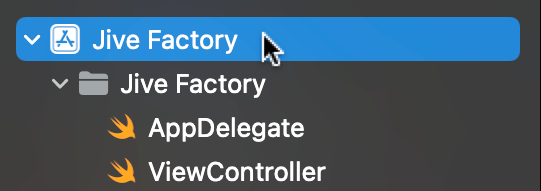
  1. Click on the Jive Factory project name at the top of the Project navigator. This action opens Xcode's Project Settings Editor, where you configure build settings, capabilities, and framework dependencies.

    open project settings editor

  2. If the projects and targets sidebar isn't visible, click Show projects and targets list show hide document outline icon located in the upper-left corner above the Identity section.

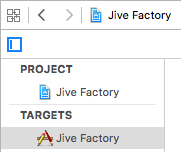
  3. Under the Targets section, ensure Jive Factory is selected. Targets define how your project builds into a final product—in this case, an iPhone application.

    targets jivefactory

  4. Click the Build Phases tab. This section controls the compilation and linking process for your application.
  5. Expand the Link Binary With Libraries section to view currently linked frameworks.
  6. Click the Add items button add button located in the bottom-left corner of this section.
  7. In the framework search bar, type: map
  8. From the filtered results, double-click MapKit.framework to add it to your project dependencies.
  9. Verify the integration by checking the Project navigator—you'll notice Xcode automatically created a Frameworks folder containing MapKit.framework. This organizational structure keeps your external dependencies clearly separated from your custom code.

Framework Integration Checklist

0/4

Adding a Map View

Now that MapKit is properly integrated, we'll add the visual map component to our user interface. The Map Kit View provides users with familiar map interactions while giving developers programmatic control over location, zoom levels, and custom annotations.

  1. In the Project navigator, select Main to open the storyboard editor.
  2. Ensure your Interface Builder canvas is set to 100% zoom for precise positioning when adding the Map Kit View component.
  3. In the Object library object library icon search field, type: map
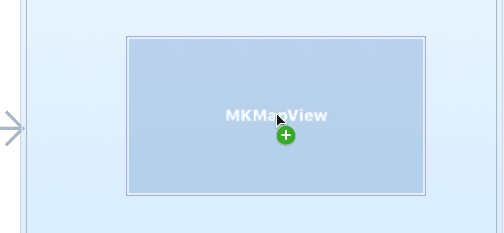
  4. From the Object library object library icon, drag the Map Kit View onto the Map View Controller in the Editor area. Exercise caution to avoid dragging onto the tab bar area or positioning it so it overwrites the existing view controller. During the drag operation, you should see positioning guides like this:

    drag MapView

Professional Tip: If you accidentally overwrite the existing view, immediately press Cmd–Z to undo and retry the Map Kit View placement. Proper UI component positioning is crucial for maintaining clean view hierarchies.

  1. Resize the Map Kit View to fill the entire iPhone screen by dragging the corner and edge handles. This creates an immersive map experience for users.

  2. Ensure the Map Kit View remains selected in the Interface Builder editor.
  3. In the Utilities panel, click the Attributes inspector tab attributes inspector icon to access map-specific configuration options.
  4. In the Map View configuration section, locate Shows and enable User Location. This feature displays a blue dot indicating the user's current position when location services are available.
  5. Test the current implementation by clicking the Run button to launch the iOS Simulator.
  6. Once the Simulator loads completely, tap the Map tab to view your integrated map.
  7. When prompted with a location services alert, tap OK to grant permission.

    Note: The iOS Simulator cannot access actual GPS coordinates, so user location won't display. On physical devices, this feature shows the user's real-time location with remarkable accuracy.

  8. Test the map's interactive capabilities by simulating zoom gestures. Hold the Option key to display two gray circles representing fingertips. Click and drag to simulate pinch-to-zoom functionality. This interaction pattern is fundamental to modern mobile user experience design.

Precise Positioning Required

When dragging Map Kit View from Object library, avoid positioning over the bottom tab area or overwrapping existing views. Use Command-Z to undo if you accidentally overwrite the existing view structure.

Map View Configuration

1

Add Map Kit View

Drag Map Kit View from Object library onto Map View Controller at 100% zoom level

2

Resize to Fill Screen

Drag handles to resize Map View to match iPhone screen dimensions

3

Enable User Location

Check 'Shows User Location' in Attributes inspector for location tracking capability

Setting the Jive Factory Location

While displaying user location is valuable, our business objective requires showcasing the Jive Factory's specific location. This involves creating custom view controller logic and integrating programmatic map controls—essential skills for any location-aware iOS application.

  1. Return to Xcode from the Simulator.
  2. In the Project navigator, select BandDetail.swift. This selection determines where Xcode will position the new file in your project structure.
  3. Press Cmd–N to create a new file.
  4. Double-click Cocoa Touch Class to select this iOS-specific template.
  5. From the Subclass of dropdown menu, select UIViewController (you can begin typing and let Xcode's intelligent autocompletion assist you).
  6. Set the Class name to: MapViewController
  7. Click Next to proceed.
  8. Verify you're saving within the Jive Factory folder, then click Create.
  9. Confirm that MapViewController now appears in the Project navigator's file list.
  10. Return to the storyboard by clicking Main in the Project navigator.
  11. Deselect all elements by clicking an empty area of the Interface Builder canvas.
  12. Select the Map View Controller by clicking its top navigation bar, which should highlight the entire controller with a blue outline.
  13. In the Utilities area, click the Identity inspector tab identity inspector icon to access class binding options.
  14. Under Custom Class, begin typing Map in the Class field. Xcode should autocomplete to MapViewController—press Return to confirm the binding. If autocomplete doesn't trigger, type the full class name manually.
  15. If the Document Outline panel is open, click Hide Document Outline show hide document outline icon to maximize workspace efficiency.
  16. Click the Adjust Editor Options button assistant editor icon in the upper-right corner and select Assistant to enable split-screen editing between the storyboard and code.
  17. If MapViewController.swift doesn't automatically appear in the Assistant editor, click the storyboard's Map View Controller title bar and select the appropriate file from the context menu.
  18. Below the existing import UIKit statement (approximately line 10), add the MapKit framework import:

    import UIKit
    import MapKit
    
    class MapViewController: UIViewController {
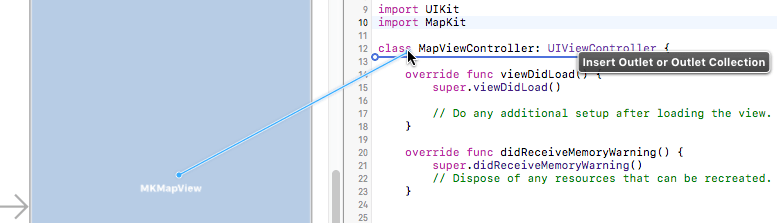
  19. Create an IBOutlet connection by holding Control and dragging from the MK Map View in the storyboard to the code area below the class declaration, as illustrated:

    insertoutlet mapview

  20. In the connection configuration popup, specify these settings:

    Connection: Outlet
    Name: jiveMapView
    Type: MKMapView
    Storage: Weak
  21. Click Connect to establish the outlet relationship.
  22. Navigate to MapViewController.swift in the Project Navigator to begin implementing the location logic.

Custom Map View Controller Setup

Step 1

Create New Class

Generate MapViewController as UIViewController subclass

Step 2

Connect to Storyboard

Link Map View Controller to MapViewController in Identity inspector

Step 3

Create IBOutlet

Control-drag from MK Map View to create jiveMapView outlet connection

Defining Location Coordinates

Professional map implementation requires precise coordinate specification and zoom level configuration. We'll define the Jive Factory's exact geographical position using latitude and longitude coordinates, plus a span value controlling the map's zoom level. These constants ensure consistent map presentation across all user interactions.

  1. Navigate to File > Open in the menu bar.
  2. Browse to Desktop > Class Files > yourname-iOS Dev Level 2 Class > Code Snippets and open mapCoordinates.txt.
  3. Select all content with Cmd–A.
  4. Copy the code using Cmd–C.
  5. Close the text file.
  6. In the Project navigator, select MapViewController.swift.
  7. Locate the @IBOutlet weak var jiveMapView: MKMapView! declaration.
  8. Create space above the outlet and paste the coordinate constants:

    class MapViewController: UIViewController {
    
       let jiveLatitude = 40.72004
       let jiveLongitude = -74.003912
       let jiveSpan = 0.05
    
       @IBOutlet weak var jiveMapView: MKMapView!

    These constants define the Jive Factory's precise location (latitude and longitude) and zoom level (span). For professional applications, you can obtain accurate coordinates using services like Google Maps, Apple Maps, or specialized geocoding APIs. The span value determines the visible map area—smaller values create closer zoom levels, while larger values show broader geographical regions.

    We'll leverage MapKit's MKCoordinateRegion class to configure our map display. An MKCoordinateRegion combines a center coordinate point with a span defining the visible area around that center.

  9. Navigate to the viewDidLoad method in your MapViewController.
  10. Replace the default comment with code to initialize a map region:

    override func viewDidLoad() {
       super.viewDidLoad()
    
       var jiveRegion = MKCoordinateRegion()
    }

    This creates a jiveRegion object using MapKit's MKCoordinateRegion structure.

  11. Add a center point coordinate object:

    override func viewDidLoad() {
       super.viewDidLoad()
    
       var jiveRegion = MKCoordinateRegion()
       var center = CLLocationCoordinate2D()
    }
  12. Configure the center point using our predefined coordinate constants:

    var jiveRegion = MKCoordinateRegion()    
       var center = CLLocationCoordinate2D()
       center.latitude = jiveLatitude
       center.longitude = jiveLongitude
    }
  13. Create a span object to control the zoom level:

    center.longitude = jiveLongitude
       var span = MKCoordinateSpan()
    }
  14. Set the span's latitude and longitude deltas to create uniform zooming:

    var span = MKCoordinateSpan()
       span.latitudeDelta = jiveSpan
       span.longitudeDelta = jiveSpan
    }
  15. Apply the center point and span to the region object:

    span.longitudeDelta = jiveSpan
    
       jiveRegion.center = center
       jiveRegion.span = span
    }
  16. Configure the map view to display our custom region with smooth animation:

    jiveRegion.span = span
       jiveMapView.setRegion(jiveRegion, animated: true)
    }
  17. Test the implementation by clicking the Run button.
  18. After the Simulator launches, tap the Map tab. The map now centers on the Jive Factory's New York location, but you'll notice it lacks a location pin. We need to add a map annotation to provide visual location indication.
  19. Return to Xcode to implement the annotation feature.
  20. After the region configuration code, add an annotation object:

    jiveMapView.setRegion(jiveRegion, animated: true)
    
       let jivePoint = MKPointAnnotation()
    }
  21. Configure the annotation with location data and descriptive information:

    let jivePoint = MKPointAnnotation()
       jivePoint.coordinate = center
       jivePoint.title = "The Jive Factory"
       jivePoint.subtitle = "580 Lispenard, NY, NY 10013"
    }
  22. Add the configured annotation to the map view:

    jivePoint.subtitle = "580 Lispenard, NY, NY 10013"
       jiveMapView.addAnnotation(jivePoint)
    }
  23. Click Run to test the complete implementation.
  24. Navigate to the Map tab in the Simulator.
  25. Excellent! Your map now displays a precise red pin marking the Jive Factory's location. Tap the pin to reveal the title and subtitle information you configured, providing users with essential location context.

Location Coordinate Components

Latitude Value

40.72004 represents the north-south position of Jive Factory in New York City coordinate system.

Longitude Value

-74.003912 represents the east-west position using negative values for western hemisphere locations.

Span Control

0.05 determines zoom level precision, with smaller values providing closer, more detailed map views.

MapKit Implementation Process

1

Create MKCoordinateRegion

Establish region object with center point and span properties for map area definition

2

Configure CLLocationCoordinate2D

Set latitude and longitude values using predefined constants for precise location targeting

3

Define MKCoordinateSpan

Establish zoom level using latitudeDelta and longitudeDelta properties for optimal view

4

Apply Region to Map View

Use setRegion method with animation to smoothly transition to specified location

Adding Auto Layout

Professional iOS applications must provide consistent user experiences across Apple's diverse device ecosystem. Auto Layout constraints ensure your map interface adapts seamlessly to different screen sizes, from iPhone SE to iPhone Pro Max, maintaining optimal proportions and usability regardless of device dimensions.

  1. Select the MK Map View component in the storyboard.
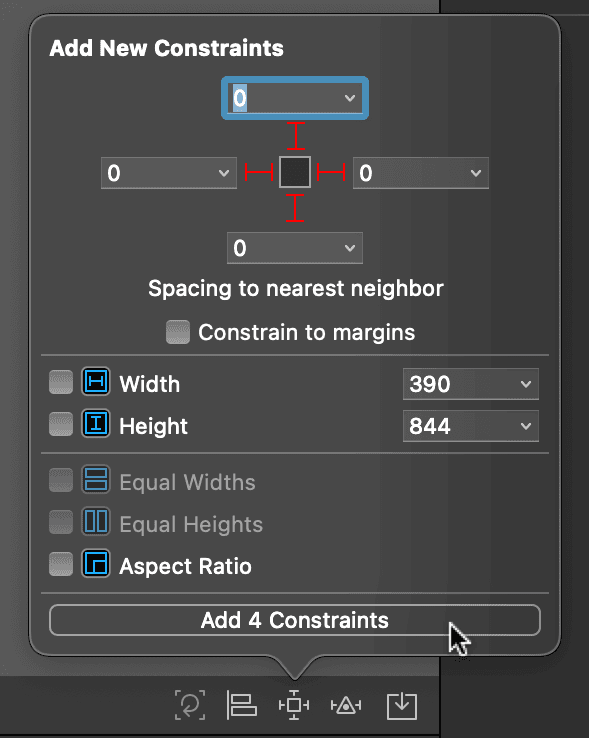
  2. Click the Add new constraints button pin button located at the bottom-right of the Interface Builder editor.
  3. In the constraints popup, ensure Constrain to margins is unchecked for edge-to-edge map display. Verify all four constraint values are set to 0.
  4. Under Add New Constraints, notice the four red dotted lines surrounding a central white box. Click all four lines to activate constraints for top, bottom, leading, and trailing edges.
  5. Click Add 4 Constraints to apply the configuration:

    map add constraints

    Technical Note: These constraints pin the map view to all four edges of its parent view, ensuring the map fills the entire screen real estate on any device size. This creates an immersive, full-screen map experience that adapts dynamically to different iPhone models.

  6. Test responsiveness across device sizes by changing the active scheme to iPhone 13 Pro Max.
  7. Run the application to verify proper scaling.
  8. After the Simulator loads, tap the Map tab to confirm the map fills the larger screen perfectly.
  9. Return to Xcode for additional testing.
  10. For comprehensive testing, experiment with other device sizes such as iPhone SE or iPhone 15. This validates your Auto Layout implementation across Apple's entire device range.
  11. Maintain the current file state. The next exercise will demonstrate integrating external web content directly within your application, building upon the location features you've just implemented.

Cross-Device Compatibility

Auto Layout constraints ensure your map view adapts perfectly across all iPhone screen sizes, from iPhone SE to iPhone 13 Pro Max, maintaining consistent edge-to-edge coverage.

Constraint Configuration Steps

0/4

Key Takeaways

1MapKit framework integration requires adding MapKit.framework through Build Phases and Link Binary With Libraries settings in Xcode project configuration
2Map Kit View components must be precisely positioned to avoid overwriting existing interface elements, with careful attention to zoom level and positioning
3Custom MapViewController classes enable programmatic control over map behavior, requiring proper IBOutlet connections between storyboard and code
4Location coordinates require three essential values: latitude (40.72004), longitude (-74.003912), and span (0.05) for accurate positioning and zoom control
5MKCoordinateRegion, CLLocationCoordinate2D, and MKCoordinateSpan classes work together to define map regions with precise center points and zoom levels
6MKPointAnnotation objects provide location markers with customizable coordinate, title, and subtitle properties for enhanced user interaction
7Auto Layout constraints with zero-margin settings ensure map views adapt consistently across different iPhone screen sizes and orientations
8Testing across multiple device simulators (iPhone SE, iPhone 13 Pro, iPhone 13 Pro Max) validates responsive design implementation and user experience consistency

RELATED ARTICLES