Leaders Magazine: Master Pages & 1st Article
What This Tutorial Covers
Master Pages
Reusable page templates for consistent magazine layouts.
Page Numbers
Auto-incrementing page numbers across the publication.
Article Flow
Threaded text frames that flow content across pages.
Noble Desktop's Graphic Design Certificate covers InDesign alongside Photoshop and Illustrator.
Learn how to create magazine pages from scratch with our InDesign tutorial, featuring step-by-step instructions for setting up documents, creating master pages, adding guides, and resizing text frames.
Exercise Preview
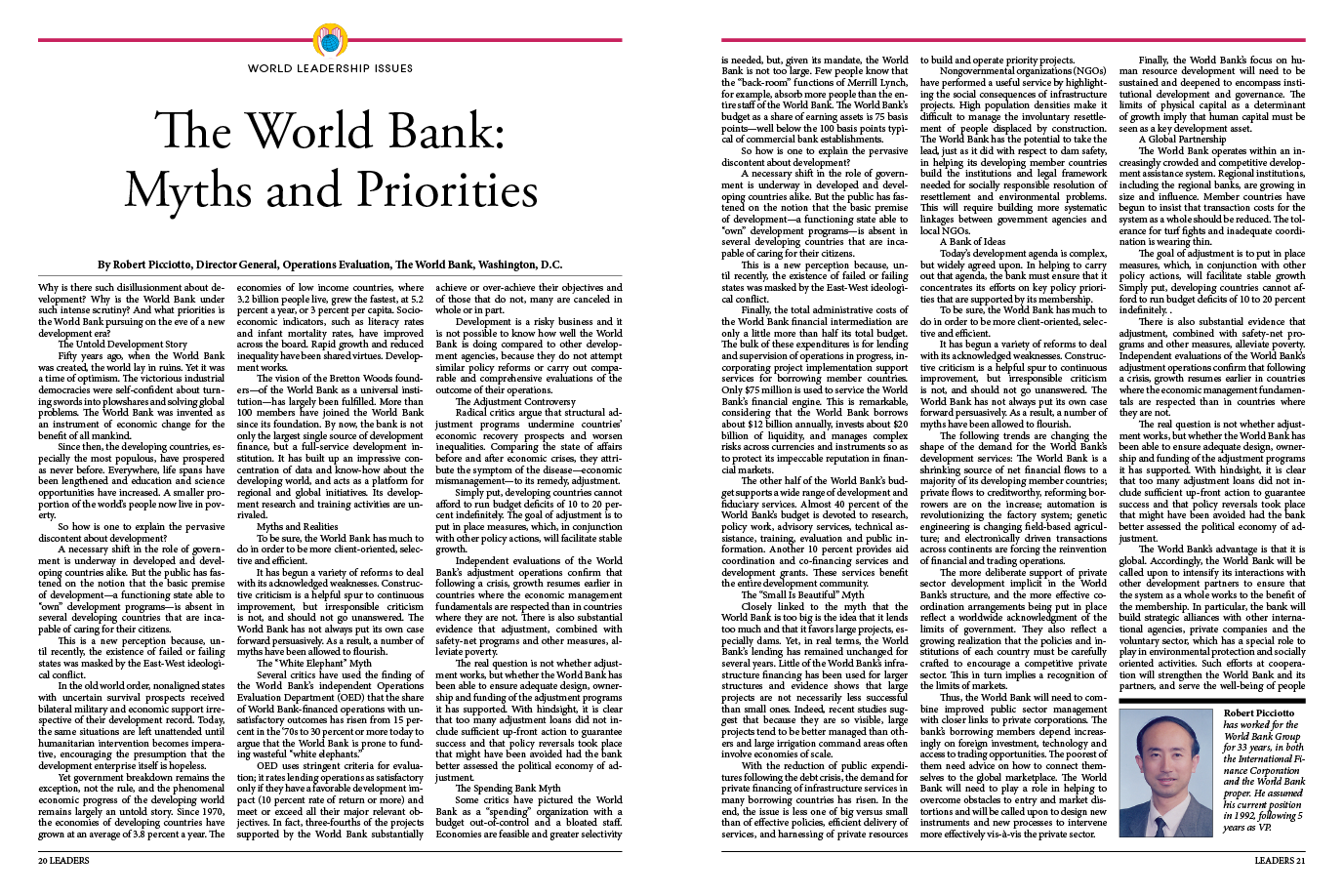
Setting up the Document
- Go into File > New > Document and set the following:
- Set Width to 9 in and Height to 12 in.
- To the right of Width, set Units to Picas.
- Start #: 20
- Check on Facing Pages if it isn’t already.
- Check Primary Text Frame. Do NOT miss this!
- Set Columns to 3 and Column Gutter to 1p0.
- In the Margins section, unlink
 the values and set Margins of Top: 3p11, Bottom: 4p, Inside: 4p, and Outside: 3p
 - In the Bleed and Slug section, make all Bleed options 0p if they aren’t already.
Notice that we’re setting the inside margin to be bigger than the outside margin. We’re doing this to account for the binding.
Click Create.
In the InDesign menu (Mac) or Edit menu (Windows), go to Preferences > Units & Increments.
Under Ruler Units, set Origin to Page.
NOTE: The Horizontal and Vertical ruler units should already be set to Picas. InDesign already took care of this because we set it in the new document dialog.
Click OK.
Go into File > Save As. Navigate into the InDesign Class folder, then into the Leaders Magazine folder and save it there as yourname-leaders.indd.
Setting up the First Master Page (The Article Opening Page)
Take a moment to get acquainted with the Pages panel on the right:
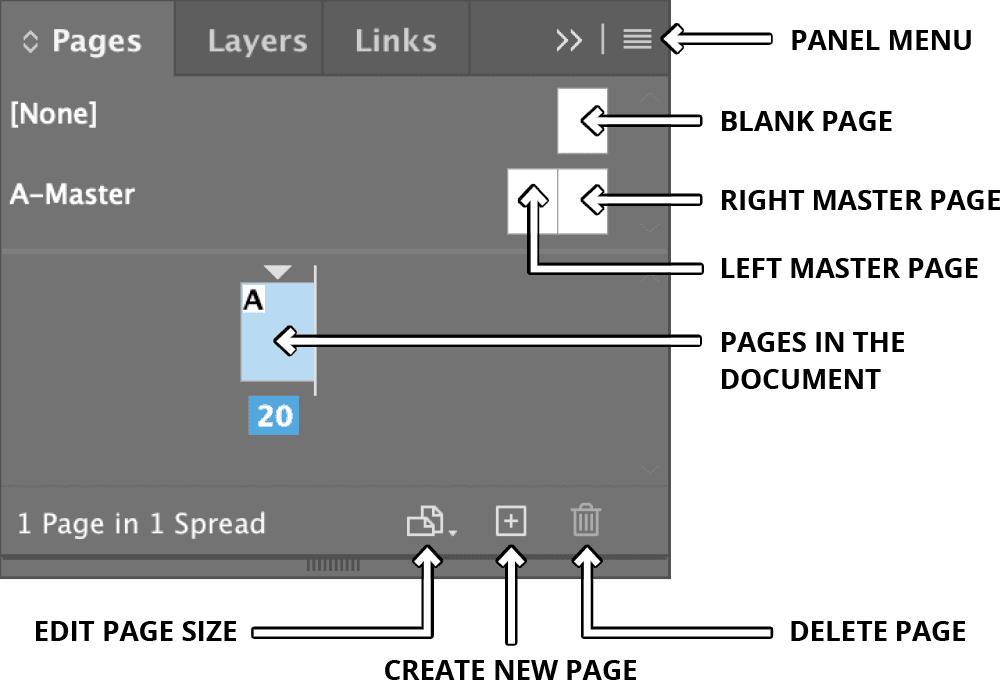
At the top of the Pages panel, there is already an A-Master created for you. We’ll be customizing it, but let’s give it a better name. Click on its name to select it.
At the top-right corner of the Pages panel, go into the Pages panel menu
 and choose Master Options for “A-Master”.
Leave the A prefix but change the name to 3 Col First and click OK.
To edit this master page, double–click its name.
You should now see two pages. If you are still only seeing one page, make sure you double–click on the master page name! It’s on this master page that we’ll add the common design elements for the opening page of an article.
Resizing the Main Text Frames
Make sure you can see both pages in the master spread. With the Selection tool
 , click the text frame on the left page, then hold Shift and click the text frame on the right page. Both frames are now selected.
In the Control panel, to the right of the width and height (W and H), make sure the Constrain proportions button
 is NOT depressed. If it is, click it so they are unlinked
  .
.At the top left of the Control panel, click the top left reference point
 . Then enter the following settings:
Y: 8p8 H: 59p4 Select the Line tool
 .
.Hold Shift (so the line will be perfectly horizontal) and draw a line just under the main text box on the LEFT page. You’ll fine-tune the exact specs in a second.
At the top left of the Control panel, click the middle left reference point
 . Then enter the following settings:
X: 3p L: 47p Y: 68p5 Make the line width 0.5 pt
Adding the Page Number
We’ll need a text frame at the bottom of the page for the page number. With the Type tool
 , draw a frame (don’t worry about size) anywhere on the LEFT page.
Switch to the Selection tool
so the Control panel displays positioning options.TIP: When the text cursor is in a box, press Escape (Esc) to switch to the Selection tool
.At the top left of the Control panel, click the top left reference point
. Then enter the following settings:X: 3p W: 47p Y: 68p11 H: 1p3 With the Type tool
, click into the frame so the cursor is blinking in it.Add the current page number by choosing Type > Insert Special Character > Markers > Current Page Number.
InDesign will represent the current page number on this master page with an A because you are on the A Master. After it, type a space and the word LEADERS.
Select all the type in the box, including the page number.
Make it 9 pt Minion Pro Regular and All Caps
 .
.Now’s a good time to save the file.
Duplicating Everything onto the Opposing Master Page
In a facing page document, master pages are actually a 2-page spread. When adding pages to your document, InDesign will use the corresponding master page. For example, if you add a left page, it will look like the left master page.
We’ve created one page so far (the left master page) and need the other (right master page) to be the same—well almost. Since the inside margins are bigger, to account for the binding, the right page has a larger left margin. Once this master spread is done, it won’t matter if we use it to create a left or a right page. It’ll look almost the same, but it’ll have the correct inside margin.
Choose the Selection tool
.Select the line below the main text box and Shift–click to select the page number box. (There is already a main text box on the other page so we don’t need to duplicate this one.)
Go to Edit > Step and Repeat and set the following:
Repeat Count: 1 Vertical Offset: 0p Horizontal Offset: 55p (That’s 54p for the page width + 1p for the extra inside margin.) Click OK.
Everything has been duplicated onto the right page. Deselect everything by choosing Edit > Deselect All.
The page number at the bottom of the right page needs to look like a mirror of the left page, so select the text and make it right aligned
 .
.Select only the word Leaders and cut it.
Paste it on the left side of the A so it reads Leaders A.
Importing & Placing the Text
Go to the first page in the file (page 20) by double–clicking it in the Pages panel.
Notice how this left page already looks like the left page of the master. That’s because it’s linked to it. As shown below, in the Pages panel, the A on the page shows it’s linked to its “parent” A Master page.

- Go to File > Place and:
- At the bottom, make sure Show Import Options is NOT checked (Mac users may need to click the Options button).
- In the InDesign Class folder, go into the Leaders Magazine folder and choose article-worldbank2pgPicciotto.txt.
- You will see that the article is now loaded into the cursor. Click into the main text box to place the article into the layout.
Did you notice that InDesign just added two more pages to the document to fit the entire length of the article? This auto-flow feature can be helpful if you are designing a multi-page book, but not for this magazine article. Luckily we can turn off that preference.
Undo placing the article.
In the InDesign menu (Mac) or Edit menu (Windows), go to Preferences > Type.
Uncheck the box Smart Text Reflow and click OK.
You should still see the article loaded in the cursor. (If you don’t, go to File > Place and choose article-worldbank2pgPicciotto.txt.)
Click into the main text box to place the article into the layout. This time the layout remains one page.
Styling the Headline
We’ve already figured out the best fonts, sizes, etc., so let’s go ahead and style the headline, byline, and article text now. We will save them as style sheets later.
With the Type tool
, select the first sentence The World Bank: Myths and Priorities. This is the headline.In the Control panel, set the following options (if you don’t see them, switch to the Character options
 via the button on the left):
Font: Adobe Garamond Pro Regular (listed under G) Size  :
:51 pt Leading  :
:57 pt In the Control panel, switch to the Paragraph options
 and set the following:
Align: Center 
Space After  :
:4p0 Span Columns  :
:Span All Notice that the headline breaks into two lines. That’s fine, but it would look better if Myths and Priorities stayed together. Place the cursor before the word Myths and press Shift–Return (Mac) or Shift–Enter (Windows) to add a forced line break.
Styling the Byline
Select the next paragraph (from By through D.C.). This is the byline.
In the Control panel’s Character options
, set the following:Font: Minion Pro Bold Size :11 pt Leading :11 pt In the Control panel’s Paragraph options
, set the following:Align: Center Space After :0p11 Span Columns :Span All With the byline still selected, click the Align to baseline grid button
 (located to the right of the Hyphenate checkbox).
In the Control panel menu
 on the top right of the screen, choose Paragraph Rules.
We’re going to be setting a couple of settings in this dialog, so don’t click OK till we tell you!
Change Rule Above to Rule Below and check Rule On.
Set the Weight to 0.5 pt and the Offset to 0p7.
Click OK when you’re done.
Styling the Article Text
With the Type tool
, click and drag to highlight the remaining text across the three columns. This is the beginning of the article. Don’t worry about selecting the overflow text; we’ll take care of that later.In the Control panel’s Character options
, set the following:Font: Minion Pro Regular Size :10 pt Leading :11 pt In the Control panel’s Paragraph options
, set the following:Align: Justify with last line aligned left 
First Line Left Indent  :
:1p7 Click the Align to baseline grid button
(located to the right of the Hyphenate checkbox).NOTE: This button makes the text snap onto the baseline grid we set earlier. Setting up the grid was the first step, but you must depress this button so the text will use the grid.
Creating & Applying Paragraph Styles
Place the cursor anywhere in the styled headline text.
Open the Paragraph Styles panel (Type > Paragraph Styles).
Go into its panel menu
and choose New Paragraph Style.Name the style headline and make sure Apply Style to Selection is checked and Add to CC Library is unchecked.
The style is done, so click OK.
Next, place the cursor anywhere in the styled byline text.
From the Paragraph Styles panel menu
, choose New Paragraph Style.Name the style byline and click OK.
Finally, place the cursor anywhere in the styled article text.
From the Paragraph Styles panel menu
, choose New Paragraph Style.Name the style body text and click OK.
We need to style the rest of the text in the article, even the overflow we can’t see right now. To do this, place the cursor at the beginning of the article. Select all of the remaining text by pressing Cmd–Shift–End (Mac) or CTRL–Shift–End (Windows), (On some keyboards without an End key, you may be able to use the Function key to access the End key, for example: Cmd–Shift–Fn–Right Arrow.)
Click on the body text style to apply it.
Duplicating a Style
Oops! The first paragraph of most stories should NOT be indented. We’ll also need a first paragraph style. Use the Type tool
and click anywhere in the first paragraph of the body text we just styled.- From the Paragraph Styles panel menu , choose Duplicate Style and set the following:
- Change the name to body—first
- Click on Indents and Spacing on the left and change First Line Indent to 0p.
The style is done, so click OK.
Making a Second Master Page for the Additional Pages
If you look at the bottom of the page, at the end of the article text you’ll notice a red text overflow symbol  . Not all the text fits since this is supposed to be a 2-page article. But the master page we created is only for article openers. We need another master page for the remaining pages. Since the article opener will be similar to the other pages, we’ll duplicate and edit it to save some work.
At the top of the Pages panel, select the A-3 Col First master by clicking its name.
From the Pages panel menu
, choose Duplicate Master Spread “A-3 Col First”. This creates a B-Master.This new B-Master should already be selected, so from the Pages panel menu
, choose Master Options for “B-Master”.Change the name to 3 Col Full Page and click OK.
Double–click the B-3 Col Full Page master to make sure we’re on it. Currently this master page looks just like A-3 Col First.
Make sure you can see both pages in the master spread. With the Selection tool
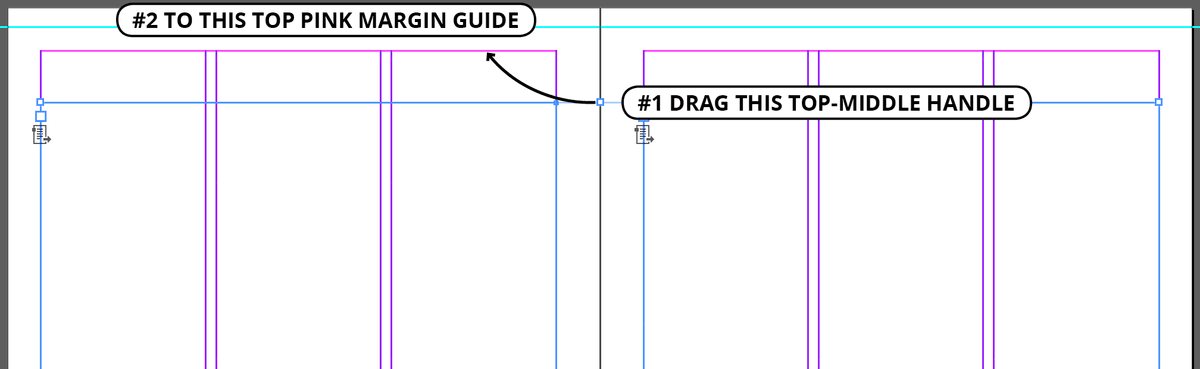
, click the text frame on the left page, then hold Shift and click the text frame on the right page. Both frames are now selected.Drag the top middle handle up and over to the left so it snaps to the top pink margin guide as seen in the example below.
We want a line at the top of the LEFT page. Choose the Line tool
.Hold Shift and draw a line just above the pink margin guide on the left page.
At the top left of the Control panel, click the middle left reference point
. Then enter the following settings:X: 3p L: 47p Y: 3p1.7 Make the stroke 3.6 pt
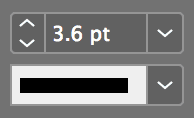
To add the rule to the right page, select it and go to Edit > Duplicate.
InDesign remembered the settings you used for the last Step and Repeat. Duplicate just reuses those offsets to make one copy!
Adding a Second Page Based on the New Master Page
The master page is done so we can now use it to add a new page to the document.
Double–click on the first page in the document (page 20).
We need to add a second page to the right of this current page. When doing so, you must be careful of where you drag from. If you grab the name of the master page, you’ll be adding two pages (a spread) which is NOT what we want. As shown below, drag ONLY the right-hand B-3 Col Full Page next to the page in the document. When an insertion line appears, let go of the mouse. This will add just one page.
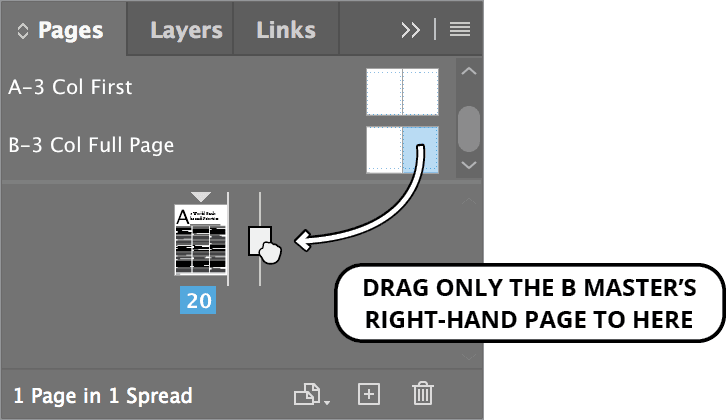
You should now have page 21 on the right of page 20.
“Threading” the Text Across the Pages
Choose the Selection tool
.To flow the leftover text from the first page to the second, select the main 3-column text box that is filled with text.
At the bottom right of the text frame, click the overflow symbol
. This loads the text into the cursor.Scroll so you can see the empty 3-column text box on the right page (page 21) and click on it.
The remaining text should now be on the second page. Don’t worry about whether it does or doesn’t completely fill up all three columns. Later, we’ll add an author biography section at the bottom of the third column.
Go to Edit > Deselect All.
Save the file and leave it open since you’ll continue using it in the next exercises.