Curves
Illustrator vs Photoshop
Illustrator
Vector — scale infinitely, perfect for logos, icons, illustration.
Photoshop
Raster — fixed resolution, perfect for photos and pixel art.
Vectors Print Crisp
Logos and icons stay sharp at any size.
Round-Trip
Place .ai into Photoshop or vice versa — both apps coexist.
Noble Desktop's Illustrator Bootcamp teaches the Pen tool, vector drawing, and pro illustration.
Explore this in-depth tutorial on Adobe Illustrator, including topics like drawing curves with the Pen tool, understanding anchor points and direction points, and mastering default fill and stroke techniques.
Exercise Preview
Exercise Overview
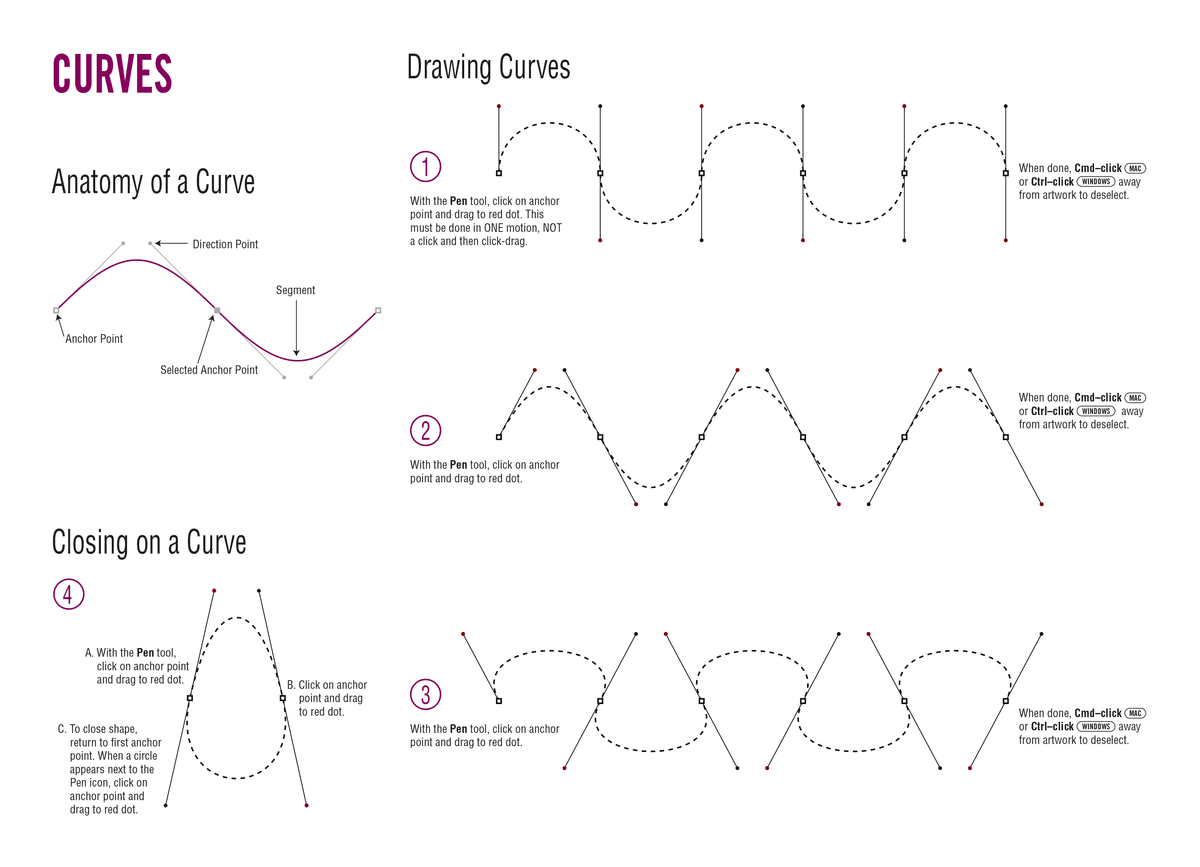
Continuing in our quest for mastery of the Pen tool  , this exercise walks you through creating curved lines and shapes.
From the Illustrator Class folder, open the file Curves Template.ai.
Select File > Save As, naming the file yourname-Curves.ai.
Click Save. In the dialog that appears, leave the default options checked and click OK.
In the Tools panel, click the Default Fill and Stroke button
 .
.In the Tools panel, click the Fill icon and then click the None button
 .
.Follow the on-screen directions in the file. When you have completed the directions, File > Save your changes.