April 1, 2026/7 min read

5 Tools for Designing Logos in Illustrator

Master Essential Illustrator Tools for Professional Logo Creation

Essential Illustrator Tools Overview

Selection & Precision Tools

Direct Selection Tool (A) and Pen Tool (P) provide the foundation for precise logo manipulation and custom shape creation.

Typography Features

Type Tool (T) and Touch Type Tool enable flexible text handling, from curved paths to individual letter manipulation.

Shape Creation & Building

Shape Tools and Shape Builder Tool (Shift+M) offer geometric precision and efficient shape combination workflows.

When designing logos in Adobe Illustrator, mastering the right tools can mean the difference between amateur-looking designs and professional-grade brand identity work. Here are 5 essential tools (plus one critical menu option) that every logo designer should have in their arsenal:

  1. Menu: Type > Create Outlines
  2. Direct Selection tool
  3. Pen tool
  4. Type tools
  5. Shape tools
  6. Shape Builder tool

Creating Outlines: The Foundation of Professional Logo Delivery

In the Type menu, you'll find the Create Outlines option Cmd–Shift–O (Mac) or CTRL–Shift–O (Windows). While this isn't technically a tool, it's arguably the most critical step in professional logo design workflow. This command converts live text into vector shapes, fundamentally changing how you can manipulate and deliver your designs.

Once you've converted your type into outlines, it's no longer editable as text—instead, it becomes a collection of vector paths that can be modified like any other shape in Illustrator. This transformation unlocks advanced editing capabilities, allowing you to stretch letters, modify letterforms, and create custom typography that would be impossible with live text. More importantly, outlining type is essential before client delivery. It prevents unauthorized editing, ensures your design displays correctly on systems without your chosen fonts installed, and demonstrates professional standards that clients and print vendors expect.

Illustrator interface showing text converted to outlines in outline mode

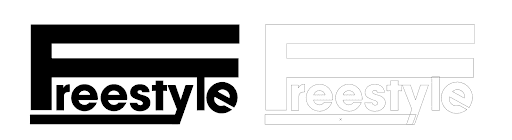
In the example above, the word "Freestyle" was typed, then converted to outlines for further customization. The left example shows the type with a black fill, while the right example reveals the same text in outline mode, displaying the underlying vector structure that makes advanced editing possible.

Text to Outline Conversion Process

1

Select Your Text

Use the Selection tool to highlight the text you want to convert to outlines.

2

Access Create Outlines

Navigate to Type menu and select Create Outlines, or use keyboard shortcut Cmd-Shift-O (Mac) or CTRL-Shift-O (Windows).

3

Convert and Edit

Text becomes editable shapes that can be modified like any other Illustrator object, and remains viewable without original fonts.

Client Handoff Best Practice

Always outline type before delivering final logo files to clients. This prevents font compatibility issues and protects your design from unauthorized text edits.

The Direct Selection Tool: Precision Control for Custom Letterforms

While Illustrator offers several selection tools—including the Lasso tool, Group Selection tool, and Magic Wand tool—logo design primarily relies on two: the main Selection tool (V) and the Direct Selection tool (A). Understanding when to use each is fundamental to efficient logo design workflow.

The Selection tool selects complete objects and groups, perfect for moving entire elements or applying transformations. The Direct Selection tool, however, is where the magic happens in logo design. It allows you to select and manipulate individual anchor points and path segments, giving you surgical precision to customize letterforms, refine curves, and create the subtle adjustments that separate professional logos from amateur attempts.

This granular control becomes invaluable when working with outlined text or creating custom symbols. You can extend serifs, adjust character spacing beyond traditional kerning limits, or create entirely new letterform variations that maintain typographic integrity while expressing your brand's unique personality.

Illustrator Direct Selection tool being used to modify letter shapes

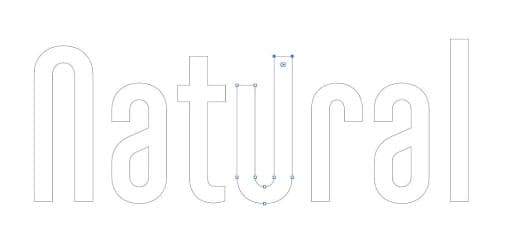
In this example, after converting text to outlines, the Direct Selection tool (A) was used to extend the right side of the 'U', creating a custom letterform that adds visual interest while maintaining readability.

The Pen Tool: Your Gateway to Unlimited Creative Possibilities

The Pen tool represents the heart of vector design and separates Illustrator novices from true professionals. While it demands more initial investment in learning than other tools, mastering the Pen tool unlocks unlimited creative potential—you can literally draw any shape imaginable with mathematical precision.

Effective Pen tool usage requires understanding several key concepts: creating and editing paths, strategically placing anchor points, crafting smooth curves using Bézier handles, and knowing when to use corner points versus smooth points. The tool's precision makes it indispensable for creating custom icons, brand symbols, and organic shapes that shape tools simply cannot achieve.

Many designers initially find the Pen tool intimidating, but developing muscle memory with this tool is crucial for professional logo work. Practice drawing simple shapes first, then progress to more complex forms. Focus on using the minimum number of anchor points necessary—cleaner paths result in more scalable, professional logos.

Illustrator Pen tool used to draw coffee beans and waves in logos

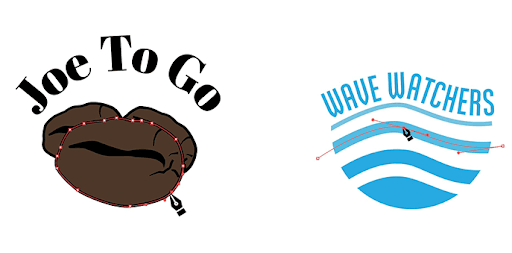
These examples demonstrate the Pen tool's versatility: the organic coffee bean shapes on the left required careful curve manipulation, while the flowing wave lines on the right showcase how the tool excels at creating rhythmic, dynamic elements that bring energy to logo designs.

The Type Tool: Beyond Basic Text Input

Logo design demands more sophisticated typography than standard document creation. The Type tool family in Illustrator provides specialized functionality that transforms how text integrates with your brand identity designs.

Beyond basic text input, you'll frequently need the Type on a Path tool for creating curved text around circles or custom shapes—essential for badges, seals, and circular logo layouts. The Vertical Type tools become crucial for international clients or designs requiring vertical text flow. Additionally, precise kerning and tracking adjustments often make the difference between amateur and professional-looking typography.

Modern logo design also requires understanding how typography will perform across digital platforms, from social media avatars to mobile app icons. Consider how your type choices will scale and remain legible at various sizes, and always test readability at small dimensions.

Illustrator Type tool used to create curved and vertical text in a logo

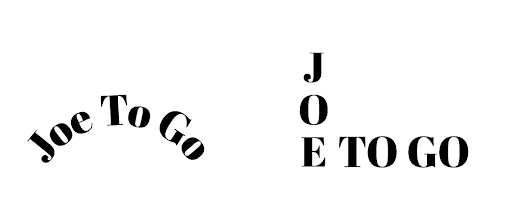
The left example demonstrates text following a curved path, perfect for creating traditional badge-style logos, while the right shows the strategic use of both vertical and horizontal text orientation to create visual hierarchy and interest.

Bonus: Touch Type Tool—Live Text Flexibility

The Touch Type tool offers a unique advantage in logo development: the ability to move, scale, and rotate individual characters while keeping text "live" and editable. This means you can explore typographic variations and test different fonts without committing to outlined text.

This tool proves invaluable during the exploration phase of logo design, allowing rapid iteration and client presentation of multiple typographic treatments. You maintain the flexibility to change fonts globally while preserving your custom character adjustments—a significant workflow advantage when clients request font alternatives.

Live Text Advantage

The Touch Type Tool lets you move, scale, and rotate individual letters while keeping text editable. This allows font experimentation without losing the ability to make global text changes.

Shape Tools: The Geometry of Great Logo Design

The most memorable logos often reduce complex ideas to simple, geometric forms. Illustrator's shape tools—Rectangle, Ellipse, Rounded Rectangle, Polygon, and Star—provide the foundation for creating these powerful, scalable designs.

Professional tip: Hold Shift while dragging to constrain proportions and create perfect circles and squares. These geometric constraints aren't limitations—they're the building blocks of iconic design. Think of Apple's apple, Nike's swoosh, or Adidas's three stripes. Each began with simple geometric relationships that create instant recognition and powerful brand recall.

The geometric approach also ensures your logos scale flawlessly from business cards to billboards. Simple shapes render cleanly at any size and translate effectively across all media, from embroidered apparel to digital displays.

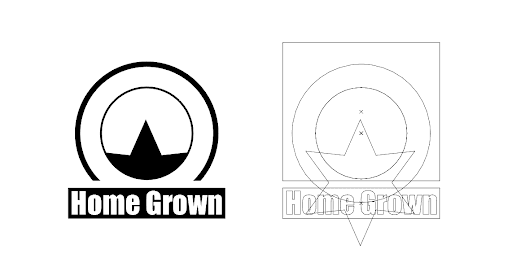
Illustrator interface showing a geometric logo design with overlapping shapes

This example illustrates how complex-looking logos often derive from simple geometric foundations. The left image shows the final logo design, while the right reveals the underlying geometric structure in outline mode. Notice how strategic overlapping and masking create sophisticated visual effects from basic shapes.

Geometric Shape Tools

Rectangle Tool

Creates precise squares and rectangles. Hold Shift while dragging to constrain proportions for perfect squares.

Ellipse Tool

Generates circles and ovals. Essential for creating circular logos, badges, and organic design elements.

Polygon & Star Tools

Build complex geometric shapes with customizable sides and points, perfect for technical or symbolic logos.

Many of the best logos can be broken down into simple geometric shapes.
Geometric foundations provide strong visual structure and memorable recognition in professional logo design.

Shape Builder Tool: Streamlined Path Operations

While Illustrator offers multiple methods for combining shapes (including the traditional Pathfinder panel), the Shape Builder tool provides the most intuitive approach for creating complex forms from simple geometric elements. This tool excels at uniting, subtracting, and dividing shapes through simple click-and-drag gestures.

The Shape Builder tool becomes particularly powerful when creating abstract marks and symbols. Rather than wrestling with complex boolean operations, you can visually "paint" the shapes you want to keep or remove. Alt-click (Option-click on Mac) to subtract areas, or simply drag across shapes to unite them. This visual approach often leads to creative discoveries that more technical methods might miss.

For logo designers working under tight deadlines, mastering the Shape Builder tool can significantly accelerate the design process, allowing more time for creative exploration rather than technical execution.

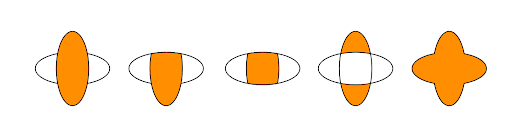
Illustrator Shape Builder tool used to combine and modify overlapping shapes

Starting with two simple overlapping ovals, the Shape Builder tool creates multiple design variations through different combinations of uniting and subtracting operations. This demonstrates how one basic geometric relationship can generate numerous logo possibilities, each with its own visual personality and brand implications.

Conclusion: Building Your Professional Logo Design Toolkit

While Illustrator contains hundreds of tools and features, mastering these five essential tools plus the Create Outlines function establishes the foundation for professional logo design work. These tools work synergistically—the Shape tools create your foundation, the Pen tool adds custom elements, the Type tools handle typography, the Direct Selection tool provides precision control, and the Shape Builder tool streamlines complex operations.

Focus on developing proficiency with these core tools before exploring Illustrator's more specialized features. This approach builds a solid technical foundation that frees your creativity to focus on what matters most: designing memorable, effective brand identities that serve your clients' business objectives.

Logo Design Workflow Essentials

0/5

Key Takeaways

1Create Outlines menu option (Cmd-Shift-O/CTRL-Shift-O) converts text to editable shapes and ensures font compatibility for client handoffs
2Direct Selection Tool (A) enables precise editing of individual anchor points and segments, while Selection Tool (V) handles complete objects
3Pen Tool (P) has a steep learning curve but provides unlimited shape creation capabilities through paths, curves, and anchor point manipulation
4Type Tool (T) offers advanced typography options including Type on a Path and Vertical Type for creative logo layouts beyond standard horizontal text
5Touch Type Tool allows individual letter manipulation while maintaining live, editable text for font experimentation
6Shape Tools create geometric foundations using Rectangle, Ellipse, Polygon, and Star tools with Shift-constraint for perfect proportions
7Shape Builder Tool (Shift+M) provides efficient shape combination workflow through intuitive clicks and drags, often faster than traditional Pathfinder methods
8Mastering these five core tools plus Create Outlines creates an efficient workflow foundation that allows designers to focus creativity on logo concept development

RELATED ARTICLES