April 1, 2026Dan Rodney/11 min read

Mobile-Friendly Column Layout

Master responsive HTML email layouts for all devices

Email Client Compatibility Challenge

Media queries are not supported in some mobile email clients. Gmail used to strip out the entire style tag and its media queries altogether, but now keeps them in most places. Users without media query support will see the desktop version scaled down.

What You'll Master in This HTML Email Tutorial:

This comprehensive lesson covers four essential skills for responsive email development: coding responsive table structures for 2-column content layouts, implementing mobile-first responsive design by converting desktop layouts to single-column mobile views, integrating multiple content blocks with consistent styling, and advanced CSS refinement techniques for cross-client compatibility.

Exercise Preview

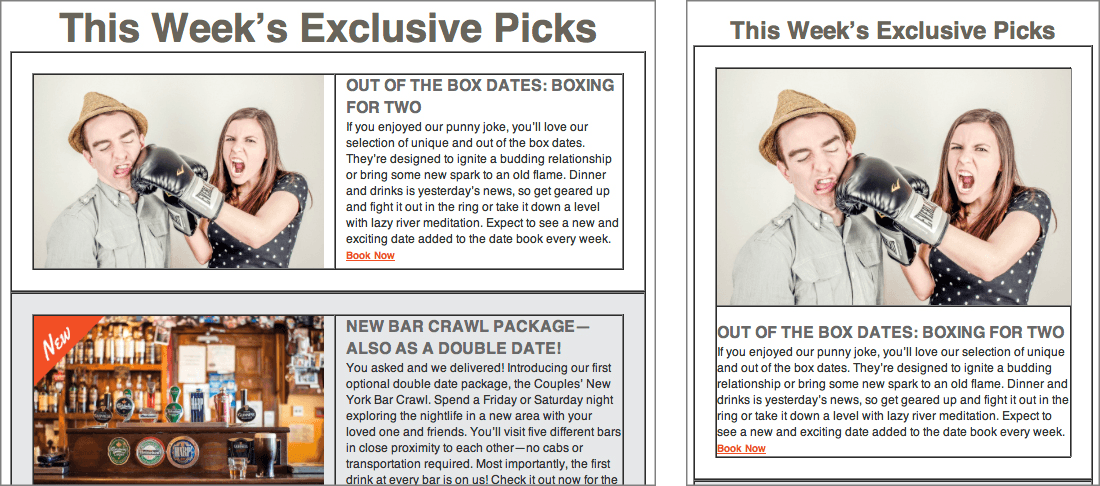
preview desktop and mobile column difference

Exercise Overview

In this hands-on exercise, you'll build a sophisticated responsive email template featuring a 2-column desktop layout that seamlessly transforms into an optimized 1-column mobile experience. This technique represents industry best practices for modern email design in 2026.

While media queries have gained broader support across email clients in recent years, some limitations persist. Gmail now preserves media queries in most scenarios—a significant improvement from earlier versions that stripped the entire style tag. However, certain edge cases still exist where media queries may be removed. Recipients without media query support will see the desktop version scaled to fit their screen, which remains readable with zoom functionality, ensuring your message reaches everyone effectively.

  1. We strongly recommend completing the previous exercise (1C) before proceeding, as this lesson builds directly on those foundational concepts. If you haven't finished the prerequisite exercise, follow the setup instructions in the sidebar below.

    Exercise Completion Process

    1

    Setup Files

    Close existing files and navigate to Class Files folder. Delete existing 2-Column Layout folder if present, then duplicate the 2-Column Layout Banner Done folder.

    2

    Review Mockup

    Open the 2-Column Email Design Mockup PDF to understand the layout requirements for 3 exclusive picks with pictures, headings, and descriptions.

    3

    Create Layout Structure

    Build nested tables for responsive design - a 1-column outer table containing a 2-column inner table for desktop layout.

If You Did Not Complete the Previous Exercise (1C)

  1. Close any open files in your code editor.
  2. Navigate to Desktop > Class Files > yourname-HTML Email Class.
  3. Delete the existing 2-Column Layout folder if present.
  4. Locate and duplicate the 2-Column Layout Banner Done folder.
  5. Rename the duplicated folder to 2-Column Layout.
  • Let's examine our design mockup to develop a strategic approach for implementing the remaining content sections. Navigate to Desktop > Class Files > yourname-Responsive Email Class on your system.

  • Double-click 2-Column Email Design Mockup.pdf to open the complete design specification.

  • Our goal is to implement three "exclusive picks" content blocks, each containing an image, headline, and descriptive text. The challenge lies in creating a robust 2-column desktop layout that gracefully collapses to a single column on mobile devices. We'll achieve this through strategic table nesting—a technique that, while initially complex, provides precise layout control across email clients.

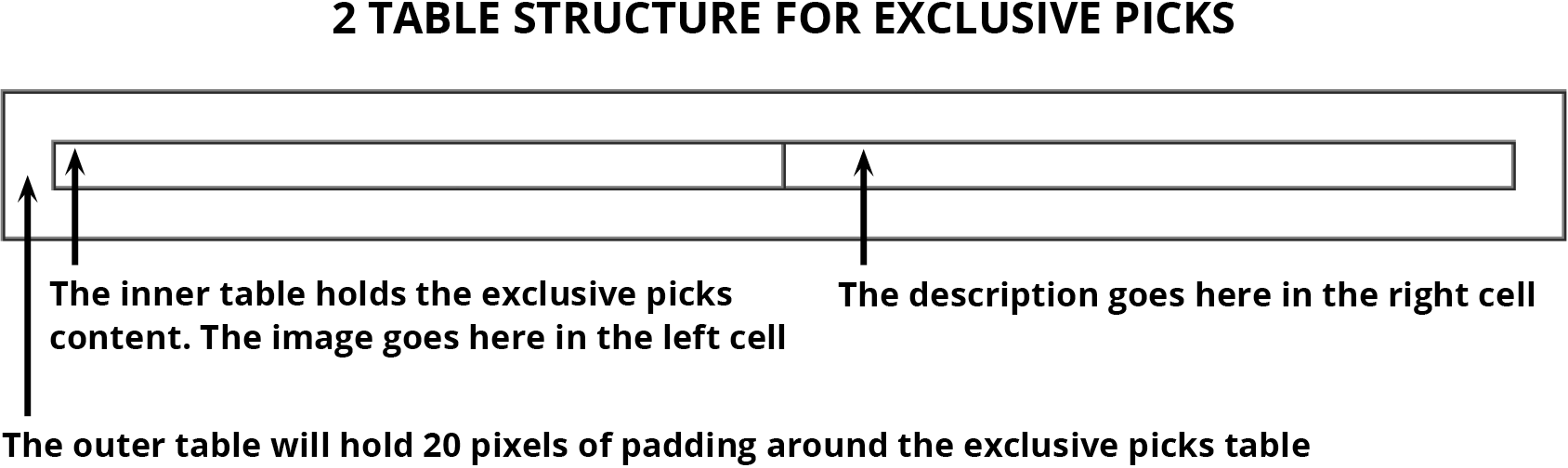
    We'll begin by establishing the foundational structure for our first exclusive pick (the boxing date promotion). Our approach involves creating a parent single-column table within the existing content area, then nesting a two-column table inside it. This nested table will house our content: the promotional image in the left column and the corresponding headline and description in the right column. Here's the structural hierarchy we're implementing:

    desktop column structure example

  • Building the Nested Table Structure for Exclusive Picks Content

    1. Open date-night-exclusive-picks.html from your 2-Column Layout folder in your preferred code editor.

      NOTE: For enhanced workflow efficiency, consider opening the entire 2-Column Layout folder if your editor supports this feature (Visual Studio Code, Sublime Text, and most modern editors offer this capability).

    2. We'll start by retrieving pre-written code for our first nested table structure. In your code editor, open table-code.html located in 2-Column Layout > snippets.

    3. Select and copy all the code from this file, but keep it open—we'll reference it again shortly.

    4. Return to date-night-exclusive-picks.html and locate the h1 element. Immediately below it, paste the copied code:

      <td class="mainContent" align="center" width="100%">
         <h1>This Week&#8217;s Exclusive Picks</h1>
         <table align="center" border="1" cellpadding="0" cellspacing="0" width="100%">
            <tr>
               <td align="center" width="100%">
      
               </td>
            </tr>
         </table>
      </td>

      NOTE: The 1-pixel border serves as a visual debugging aid during development. We'll remove this once our layout is finalized.

    5. To create proper spacing around our nested 2-column table, we'll add padding to the container cell. Around line 53, enhance the td element with the following inline style attribute:

      <td align="center" width="100%" style="padding: 20px;">
    6. Now we'll create the inner two-column structure. Copy the table code snippet again from your clipboard, then paste it around line 54 as shown:

      <td align="center" width="100%" style="padding: 20px;">
         <table align="center" border="1" cellpadding="0" cellspacing="0" width="100%">
            <tr>
               <td align="center" width="100%">
      
               </td>
            </tr>
         </table>
      </td>

      This inner table will contain our first exclusive pick content block. For optimal desktop display, we'll configure each column to occupy exactly half the available width—one for the promotional image, one for the accompanying text content.

    7. Modify the table cell width and add a temporary placeholder for testing purposes:

      <td align="center" width="50%">
         &nbsp;
      </td>
    8. Select and copy these three lines of code (the complete td element from approximately lines 56–58).

    9. Create the second column by pasting the copied code immediately after the first table cell:

      <table align="center" border="1" cellpadding="0" cellspacing="0" width="100%">
         <tr>
            <td align="center" width="50%">
               &nbsp;
            </td>
            <td align="center" width="50%">
               &nbsp;
            </td></tr>
      </table>
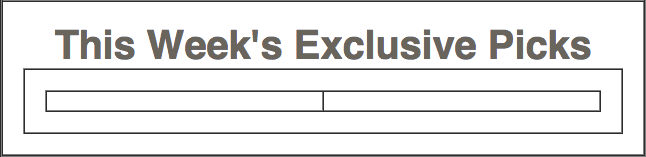
    10. Save your file and preview date-night-exclusive-picks.html in a web browser. You should now see the nested table structure displayed beneath your heading, complete with visible borders for debugging.

      innermost tables before 2col content

    11. Keep this browser window open for real-time testing—you'll be refreshing frequently to see your changes.

    12. Now let's integrate the actual content. In your code editor, open email-content.html from the 2-Column Layout > snippets directory.

    13. We'll start with the promotional image. Copy only the code from line 6 (the complete image element wrapped in its placeholder link).

    14. Keep this file accessible—we'll extract additional content elements shortly.

    15. Switch back to date-night-exclusive-picks.html.

    16. Around line 57, replace the placeholder non-breaking space (&nbsp;) with the image code in the first column:

      <td align="center" width="50%">
         <a href="https://www.example.com" target="_blank"><img src="http://www.nobledesktop.com/nl-date-night/img/couple-boxing.jpg" width="290" ALT="Couple Fighting"></a>
      </td>
      <td align="center" width="50%">
         &nbsp;
      </td>
    17. Return to the email-content.html file.
    18. Copy the heading and paragraph elements from lines 7–8.
    19. Keep this reference file open and switch back to date-night-exclusive-picks.html.
    20. Around line 60, replace the second column's placeholder with the text content:

      <tr>
         <td align="center" width="50%">
            <a href="https://www.example.com" target="_blank"><img src="http://www.nobledesktop.com/nl-date-night/img/couple-boxing.jpg" width="290" ALT="Couple Fighting"></a>
         </td>
         <td align="center" width="50%">
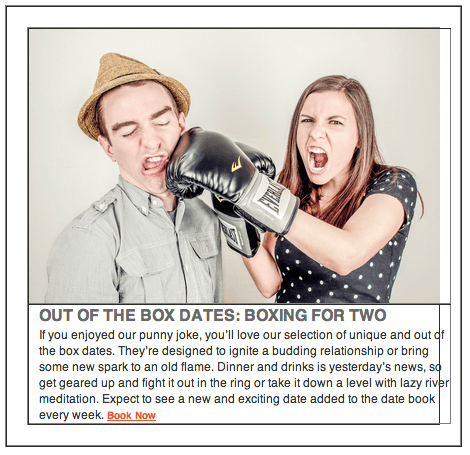
            <h2>OUT OF THE BOX DATES: BOXING FOR&nbsp;TWO</h2>
            <p>If you enjoyed our punny joke, you&#8217;ll love our selection of unique and out of the box dates. They&#8217;re designed to ignite a budding relationship or bring some new spark to an old flame. Dinner and drinks is yesterday&#8217;s news, so get geared up and fight it out in the ring or take it down a level with lazy river meditation. Expect to see a new and exciting date added to the date book every week. <a class="bookLink" href="https://www.example.com" target="_blank">Book Now</a></p>
         </td>
      </tr>
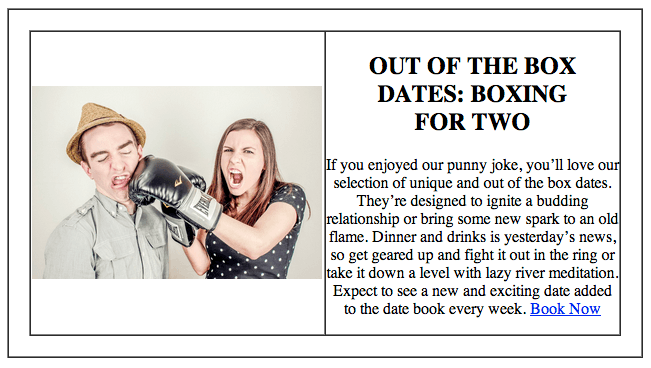
    21. Save your work and refresh the browser. Your two-column layout now displays with the image positioned on the left and the corresponding text content on the right:

      2col content rough

    Refining the 2-Column Layout Design

    With our basic structure in place, let's optimize the visual presentation. The current center alignment works for our debugging phase, but left-alignment will significantly improve readability for the text content.

    1. Return to date-night-exclusive-picks.html in your code editor.

    2. Around line 56, update the left column's alignment attribute:

      <td align="left" width="50%">
         <a href="https://www.example.com" target="_blank"><img src="http://www.nobledesktop.com/nl-date-night/img/couple-boxing.jpg" width="290" ALT="Couple Fighting"></a>
      </td>
    3. Around line 59, apply the same alignment change to the right column:

      </td>
      <td align="left" width="50%">
         <h2>OUT OF THE BOX DATES: BOXING FOR&nbsp;TWO</h2>
    4. Save and refresh your browser to see the improved alignment.

      The layout is better, but table cells default to middle vertical alignment. For a more polished appearance, we need to align both the image and text to the top of their respective cells, allowing the taller element to determine the overall row height.

    5. Return to your code editor for the next optimization.

    6. Add the valign (vertical alignment) attribute to both table cells around lines 56 and 59:

      <td align="left" width="50%" valign="top">
         <a href="https://www.example.com" target="_blank"><img src="http://www.nobledesktop.com/nl-date-night/img/couple-boxing.jpg" width="290" ALT="Couple Fighting"></a>
      </td>
      <td align="left" width="50%" valign="top">
    7. Save and refresh to see the top-aligned layout. Notice the improved spacing, though we'll need to address the heading positioning in the right column.

    8. To streamline development, we've prepared the essential CSS for the h2 element, paragraph styling, and the "Book Now" call-to-action link. Open text-styles.css from the snippets folder.

    9. Copy all the code from this stylesheet.

    10. Close the CSS file and return to date-night-exclusive-picks.html.

    11. These styles primarily target the desktop layout, so we'll integrate them with the general styles that will later be inlined for maximum email client compatibility. Locate the h1 rule around line 19 and paste the code immediately after it:

      margin: 0;
      }
      h2 {
         color: #696969;

      Code Omitted To Save Space

      margin-bottom: 0;
      }
      p {
         color: #363636;

      Code Omitted To Save Space

      margin-top: 0;
      }.bookLink {
         color: #e74b34;
         font-weight: bold;
      }.mainContent {
    12. Save and refresh your browser. The typography now looks professional, but the text appears too close to the image. Let's add appropriate spacing between the columns.

    13. Return to your code editor to implement column padding.

    14. Add strategic inline padding to both table cells around lines 76 and 79, creating balanced spacing between the image and text:

      <td align="left" width="50%" valign="top" style="padding-right: 10px;">
         <a href="https://www.example.com" target="_blank"><img src="http://www.nobledesktop.com/nl-date-night/img/couple-boxing.jpg" width="290" ALT="Couple Fighting"></a>
      </td>
      <td align="left" width="50%" valign="top" style="padding-left: 10px;">
    15. Save and refresh to see the improved spacing. Your desktop layout should now display a professional balance between image and text content.

    16. Test the responsive behavior by gradually resizing your browser window to simulate mobile viewing conditions.

    As you narrow the window, you'll notice the right column compresses while the left column remains rigid due to the fixed-width image. We created a responsive image class in the previous exercise, but haven't yet applied it to this image element.

    1. Return to your code editor to enable responsive image scaling.

    2. Around line 77, add the resImage class to the boxing couple image:

      <a href="https://www.example.com" target="_blank"><img class="resImage" src="http://www.nobledesktop.com/nl-date-night/img/couple-boxing.jpg" width="290" ALT="Couple Fighting"></a>
    3. Save and refresh your browser to activate responsive image scaling.

    4. Test the window resizing again—the image now scales proportionally, creating a more flexible layout.

    Implementing the Mobile-First 1-Column Conversion

    While our current responsive scaling improves the layout, mobile phone users still face readability challenges with narrow columns, tiny images, and compressed text. The solution lies in transforming our 2-column desktop layout into a streamlined 1-column mobile experience.

    This conversion requires instructing the two table cells to behave like block-level elements (similar to divs) rather than traditional table cells when viewed on mobile devices.

    1. Return to your code editor to begin the mobile transformation.

    2. Around lines 76 and 79, add the deviceWidth class to both content table cells. This class name reflects its purpose: enabling elements to utilize the full available width on any mobile device:

      <td class="deviceWidth" align="left" width="50%" valign="top" style="padding-right: 10px;">
         <a href="https://www.example.com" target="_blank"><img class="resImage" src="http://www.nobledesktop.com/nl-date-night/img/couple-boxing.jpg" width="290" ALT="Couple Fighting"></a>
      </td>
      <td class="deviceWidth" align="left" width="50%" valign="top" style="padding-left: 10px;">
    3. Now create the CSS rule that powers this transformation. In your media query section, add the following rule beneath the .wrapper rule:

      display: block!important;
      }
      .deviceWidth {
         display: block!important;
         width: 100%!important;
      }.resImage {

      NOTE: The !important declarations ensure these media query rules override inline styles, which is essential for reliable cross-client functionality.

    4. Save your changes and refresh the browser to test the transformation.

    5. Resize the browser window and observe the dramatic change—your layout instantly converts to a single column when the viewport reaches 680 pixels wide:

      1 column mobile tables awkward look

    6. While the functionality works perfectly, some visual refinements are needed. The content extends beyond the right edge due to the padding attributes we added for desktop column spacing. Let's override this padding specifically for mobile viewing.

    7. Enhance the .deviceWidth rule by adding padding reset functionality:

      .deviceWidth {
         display: block!important;
         padding: 0!important;
         width: 100%!important;
      }
    8. Save and refresh to test the improved mobile layout.

    9. Resize the browser window again—the content now fits properly within the mobile viewport without overflow issues. However, in the single-column layout, the h2 heading appears too close to the image above it.

    10. Return to your code editor to add appropriate mobile spacing.

    11. In your media query section, add a new h2 rule under the existing h1 rule:

      font-size: 24px!important;
      }
      h2 {
         margin-top: 15px!important;
      }
    12. Save and refresh to see the final mobile optimization.

    13. Test the responsive behavior once more—your image and text now display with professional spacing in both desktop and mobile layouts, creating an optimal reading experience across all devices.

    Expanding the Content: Additional Date Listings

    1. Now that our responsive framework is perfected, we'll duplicate this structure to create the remaining date listings. Return to date-night-exclusive-picks.html in your code editor.

    2. We need to copy the complete nested table structure we've created. Starting just after the h1 element, select and copy the entire outer table (approximately lines 79–95):

      <table align="center" border="1" cellpadding="0" cellspacing="0" width="100%">
         <tr>
            <td align="center" width="100%" style="padding: 20px;">
               <table align="center" border="1" cellpadding="0" cellspacing="0" width="100%">
                  <tr>
                     <td class="deviceWidth" align="left" width="50%" valign="top" style="padding-right: 10px;">

      Code Omitted To Save Space

      </td>
                     <td class="deviceWidth" align="left" width="50%" valign="top" style="padding-left: 10px;">
                        <h2>OUT OF THE BOX DATES: BOXING FOR&nbsp;TWO</h2>

      Code Omitted To Save Space

      </td>
                  </tr>
               </table>
            </td>
         </tr>
      </table>
    3. Paste this complete table structure twice directly below the existing table to create 2 additional date listing containers.

    4. Save and refresh your browser—you should now see three identical boxing date listings, confirming that the structure replication was successful.

    5. Let's replace the placeholder content with unique offerings. Return to your code editor.

    6. Switch back to the email-content.html

    Key Takeaways

    1Nested tables provide better control over responsive email layouts compared to single table structures
    2Media query support varies across email clients, with Gmail historically stripping style tags but now maintaining them in most cases
    3The deviceWidth class combined with display block and 100% width enables table cells to behave like block elements on mobile
    4Vertical alignment using valign top ensures consistent positioning between image and text content columns
    5Important declarations are necessary in CSS rules to override inline styles in email templates
    6Responsive images require specific classes and max-width properties to scale properly in email clients
    7Mobile padding must be explicitly removed to prevent content overflow in narrow mobile screens
    8A 680-pixel breakpoint effectively distinguishes between desktop and mobile email viewing experiences

    RELATED ARTICLES