April 1, 2026Dan Rodney/11 min read

2-Column Layout: Media Queries

Master responsive HTML email with media queries

Core Skills You'll Master

Nested Table Structure

Learn to create complex email layouts using properly nested HTML tables that work across all email clients.

Desktop & Mobile Styling

Write CSS that adapts seamlessly between desktop two-column and mobile single-column layouts.

Media Query Implementation

Implement responsive design techniques specifically optimized for email client compatibility.

Topics Covered in This HTML Email Tutorial:

Coding the Nested Table Structure, Writing Styles for Desktop & Mobile Versions, Media Queries for Fine-tuning Mobile Responsive Design, Modifying Media Queries

Exercise Preview

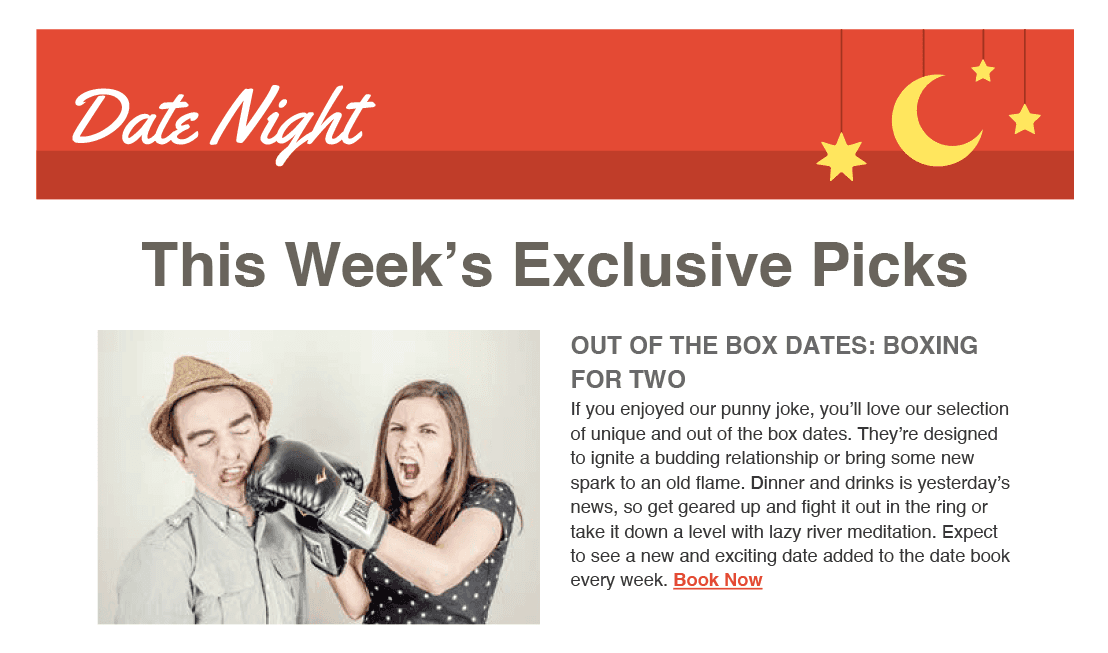
2 column newsletter banner&headline

Exercise Overview

This is the foundational exercise in a comprehensive series where you'll master creating professional 2-column newsletters that perform flawlessly across all email clients. Media queries will enable us to craft a sophisticated 2-column layout for desktop users while providing an optimized 1-column experience for mobile subscribers. In this exercise, you'll establish the core table structure and implement the banner image with the main heading—essential building blocks for any successful email campaign.

Modern email marketing demands responsive design, as over 60% of emails are now opened on mobile devices. This exercise will teach you industry-standard techniques used by leading marketing teams at Fortune 500 companies.

Layout Strategy

This exercise focuses on creating a 2-column newsletter layout that transforms into a 1-column mobile layout using media queries. The modular table approach ensures consistent spacing across email clients.

Previewing the Finished Design

  1. To examine the completed email design you'll be coding throughout this class, navigate to your Desktop and then proceed to Class Files > yourname-Responsive Email Class

  2. Double-click on 2-Column Email Design Mockup.pdf to open it. This sophisticated layout represents a significant advancement from single-column emails, with multi-column design introducing complexity that dramatically affects how different email clients render your content. Understanding these nuances is crucial for professional email development.

  3. Keep the PDF design file open throughout this exercise. We'll reference it frequently to ensure pixel-perfect implementation and to understand the strategic design decisions behind each element.

Getting Started

  1. In your preferred code editor, open date-night-exclusive-picks.html from the 2-Column Layout folder.

    NOTE: If you're using a modern code editor like Visual Studio Code, Sublime Text, or Atom, consider opening the entire 2-Column Layout folder as a project. This provides better file navigation and IntelliSense support for your development workflow.

  2. We'll begin by creating the foundational outer table structure. Rather than manually typing the extensive table markup with all required attributes (a time-consuming and error-prone process), we've prepared optimized code snippets that follow email development best practices. Open table-code.html from 2-Column Layout > snippets.

  3. Select and copy all the code from this file.

  4. Keep the snippet file open—you'll need to reference it again later in this exercise.

  5. Return to date-night-exclusive-picks.html and paste the table code inside the body element as shown below in bold.

    <body>
       <table align="center" border="1" cellpadding="0" cellspacing="0" width="100%">
          <tr>
             <td align="center" width="100%">
    
             </td>
          </tr>
       </table>
    </body>

    NOTE: The temporary 1-pixel border serves as a visual debugging tool, allowing you to see table boundaries during development. This is a professional best practice—you'll remove this border in the final production version.

  6. Following email industry standards, we need to establish a fixed width for consistent rendering across email clients. Update the width attribute as shown in bold:

    <table align="center" border="1" cellpadding="0" cellspacing="0" width="680">

    The 680-pixel width ensures optimal display across major email clients while maintaining readability on most desktop screens.

  7. Save the file to preserve your progress.

Initial Setup Process

1

Open Project Files

Navigate to your Desktop and access the Class Files folder, then open the 2-Column Layout directory in your code editor.

2

Create Outer Table

Copy the prepared table code snippet and paste it into the HTML body with proper attributes including border, cellpadding, and cellspacing.

3

Set Fixed Width

Update the table width to 680 pixels to ensure consistent display across different email clients.

Placing the Top Banner Image

Now we'll implement the banner image—a critical element that establishes brand identity and visual hierarchy. Professional email templates require strategic image placement to ensure consistent rendering across diverse email clients.

  1. Open email-content.html from the snippets folder. This file contains all pre-written email content, streamlining your development process.

  2. Copy only the banner image code from line 1—we'll add other content elements systematically in subsequent steps.

  3. Leave this file open for easy access to additional content as we progress through the exercise.

  4. Switch back to date-night-exclusive-picks.html and paste the banner code inside the table cell, as shown below in bold:

    <td align="center" width="100%">
       <a href="https://www.example.com" target="_blank"><img src="http://www.nobledesktop.com/nl-date-night/img/header.png" width="680" ALT="Date Night"></a>
    </td>

    NOTE: We're using example.com as a placeholder URL. In production, this would link to your campaign landing page. Avoid empty href attributes or href="#"—these can trigger spam filters and cause rendering issues in clients like Outlook.com.

  5. Save the file and preview date-night-exclusive-picks.html in your browser to verify proper banner placement.

    The banner should display cleanly within the table structure. You may notice a small gap below the image—this is normal default browser behavior that we'll address with CSS shortly.

  6. Keep the browser tab open for live preview as you continue development—this real-time feedback loop significantly improves development efficiency.

Email Link Best Practice

Always use a valid placeholder URL like example.com instead of empty href attributes. Empty hrefs can cause display issues in email clients like Outlook.com.

Banner Implementation Checklist

0/4

Nesting an Inner Table for the Main Content

Professional email development requires a modular approach to handle complex layouts reliably across email clients. We'll implement a nested table structure that provides maximum control over content positioning.

  1. Before diving into code, let's establish our strategic approach by reviewing the 2-Column Email Design Mockup.pdf once more.

  2. For sophisticated layouts like this newsletter, we employ a modular table architecture—each distinct content section gets its own table container. This approach ensures consistent spacing and structure across notoriously unpredictable email clients, while making weekly content updates manageable for ongoing campaigns.

    email mockup 2 column

    While we could nest content directly under the banner within the current cell, separating the banner into its own discrete table row provides superior control over cross-device rendering. Our main table will contain two rows: the top row housing the banner image and the bottom row containing all other content sections.

  3. Return to your code editor and implement the additional table structure by adding a new row and cell:

    <table align="center" border="1" cellpadding="0" cellspacing="0" width="680">
       <tr>
          <td align="center" width="100%">
             <a href="https://www.example.com" target="_blank"><img src="http://www.nobledesktop.com/nl-date-night/img/header.png" width="680" ALT="Date Night"></a>
          </td>
       </tr>
       <tr>
          <td align="center" width="100%">
    
          </td>
       </tr>
    </table>
  4. Now we'll nest our content table within this new cell. Switch back to table-code.html to copy the foundational table structure.

  5. Close the snippet file and return to date-night-exclusive-picks.html.

  6. Around line 17, paste the nested table code as shown below in bold:

    <table align="center" border="1" cellpadding="0" cellspacing="0" width="680">
       <tr>
          <td align="center" width="100%">
             <a href="https://www.example.com" target="_blank"><img src="http://www.nobledesktop.com/nl-date-night/img/header.png" width="680" ALT="Date Night"></a>
          </td>
       </tr>
       <tr>
          <td align="center" width="100%">
             <table align="center" border="1" cellpadding="0" cellspacing="0" width="100%">
                <tr>
                   <td align="center" width="100%">
    
                   </td>
                </tr>
             </table>
          </td>
       </tr>
    </table>
  7. Let's add the main heading that will anchor our content hierarchy. Switch back to email-content.html in your code editor.

  8. Copy only the heading code from line 3—this selective approach prevents accidental overwrites of your existing structure.

  9. Close the content file and return to date-night-exclusive-picks.html.

  10. Around line 20, paste the heading code inside the nested table cell as shown in bold:

    <td align="center" width="100%">
       <h1>This Week&#8217;s Exclusive Picks</h1>
    </td>
  11. Save the file and refresh your browser. The image and heading now occupy separate table structures, giving you precise control over their positioning and styling. The doubled-up border appearance in the content section is expected—it's created by the overlapping borders of the outer (680px fixed width) and inner (100% relative width) tables.

Modular Table Strategy

Using discrete tables for each content section provides consistent spacing across email clients and makes weekly newsletter updates much easier to manage.

Table Structure Approaches

FeatureSingle TableNested Tables
ComplexitySimpleModerate
ControlLimitedPrecise
Client SupportBasicExcellent
MaintenanceDifficultEasy
Recommended: Nested tables provide superior control and compatibility for professional email campaigns.

Coding the Styles That Apply to Both Versions

Now we'll implement the CSS foundation that ensures consistent rendering across both desktop and mobile experiences. This approach—coding universal styles first, then mobile-specific overrides—represents industry best practice for responsive email development.

  1. Our first priority is eliminating the unwanted space below the banner image—a common issue that can undermine your email's professional appearance.

  2. Add a style block immediately after the title tag to house your CSS rules:

    <title>Date Night Exclusive Picks</title>
       <style>
       </style>
    </head>
  3. Implement the image display rule that eliminates the baseline gap—a critical fix for professional email presentation:

    <style>
       img {
          display: block;
       }
    </style>
  4. Save and refresh your browser. The awkward space below the banner image should now be eliminated. This CSS rule applies to all images in your email, preventing this issue throughout your template.

  5. Hover over the banner image to see the cursor change to a pointer cursor icon, confirming the link is active.

    Certain email clients and browsers can add unsightly blue borders around linked images—a presentation issue that immediately signals amateur email development. Let's prevent this across all clients.

  6. Return to your code editor to add the border prevention rule.

  7. Expand the img rule with the border reset property:

    img {
       display: block;
       border: 0;
    }
  8. Now add comprehensive styling for the main heading that establishes visual hierarchy and brand consistency:

    img {
          display: block;
          border: 0;
       }
       h1 {
          color: #69655c;
          font-family: sans-serif;
          font-size: 40px;
          font-weight: bold;
          margin: 0;
       }
    </style>
  9. Save and refresh your browser. The heading now displays with proper gray coloring and typography, with margins reset for precise control over spacing.

    While the typography looks professional, the text appears cramped against the table edges. Adding 20 pixels of padding will provide appropriate breathing room. Rather than using inline styles (which become difficult to maintain), we'll implement a CSS class—a scalable approach that streamlines workflow and enables future modifications.

  10. Around line 33, add a semantic class name to the table cell containing the heading:

    <tr>
       <td class="mainContent" align="center" width="100%">
          <h1>This Week&#8217;s Exclusive Picks</h1>
  11. Add the corresponding CSS rule that provides consistent padding for your main content area:

    margin: 0;
       }
       .mainContent {
          padding: 20px;
       }
    </style>
  12. Save and refresh your browser. The 20-pixel padding now provides professional spacing around the heading text.

    Your email template now meets desktop display standards. To evaluate the mobile experience, resize your browser window to simulate smartphone viewing conditions.

    As expected, the fixed-width layout doesn't adapt to smaller screens—this is precisely why media queries are essential for professional email campaigns. We need to make both the container table and banner image responsive.

Base CSS Implementation

1

Remove Image Gaps

Set images to display block to eliminate unwanted spacing that appears below banner images in email clients.

2

Prevent Link Borders

Add border zero to images to prevent ugly blue borders that some email clients add to linked images.

3

Style Main Heading

Apply color, font-family, font-size, and remove default margins for consistent header appearance.

4

Add Content Padding

Create a mainContent class with 20px padding to provide proper spacing around text content.

Writing Media Queries for Mobile Devices

Media queries represent the cornerstone of responsive email design, enabling you to deliver optimized experiences across the full spectrum of devices your subscribers use. We'll implement mobile-specific styles that transform your 2-column desktop layout into a streamlined mobile experience.

Best practice dictates placing media queries after universal styles within your style block—this creates a logical separation between desktop and mobile rules while ensuring proper CSS cascade behavior.

  1. Return to date-night-exclusive-picks.html in your code editor to begin implementing responsive behavior.
  2. Around line 26, add a semantic class to the outer table for targeted styling:

    <body>
       <table class="wrapper" align="center" border="1" cellpadding="0" cellspacing="0" width="680">
  3. Implement the media query structure that targets devices with screen widths of 680 pixels or smaller:

    .mainContent {
          padding: 20px;
       }
       @media only screen and (max-width: 680px) {
    
       }
    </style>

    This media query creates a precise breakpoint that ensures your mobile styles activate exactly when needed. All mobile-specific CSS rules will be contained within these curly braces, providing clean organization and preventing style conflicts.

  4. Add the flexible table styling that enables responsive behavior for your main container:

    @media only screen and (max-width: 680px) {
       .wrapper {
          max-width: 680px;
          width: 100%;
          display: block;
       }
    }
  5. Images require special handling for responsive behavior. Rather than applying global image rules that might affect future content, we'll use a targeted class approach for maximum control.

    Around line 36, add the responsive image class to your banner:

    <a href="https://www.example.com" target="_blank"><img class="resImage" src="http://www.nobledesktop.com/nl-date-night/img/header.png" width="680" ALT="Date Night"></a>
  6. Implement the responsive image CSS that ensures proportional scaling while maintaining image quality:

    @media only screen and (max-width: 680px) {.wrapper {
          max-width: 680px;
          width: 100%;
          display: block;
       }
       .resImage {
          width: 100%;
          height: auto;
       }
    }
  7. Save your file and refresh the browser to test the responsive behavior.

  8. Gradually resize your browser window to a smaller width. The entire email structure should now scale smoothly to fit the available space!

    While the responsive scaling works perfectly, the 40-pixel heading will consume excessive screen real estate on mobile devices—a common issue that can negatively impact user engagement. Let's optimize the typography for mobile viewing.

  9. Return to your code editor to add mobile-specific typography rules.

  10. Add the mobile heading style that provides better readability on small screens:

    .resImage {
          width: 100%;
          height: auto;
       }
       h1 {
          font-size: 24px;
       }
    }
  11. Save and refresh your browser to see the typography optimization in action.

  12. Resize your browser to test the breakpoint—the heading should automatically reduce to 24 pixels when the window reaches 680 pixels or smaller, providing a much more appropriate mobile experience.

Mobile Breakpoint Strategy

Desktop Width
680
Mobile Breakpoint
680
Mobile Font Size
24
Media Query Organization

Place media queries after regular CSS rules within the style tag. This creates a clear separation between desktop and mobile styles for easier maintenance.

!important Rules

When deploying your email through marketing platforms, CSS inlining becomes necessary for optimal deliverability—most email clients require inline styles for reliable rendering. However, inline CSS carries high specificity, potentially overriding your carefully crafted media queries. The !important declaration solves this critical issue.

  1. Add the !important declaration to ensure your media queries maintain control over inline styles on mobile devices:

    @media only screen and (max-width: 680px) {.wrapper {
          max-width: 680px !important;
          width: 100%;
          display: block;
       }
  2. The !important declaration is a CSS specificity override that takes precedence over normal declarations—essential for responsive email development. Copy this modifier to apply consistently across all mobile rules.

  3. Apply !important to every property within your media query for complete mobile style protection:

    @media only screen and (max-width: 680px) {.wrapper {
          max-width: 680px!important;
          width: 100% !important;
          display: block !important;
       }.resImage {
          width: 100% !important;
          height: auto !important;
       }
       h1 {
          font-size: 24px !important;
       }
    }
  4. Save and refresh your browser. The responsive behavior remains identical, but your media queries now possess the specificity required to override inline styles in production email campaigns.

  5. Keep both your browser and code editor open as we continue building this comprehensive newsletter template in the next exercise, where we'll add the complete 2-column content structure and advanced responsive techniques.

Why Important Rules Matter

When email CSS is inlined, it gains high specificity that media queries cannot override. Adding important declarations ensures mobile styles can still take precedence.

Using Important Declarations

Pros
Overrides inline styles effectively
Ensures mobile responsiveness works
Maintains media query functionality
Required for email client compatibility
Cons
Increases CSS specificity
Can make debugging more complex
Should be used strategically
Not ideal for general web development

Key Takeaways

1Email HTML requires nested table structures for consistent cross-client compatibility, with discrete tables for each content section providing better control and easier maintenance.
2Media queries enable responsive email design by creating separate styling rules for desktop two-column and mobile single-column layouts at the 680px breakpoint.
3Image display issues in emails are resolved by setting display block and border zero properties to eliminate gaps and prevent unwanted link borders.
4The important declaration is essential in email CSS to ensure media query styles can override inline styles that are added during the email sending process.
5Modular table approach with wrapper classes and content-specific styling provides the foundation for professional newsletter layouts that work across all email clients.
6Fixed width outer tables with percentage-based inner tables create the flexible structure needed for responsive email design without breaking in older clients.
7Testing browser window resizing simulates mobile viewing and validates that responsive breakpoints and font size adjustments work correctly before deployment.

RELATED ARTICLES