April 1, 2026Dan Rodney/9 min read

Browser Developer Tools & Validating HTML

Master Chrome DevTools for HTML and CSS Development

Core Development Skills You'll Master

DevTools Navigation

Learn to inspect, edit, and debug HTML elements in real-time using Chrome's powerful developer tools interface.

CSS Fine-Tuning

Master live CSS editing with instant visual feedback to perfect your styling before committing changes to code.

Code Validation

Implement professional validation workflows to catch errors and ensure your HTML meets web standards.

Topics Covered in This HTML & CSS Tutorial:

Opening Chrome DevTools for Real-Time Code Analysis, Mastering HTML Editing in the Elements Panel, Advanced CSS Manipulation: Enabling, Disabling, and Live Editing, Professional CSS Fine-Tuning Techniques, Hexadecimal Color Shorthand Optimization, Code Quality Assurance: Professional Validation Methods

Exercise Preview

using browser dev preview

Exercise Overview

Every modern browser includes sophisticated development tools that enable real-time HTML and CSS manipulation—capabilities that have become essential for professional web development. In this exercise, you'll master these tools to dramatically accelerate your development workflow and troubleshooting capabilities.

While we'll focus on Chrome's DevTools—widely considered the industry standard—the concepts and techniques translate directly to Firefox Developer Tools, Safari Web Inspector, and Edge DevTools. These skills form the foundation of professional front-end development practices.

  1. If you completed the previous exercise, index.html should still be open in your browser, and you can skip the following setup instructions. If you closed index.html, reopen it now. We strongly recommend completing exercises 1C–2B before proceeding, as they establish the foundational code structure. If you haven't finished them, follow the setup instructions below.

    Browser DevTools Compatibility

    While this tutorial focuses on Chrome's DevTools, all major browsers including Firefox, Safari, and Edge offer similar developer tools with comparable functionality for HTML and CSS debugging.

If You Did Not Complete Previous Exercises (1C–2B)

  1. Close any files currently open in your code editor.
  2. In your code editor, open index-ready-for-dev-tools.html from the News website folder.
  3. Execute File > Save As and save the file as index.html, replacing the previous version in your folder.

Mastering Chrome's DevTools

Chrome's DevTools represent one of the most powerful development environments available, offering capabilities that rival dedicated IDEs for front-end development. Let's explore how professionals use these tools for rapid prototyping and debugging.

  1. Launch index.html in Chrome browser.
  2. To access the DevTools, Ctrl+click (Mac) or right-click (Windows) on any image near the top of the page and select Inspect.

    NOTE: The element you inspect will be automatically selected in the DevTools, providing immediate context for your debugging session.

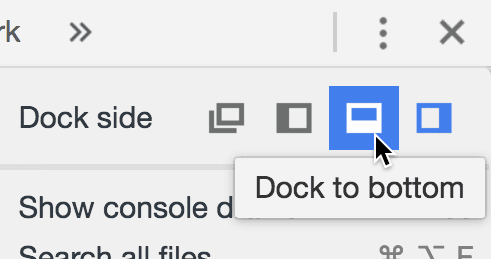
  3. For optimal workflow, we'll dock the DevTools to the bottom of the browser window. If the DevTools are currently docked to the right side, click the chrome devtools menu menu button at the top right of the DevTools panel, then select Dock to bottom as shown below:

    chrome dock to bottom icon

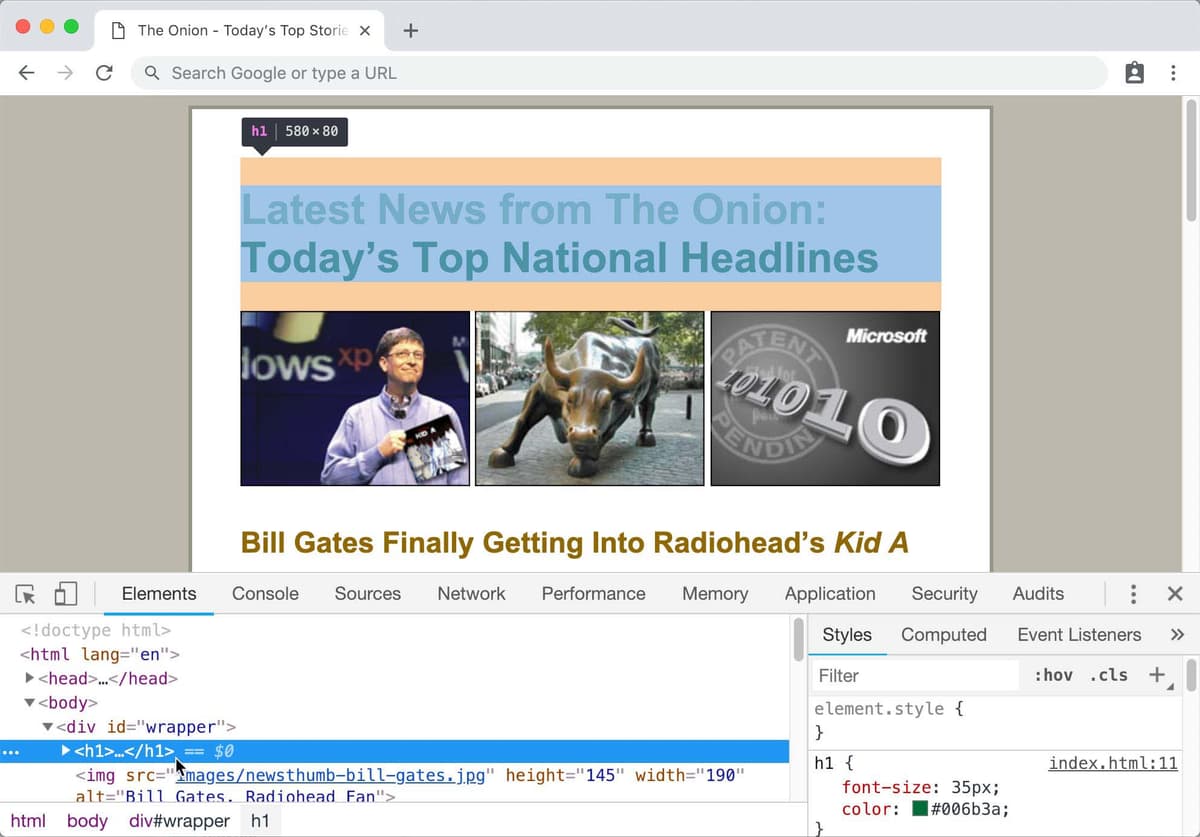
  4. The DevTools interface is organized into specialized panels, each serving distinct development needs. The Elements panel—currently active on the left—provides a live view of the DOM tree (Document Object Model). This interactive representation shows your document's hierarchical structure and allows real-time manipulation of any element.

    Hover over various HTML tags in the Elements panel. Notice how each element becomes highlighted in the main browser window, accompanied by detailed tooltips showing dimensions, margins, and padding. This visual feedback system is invaluable for understanding layout relationships and identifying spacing issues.

    using browser dev preview

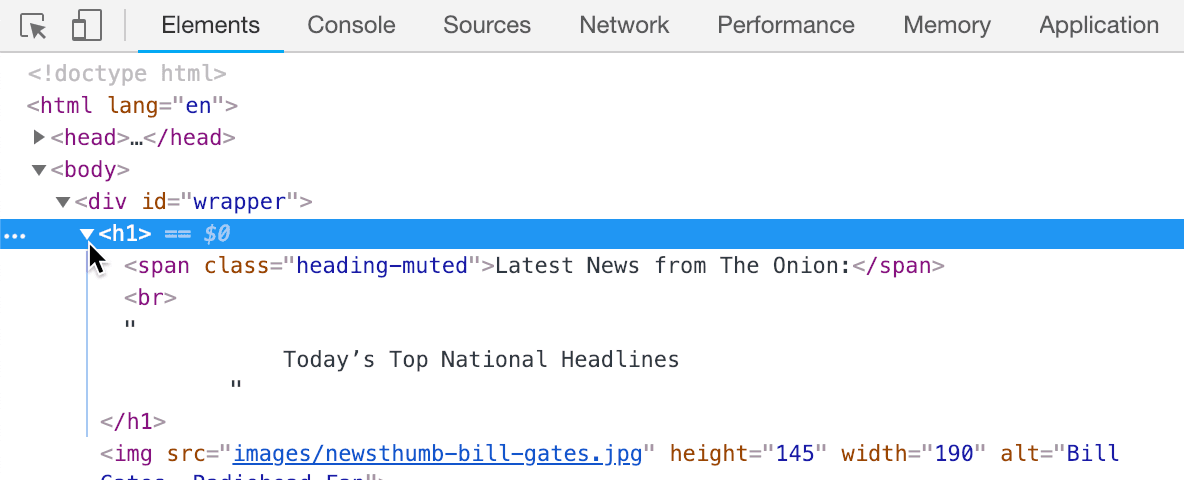
  5. Observe the expandable arrows next to HTML elements, which reveal nested content structures. Click to expand the <h1> tag (located directly above the three img tags) to examine its internal structure. This hierarchical navigation is crucial for understanding complex layouts and targeting specific elements with CSS.
  6. Examine the nested <span> and <br> tags within the <h1>. Understanding these relationships is fundamental: the <h1> serves as the parent element, while <span> and <br> are child elements. These child elements are siblings to each other within the DOM hierarchy. This parent-child-sibling relationship structure governs CSS inheritance and selector specificity—core concepts in professional web development.

    browser inspector html element2

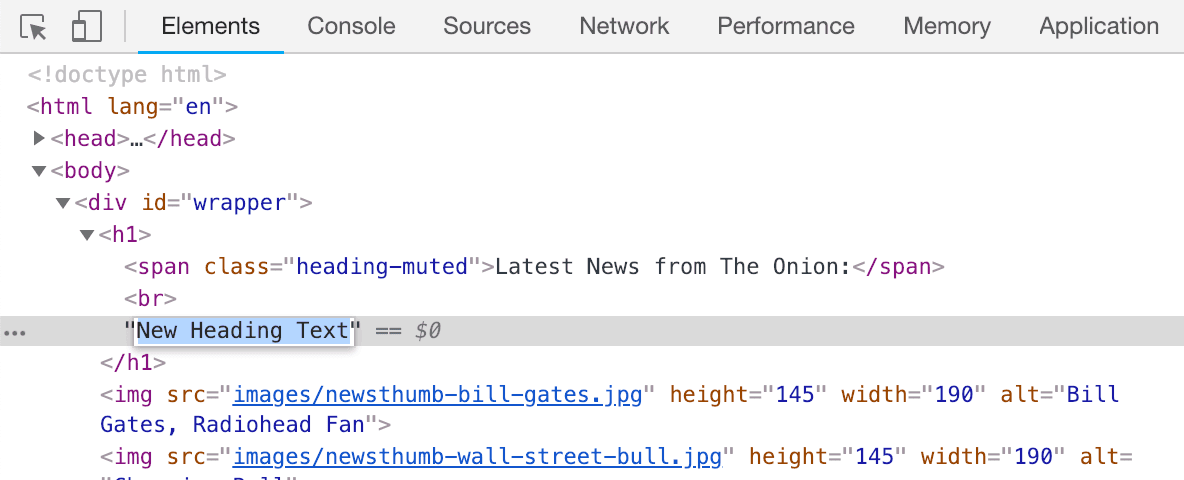
  7. Double-click the text content within the <h1> element and replace it with your own text, as demonstrated below:

    browser inspector edit h1

  8. Press Return (Mac) or Enter (Windows) to apply the change. The browser immediately reflects your modification—a powerful capability that enables rapid content and layout experimentation without file modifications.

    Take time to experiment with different text content and observe the live updates. Remember: these changes exist only in the browser's memory and won't be saved to your actual HTML file. This safe sandbox environment encourages bold experimentation without fear of breaking your source code.

  9. Refresh the browser to restore the original content, demonstrating the temporary nature of DevTools modifications.
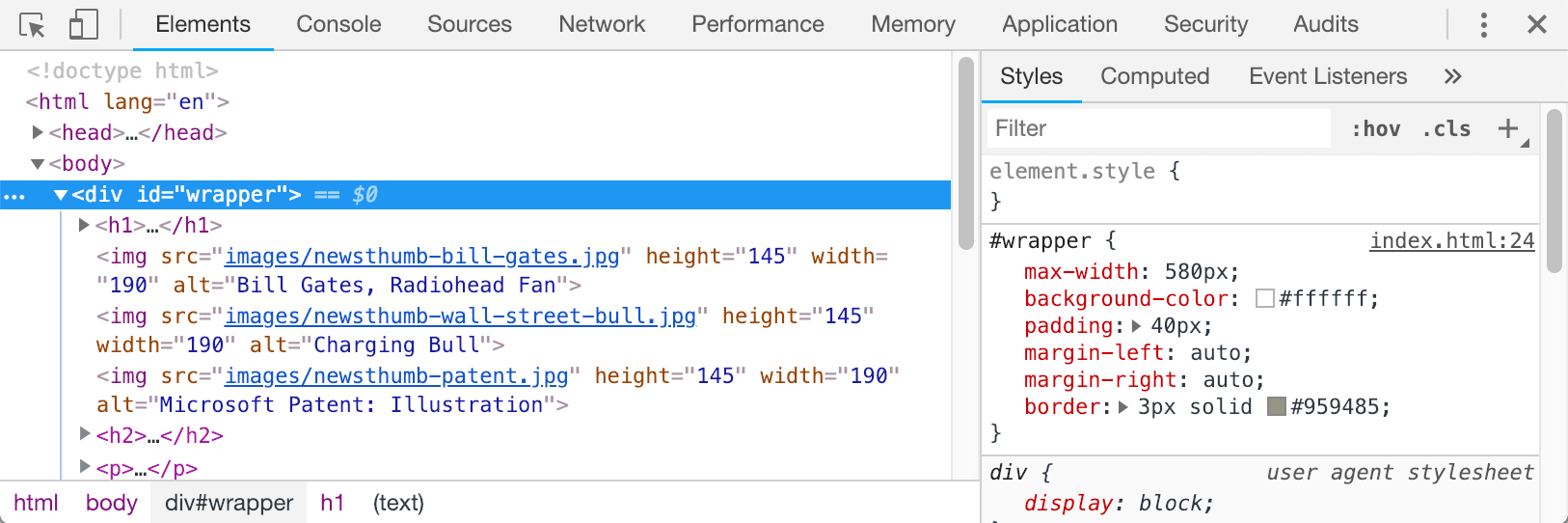
  10. Now let's explore CSS manipulation. Click on the <div id="wrapper"> tag in the Elements panel, located just below the <body> tag.
  11. Direct your attention to the Styles panel on the right side, which displays all CSS rules affecting the selected element. This panel shows not only your custom styles but also computed styles, inherited properties, and browser defaults—providing complete visibility into styling decisions.

    browser inspector css

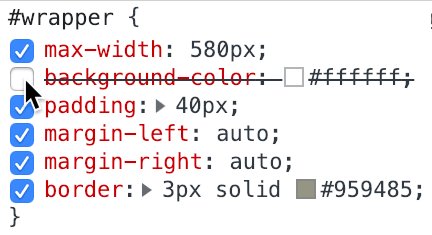
  12. Hover over the CSS properties for the #wrapper rule. Notice the checkboxes that appear next to each property—these allow instant toggling of individual styles. Click to uncheck and recheck various properties, observing how the page layout responds. Disabled properties display with a strikethrough, clearly indicating their inactive state:

    browser inspector strike thru

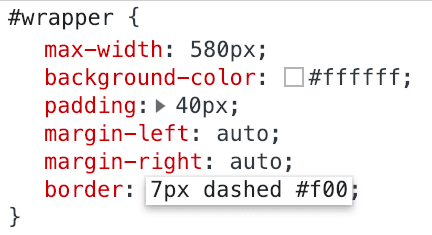
  13. Locate the border property and click directly on its value (3px solid #959485) to enter edit mode.
  14. Replace the existing value with 7px dashed #f00 and observe the immediate visual update:

    browser inspector editing css

    NOTE: CSS offers extensive border style options including dotted, double, groove, ridge, inset, and outset. Each creates distinct visual effects suitable for different design contexts.

Hexadecimal Color Shorthand: Professional Optimization

Professional developers optimize their CSS by using hexadecimal shorthand notation whenever possible. When a hex color contains three identical character pairs, it can be condensed to three digits: #fff instead of #ffffff, or #3c6 instead of #33cc66. This shorthand only applies to colors with identical paired characters—colors like #0075a4 cannot be shortened. This practice reduces file size and improves code readability.

  • Continue experimenting with different values and properties. This hands-on exploration builds intuitive understanding of CSS behavior and visual impact. Remember: these DevTools modifications serve as a testing ground—you must manually transfer any desired changes to your actual CSS files to make them permanent.
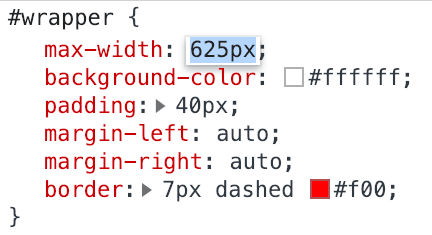
  • Now let's explore Chrome's advanced value manipulation features. Find the width property and click on its numerical value to select it.
  • While watching the wrapper div's width update in real-time, experiment with these keyboard shortcuts:

    • Press the Up Arrow key to increase the value by 1 pixel increments.
    • Press the Down Arrow key to decrease values incrementally.
    • Hold Shift while using Arrow keys to adjust values by 10 pixel increments for rapid changes.

    This precision control system enables pixel-perfect adjustments and rapid prototyping of spacing and sizing decisions.

    browser inspector editing css2

  • Refresh the browser to restore original values, resetting our experimental changes.

    While we won't permanently modify this element's dimensions, you've now experienced how DevTools provide immediate visual feedback for CSS experimentation—a workflow that dramatically accelerates development and reduces the traditional edit-save-refresh cycle that slows down traditional coding approaches.

    Now let's apply these techniques to solve a real design problem on this page.

  • Professional CSS Fine-Tuning: Correcting Heading Margins

    Let's address a common spacing issue that affects visual hierarchy and overall design balance. Professional developers constantly fine-tune these details to achieve polished, publication-quality results.

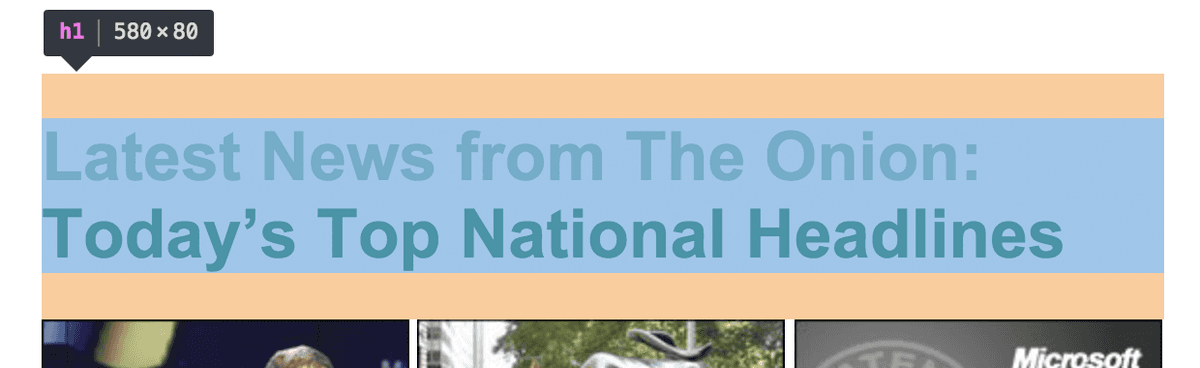
    1. Examine the main page heading ("Latest News from the Onion: Today's Top National Headlines") and notice the uneven spacing around it. The excessive top margin creates visual imbalance, disrupting the page's vertical rhythm. This type of spacing inconsistency is a hallmark of amateur web design.
    2. In the DevTools Elements panel, locate and click the <h1> tag to select it.
    3. Hover over the <h1> tag while observing the browser window. The orange-colored highlighting above and below the header indicates margin space—Chrome's visual debugging system uses color coding to distinguish margins (orange) from padding (green) and content areas (blue):

      browser inspector h1 margin

    4. With the <h1> tag selected, examine the associated styles in the right-side Styles panel. This comprehensive view shows all CSS rules affecting the element.
    5. Notice that while our custom CSS (in the embedded style tag) doesn't explicitly define margins for h1, the browser applies default styling through the user agent stylesheet. All browsers include these default styles, automatically adding margins to headings, paragraphs, and lists. Professional developers typically override these defaults to achieve precise design control.
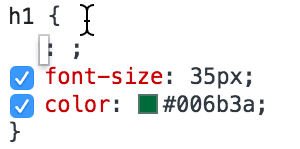
    6. To edit our h1 rule, click once inside the opening curly brace in the Styles panel to enter edit mode:

      browser developer edit h1 rules

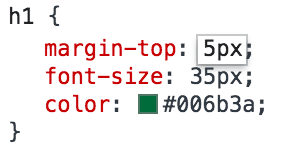
    7. Type margin-top and press Tab to auto-complete the property. Then enter 5px as the initial value:

      browser developer edit h1 margin

    8. Use the Up Arrow and Down Arrow keys to adjust the margin value while observing the visual changes. Notice how setting margin-top to 0px creates more balanced spacing around the heading. This achieves better visual hierarchy and improved overall page composition.
    9. Switch to your code editor where index.html should still be open. If you've closed it, reopen the file now.
    10. Locate the h1 CSS rule (near the top of the style tag) and add the margin-top property as shown in bold below:

      h1 {
         margin-top: 0;
         font-size: 35px;
         color: #006b3a;
      }

      NOTE: CSS best practices typically require units of measurement (px, em, rem, %) for numeric values. However, zero is universally zero regardless of unit, so 0 without a unit suffix is not only acceptable but preferred for cleaner, more efficient code.

    11. Save the file using Ctrl+S (Windows) or Cmd+S (Mac).
    12. Return to your browser and refresh index.html to see the permanent implementation of your design improvement.

    Code Quality Assurance: Professional Validation Practices

    Code validation remains a critical component of professional web development, even as browsers have become more forgiving of minor errors. Validation catches syntax errors, accessibility issues, and standards compliance problems that could impact SEO, performance, or cross-browser compatibility. Many professional development workflows include automated validation as part of their build process.

    1. Open a new browser tab and navigate to: validator.w3.org—the W3C's official HTML validation service, maintained by the organization that defines web standards.
    2. Click the Validate by File Upload tab to access local file validation.
    3. Click the Choose File or Browse button and navigate to your project files:

      • Navigate to Class Files > Web Dev Class > News website.
      • Double-click index.html to select it for validation.
    4. Click the Check button to begin validation.

      A successful validation will display: Document checking completed. No errors or warnings to show. This confirms your code adheres to current HTML standards and best practices, ensuring optimal compatibility and performance across all modern browsers and devices.

    Key Takeaways

    1Browser DevTools provide real-time HTML and CSS editing capabilities for rapid prototyping and debugging without modifying source files
    2Chrome's Elements panel reveals the complete DOM structure, showing parent-child relationships and sibling elements in a hierarchical tree view
    3CSS properties can be temporarily enabled, disabled, or modified in DevTools using checkboxes and direct value editing for immediate visual feedback
    4Hexadecimal color shorthand reduces six-digit codes to three digits when containing identical character pairs, improving code efficiency
    5Browser default styles from user agent stylesheets can be overridden by adding specific CSS rules to eliminate unwanted margins and spacing
    6Keyboard shortcuts in DevTools allow precise value adjustments with arrow keys for single-pixel changes or Shift+arrows for ten-pixel increments
    7HTML validation through W3C's validator service identifies coding errors, unclosed tags, and compliance issues that may not be immediately visible
    8DevTools changes are temporary and require manual implementation in actual CSS files to persist modifications across browser sessions

    RELATED ARTICLES