Promo: Nested Timelines
What This Tutorial Covers
Master Timelines
Compose smaller timelines into larger sequences.
Reusability
Build modular animations that can be reused.
Synchronization
Coordinate timing across nested animations.
Noble Desktop's JavaScript Development Certificate teaches modern JavaScript — the foundation behind GSAP and other animation libraries.
Grasp the art of developing complex animations with this comprehensive GreenSock tutorial. Learn how to nest timelines within a parent timeline, add individual tweens to the parent timeline, and make provisions for potential connectivity issues.
Topics Covered in This GreenSock Tutorial:
Nesting Timelines Within a Parent Timeline, Adding Individual Tweens to the Parent Timeline, Making Provisions for Connectivity Problems
Exercise Preview
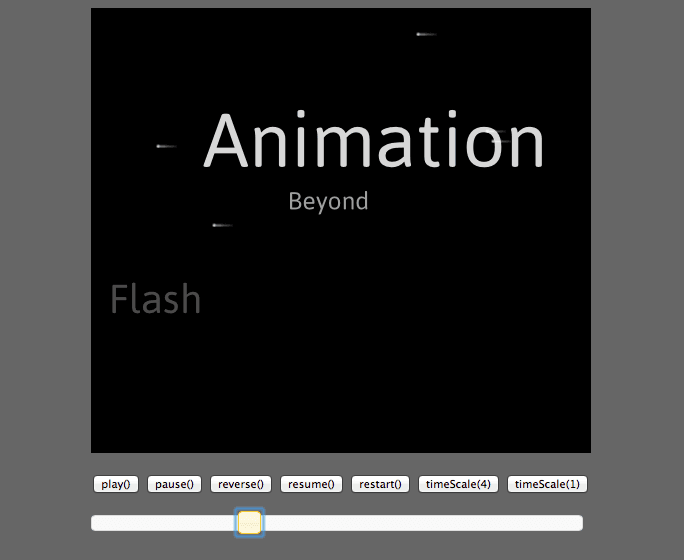
Exercise Overview
In this exercise, we will nest the two timelines we created in previous exercises within a parent timeline. Once the timelines are nested, we will be able to debug the entire sequence by fine-tuning the timing, testing for possible real-world issues such as connectivity issues, and controlling the animation as a whole (with the play(), pause(), and reverse() buttons we used in a previous exercise, for instance).
Getting Started
In your code editor, open yourname-GSAP Class > Promo Nested Timelines > index.html (or the entire Promo Nested Timelines folder if your code editor allows).
This file is identical to the state of index.html at the end of the last exercise. We left the page with two timelines playing at the same time, but now we need to rearrange the structure of the timelines so they can be placed inside a parent timeline.
Find the following two functions on lines 55–56 and delete them:
getStarsTimeline();
getTitlesTimeline();
Nesting Timelines Within a Parent Timeline
We will use TimelineLite’s add() method to add the timelines created by the functions getStarsTimeline() and getTitlesTimeline() to a parent timeline.
In order to do this, we need to change both functions slightly. To re-configure these methods so they not only create timelines, but also return timelines, add the code shown below in bold to each function (around lines 44 and 54):
function getStarsTimeline(){
   var $starfield = $("#starfield"),
       tl = new TimelineLite();

   for(var i = 0; i<50; i++){
Code Omitted To Save Space
}
   return tl;
}

function getTitlesTimeline(){
   var $titles = $(".title"),
       tl = new TimelineLite();

      tl.set($titles, {xPercent:-100}).staggerTo($titles, 3, {X:width, xPercent:0, ease:SlowMo.ease.config(0.1,1.2)}, 0.3).staggerFrom($titles, 3, {scale:0, opacity:0, ease:SlowMo.ease.config(0.1,1.2, true)}, 0.3,0);
   return tl;
}
Both of these functions create a TimelineLite called tl, and now that we’ve added this line of code, each function will return a single instance of the timeline object the function creates. Returning an instance of the timeline object will give us greater control nesting the timeline in a parent timeline and controlling its start time.
Let’s create the main timeline. Add the following code beneath the end of the getTitlesTimeline() function (around line 57):
.staggerFrom($titles, 3, {scale:0, opacity:0, ease:SlowMo.ease.config(0.1,1.2, true)}, 0.3,0);
   return tl;
}

var mainTimeline = new TimelineLite();
This is the parent timeline. Let’s add the other timelines to it.
Add the following bold code:
var mainTimeline = new TimelineLite();
mainTimeline.add(getStarsTimeline())
We are using the add() method to nest the timeline that gets returned by the getStarsTimeline() function.
Save the file and preview in a browser.
The Animation Beyond Flash text will be static, but because we added the getStarsTimeline() function to the parent timeline, the starfield will be animating! Great!
Return to your code editor and add the following bold code to nest the Titles timeline within the parent timeline:
var mainTimeline = new TimelineLite();
mainTimeline.add(getStarsTimeline())
.add(getTitlesTimeline())
Save the file and preview in a browser.
Hmm, the animations are playing sequentially; the titles animation doesn’t start until the starfield animation finishes. This isn’t what we want.
Return to your code editor and pass in a position parameter as follows:
.add(getTitlesTimeline(), 0)Save the file and preview in a browser. Excellent, both animations start at the same time within the parent timeline.
Adding Individual Tweens to the Parent Timeline
We are able to add as many timelines as we want to the parent timeline, but we are also permitted to add single tweens. Let’s try it out, making the whole $demo div fade in before the two timelines play.
In your code editor, add the following bold code around line 59:
mainTimeline
.from($demo, 2, {autoAlpha:0}).add(getStarsTimeline())
This code will make the
$demo div fade in over 2 seconds from an autoAlpha of 0. GSAP’s autoAlpha plugin toggles an element’s CSS visibility property to hidden when its opacity reaches zero. This useful plugin ensures that users cannot click on or otherwise interact with this element when we want it to be invisible. Pretty smart.Save the file and preview the page in a browser.
Reload the page a few times and look carefully to see that the black background DOES fade in over two seconds. It’s a nice improvement, but the titles timeline plays immediately because it starts at an absolute time of 0, while the stars timeline doesn’t play until the fade has finished. We will clearly have to fine-tune our timing.
We can think about the demo element’s initial fade-in as “panel1” of our storyboard. This would make the starfield and titles animation “panel2.” Let’s label them as such in the code.
Return to your code editor and add the following labels (in bold):
var mainTimeline = new TimelineLite();
mainTimeline.from($demo, 2, {autoAlpha:0}).add(getStarsTimeline(), "panel2").add(getTitlesTimeline(), "panel2")
Once again, labels offer the cleanest solution. Remember that the first mention of the
"panel2"label actually creates the label. This means our label refers to the beginning of the stars timeline and the second label call adds the titles timeline at this new label poition. Having both nested timelines start at the same label position will solve the issue with the timing.Save the file and preview in a browser. This is better: the fade-in happens for two seconds, then the two timelines start. It’s great that we have such precise control over all the timelines.
The fade-in goes on a bit too long; let’s shorten it.
Return to your code editor and make the following change:
var mainTimeline = new TimelineLite();
mainTimeline.from($demo, 0.5, {autoAlpha:0}).add(getStarsTimeline(), "panel2").add(getTitlesTimeline(), "panel2")
Save the file and preview in a browser. That pacing seems better. (Plus, by using labels rather than absolute times, we didn’t have to make more than one change in our code!)
Making Provisions for Connectivity Problems
When developing animations, it’s always important to consider some worst-case scenarios such as: What will my animation look like if the user has some network problems and the JavaScript doesn’t load quickly enough?
Bad internet connections can cause assets to flash and flicker while the page renders. Let’s simulate a bad internet connection and learn an easy way to optimize user experience using the autoAlpha property.
Let’s wrap the parent timeline in a function, which will allow us to simulate a bad internet connection. Add the following bold code:
function createTimeline() {
   var mainTimeline = new TimelineLite();
   mainTimeline.from($demo, 0.5, {autoAlpha:0}).add(getStarsTimeline(), "panel2").add(getTitlesTimeline(), "panel2")
}
Yes, we are containing everything within ANOTHER function; now the code won’t run at all until we call the createTimeline() function.
Save the file and preview in a browser. The page will be completely static, with white text on a black background; this is what will happen if internet connectivity problems are so bad that the timeline never gets created.
Return to your code editor and add the following bold code:
function createTimeline() {
   var mainTimeline = new TimelineLite();
   mainTimeline.from($demo, 0.5, {autoAlpha:0}).add(getStarsTimeline(), "panel2").add(getTitlesTimeline(), "panel2")
}
//simulate some sort of network problem
TweenLite.delayedCall(1, createTimeline);
Like the name suggests, TweenLite’s delayedCall() method allows us to delay the calling of a given function. As for its parameters: the number 1 refers to the amount of the delay (in seconds), and the second parameter is the name of the function we’ll be delaying.
NOTE: Make sure to omit the parentheses () for createTimeline because we are referencing this function rather than calling the function.
Save the file and preview the page in a browser. The “static version” displays for one second thanks to the simulated connectivity problems. After that delay, the two timelines play normally.
We need to ensure that users don’t see the assets before the page loads.
In your code editor, open Promo Nested Timelines > css > style.css
Add the following bold code to the #demo div, which starts on line 7:
#demo {
   position:relative;
   width:500px;
   height:445px;
   background-color:,000;
   margin:auto;
   overflow:hidden;
   visiblity:hidden;
}
By setting visibility to hidden, we ensure that at the moment when the page first loads (before the JavaScript executes), that div will be invisible. Once the JavaScript executes, the timeline will be created and the div will fade in nicely.
Save the file and preview the page in a browser.
Excellent, there is one second of complete nothingness (the simulated bad connection) after which the autoAlpha of mainTimeline is tweened from zero to full visibility (autoAlpha overrides the CSS visibility property) and the animation plays normally. Much better than seeing the text appear and disappear!
Bonus 1: Promo Animation with Controller
To help you better understand how nesting timelines within a parent timeline can provide greater control over an animation, we have prepared a version of this animation integrated with a controller. Let’s check it out.
In a browser, open Promo Nested Timelines Done > finished_with_controls.html
If you did the TimelineLite Control exercise, you’ll recognize the controls at the bottom from testing the Into the Wind animation. We prepared this file for you because you already have experience coding these controls (or you can see how to do it in that exercise).
Try playing around a bit with the controls. Because all of the child timelines are contained in a parent timeline, we can link the controller to the parent timeline and easily reverse, pause, and scrub through it, for example, with a single set of controls.
Bonus 2: Checking Out the Finished Promo’s Code
Open the following file in your code editor: Promo Done > index.html
Take some time to check out the functions for the five individual timelines (such as getStarsTimeline() around line 88 and getTitlesTimeline() around line 100). Notice that all of these timeline functions end with return tl to return the timeline that they create.
Check out the parent timeline around line 134:
//build main timeline
mainTimeline.from($demo, 0.5, {autoAlpha:0}).add(getNobleTimeline(), 0.5).add("panel2", "-=1.5").add(getStarsTimeline(), "panel2").add(getTitlesTimeline(), "panel2").add(getPoweredByTimeline()).add(getEndTimeline(), "-=0.2");
Here the add() method has been used to nest five timelines within a parent timeline, just as we did in this exercise.
When creating complex animations, this is always a good strategy.