Basic Tweening: Free GreenSock Tutorial

Master CSS animations with GreenSock's powerful tweening library

GreenSock Animation Platform Overview

3
core GSAP components covered
2s
second animation duration
360°
degrees rotation in example

Topics Covered in This GreenSock Tutorial:

Loading Scripts, Anatomy of a TweenLite Tween, the TweenLite.to() Method, Tweening Multiple Properties, Easing

Exercise Preview

exercise preview basic tweening

Exercise Overview

In this hands-on exercise, you'll master the fundamentals of the GreenSock Animation Platform (GSAP) by integrating it into a real project and animating essential CSS properties. You'll discover why GSAP has become the gold standard for web animation—delivering smooth, performant animations with remarkably clean syntax.

TweenLite serves as the powerhouse core of GSAP's animation engine, capable of smoothly animating virtually any property of any object. Despite its lightweight footprint, it delivers professional-grade features that have made it the go-to choice for developers at companies like Google, Adobe, and Microsoft.

GSAP's modular architecture empowers you to load only the components you need, keeping your bundle size optimized—a critical consideration for modern web performance. Alternatively, you can leverage TweenMax for convenience, which packages the most commonly used components into a single file. We'll start with the targeted approach, loading only essential modules, then graduate to TweenMax as our animation requirements become more sophisticated.

GSAP Architecture Benefits

Modular Loading

Load only the files you need to keep file size small. Scale up to TweenMax for convenience when projects require more features.

Lightweight Core

TweenLite provides full-featured animation capabilities while remaining relatively lightweight and handling any object property.

Universal Compatibility

Animates just about any property of any object with cross-browser support and automatic vendor prefix handling.

Previewing the Finished Animation

Before diving into the code, let's examine the polished animation you'll be creating to understand our destination.

  1. Launch Google Chrome (or your preferred modern browser).

  2. Open a file using Cmd–O (Mac) or Ctrl–O (Windows).

  3. Navigate to Desktop > Class Files > yourname-GSAP Class > Tweening Basics.

    NOTE: All exercise folders for this workbook are organized within the yourname-GSAP Class directory for easy access.

  4. Double-click finished.html.

    Watch as the Noble Desktop icon elegantly rotates while sliding across the screen—this is the power of GSAP in action.

  5. Refresh the page using Cmd–R (Mac) or F5 (Windows) to replay the animation. Study the smoothness and timing—qualities that separate professional animations from amateur attempts.

  6. Close the browser when you're ready to begin building.

Loading Scripts

Professional GSAP implementation begins with understanding its modular system. For this exercise, we'll utilize three core components: TweenLite for animation logic, CSSPlugin for DOM manipulation, and EasePack for advanced motion curves.

  1. Open start.html from the Tweening Basics folder using your preferred code editor (VS Code, Sublime Text, Dreamweaver, or similar).

    PRO TIP: Consider opening the entire Tweening Basics folder as a project in your editor for easier file navigation and IntelliSense support.

  2. Examine the foundational HTML structure. Within the body tag around line 18, you'll find:

    <img id="icon" src="img/noble-icon.png" width="210" height="211">
  3. Note the id="icon" attribute—this serves as our animation target selector. Proper element identification is crucial for maintainable GSAP code, especially in complex projects.

    Now we'll integrate the GSAP JavaScript modules. While production environments typically use CDN links for performance and caching benefits, we're using local files to ensure offline capability during development.

  4. Locate the comment around line 20:

    <!—load scripts after DOM has been rendered—>
  5. Add the essential GSAP modules below this comment:

    <!—load scripts after DOM has been rendered—>
    <script src="js/gsap/TweenLite.js"></script>
    <script src="js/gsap/plugins/CSSPlugin.js"></script>
    <script src="js/gsap/easing/EasePack.js"></script>

    This lightweight combination represents the foundation of most professional GSAP implementations:

    TweenLite provides GSAP's core animation engine with essential easing functions: Power0 through Power4, plus Linear, Quad, Cubic, Quart, Quint, and Strong. These cover 90% of animation needs while maintaining minimal overhead.

    CSSPlugin extends TweenLite's capabilities to handle CSS properties seamlessly. Beyond basic properties like width, height, and positioning, it excels at complex transforms (rotation, scaling, skewing, 3D transforms), color animations, opacity, and advanced CSS features—all with automatic vendor prefix handling.

    EasePack elevates your animations with sophisticated easing options including Elastic (spring-like motion), SlowMo (cinematic effects), Bounce (natural physics), SteppedEase (frame-by-frame animation), RoughEase (organic imperfection), plus mathematical curves like Sine, Circ, and Expo.

  6. Save your file to commit these changes.

Required GSAP Components Setup

0/3

Anatomy of a TweenLite Tween

Understanding GSAP's syntax structure is essential for creating maintainable animations. Every tween requires three fundamental pieces of information that determine its behavior and appearance.

  1. Every successful animation requires these core elements:

    • Target object: The DOM element, JavaScript object, or array of objects to animate
    • Duration: The animation timeline length (in seconds by default)
    • Properties: The CSS properties to animate and their final values
  2. These elements feed into TweenLite's primary method (reference only—don't type this):

    TweenLite.to( target:Object, duration:Number, vars:Object )
    target: The DOM element(s) or JavaScript object(s) to animate. Can be a single element, array, or selector string.
    duration: Animation duration in seconds (default) or other units. Fractional values like 0.5 are perfectly valid.
    vars: Configuration object containing CSS properties, special properties (ease, delay, onComplete), and advanced features.

    For comprehensive technical documentation, reference the official TweenLite.to() API at greensock.com/docs/TweenLite/static.to(). However, the step-by-step approach below will build your practical understanding organically.

TweenLite.to() Method Structure

1

Define Target

Specify the object or objects being animated - the element you want to tween

2

Set Duration

Determine how long the animation runs in seconds by default

3

Configure Properties

Create JavaScript object with property-value pairs plus special properties like eases and callbacks

Using the TweenLite.to() Method

Now we'll transform theory into practice by creating our first functional GSAP animation. This systematic approach ensures clean, readable code that scales effectively.

  1. Establish a JavaScript reference to your target element. In the script section under the add your own script comment, add:

    <!—add your own script—>
    <script>
       var icon = document.getElementById("icon");
    </script>

    This creates a reusable reference to our image element. Professional tip: storing DOM references in variables improves performance by avoiding repeated DOM queries.

  2. Create spacing for your animation code by pressing Return (Mac) or Enter (Windows) three times after your variable declaration.

  3. Add the basic TweenLite method structure:

    var icon = document.getElementById("icon");
    
       TweenLite.to();
    
    </script>
  4. Complete the tween with the required parameters:

    TweenLite.to(icon, 2, {opacity:0});
  5. Let's deconstruct this animation call:

    • First parameter (icon): The target element to animate—our image with ID "icon"
    • Second parameter (2): The duration—2 seconds for a smooth, observable transition
    • Third parameter ({opacity:0}): The vars object defining the end state—completely transparent (opacity: 0)

    The vars object is GSAP's powerhouse, accepting unlimited CSS properties alongside special animation properties like callbacks, eases, delays, and timeline controls. This flexible architecture makes complex animations surprisingly manageable.

  6. Save your progress using Cmd–S (Mac) or Ctrl–S (Windows).

  7. Test your animation in a web browser.

    WORKFLOW TIP: Modern editors offer browser preview shortcuts for efficient development. In Sublime Text with SideBarEnhancements, use F12 (or fn–F12). In Dreamweaver, select File > Preview in Browser. Otherwise, manually open the file via your browser's file menu.

    Browser Preview Workflow

    Keep your HTML file open in the browser while coding. Simply reload with Cmd-R (Mac) or F5 (Windows) to see changes instantly without reopening files.

Browser Preview Shortcuts

Efficient development workflows rely on rapid preview capabilities. If using Sublime Text with SideBarEnhancements and custom key bindings from the Before You Begin section, press F12 (or fn–F12 depending on your system settings) to instantly open your HTML in the default browser.

Mac users: You may need to disable the Show Dashboard shortcut in System Preferences > Mission Control (or Keyboard) to avoid conflicts.

Dreamweaver users can access File > Preview in Browser for similar functionality.

  • Observe the smooth 2-second fade transition as the icon gracefully disappears. This demonstrates GSAP's superior interpolation algorithms compared to basic CSS transitions.

    noble logo opacity tween

  • Keep the browser tab open for efficient testing—simply refresh the page to replay animations as you develop.

  • This seamless workflow of code-save-refresh accelerates animation development and helps you achieve pixel-perfect timing.

  • Tweening Multiple Properties

    GSAP's true power emerges when animating multiple properties simultaneously. This creates sophisticated, layered animations that would require complex timing coordination in CSS or other frameworks.

    The vars object accepts unlimited CSS properties, enabling rich multi-dimensional animations with a single method call. Let's enhance our fade animation with rotation for a more dynamic effect.

    1. Return to your code editor and add rotation to the existing opacity tween:

      TweenLite.to(icon, 2, {opacity:0, rotation:360});

      IMPORTANT: Notice the comma separating properties—proper syntax is crucial for complex animations. Also observe GSAP's clean rotation syntax: no vendor prefixes, no complex transform strings, just rotation:360.

    2. Save and preview your enhanced animation in the browser.

    3. Marvel at the synchronized fade and rotation—two complex animations perfectly orchestrated in a single line of code. This demonstrates why professionals choose GSAP for production work.

      noble logo opacity rotate tween

    4. Return to your editor for the next enhancement.

    5. Simplify to focus on positioning by removing the opacity property:

      TweenLite.to(icon, 2, {rotation:360});

      This isolation technique helps when debugging complex animations—start simple, then layer complexity.

    6. Add horizontal movement to recreate the finished animation's sliding effect:

      TweenLite.to(icon, 2, {rotation:360, left:400});
    7. Save and test the animation.

      You'll notice the rotation works perfectly, but the horizontal movement fails. This reveals a critical CSS positioning requirement for GSAP animations.

    8. Return to your code editor to resolve this issue.

    9. For GSAP to animate positional properties (left, right, top, bottom), the target element must have CSS positioning context. Around line 12, enhance the #icon CSS rule:

      #icon {   
         position: relative;
      }

      This establishes the positioning context needed for left/right/top/bottom animations without disrupting the document flow.

    10. Save and preview the complete animation. Now you'll see both smooth rotation and horizontal sliding—the foundation of professional motion design.

    CSS Position Requirement

    To tween positional properties like left, top, or right, the target element MUST have a CSS position property set to absolute, relative, or fixed.

    GSAP vs CSS Transforms

    Pros
    No vendor prefixes needed
    Automatic cross-browser compatibility
    Clean, readable syntax
    Works back to IE 6 for 2D transforms
    Cons
    Requires external library
    Additional HTTP requests for scripts
    Learning curve for GSAP-specific syntax

    Easing

    Easing transforms mechanical movement into natural, engaging motion by varying the rate of change throughout an animation. It's the difference between robotic transitions and animations that feel alive and purposeful.

    GSAP provides an extensive easing library, from subtle mathematical curves to dramatic special effects. Understanding when and how to apply different eases is crucial for professional animation work.

    1. Explore GSAP's comprehensive easing options using the interactive Ease Visualizer: greensock.com/ease-visualizer

      This invaluable tool helps you select the perfect ease by visualizing motion curves and providing copy-ready code.

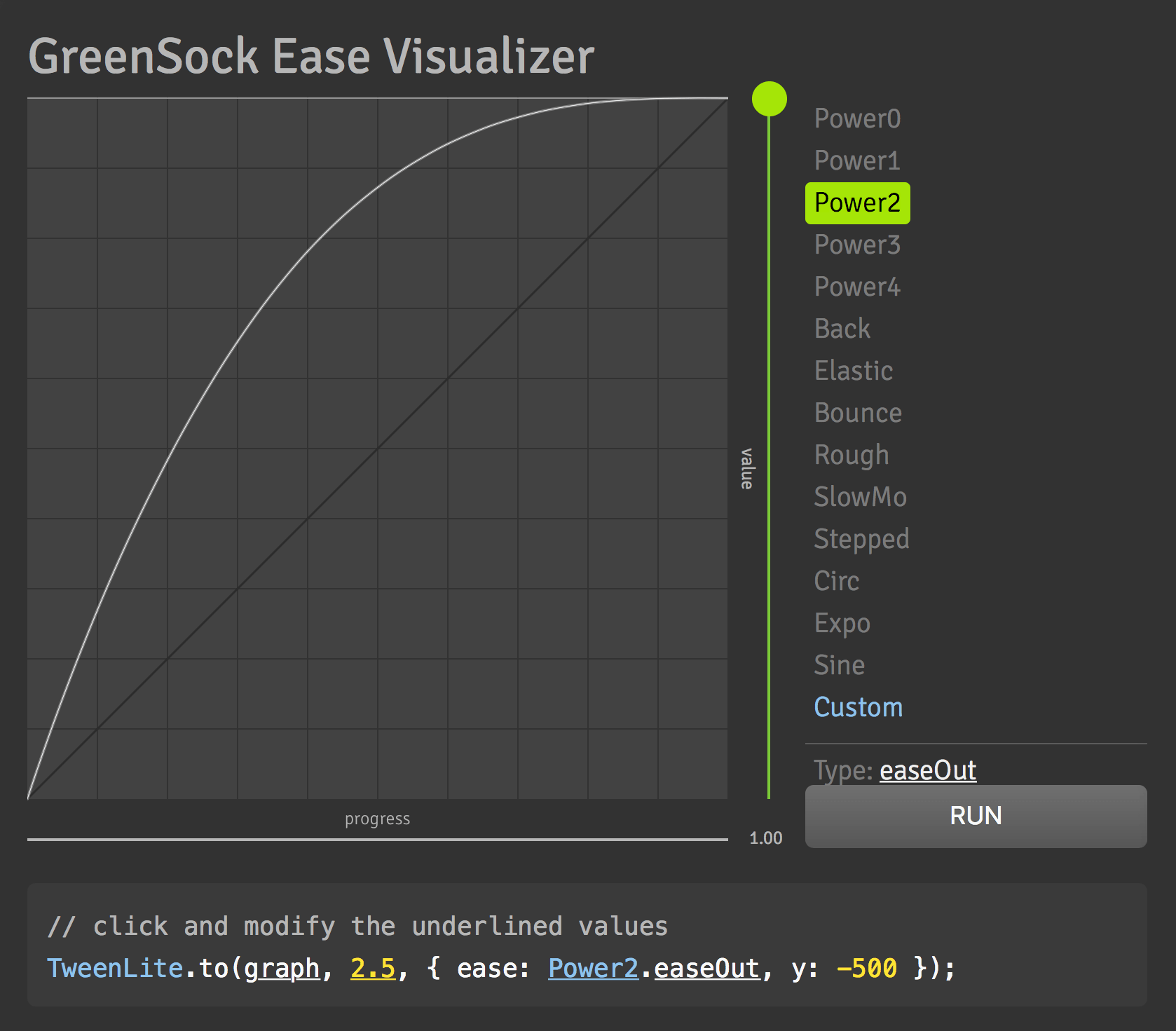
    2. The Ease Visualizer interface provides immediate visual feedback:

      ease visualizer

      The right panel categorizes eases by type (Power, Back, Bounce, etc.), while the graph shows the acceleration curve. This visual approach makes selecting appropriate eases intuitive rather than guesswork.

    3. The generated code below the visualization updates dynamically based on your selections. Click any underlined text to fine-tune parameters and create custom variations.

      PRO TIP: The accompanying video tutorial on the Ease Visualizer page provides deeper insights into ease selection for different animation goals.

    4. Let's implement a playful Bounce ease to add character to our animation.

    5. Add the bounce effect after your positioning property:

      TweenLite.to(icon, 2, {rotation:360, left:400, ease:Bounce.easeOut});

      The Bounce.easeOut creates settling motion at the animation's conclusion—perfect for objects "landing" in their final position.

    6. Save and preview the bouncing conclusion. This subtle detail transforms a basic movement into engaging motion.

    7. Experiment with a different easing style. Replace Bounce with Back:

      TweenLite.to(icon, 2, {rotation:360, left:400, ease:Back.easeOut});
    8. Save and observe the new motion pattern.

      The Back ease creates anticipation by overshooting the target before settling—a technique borrowed from traditional animation principles.

    9. Page-load animations can feel abrupt and easily missed. Let's add strategic timing control.

    10. Introduce a one-second delay to build anticipation:

      TweenLite.to(icon, 2, {rotation:360, left:400, ease:Back.easeOut, delay:1});

      This pause allows users to focus on the page content before the animation commands attention—a crucial UX consideration.

    11. Save and test the complete animation with its refined timing. The delay creates a more polished, intentional user experience.

      Continue experimenting with different eases to understand their unique personalities and appropriate use cases.

    Ease Visualizer Tool

    Use GreenSock's Ease Visualizer at greensock.com/ease-visualizer to preview different easing options and get code snippets with configurable parameters.

    GSAP Power Eases vs Traditional Names

    FeaturePower EaseTraditional Equivalent
    Power0No easingLinear.easeNone
    Power1Light easingQuad
    Power2Medium easingCubic
    Power3Strong easingQuart
    Power4Very strong easingQuint
    Recommended: Start with Power1 and work up to Power4 for intuitive ease strength selection

    EasePack Additional Options

    Special Effects Eases

    Back, Bounce, and Elastic eases provide unique animation personalities with overshoot and spring-back effects.

    Legacy Mathematical Eases

    Traditional eases like Circ, Sine, and Quad maintain compatibility with existing animation workflows.

    Proprietary GSAP Eases

    Unique options like SlowMo and RoughEase offer advanced control not available in other animation libraries.

    Professional Easing Strategy

    Traditional easing names (Quad, Cubic, Quart) derive from mathematical equations but provide little guidance for animators. GSAP's Power naming system revolutionizes ease selection by clearly indicating strength levels, enabling confident experimentation and precise control.

    Power0: Linear motion with no easing (equivalent to Linear.easeNone)
    Power1: Gentle acceleration/deceleration (equivalent to Quad)
    Power2: Moderate easing for most UI animations (equivalent to Cubic)
    Power3: Strong easing for dramatic effects (equivalent to Quart)
    Power4: Maximum mathematical easing (equivalent to Quint)

    GSAP's EasePack (bundled in TweenMax.js or available separately) extends your options with:

    • Special effects eases: Back (anticipation), Bounce (natural physics), Elastic (spring dynamics)
    • Legacy mathematical eases: Circ, Sine, Expo for specific curve requirements
    • Proprietary innovations: SlowMo (cinematic speed ramping), RoughEase (organic imperfection)

    Professional recommendation: Start with Power2 for most UI work, then adjust up or down based on the desired intensity.

    Ease Visualizer Tool

    Use GreenSock's Ease Visualizer at greensock.com/ease-visualizer to preview different easing options and get code snippets with configurable parameters.

    GSAP Eliminates CSS Transform Complexity

    CSS transforms require extensive vendor-prefix management that complicates development and maintenance. Consider the verbose CSS needed for simple 90-degree rotation across modern browsers:

    -webkit-transform: rotate(90deg);
    -moz-transform: rotate(90deg);
    -ms-transform: rotate(90deg);
    -o-transform: rotate(90deg);
    filter: progid:DXImageTransform.Microsoft.BasicImage(rotation=1); /* Legacy IE */

    GSAP's CSSPlugin reduces this complexity to elegant simplicity: rotation:90. The plugin automatically handles all browser prefixes, vendor-specific syntax variations, and compatibility issues behind the scenes.

    Even more impressively, GSAP provides consistent 2D transform support back to Internet Explorer 6, solving cross-browser compatibility challenges that would otherwise require extensive fallback code and testing. This reliability is why major corporations trust GSAP for mission-critical web applications.

    Key Takeaways

    1GSAP provides a modular architecture allowing you to load only necessary components like TweenLite, CSSPlugin, and EasePack for optimal performance
    2The TweenLite.to() method requires three parameters: target object, duration in seconds, and a vars object containing end values and special properties
    3Elements must have CSS position property set to absolute, relative, or fixed to animate positional properties like left, top, or right
    4GSAP automatically handles vendor prefixes for CSS transforms, eliminating the need for multiple browser-specific property declarations
    5Power eases (Power0 through Power4) provide intuitive naming that makes it easy to adjust animation strength compared to traditional mathematical names
    6The delay property allows precise timing control, preventing animations from starting immediately when the page loads
    7Multiple CSS properties can be animated simultaneously within a single tween by separating them with commas in the vars object
    8GreenSock's Ease Visualizer tool helps developers preview and configure different easing options with real-time visual feedback and code generation

    RELATED ARTICLES