April 1, 2026Jerron Smith/9 min read

Spline Modeling: Loft

Master advanced 3D spline modeling with Cinema 4D

Core Concepts You'll Master

Spline Modeling

Learn to create complex shapes using curved lines and paths. Build sophisticated 3D objects from simple spline primitives.

Loft Generator

Understand how to connect multiple splines into smooth surfaces. Create organic shapes impossible with traditional modeling.

Template Workflow

Set up reference images and organized project structures. Maintain professional file organization for complex projects.

Topics Covered in This Cinema 4D Tutorial:

Creating Splines, Shapes & Lines, Loft Generator

Exercise Preview

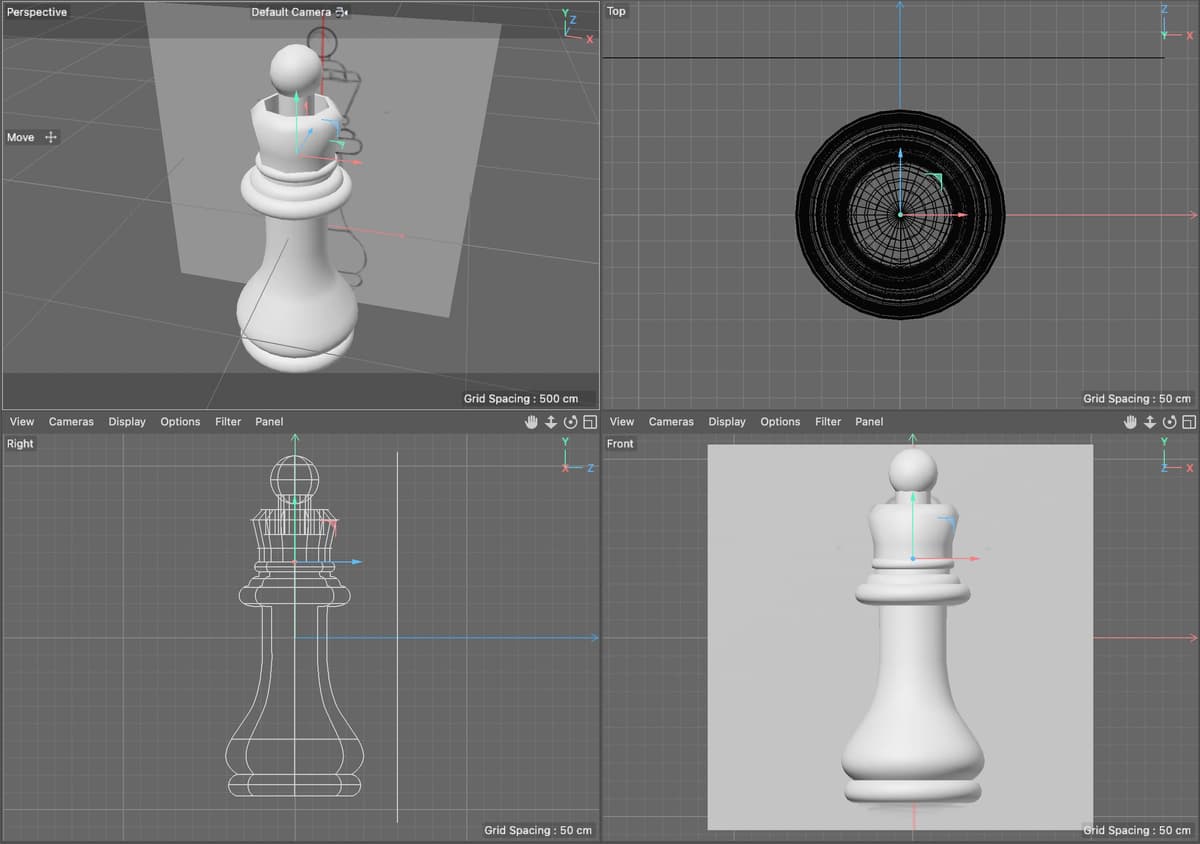
Preview4a

Exercise Overview

In this exercise, you'll master the loft modeling technique—a powerful method for creating complex organic shapes that traditional modeling approaches simply can't match. This technique is essential for professional 3D artists working on everything from architectural visualization to character design.

Project Focus

This tutorial creates a chess queen crown that cannot be made with radial symmetry tools like lathe objects, making it perfect for demonstrating loft techniques.

Getting Started

  1. Launch Cinema 4D Lite and prepare your workspace for optimal efficiency.

  2. If the Quick Start Dialog appears upon launch, close it to access the main interface.

  3. For existing projects in C4D Lite, save your current work by choosing File > Save.

  4. Clear your workspace by choosing File > Close All Projects.

  5. Load the tutorial project by choosing File > Open Project.

    • Navigate to C4D in AE Class > Spline Modeling—Loft
    • Double–click on Chess Queen—Started.c4d to open it.
  6. Immediately create your working version by choosing File > Save Project As

  7. If necessary, navigate to C4D in AE Class > Spline Modeling—Loft

  8. Name the file Your Name—Chess Queen.c4d to maintain version control

  9. Click Save to establish your working file. You're now ready to begin crafting professional-quality 3D geometry.

    In this exercise, you'll employ a loft generator to construct the ornate crown of a chess piece. While the body utilizes a lathe object for its radial symmetry, the crown's complex, non-symmetrical geometry demands the sophisticated approach that only loft modeling can provide. This demonstrates a key principle in professional 3D work: selecting the right tool for each specific modeling challenge.

Project Setup Workflow

1

Launch Cinema 4D Lite

Close Quick Start Dialog and save any existing projects before proceeding

2

Open Template File

Navigate to Chess Queen Started.c4d in the Spline Modeling Loft folder

3

Save Project Copy

Use Save Project As to create your personal working file with your name

What is a Loft?

In Cinema 4D, the Loft generator represents one of the most versatile tools in a professional modeler's arsenal. It creates smooth, curved surfaces between two or more splines (shapes), enabling you to craft complex organic forms that would be impossible or extremely time-consuming using traditional box modeling techniques.

The process is elegantly simple yet powerfully flexible: you create a series of cross-sectional shapes (splines) positioned in 3D space, then the Loft generator automatically generates a continuous surface that flows smoothly through each spline. This approach mirrors real-world manufacturing processes like boat hull construction or automotive body design, where physical templates guide the creation of curved surfaces.

The generator's comprehensive attribute system offers precise control over surface quality, subdivision levels, and normal direction—critical factors for achieving professional results. Modern workflows often combine loft modeling with sculpting and procedural texturing to create assets that meet today's demanding visual standards. Once your lofted surface is complete, you can apply advanced materials, displacement maps, and procedural textures to achieve photorealistic results.

The Loft generator allows you to create complex and organic shapes that would be difficult to create using other modeling methods.
Loft objects excel where traditional primitive shapes and symmetrical tools fall short, especially for irregular organic forms.

Loft Generator Capabilities

Surface Generation

Creates smooth curved surfaces between multiple splines. Connects separate shapes into continuous geometry.

Attribute Control

Provides options for segment count and surface normals. Allows fine-tuning of mesh density and orientation.

Creating a Modeling Template

Professional 3D modeling always begins with solid reference material. We've prepared a reference template for this lesson—a textured plane that serves as your modeling guide. This approach reflects industry-standard practice where concept art, technical drawings, or photographic references are integrated directly into the 3D workspace for maximum accuracy and efficiency.

In production environments, reference templates are crucial for maintaining consistency across team members and ensuring client specifications are met precisely. Whether you're modeling for film, games, or product visualization, this template-based approach significantly reduces revision cycles and improves final quality.

Should you need to create your own reference template for future projects, follow these professional-grade steps:

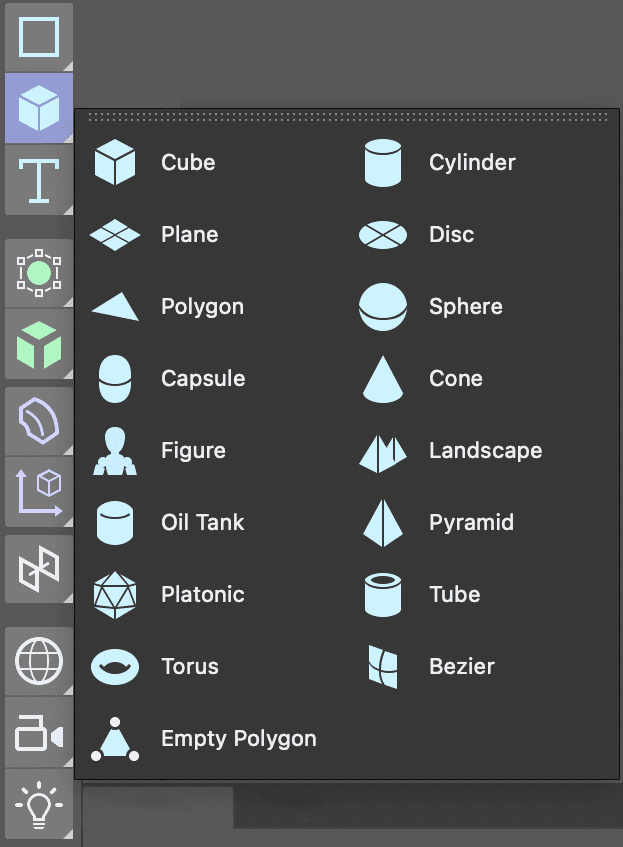
  1. Access the primitive shapes through the Create Menu by pressing and holding the Cube button to reveal the full primitive library.

    tools PrimShapes

  2. Select the Plane object—the ideal canvas for reference imagery.

  3. Optimize your workspace layout by clicking the Toggle Active View button toggleActiveView button in the Perspective viewport to reveal all four viewports simultaneously.

  4. Maintain organized project structure by double–clicking the Plane in the Object Manager and renaming it Model Reference or another descriptive name for easy identification.

  5. Position the plane optimally by rotating it to face directly toward you in the Front view—ensuring clear visibility during modeling.

  6. Achieve pixel-perfect reference accuracy by accessing the Attribute Manager's Object tab and adjusting the plane's dimensions to match your reference image exactly.

NOTE: Matching plane dimensions to image dimensions prevents texture distortion—a critical detail that separates professional workflows from amateur approaches. This precision ensures your reference maintains accurate proportions throughout the modeling process.

  1. Frame your reference optimally by clicking in the Front view and pressing H or choosing View > Frame Geometry.

    • Apply this framing technique to all viewports for consistent visual reference.
  2. Enable texture visualization by selecting Display > Gouraud Shading in the Front viewport. This allows real-time texture preview, essential for accurate reference-based modeling.

  3. Access advanced material controls by clicking the Material Manager button materialmanager button.

  4. Create a new material foundation by clicking the New Default Material button newDefaultMat button.

  5. Establish clear project organization by double–clicking the material name and renaming it Model Reference.

    • Confirm the name change by pressing Return (Mac) or Enter (Windows), or clicking any empty space.
  6. Access comprehensive material settings by double–clicking the material icon icon NewMat to open the Material Editor.

  7. Optimize the material for reference use by disabling the Reflectance switch. Reflective surfaces can create visual distractions that interfere with accurate modeling.

  8. Prepare for texture loading by clicking the Color channel to activate it.

  9. Load your reference image by clicking the texture arrow and selecting Load Image.

  10. Navigate to your reference image and double–click to load it into the material.

    NOTE: Cinema 4D's intelligent asset management will prompt you to copy external images into your project folder—a best practice that prevents broken links and ensures project portability across different systems and team members.

  11. Complete the material setup by closing the Material Editor.

  12. Apply the material by dragging it from the Material Manager directly onto the Model Reference plane in the Object Manager.

NOTE: Professional tip—you can also drag materials directly onto objects in the viewports for faster workflows, particularly useful during iterative design processes.

  1. Clean up your interface by closing the Material Manager.

  2. Select your reference plane by clicking the Model Reference object in the Object Manager.

  3. Position the reference strategically using the Move tool to push the image behind the origin. This placement ensures clear visibility of your 3D geometry without intersection conflicts.

  4. Implement professional project organization by creating a dedicated reference layer:

    • CTRL–click (Mac) or Right–click (Windows) on the Model Reference object in the Object Manager.
    • Select Add to New Layer and observe the layer indicator that appears next to the object name.
  5. Configure your reference layer for optimal workflow in the Layer Manager:

    • Double–click the new layer and rename it Reference for clear identification.
    • Click the lock icon under the L column to prevent accidental modifications.

    NOTE: The Layer Manager's column headers control different properties—S for solo visibility, V for general visibility, etc. Access the View menu in the Layer Manager to understand all available controls.

  6. Access layer properties by clicking the Attribute Manager tab when your reference layer is selected.

  7. Preserve your work by pressing Cmd–S (Mac) or CTRL–S (Windows), or choose File > Save Project.

Reference Image Setup

Creating a plane with the same dimensions as your reference image prevents texture distortions and provides accurate modeling guides.

Template Creation Process

1

Create Reference Plane

Use Create menu to add a plane primitive, rename it Model Reference for easy identification

2

Apply Reference Material

Create new material, disable Reflectance, load reference image, and apply to plane

3

Organize with Layers

Add reference to new layer, lock it to prevent accidental editing, position behind origin

Creating a Loft

Loft modeling requires a methodical approach to achieve professional results. The technique involves creating a series of closed splines (cross-sectional shapes) that define the object's form at different points along its length. The Loft generator then creates a continuous surface that flows smoothly between these shapes, much like stretching fabric over a series of wire frames.

This approach excels where traditional modeling falls short—creating organic forms, complex curved surfaces, and objects that change dramatically in cross-section. From architectural moldings to character modeling, loft techniques are fundamental to professional 3D workflows.

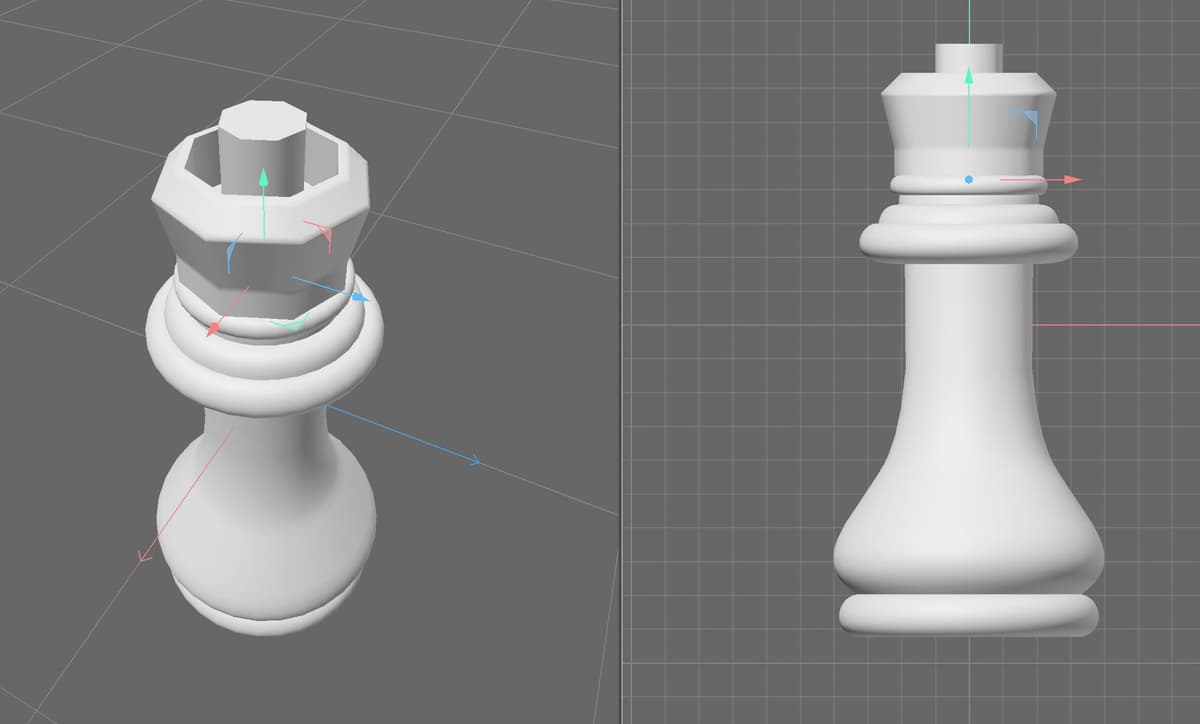
loftEx01

  1. Establish your loft foundation by creating the base shape through the Create menu.

    For the Queen's crown, we selected a circle as our base—providing the elegant circular foundation typical of royal chess pieces while allowing for complex variations above.

  2. Access the powerful Loft generator through the Create menu to begin building your surface generator.

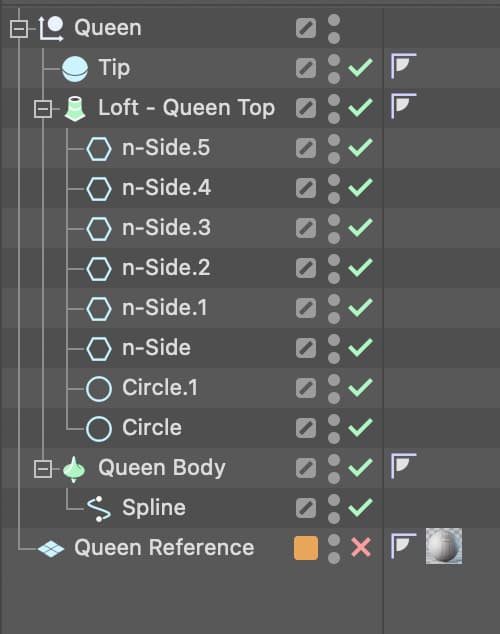
  3. Organize your loft structure in the Object Manager by dragging your base shape into the Loft object.

    • Maintain project clarity by double–clicking the Loft and renaming it descriptively—we chose Queen Top to clearly identify this component.
  4. Build your loft's complexity by creating additional shapes and positioning them strategically above the base shape in 3D space.

    Professional insight: While lofts can flow in any direction and incorporate rotated shapes for complex twists and bends, vertical construction often provides the most predictable and controllable results for architectural and product modeling.

  5. Expand your loft structure by adding each new shape to the loft object in the Object Manager.

  6. Continue developing your form by systematically adding shapes until the loft matches your design vision. Our example combines circles and n-sided polygons to achieve the ornate crown geometry shown in the preview.

    loftEx02

  7. Secure your progress by pressing Cmd–S (Mac) or CTRL–S (Windows) or choosing File > Save Project.

Loft Construction Workflow

1

Create Base Shape

Start with closed splines like circles for the foundation of your loft object

2

Add Loft Generator

Create loft object from menu, rename it descriptively, drag first shape into it

3

Build Vertically

Create additional shapes positioned above previous ones, add each to the loft hierarchy

4

Combine Shape Types

Mix circles and n-sided polygons to achieve desired crown appearance

Editing the Shapes of a Loft

One of the loft generator's greatest strengths lies in its parametric nature—shapes remain fully editable even after being incorporated into the loft structure. This non-destructive workflow is essential for iterative design processes and client revisions, allowing you to refine forms without rebuilding entire sections.

  1. Access individual shape properties by selecting the specific loft shape (spline) in the Object Manager.

  2. Fine-tune shape characteristics through the Attribute Manager's shape-specific controls, adjusting radius, side count, or other primitive parameters.

NOTE: For advanced point-level editing of primitive splines like circles and n-sides, convert them to editable objects by CTRL–clicking (Mac) or Right–clicking (Windows) and selecting Make Editable, or use the efficient keyboard shortcut C. This unlocks individual point manipulation for precise custom shaping.

Making Primitives Editable

Use Make Editable command or keyboard shortcut C to access individual points on primitive spline objects for detailed shape modifications.

Modifying Loft Attributes

The Loft generator's sophisticated attribute system provides professional-level control over surface quality, geometry distribution, and texture mapping behavior. Understanding these parameters is crucial for achieving production-ready results that meet modern rendering and animation requirements.

  1. Access comprehensive loft controls by selecting the loft generator in the Object Manager. Focus on the key attribute tabs for maximum impact:

    • Object: Controls mesh density and surface quality—critical for balancing performance with visual fidelity
    • Caps: Manages end closures, including advanced beveling options for architectural and product modeling
    • Selections: Enables multi-material workflows by creating named selections for different surface regions—essential for complex texturing schemes
  2. For optimal results in this exercise, apply these professionally-tested settings:

    • Mesh Subdivision U: 8 (matching the n-sided polygon count for consistent geometry flow)
    • Mesh Subdivision V: 80 (providing smooth surface interpolation along the loft path)
    • Linear Interpolation: Enabled (ensuring predictable surface behavior between dramatically different cross-sections)
  3. Preserve your refined settings by pressing Cmd–S (Mac) or CTRL–S (Windows) or choosing File > Save Project.

Key Loft Attribute Tabs

FeatureTabPurpose
ObjectObjectControls mesh detail and subdivision settings
CapsCapsManages end surfaces, bevel shape and size options
SelectionsSelectionsAssigns different textures to Shell, Start Cap, End Cap
Recommended: Focus on Object tab for mesh quality, Caps for professional finishing touches

Recommended Settings for Chess Piece

Mesh Subdivision U: 8

Matches the number of sides on n-sided polygons used in the loft for consistent geometry.

Mesh Subdivision V: 80

Provides smooth vertical surface resolution for high-quality curved surfaces.

Linear Interpolation: Checked

Ensures predictable surface behavior between spline shapes for controlled modeling.

Key Takeaways

1Loft generators create smooth surfaces between multiple splines, ideal for complex organic shapes that cannot be made with radial symmetry tools
2Proper project setup includes saving personal copies, organizing reference materials on locked layers, and maintaining professional file naming conventions
3Reference templates using planes with image textures provide accurate modeling guides when plane dimensions match the reference image size
4Loft objects require closed splines as input and can combine different primitive shapes like circles and n-sided polygons for varied geometry
5Spline shapes within lofts remain editable after creation, allowing continued refinement of the overall form
6Mesh subdivision settings should match the geometry of input splines, with U-subdivision matching spline sides and V-subdivision controlling surface smoothness
7The Attribute Manager provides three key tabs for loft control: Object for mesh details, Caps for end surfaces, and Selections for texture assignment
8Linear Interpolation ensures predictable surface behavior between splines, essential for maintaining control over complex organic modeling projects

RELATED ARTICLES