April 1, 2026Jerron Smith/7 min read

Removing Unwanted Elements – Content Aware Fill

Master Content Aware Fill for Professional Video Editing

What is Content Aware Fill?

Content Aware Fill is an advanced After Effects feature that intelligently removes unwanted elements from video by analyzing surrounding pixels and filling transparent areas seamlessly.

Topics Covered in This After Effects Tutorial:

Content Aware Fill for Video, Creating Masks, Mask Tracking

Core Skills You'll Learn

Content Aware Fill

Master the advanced technique for removing unwanted objects from video footage using intelligent pixel analysis and replacement.

Mask Creation & Tracking

Learn to create precise masks around objects and track their movement through multiple frames for accurate removal.

Logo Removal

Apply these techniques to real-world scenarios like removing logos, text, or other unwanted elements from clothing or surfaces.

Exercise Preview

preview 3a

Exercise Overview

In this exercise, you'll master one of the most powerful object removal techniques in modern video post-production. You'll learn how to seamlessly eliminate unwanted elements from footage using mask tracking combined with Content-Aware Fill—a technology that intelligently reconstructs the background behind removed objects. This workflow is essential for professional editors dealing with logos, microphones, crew members, or any distracting elements that compromise the visual integrity of their footage.

Tutorial Workflow Overview

1

Setup & Preview

Configure workspace and examine the source video to identify unwanted elements requiring removal

2

Create & Track Masks

Draw precise masks around target elements and apply motion tracking for accurate coverage

3

Apply Content Aware Fill

Configure fill settings and generate the final removal layer with optimal parameters

Previewing the Final Video

  1. Let's examine the before-and-after results of this technique. If you're currently in After Effects, keep it open but switch to your Desktop.
  2. On the Desktop, navigate to Class Files > After Effects Advanced Class> Object Removal > Preview Movie and double–click Logo Removal.mp4.
  3. Study the footage carefully and notice:

    • There is a prominent logo on the main subject's shirt that disrupts the visual flow and needs to be completely removed without leaving any artifacts.
  4. Play through the entire sequence multiple times to understand how the logo moves with the subject, then close the preview when you're ready to proceed.

Now that you understand the challenge, let's prepare your workspace for optimal efficiency.

Setting up the Workspace

  1. In After Effects, go to Window > Workspace > Standard.

  2. Choose Window > Workspace > Reset "Standard" to Saved Layout to ensure all panels are properly positioned.

  3. Maximize your After Effects window for optimal working space:

    Mac: At the top left of the window, click the green button (the third button).
    Windows: At the top right of the window, click the Maximize button (the middle button).

With your workspace optimized, let's load the project files and begin the removal process.

Workspace Setup Checklist

0/3

Getting Started

  1. In After Effects, if you have a project currently open, choose File > Save to preserve your work.

  2. Choose File > Open Project and:

    • Navigate to Desktop > Class Files > After Effects Advanced Class > Object Removal.
    • Double–click on Logo Removal—started.aep to open the prepared project file.
  3. Choose File > Save As > Save As and:

    • Name the file Your Name—Logo Removal.aep and
    • Save it into Desktop > Class Files > After Effects Advanced Class> Object Removal.
  4. For this exercise, you'll be working exclusively within the Remove Logo composition, which contains the footage ready for processing.

The foundation of successful content-aware filling lies in precise masking. Let's create the mask that will define exactly what needs to be removed.

File Organization Best Practice

Always save your project with a descriptive name and version control. This tutorial uses 'Your Name—Logo Removal.aep' format for easy identification and collaboration.

Masking for Content Aware Fill

Content Aware Fill operates by intelligently reconstructing transparent areas of a composition using surrounding visual information and temporal data from adjacent frames. This means you must first create precise masks that isolate the unwanted elements, effectively making them transparent so the algorithm can work its magic.

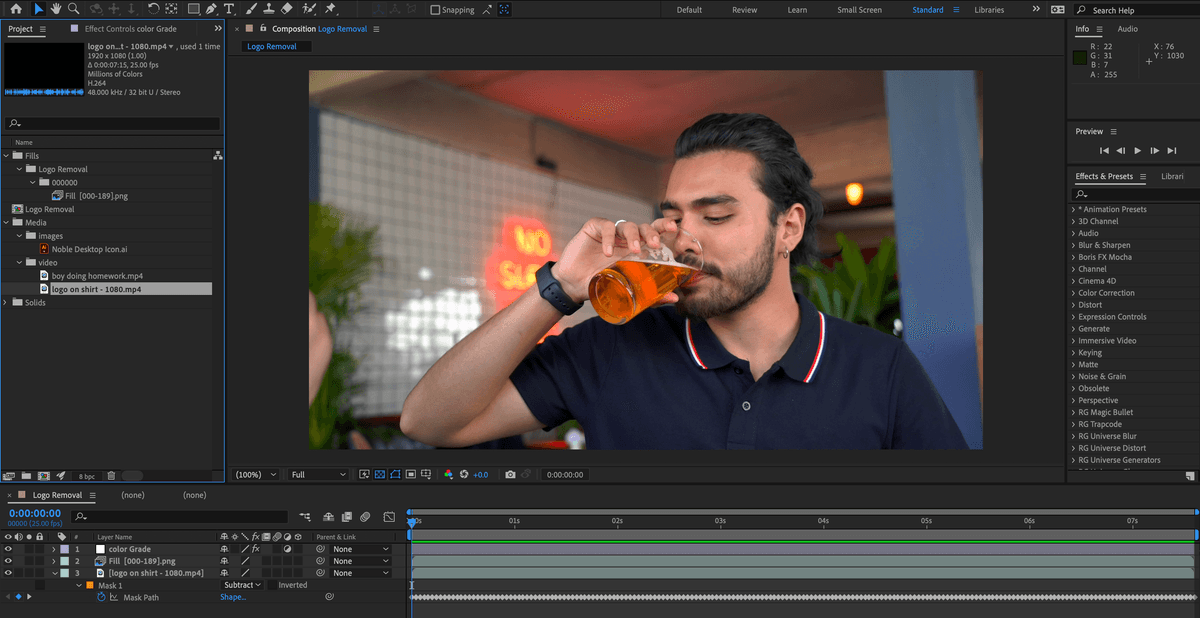
  1. Scrub through your timeline to locate a frame where the unwanted element (the logo) is clearly visible and well-defined. This will serve as your reference frame for mask creation.

  2. Select the appropriate mask tool from the toolbar—use the pen tool for irregular shapes, or rectangle/ellipse tools for simpler geometric forms. Draw your mask carefully around the logo, ensuring you capture the entire element without including unnecessary surrounding areas.

    NOTE: When using the Pen tool, you must create a completely closed path to function as a mask. Incomplete paths will not work with Content Aware Fill.

  3. If the mask properties aren't visible in the Timeline panel, press M on your keyboard to reveal all mask parameters.

  4. Change the mask blend mode from Add to Subtract using the dropdown menu to the right of the mask name. This creates the transparency that Content Aware Fill requires to function.

Static masks work well for stationary objects, but when dealing with moving subjects or camera movement, you'll need to employ mask tracking to maintain precision throughout the sequence.

Mask Tool Options

Pen Tool

Best for irregular shapes and precise control. Requires creating a closed path to function as a mask.

Rectangle Tool

Ideal for geometric shapes and quick selections. Perfect for removing square logos or text blocks.

Ellipse Tool

Optimal for circular or oval objects. Great for removing round logos or circular elements.

Critical Mask Setting

Always switch your mask function to 'Subtract' mode. Content Aware Fill requires transparent areas to work effectively, not masked areas.

Tracking a Mask

If both your subject and camera remain completely static throughout the shot, you can skip this tracking step. However, in professional production scenarios, some degree of movement is almost inevitable, making mask tracking an essential skill for achieving seamless results.

  1. In the Timeline panel, Ctrl–click (Mac) or Right–click (Windows) on the mask name and select Track Mask from the contextual menu.

    This action opens the Tracker panel. In the Standard workspace, it appears to the right of the Timeline panel, providing easy access to tracking controls.

  2. Verify that the Method dropdown is set to Position, Scale & Rotation. This comprehensive tracking mode accounts for the most common types of movement and deformation.

  3. Depending on whether you created your mask at the beginning, middle, or end of your sequence, use either the Track Forward or Track Backwards button (or both) to analyze the entire timeline.

    NOTE: After Effects temporarily disables the mask function during the tracking process. Don't be alarmed if your mask disappears—it will return once tracking is complete.

With your mask properly tracked and aligned, you're ready to harness the power of Content Aware Fill to reconstruct the background seamlessly.

When to Use Mask Tracking

FeatureSkip TrackingUse Tracking
Camera MovementStatic cameraMoving camera
Object MovementStatic objectMoving object
Processing TimeFasterSlower but accurate
Recommended: Use tracking when either camera or object moves to maintain accurate mask coverage

Applying Content Aware Fill

  1. Open the Content Aware Fill panel by choosing Window > Content–Aware Fill.

    NOTE: In the Standard workspace, you may need to resize the panel by dragging its edges to reveal all controls, particularly the action buttons at the bottom and the parameter spaces below them.

  2. Adjust the Alpha Expansion value to extend the fill area slightly beyond your mask boundaries. This helps create smoother edge blending and eliminates potential artifacts along the mask perimeter.

  3. Select your Fill Method based on your specific scenario. For a logo on clothing with subject movement, Surface typically provides the best results as it accounts for the underlying fabric texture and movement.

  4. Enable Lighting Correction if your footage contains varying illumination conditions—such as the subject moving through different lighting zones or natural lighting changes during the shot.

  5. Set the Range parameter to either the Work Area (if you've defined a specific range) or the entire composition length, depending on your project requirements.

  6. Click Generate Fill Layer to begin the computational process.

    NOTE: Content Aware Fill processing time varies significantly based on your system specifications, footage resolution, and sequence duration. Complex removals on 4K footage may require several minutes to complete. Monitor the progress bar and avoid interrupting the process.

    Once processing completes, review the results carefully. If the outcome doesn't meet your standards, you can delete the generated fill layer and experiment with different method and parameter combinations.

  7. Save your project to preserve your work and settings.

Content Aware Fill Application Process

1

Open Content-Aware Fill Panel

Access the dedicated panel and adjust its height to see all controls and options

2

Configure Alpha Expansion

Increase the fill area size to ensure complete coverage of the unwanted element

3

Select Fill Method

Choose appropriate method based on your specific removal requirements

4

Set Range and Generate

Define work area or full composition range and generate the fill layer

Processing Time Consideration

Content-Aware fill processing time depends on system configuration, video dimensions, and length. Larger projects may require significant processing time.

Content Aware Fill Options

Object: Engineered for removing distinct objects from footage by reconstructing the background scene. The algorithm analyzes pixel data from current and surrounding frames, estimating the motion of scenery behind the masked object to generate appropriate replacement pixels. This method excels at removing moving elements like vehicles on roads, aircraft in skies, or people walking through scenes where the background has sufficient detail for reconstruction.

Surface: Optimized for replacing surface elements while preserving the underlying structure and movement of the base object. Similar to Object mode, it samples from surrounding frames but maintains awareness of the surface's own motion characteristics. This approach is ideal for removing logos, text, or graphics applied to clothing, signage, or other textured surfaces where the underlying material needs to remain intact and natural-looking.

Edge Blend: Employs a streamlined approach that samples and blends pixels from the immediate edges of the transparent area. While this method renders significantly faster than the alternatives, it cannot utilize Lighting Correction and works best with simple, static removals. Use this for removing text or graphics from uniform surfaces like paper documents, clean walls, or other areas with minimal texture variation.

Lighting Correction: An advanced feature that compensates for dynamic illumination changes throughout your sequence. Essential when your removal area transitions between different lighting conditions—such as moving from shadow to sunlight, or when ambient lighting shifts during the shot. You can enhance results by preparing reference images in Photoshop that demonstrate the desired final appearance, giving the algorithm additional context for optimal reconstruction.

Fill Method Comparison

FeatureObjectSurfaceEdge Blend
Best ForMoving objectsStatic surfacesFlat textures
Processing SpeedModerateModerateFast
Motion AnalysisScene behind objectUnder transparent areaNone
Lighting CorrectionAvailableAvailableNot available
Recommended: Choose Object for moving elements, Surface for logos on clothing, Edge Blend for simple graphics

Real-World Use Cases

Object Method

Perfect for removing cars from roads, birds from sky, or people from backgrounds where motion estimation is crucial.

Surface Method

Ideal for logos on shirts, text on surfaces, or any static element that needs surface-aware replacement.

Edge Blend Method

Best for graphics on paper, simple text overlays, or objects on uniform surfaces lacking complex texture.

Advanced Technique

Use a reference image prepared in Photoshop to influence the Content-Aware fill result. This gives you more control over the final appearance of the filled area.

Key Takeaways

1Content Aware Fill requires transparent areas to work, so masks must be set to Subtract mode rather than standard masking
2Mask tracking is essential when either the camera or the unwanted object moves during the video sequence
3The Object method works best for moving elements by analyzing scene motion behind the object
4Surface method is optimal for static elements like logos on clothing, using motion estimation under the transparent area
5Edge Blend method renders fastest but lacks lighting correction, making it suitable only for simple graphics on uniform surfaces
6Lighting Correction should be enabled when the fill area moves through different lighting conditions or shadows
7Processing time varies significantly based on system specs, video dimensions, and composition length
8Reference images from Photoshop can be used to guide and improve Content-Aware fill results for better control

RELATED ARTICLES