Creating Custom Loops
What This Tutorial Covers
WP_Query
WordPress's flexible query class for custom post loops.
Custom Post Types
Loops for portfolio items, products, and custom content.
Pagination
Add page navigation to custom loops.
Noble Desktop's WordPress Bootcamp teaches WordPress for site builders and developers.
Discover how to enhance your WordPress skills by learning how to display custom post types, use custom taxonomies, and create a custom search results page through our detailed tutorial.
Exercise Preview
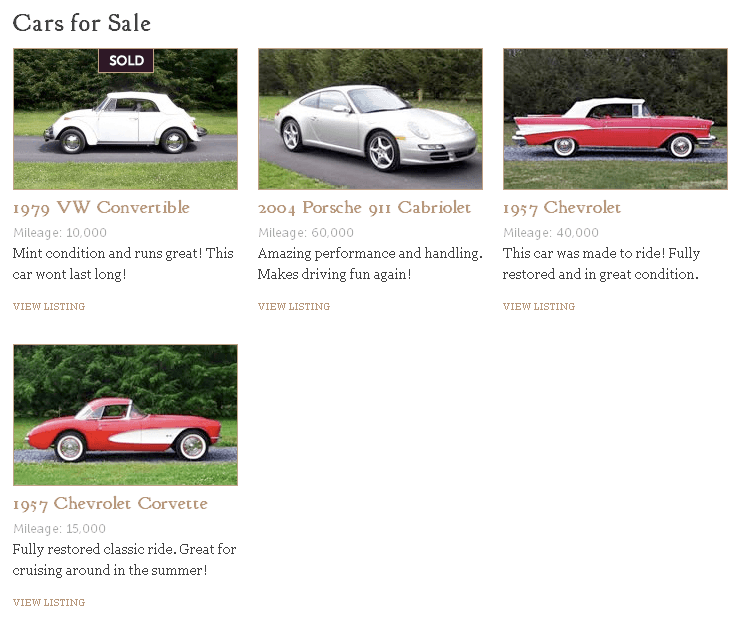
Adding Cars
Before we can get started modifying Loops, we need to add content for them to loop through. Let’s add a variety of cars with different statuses.
- Go to the WordPress Dashboard and log in if needed:
- Mac: localhost:8888/landm/wp-admin
- Windows: localhost/landm/wp-admin
On the left side of the screen, go to Cars > Add New.
The next screen looks very similar to the Add New Pages and Posts screen, except this adds a car to your custom post type. For the title, type: 1957 Chevrolet Corvette
We prepared some content for you to copy and paste. Switch to your code editor.
Open car-description.txt from Class Files > WordPress.org Class > landm Content.
Select all the code and copy it.
Hit Cmd–W (Mac) or CTRL–W (Windows) to close the file but not the folder.
Go back to the Add New Car page and click on the Text tab.
Paste the code into the content area.
Let’s add a custom excerpt, because if we don’t, WordPress will automatically display the first 55 words of your content. In the Excerpt module below, type:
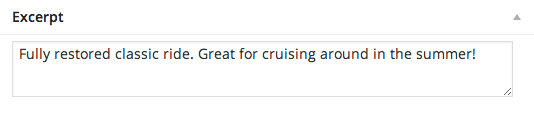
In the Custom Fields module, click Enter new and type this Name and Value:
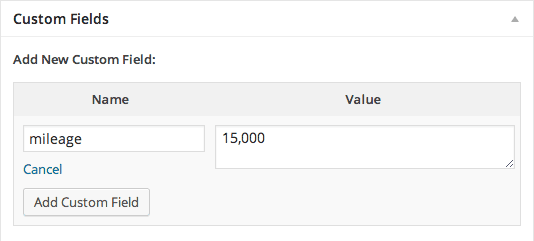
Click the Add Custom Field button.
Let’s add a Featured Image of the car that will be used in the various loops and the single car listing. On the right, under Featured Image, click Set featured image.
Click the Upload Files tab.
Click the Select Files button.
Navigate to Class Files > WordPress.org Class > landm Content > images and double–click car1.jpg.
On the right, for both Title and ALT Text, type: 1957 Corvette
Click the Set featured image button.
Before publishing this post, let’s add the correct status to the car. On the right side of the screen under Status, check both Featured and For Sale.
Click the Publish button.
Repeat the previous steps to create three additional cars with the following content:
Title: 1957 Chevrolet Description: car-description.txt (same as before) Excerpt: This car was made to ride! Fully restored and in great condition. Mileage: 40,000 (choose mileage from the menu below Name) Featured Image: car2.jpg Title and ALT Text: 1957 Chevrolet Status: Featured, For Sale Title: 2004 Porsche 911 Cabriolet Description: car-description.txt (same as before) Excerpt: Amazing performance and handling. Makes driving fun again! Mileage: 60,000 Featured Image: car3.jpg Title and ALT Text: 2004 Porsche 911 Cabriolet Status: Featured, For Sale Title: 1979 VW Convertible Description: car-description.txt (same as before) Excerpt: Mint condition and runs great! This car won’t last long! Mileage: 10,000 Featured Image: car4.jpg Title and ALT Text: 1979 VW Convertible Status: Sold