Continuing with the Loop
What This Tutorial Covers
The Loop Structure
while (have_posts()) iteration pattern.
Template Tags
the_title, the_content, the_excerpt, and other helpers.
Custom Output
Format loop output to match your theme's design.
Noble Desktop's WordPress Bootcamp teaches WordPress for site builders and developers.
Take a deep dive into this comprehensive WordPress tutorial that covers how to display post time and comments, add page navigation, and fallback content on your WordPress website.
Topics Covered in This WordPress Tutorial:
Displaying Post Time & Tags, Displaying Comments, Adding Page Navigation, Adding Fallback Content
Exercise Preview
Exercise Overview
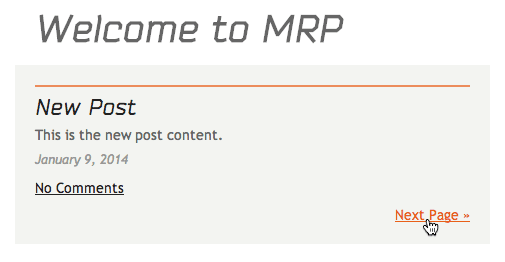
Continuing the Loop, we want to display more info from each post. We want the date it was posted, which tags the author marked, and the number of comments.
If You Did Not Do the Previous Exercise
- In a web browser, go to localhost:8888/mrp/wp-admin (Mac) or localhost/mrp/wp-admin (Windows) and log in if prompted.
- On the left of the Dashboard, mouse over Appearance and click Themes.
- Click the Add New button.
- Click the Upload link, then the Browse (or Choose File) button.
- Navigate to Desktop > Class Files > WordPress.org Class and double–click mrpTheme-ready-for-loop.zip to open it.
- Click Install Now, then click Activate.
Creating the Loop
In a code editor, open index.php from the mrpTheme folder if it isn’t already open.
Inside the Loop, below the_content
()function around line 30, add the time:<?php if ( have_posts() ) : while ( have_posts() ) : the_post(); ?> <h2><a href="<?php the_permalink(); ?>"><?php the_title(); ?></a></h2> <?php the_content(); ?> <?php the_time(); ?> <?php endwhile; ?> <?php endif; ?>Save the file.
- Open up a browser and go to:
- Mac: localhost:8888/mrp
- Windows: localhost/mrp
Leave this page open so we can periodically come back and reload to see the code changes we make.
It now shows the time, but the default time format is just displaying the hour, minutes, and am or pm. In addition, we need to apply a class to give it the look we had in the static mockup. Switch back to your code editor.
Wrap the time in a paragraph and add in formatting options:
<?php if ( have_posts() ) : while ( have_posts() ) : the_post(); ?>
   <h2><a href="<?php the_permalink(); ?>"><?php the_title(); ?></a></h2>
   <?php the_content(); ?>
   <p class="entry-meta"><?php the_time( 'F j, Y' ); ?></p>
<?php endwhile; ?>
<?php endif; ?>
The F j, Y inside the_time
()function tells it to use the full name for the month (F), the day of the month (j), and the 4-digit year (Y). Using capital vs. lowercase letters will display different values.Save the file.
- Return to the browser and reload:
- Mac: localhost:8888/mrp
- Windows: localhost/mrp
The date should be properly formatted and styled with the entry-meta class.
Adding & Displaying Post Tags
- These posts do not have any tags yet, so we’ll have to add them. In the browser, open a new tab or window and go to:
- Mac: localhost:8888/mrp/wp-admin
- Windows: localhost/mrp/wp-admin
If asked, enter your username and password.
On the left, click Posts.
Click the Hello world! post title to edit it.
On the right, in the Tags section, type: cars, restoration
Click Add.
Above, click Update to save the changes.
We will leave the other post untagged to see what happens. Switch back to your code editor.
In index.php, add -
<?php the_tags(); ?>(around line 31) to display the post tags:<?php if ( have_posts() ) : while ( have_posts() ) : the_post(); ?> <h2><a href="<?php the_permalink(); ?>"><?php the_title(); ?></a></h2> <?php the_content(); ?> <p class="entry-meta"><?php the_time( 'F j, Y' ); ?> - <?php the_tags(); ?></p> <?php endwhile; ?> <?php endif; ?>Save the file.
- Return to the browser and reload:
- Mac: localhost:8888/mrp
- Windows: localhost/mrp
This works and looks good when there are tags for the post, but when there are no tags, the dash after the date is hanging alone. Switch back to your code editor.
Delete the dash and spaces between the_time
()and the_tags(), and then add'—Tags:'to the the_tags()function:<?php the_content(); ?> <p class="entry-meta"><?php the_time( 'F j, Y' ); ?><?php the_tags( '—Tags: ' ); ?> <?php endwhile; ?>NOTE: By default, the_tags
()outputs Tags: but here we’re telling it to output that same thing, but with a dash in front.Save the file.
- Return to the browser and reload:
- Mac: localhost:8888/mrp
- Windows: localhost/mrp
It should look the same for the tagged post, but for the other untagged post, the dash won’t be there.
Another typical blog feature is displaying the number of comments for that post. Switch back to your code editor.
In index.php, add the following:
<?php if ( have_posts() ) : while ( have_posts() ) : the_post(); ?>
   <h2><a href="<?php the_permalink(); ?>"><?php the_title(); ?></a></h2>
   <?php the_content(); ?>
   <p class="entry-meta"><?php the_time( 'F j, Y' ); ?><?php the_tags( '—Tags: ' ); ?></p>
   <?php comments_popup_link(); ?>
<?php endwhile; ?>
<?php endif; ?>
Save the file.
- Return to the browser and reload:
- Mac: localhost:8888/mrp
- Windows: localhost/mrp
You should see the number of comments for each post below the time and tags.
Adding Post Navigation
Now we should consider what will happen when the number of posts spills onto more than one page. Most blogs have an Older Posts or Next Page navigation at the bottom. In the Dashboard, there is a setting that controls how many posts show up on each page, which we can use to get multiple pages of posts.
- In a browser, go to:
- Mac: localhost:8888/mrp/wp-admin
- Windows: localhost/mrp/wp-admin
If asked, enter your username and password.
On the left, mouse over Settings and click Reading.
Next to Blog pages show at most, enter 1.
Click Save Changes.
At the top, click on the Monteith Restoration & Performance title link to see the site.
We only see one post, which is good. However, there aren’t any links to go to the next page of posts, leaving a user stranded on page 1.
Switch back to your code editor.
In index.php, after the endwhile around line 33, add the following:
<?php if ( have_posts() ) : while ( have_posts() ) : the_post(); ?>
   <h2><a href="<?php the_permalink(); ?>"><?php the_title(); ?></a></h2>
   <?php the_content(); ?>
   <p class="entry-meta"><?php the_time( 'F j, Y' ); ?><?php the_tags( '—Tags: ' ); ?></p>
   <?php comments_popup_link(); ?>
<?php endwhile; ?>
   <?php posts_nav_link(); ?>
<?php endif; ?>
NOTE: posts_nav_link
()will generate both the next and previous page links.Save the file.
- Return to the browser and reload:
- Mac: localhost:8888/mrp
- Windows: localhost/mrp
The Next Page link is there, but it’s right next to the comments. It should be below them. Switch back to your code editor.
Wrap the posts_nav_link
()function in a div:<?php endwhile; ?> <div id="postsNavLink"> <?php posts_nav_link(); ?> </div> <?php endif; ?>Save the file.
- Return to the browser and reload:
- Mac: localhost:8888/mrp
- Windows: localhost/mrp
That puts the Next Page link on its own line and gives us a way to style the container later if needed.
In order to find out how to style the links, we need to use the Developer Tools to figure out what code the posts_nav_link
()function is outputting. CTRL–click (Mac) or Right–click (Windows) the Next Page link and choose Inspect.On the left, notice that the link doesn’t have an ID or class.
Close the Developer Tools console.
Switch back to your code editor.
The posts_nav_link
()function adds both the next and previous links, but it doesn’t give us a way to uniquely style each one. However, WordPress also has functions that add each link individually. Delete the posts_nav_link()function (around line 35), leaving an empty div.<?php endwhile; ?> <div id="postsNavLink"> </div> <?php endif; ?>Add the following two functions to add the individual links:
<?php endwhile; ?>
   <div id="postsNavLink">
      <?php previous_posts_link(); ?>
      <?php next_posts_link(); ?>
   </div>
<?php endif; ?>
That will add the links, but it doesn’t automatically give us a way of styling them easily. Wrap each post link in a div:
<?php endwhile; ?>
   <div id="postsNavLink">
      <div class="prevPage"><?php previous_posts_link(); ?></div>
      <div class="nextPage"><?php next_posts_link(); ?></div>
   </div>
<?php endif; ?>
Save the file.
Adding Fallback Content
What if there aren’t any posts? A blank page would lead a user to believe that the site is broken. To prevent that from happening, add the following:
<?php endwhile; ?>
   <div id="postsNavLink">
      <div class="prevPage"><?php previous_posts_link(); ?></div>
      <div class="nextPage"><?php next_posts_link(); ?></div>
   </div>
<?php else : ?>
   <p><br>Sorry, no posts matched your criteria.</p>
<?php endif; ?>
Save the file.
- To see this in action, we need to delete all of the posts. We’ll be able to undo it right afterwards, so we won’t lose them permanently. In a browser, go to:
- Mac: localhost:8888/mrp/wp-admin
- Windows: localhost/mrp/wp-admin
If asked, enter your username and password.
On the left, click Posts.
At the top of the posts list, check the checkbox next to Title to select them all.
From the Bulk Actions menu, choose Move to Trash.
Click Apply.
- We want to keep this window open to undo, so open a new browser window or tab and go to:
- Mac: localhost:8888/mrp
- Windows: localhost/mrp
You should see the Sorry, no posts matched your criteria message.
Switch back to the browser window or tab that has the Dashboard open. In the message stripe near the top that says that 2 posts were moved to the Trash, click the Undo link. If for some reason you can not undo, you can click the Trash link, select the posts, and from Bulk Actions, choose Restore.
Now that the blog page is done, we can set it back to the default settings. On the left, mouse over Settings and click Reading.
Next to Blog pages show at most, enter 10.
Click Save Changes.
Bonus: Styling the Links
We’d like to style the Next Page link to sit on the right side, and the Previous Page link on the left side.
- We’ll have to switch the posts back to display one at a time. In a browser, go to:
- Mac: localhost:8888/mrp/wp-admin
- Windows: localhost/mrp/wp-admin
If asked, enter your username and password.
On the left, mouse over Settings and click Reading.
Next to Blog pages show at most, enter 1.
Click Save Changes.
Leave the Reading Settings open in the browser.
Switch back to your code editor.
Open style.css from the mrpTheme folder.
At the very bottom of the file, after the.imgLeft rule, add the following rule (around line 436):
#postsNavLink {
   padding-top: 10px;
   padding-bottom: 10px;
   overflow: hidden;
}
We’re going to float both of the links in this div, so setting overflow to hidden will prevent it from collapsing.
After the #postsNavLink rule, add the following rules:
.nextPage {
   float: right;
}.prevPage {
   float: left;
}
Save the file.
- Return to the browser and reload:
- Mac: localhost:8888/mrp
- Windows: localhost/mrp
Notice that the Next Page link is now on the right. Click it to see the Previous Page link on the left.
We can now set our blog back to the default reading settings. Go back to the Reading Settings in your browser.
Next to Blog pages show at most, enter 10.
Click Save Changes.