Jive Factory: Creating a Basic Wireframe
What This Tutorial Covers
Low-Fidelity Wireframes
Block-level structure without visual design.
Content Hierarchy
Establish visual priority before detailed design.
Iteration
Wireframes are meant to be revised quickly.
Noble Desktop's Web Design Certificate teaches Figma, HTML, CSS, and responsive design.
Dive into the world of Mobile and Responsive Web Design with this tutorial that covers topics such as wireframing, setting up mobile-first media queries, and creating a responsive website for a music venue using a pre-coded front-end template.
Topics Covered in This Mobile & Responsive Web Design Tutorial:
Wireframing the Basic Jive Factory Layout, Setting up “mobile First” Media Queries
Exercise Preview
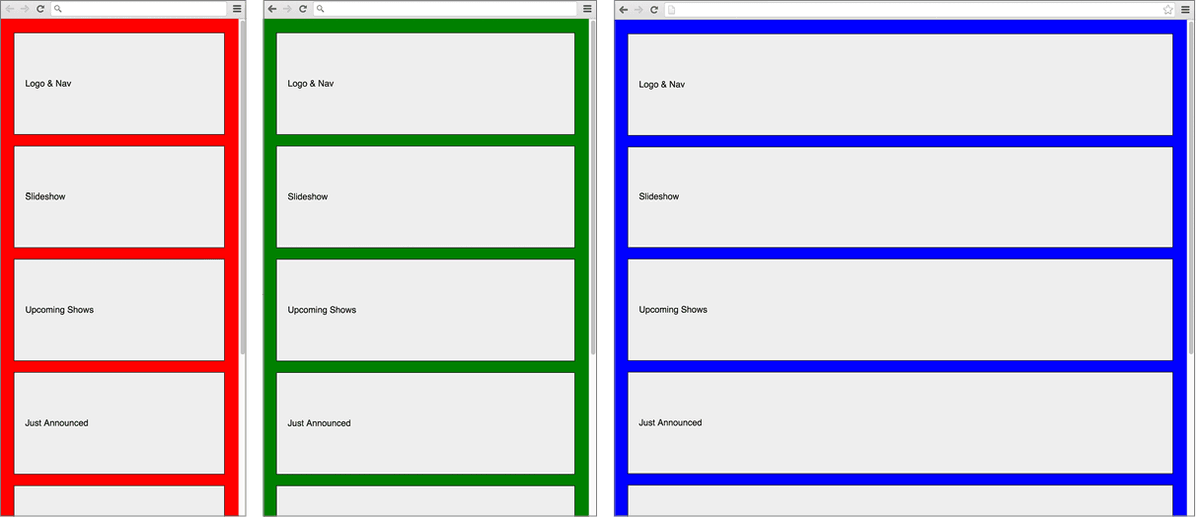
Exercise Overview
This is the first in a series of exercises in which you’ll create a responsive website for The Jive Factory, a music venue, using the mobile first approach. Before building a high-fidelity version of the page, wireframing can be useful to figure out the page structure and see how it responds across various device sizes. In this exercise, we’ll focus on creating the page’s structure. We’ll create a wireframe that we’ll add content to in later exercises.
Starter Site Template
We’re going to start you off with a prepared folder of files. Based on a popular template for front-end web development, we’ve created a starter site for you that includes some pre-coded HTML and CSS. The files and starter code get you up and running quickly because the basic HTML shell is already coded with links to CSS, JS, and has many best practices baked in. Let’s take a look at the folder and the starter files.
- On the Desktop, go to Class Files > yourname-Mobile and Responsive Class and open the Jive folder. The folder contains:
- An img folder with images.
- An index page containing a bit of initial content.
- A css folder with some pre-coded styles.
- A js folder with some handy JavaScripts.
- A snippets folder with some prepared code so you won’t have to type as much as you go through these exercises.
- A layouts folder with PDF files of the design for this website.
- Open this Jive folder in your code editor if it allows you to (like Sublime Text does).
- Open index.html in your code editor.
Briefly look over the code:
- Notice we’ve already added the viewport meta tag.
- The page links to two style sheets: normalize.min.css and main.css. We are making use of normalize’s powerful and comprehensive CSS reset.
- We have added the main sections with placeholder text. We have a header, a footer, and some divs in between. We’ll add more semantic tags later as the layout develops.
Open main.css (from the css folder within the Jive folder).
Take a moment to look over it. Notice that, in addition to a few other handy resets, we included starter rules to make sure we use border-box for the box model for all elements, fluid images, and the clearfix helper class. We’ve also provided comments to help you organize the general styles and media queries.
- Return to index.html.
Near the bottom, find the link to jQuery.
Instead of just relying on Google’s hosted version of the jQuery library (for faster loading speeds, and better cross-site caching) it checks if jQuery is loaded from Google. If not, then it’s loaded from a local backup. We got this technique (and code) from HTML5 Boilerplate, which we mentioned in a previous exercise.
Studying the Designs
Let’s take a look at the designs to see how the elements on the page are laid out differently for mobile, tablets, and desktops.
In the Jive folder, go to the layouts folder and open Layout1-Mobile.pdf. It should open in Adobe Acrobat or some PDF reader.
Zoom out so you can see the entire page.
Take a moment to look over the design.
Go to page 2. Here we’ve labeled the main sections of content for you to help you start thinking about how we’ll structure the page.
Open Layout2-Tablet.pdf from Jive > layouts.
Zoom out so you can see the entire page.
Take a moment to look over the design. Notice the addition of a slideshow.
Go to page 2.
- On the left, notice we have three sections of content (Just Announced, Happy Hour, and Email Signup) in what is essentially a sidebar floated to the left of the Upcoming Shows content.
- The sidebar content is taking up one third of the width of the page, while the Upcoming Shows content is taking up the remaining two thirds.
Open Layout3-Desktop.pdf from Jive > layouts.
Zoom out so you can see the entire page.
Take a moment to look over the design. Notice that the layout has changed.
Go to page 2 to get a better sense of how the sections have moved.
- Notice that the Logo & Nav is now floating to the left of the Slideshow and Upcoming Shows sections.
- The sidebar content (containing several small sections) is tucked in underneath the Logo & Nav.
- The width of the content has also changed. The Logo & Nav and Sidebar take up about 25% while the Slideshow and Upcoming Shows sections take up the remaining 75%.
Styling the Placeholder Content & Page Margins
Close the PDFs.
Switch back to index.html.
Now that you have a better sense of how the content will need to be laid out, let’s start by styling the placeholder content already in the page.
- Preview index.html in a browser. These are the building blocks of our website. Note that the order of sections in the code is the order of the content for mobile devices.
Return to your code editor and notice that each section of content has a module class. We’ll use this class to style each section with the same padding, background color, and border.
- Switch to main.css.
Below the PROJECT STYLES comment, add the following code:
.module {
   background: #eee;
   border: 1px solid,000;
   padding: 20px;
   margin: 0 10px 20px;
   line-height: 9;
}
NOTE: Because vertical margins collapse into each other, but horizontal margins do not, we’re using 10px horizontal margins (which add up to 20 when next to each other), and 20px margin on the bottom. This will give us an even amount of margin between our sections. The line-height is temporary, to give extra height as we do the initial setup.
- Save the file.
- Preview index.html in a browser. It should look better with the various sections of content visually separated, but we still need to add some space at the top, left, and right of the page.
Back in main.css, above the .module rule add the following new rule:
body {
   margin: 0;
   padding: 25px 15px 5px;
   background: red;
}
Typically the space around a page is set with margins, so why are we using padding? Most of the time it wouldn’t matter, but later we’ll be limiting the width of our content by setting a max-width on the body. We’ll then need to use auto margins to center the content, which means we can’t add spacing around the page with margins. We must use padding instead! So how did we come up with those padding values? We want a total of 25px around all four sides of the page:
- We do not have any top spacing, so we need 25px.
- The module class adds 10px on the left/right, so adding 15px gets us to 25px.
- The module class adds 20px on the bottom, so adding 5px gets us to 25px.
Adding the Media Queries
We’ll start by adding media queries for different breakpoints. To make it easier to know which media query breakpoint we’re seeing in the browser, we’ll add a different background color to the page for each screen size.
Back in main.css, find the MEDIA QUERIES comment.
We’ve provided you with a default media query for high resolution screens (and devices such as printers) that is used in the HTML5 Boilerplate. We can use this later, if needed. For now, we’ll write a media query to target screen width.
Below the MEDIA QUERIES comment but above the High Resolution Styles comment, add the following new media query:
@media (min-width: 480px) {

}

/* High Resolution Styles */
NOTE: This will target devices 480px and wider.
Let’s change the background color of the page. Inside the min-width: 480px media query, add the following code:
body { background: green; }- Save the file.
- Preview index.html in a browser.
- Resize the window to its smallest size and notice that the background color is red. Make the browser window wider, and notice that the background switches to green when the window is 480px or wider.
- Now let’s create a media query for the desktop styles. Back in main.css, copy the entire min-width: 480px media query, including the body rule inside it.
- Paste a copy below it.
Edit the second media query’s code as shown in bold below. Notice that we’re changing the min-width as well as the background color!
@media (min-width: 480px) { body { background: green; } } @media (min-width: 1024px) { body { background: blue; } }- Save the file.
- Preview index.html in a browser.
Resize the window and notice the background changes depending on the window size. When the window gets to 1024px or wider, the background color changes to blue.
We’ll continue working on the wireframe in the next exercise.