April 1, 2026Dan Rodney/7 min read

Flix: Media Queries for Retina/HiDPI Graphics

Master Responsive Images for High-Resolution Displays

Mobile Display Technology Evolution

Standard Resolution

Traditional 1x displays with standard pixel density. Adequate for basic web content but limited visual clarity.

Retina/HiDPI Displays

High-resolution screens with 2x or higher pixel density. Require optimized images for sharp, professional appearance.

Future-Ready Development

All screens are transitioning to high-resolution. Smart implementation ensures optimal performance across all devices.

Topics Covered in This Mobile & Responsive Web Design Tutorial:

Using Media Queries to Load Hi-res Images for Retina/HiDPI Displays

Exercise Preview

preview media queries retina graphics

Photos courtesy of istockphoto, unizyne, Image #19302441.

Exercise Overview

CSS media queries provide a powerful mechanism for delivering device-appropriate assets based on specific criteria like screen resolution. In this exercise, you'll master the technique of using media queries to conditionally load high-resolution background images for HiDPI devices (commonly known as Retina displays). This approach ensures optimal performance by serving high-resolution assets only to devices that can benefit from them, while preventing low-resolution devices from downloading unnecessarily large graphics files.

The strategic use of conditional image loading not only improves performance but also demonstrates responsive design best practices that are essential in today's multi-device landscape. You'll learn to implement a solution that balances visual quality with bandwidth efficiency—a critical consideration for modern web applications.

NOTE: The display industry has undergone a dramatic shift toward high-resolution screens across all device categories. While the dual-asset approach (serving both low and hi-res graphics) remains the most bandwidth-efficient solution, many modern sites are transitioning to a hi-res-only strategy. With advanced image optimization techniques and improved compression algorithms, the file size difference between standard and high-resolution assets has become increasingly negligible, making this a viable approach for many applications.

Media Query Image Loading Strategy

Pros
Low-resolution devices avoid downloading large files
High-resolution devices receive optimized sharp images
Improved page load times for standard displays
Better user experience across all device types
Future-proof responsive design approach
Cons
Requires maintaining multiple image versions
Additional CSS complexity for media queries
More file management overhead
Industry Trend

As all screens eventually transition to high-resolution, many sites are moving toward serving only hi-res graphics with proper optimization, as the file size difference becomes minimal with modern compression techniques.

Previewing the Initial Setup

  1. Begin by setting up a clean workspace. Close any files currently open in your code editor to avoid confusion between different projects.
  2. Navigate to your project files: Desktop > Class Files > yourname-Mobile and Responsive Class > Flix Media Queries for Retina Graphics.
  3. Open index.html in either iOS Simulator or Google Chrome. For comprehensive testing, consider using both environments to observe how different rendering engines handle high-resolution assets.
  4. For Chrome testing, activate the developer tools environment:

    • Access Chrome's DevTools by CTRL–clicking (Mac) or Right–clicking (Windows) anywhere on the page and selecting Inspect.

    • Enable device simulation mode by clicking the Toggle device toolbar button devtools device mode icon in the upper-left corner of the DevTools panel.

    • Select a test device from the dropdown menu—the iPhone 5 provides a good baseline for mobile testing.

    • Refresh the page using the Reload button or the keyboard shortcut Cmd–R (Mac) or CTRL–R (Windows) to ensure proper rendering in device mode.

  5. For iOS Simulator testing, optimize your view by navigating to Window > Scale > 100% or using the shortcut Cmd–1.

  6. Examine the header's background graphic featuring the blue ray design. Currently, you're viewing the standard-resolution (1x) background image. While this image renders acceptably on standard displays, it lacks the sharpness that high-resolution displays can provide.

    NOTE: When using iOS Simulator, the scaling allows you to observe pixel-level detail even on standard-resolution Mac displays, making quality differences more apparent than they would be in a standard browser window.

  7. Keep your preview environment open—you'll return here to observe the improvements after implementing the media query solution.

Chrome DevTools Device Testing

1

Open Developer Tools

Right-click on the page and select Inspect to access Chrome's DevTools panel

2

Enable Device Mode

Click the Toggle device toolbar button in the upper left of the DevTools panel

3

Select Test Device

Choose a specific device like iPhone 5 from the device menu above the webpage

4

Reload for Testing

Click Reload or use Cmd-R (Mac) or Ctrl-R (Windows) to refresh with device settings

Implementing High-Resolution CSS Media Queries

  1. Open the Flix Media Queries for Retina Graphics project folder in your code editor. Modern editors like Visual Studio Code, Sublime Text, or Atom provide excellent folder-based project navigation.
  2. Open main.css from the css directory to begin implementing the media query solution.
  3. This project incorporates elements from HTML5 Boilerplate, a industry-standard foundation that provides battle-tested solutions for common web development challenges. Locate the sophisticated high-resolution media query starting at line 149:

    @media print, (-webkit-min-device-pixel-ratio: 1.25), 
                  (min-resolution: 1.25dppx), 
                  (min-resolution: 120dpi) {
       /* Styles for high resolution devices go here */
    
    }

    This media query employs multiple detection methods to ensure broad device compatibility. It targets print media and high-resolution screens using three different measurement approaches: WebKit's device pixel ratio, the modern dppx (dots per pixel) unit, and the traditional dpi (dots per inch) measurement. The 1.25 threshold captures most high-resolution displays while avoiding false positives.

  4. To maintain code organization and reduce maintenance overhead, copy this media query to place it adjacent to the related header styles. This collocation strategy makes future updates more intuitive and reduces the likelihood of orphaned styles. Select and copy the entire media query block:

    @media print, (-webkit-min-device-pixel-ratio: 1.25), 
                  (min-resolution: 1.25dppx), 
                  (min-resolution: 120dpi) {
       /* Styles for high resolution devices go here */
    
    }
  5. Navigate to the header rule located at line 35 where you'll implement the high-resolution image logic.
  6. Insert the media query immediately after the closing brace of the header rule. This placement creates a logical grouping of related styles:

    border-bottom: 1px solid rgba(255,255,255,.2);
       padding: 0 15px;
    }
    @media print, (-webkit-min-device-pixel-ratio: 1.25), 
                  (min-resolution: 1.25dppx), 
                  (min-resolution: 120dpi) {
       /* Styles for high resolution devices go here */
    
    }
    header h1 {
  7. Replace the placeholder comment with the high-resolution header implementation. Remove the comment line and add this targeted rule:

    @media print, (-webkit-min-device-pixel-ratio: 1.25), 
                  (min-resolution: 1.25dppx), 
                  (min-resolution: 120dpi) {
       header {
          background-image: url(../img/header-bg@2x.png);
       }
    }

    This implementation follows the widely-adopted @2x naming convention, popularized by Apple's Retina display specifications. The high-resolution image contains four times the pixel data (twice the width × twice the height) of the standard version, providing the additional detail needed for crisp rendering on high-DPI displays.

  8. Save the CSS file to apply your changes.
  9. Return to your browser preview to observe the initial result of implementing the high-resolution media query.
  10. Refresh the page to load the updated styles.

    You'll notice the header background appears larger and gets cropped. This occurs because the high-resolution image is physically twice the dimensions of the original, but the CSS hasn't been instructed to scale it appropriately. This is the expected behavior before implementing proper background sizing—you're successfully loading the high-resolution asset.

Optimizing Background Image Scaling

  1. Maintain your browser preview while switching back to main.css in your code editor for the scaling implementation.
  2. Navigate to the original header rule at line 35 to add responsive background sizing.
  3. Add the background-size property to ensure both standard and high-resolution images scale consistently within the header container:

    header {
       background-color: #0A1D32;
       background-image: url(../img/header-bg.png);
       background-repeat: no-repeat;
       background-position: center bottom;
       border-bottom: 1px solid rgba(255,255,255,.2);
       padding: 0 15px;
       background-size: auto 100%;
    }

    The background-size: auto 100% declaration instructs the browser to maintain the image's aspect ratio while scaling the height to fill the container completely. This ensures consistent visual presentation regardless of which image asset is loaded.

  4. Save the updated CSS file.
  5. Return to your browser preview and refresh the page. The header background should now display at the correct size with improved clarity on high-resolution displays.
  6. For iOS Simulator users, the improvement in image sharpness should be immediately apparent:

    • On Retina displays, you'll see crisp, detailed graphics with proper sizing.
    • On standard displays, the simulator scaling makes the enhanced detail visible, though the overall layout appears enlarged due to the simulation environment's scaling behavior.
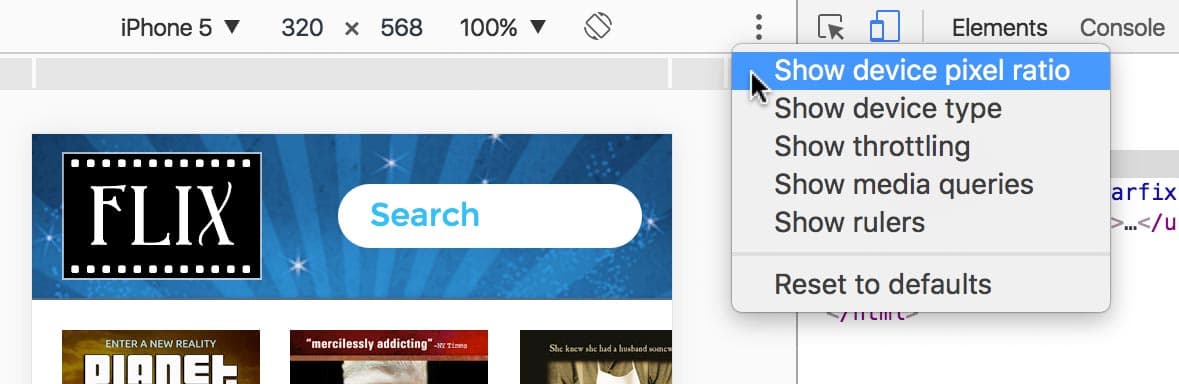
  7. Chrome users can utilize the device pixel ratio controls for precise testing. Enable this feature by clicking the three-dot menu button chrome devtools menu in DevTools and selecting Show device pixel ratio.

    device pixel ratio

  8. Activate the DPR controls by first selecting Responsive from the device dropdown menu. This enables the previously grayed-out DPR: 2.0 option.

    The Device Pixel Ratio (DPR) setting allows you to simulate how your media queries respond to different display densities—an essential capability for testing responsive image solutions.

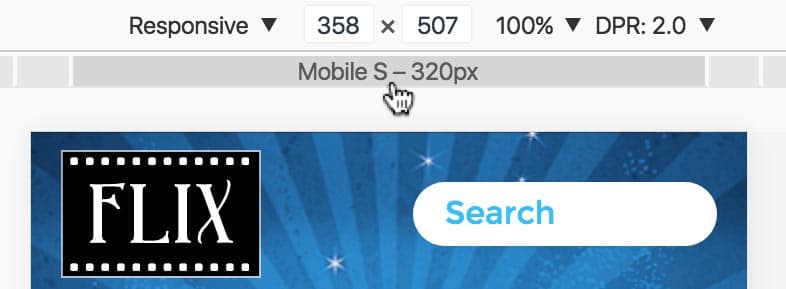
  9. Configure your viewport for mobile testing by hovering over the gray bar beneath the dimensions display. Click on Mobile S—320px to establish a consistent baseline for comparison.

    chrome responsive preview set to mobile

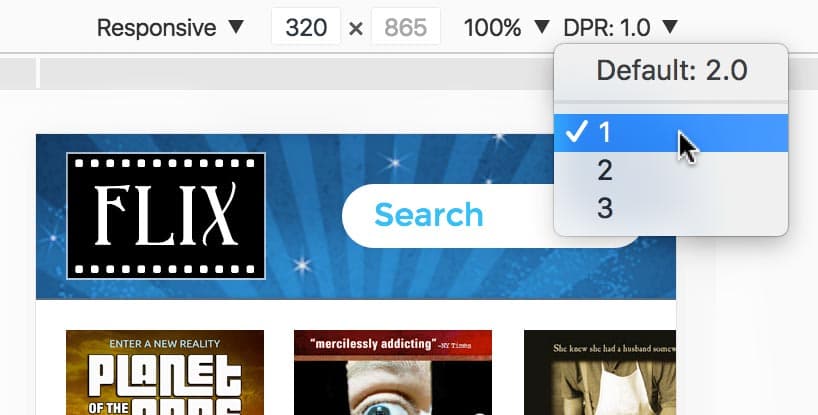
  10. Test the media query functionality by manipulating the DPR setting. Click the DPR dropdown and select 1 while observing the header background image:

    • On standard-resolution displays, you'll notice a subtle shift as the browser switches between image assets, demonstrating that your media query is functioning correctly.
    • On high-resolution displays, the difference in image clarity becomes immediately apparent as the system switches from the sharp @2x asset to the standard-resolution version.
  11. Return to the optimal setting by selecting Default: 2.0 from the DPR menu:

    • Standard display users will observe the return to the original state, confirming the media query toggle.
    • High-resolution display users will see the sharp, detailed image restored, demonstrating the successful implementation of conditional high-resolution asset loading.

Key Takeaways

1CSS media queries enable selective loading of high-resolution images based on device pixel ratio and screen resolution capabilities
2The @2x naming convention provides a clear standard for organizing standard and high-resolution image variants
3HTML5 Boilerplate's media query targets multiple browser prefixes and measurement units for comprehensive HiDPI device support
4Background-size property is essential for properly scaling 2x images to prevent cropping and sizing issues
5Chrome DevTools device pixel ratio testing allows developers to simulate and verify HiDPI display behavior
6Strategic image loading prevents low-resolution devices from downloading unnecessarily large graphics files
7Industry trend shows movement toward HiDPI-only graphics as optimization techniques reduce file size differences
8Proper media query placement near related CSS rules improves code maintainability and reduces oversight during updates

RELATED ARTICLES