Box Model: CSS3 Box-Sizing & Calc()
What This Tutorial Covers
border-box Behavior
Width includes padding and border.
calc() Math
Mix percentages and pixels in width calculations.
Layout Predictability
Avoid the surprises of content-box sizing.
Noble Desktop's Web Design Certificate teaches Figma, HTML, CSS, and responsive design.
Delve into mobile and responsive web design with this in-depth tutorial, covering topics such as the CSS3 box model, box sizing, and the CSS3 calc() function. The tutorial also offers a detailed exercise that allows you to apply your knowledge and develop crucial skills.
Topics Covered in This Mobile & Responsive Web Design Tutorial:
Reviewing the Box Model, CSS3 Box Sizing, CSS3 Calc() Function
Exercise Preview
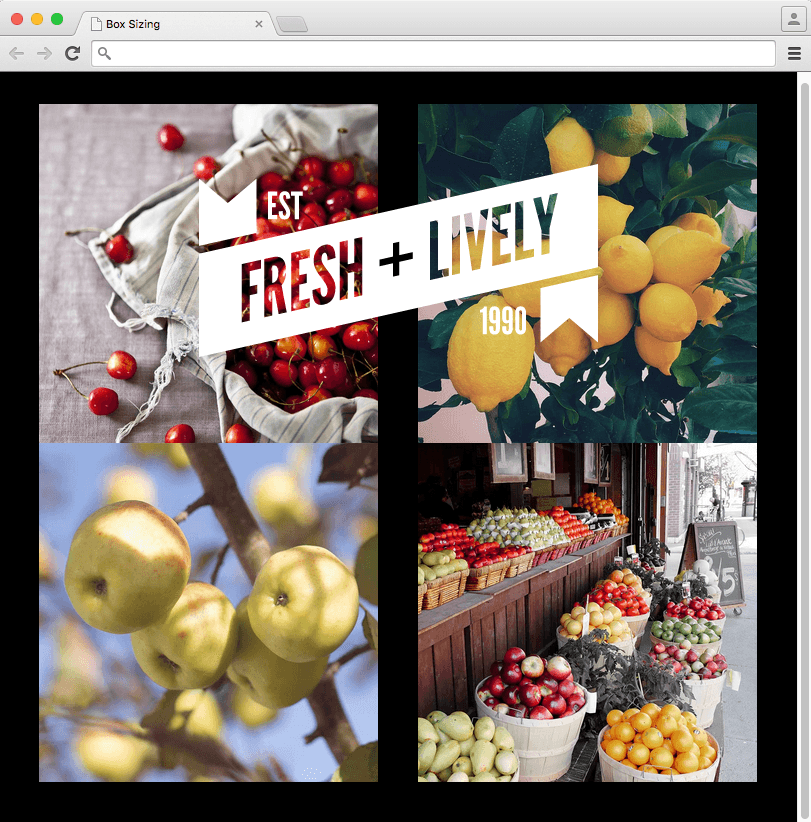
Exercise Overview
In this exercise you’ll take a deeper look at the box model, and see how padding affects the size of an element. You’ll learn how to switch to an alternate box model that makes building CSS layouts easier and more intuitive. You’ll also learn how you can use CSS to calculate numeric values that involve different types of measurements (such as percentages and pixels).
Getting Started
- For this exercise we’ll be working with the Box Sizing folder. Open that folder in your code editor if it allows you to (like Sublime Text does).
Open index.html from the Box Sizing folder.
NOTE: With such minimal styling, we embedded the CSS into the head (instead of creating an external CSS file), so you only need this one file for this exercise.
Preview index.html in a browser.
Resize the browser window to see that the column sizing is percentage-based, so the photos scale up/down. Let’s add some padding to create a frame around the images.
- Keep the page open in your browser, and switch back to index.html in your code editor.
Take a brief moment to look at the structure of this page. It’s two floated columns. Each column contains two images.
NOTE: There are other ways this page could have been created, but this layout will bring up some issues we want to address.
- On line 16 find the selector that targets our two columns (primary and secondary)
Add the following bold code to add the padding:
.primary,.secondary {
   float: left;
   width: 50%;
   padding: 40px;
}
Save the file and reload your browser.
Why are the columns not sitting side-by-side? Both columns are 50% wide. The default box model applies that width to the content, then it adds padding which further increase the size of the element. Adding 40px of padding to each side, our columns are now 50% + 80px. That makes them bigger than 100% of the screen width! The columns can’t fit next to each other, which forces the second column (which was on the right), to move down below the first column.
Changing to a Different Box Model
CSS3 introduced a new box model, which changes how the size of an element is calculated. We can now tell the browser to consider padding (and borders if present) as inside the specified width, rather than outside. (This affects height as well.)
Traditional Box Model
- Specified Size + Padding + Border = Total Calculated Size
- Padding and borders affect the size of an element
- CSS: box-sizing: content-box; (the default, so you do not have to include)
New Box Model
- Specified Size = Total Calculated Size
- Padding and borders do not affect the size of an element
- CSS: box-sizing: border-box; (not the default, so you must include)
Return to your code editor.
Add the following bold code to switch to the new CSS3 box model:
.primary,.secondary {
   float: left;
   width: 50%;
   padding: 40px;
   box-sizing: border-box;
}
The border-box value switches to a new box model, which applies the 50% width to the total width. Padding is added inside the box, instead of outside.
- Save the file.
- Reload your browser. The columns should once again be next to each other!
- The space between the divs is too large. This is because we set padding to 40px around each div, making a combined 80px center gutter. Let’s cut the center padding in half, so that it looks even all the way around.
- Return to your code editor.
We’ve already created some empty rules for you, so all you need to do is add the padding. Add the following code as shown below in bold:
.primary { padding-right: 20px; }.secondary { padding-left: 20px; }- Save the file.
- Reload your browser to see the spacing now looks even.
Return to your code editor.
Using Calc() to Center the Logo
Let’s add the page’s logo. Directly below the body tag, around line 30, add the following code as shown below in bold:
<body> <img src="img/logo.svg" class="logo" ALT="Fresh + Lively logo"> <div class="primary">- Save the file.
- Reload your browser. Wow that’s a big logo! Clearly it needs some finessing.
- Return to your code editor.
At the bottom of the styles (around line 28), above the closing style tag, add the following rule as shown in bold:
.secondary { padding-left: 20px; } .logo { position: absolute; top: 100px; left: 0; width: 488px; } </style>- Save the file.
- Reload your browser. The logo isn’t quite where we want it. Let’s try to move it halfway across the page, to the center.
- Return to your code editor.
Change the left position in the .logo rule:
.logo { position: absolute; top: 100px; left: 50%; width: 488px; }- Save the file.
Reload your browser.
Why is the logo still not centered? Browsers align an element’s corresponding edge to the specified position. So left: 50% positions the logo’s left edge at 50%.
If we could get half the logo on the left side of that 50% position, the logo would be centered. CSS3 has a nifty function called calc, that will let us calculate that position. The browser will evaluate the mathematical expression, even as a browser window is resized! Currently the logo’s left edge is 50% from the left side. The center of the graphic is half the graphic’s 488px size. It’s impossible for us to subtract pixels from a percentage and code in the result, but we can use calc to do the calculation live, even with the mix of different measurement units (percent and pixels).
- Let’s try this out. Return to your code editor.
In the .logo rule, edit the left property as shown below in bold:
.logo {
   position: absolute;
   top: 100px;
   left: calc(50%—488px / 2);
   width: 488px;
}
NOTE: For addition and subtraction, the + and—operators must always be surrounded by whitespace. For multiplication and division, the * and / operators do not need whitespace, but adding it for consistency is allowed, and recommended.
- Save the file.
Reload the page in your browser and the logo should be centered!
Making the Logo Responsive
Resize the browser window to a smaller mobile size.
Notice that the logo is not responsive. It should probably scale with the size of the window/device.
- Return to your code editor.
In the .logo rule, edit the width as shown below in bold:
.logo {
   position: absolute;
   top: 100px;
   left: calc(50%—488px / 2);
   width: 50%;
}
Now that the image width is flexible, we need to adjust the left positioning. Edit the left property as follows:
.logo {
   position: absolute;
   top: 100px;
   left: calc(50%—50% / 2);
   width: 50%;
}
Take a closer look at the code we just wrote. We could simplify this a lot more, to just a left value of 25%. Edit the left value as shown below in bold:
.logo {
   position: absolute;
   top: 100px;
   left: 25%;
   width: 50%;
}
While the calc() function is supported by all modern browsers, older browsers such as internet Explorer 8 don’t recognize it. At this point we don’t worry about supporting those very old browsers, but if calc() is not necessary we think it’s best to do the math ourselves and code in the result. While we didn’t end up needing calc in this page, it’s still quite useful and you will use it again later in this book and in your real life projects!
Save the file and reload your browser to see the final result.