MVC: Creating a Model, View, & Controller
What This Tutorial Covers
Generators
Rails generators scaffold models, views, and controllers.
MVC Connection
How the three layers communicate in a Rails request.
Conventions
Rails' file naming conventions tie MVC components together.
Noble Desktop's Full-Stack Web Development Certificate teaches modern web development concepts that transfer across Ruby, Python, and JavaScript stacks.
Dive into this Ruby on Rails tutorial that covers topics like MVC: model-view-controller, creation of a new Rails site, generating a new model, editing a migration file, populating a database with a seed file, and creating a new controller.
Topics Covered in This Ruby on Rails Tutorial:
MVC: Model-view-controller, Creating a New Rails Site for Flix, Generating a New Model, Editing a Migration File, Populating a Database with a Seed File, Creating a New Controller
Exercise Preview
Exercise Overview
Enough Ruby theory, let’s move on to Rails! In this exercise, you will start building a site called Flix that will manage movie information and movie reviews, similar to Fandango or Rotten Tomatoes. We’ll learn about the concept of MVC and then dive straight in.
MVC: Model-View-Controller
It’s important to think of your Rails projects as applications, not websites. Rails is a platform for developing robust, interactive web applications. The end product of many of these applications may be HTML for web browsers, but not necessarily—many Rails apps deliver XML, JSON, and other rich content.
As an application platform, Rails uses a programming architecture called MVC (Model-View-Controller) that is commonly used in other programming languages. MVC divides important application functionality into three components:
Model objects store data. In the recipes app we created in a previous exercise, the recipe model provided a number of methods (such as
@recipe.titleand@recipe.prep_time) to both view and edit information about each recipe. In this app, our models will include things like movies, cast members, and comments. In Rails, the model component is called ActiveRecord.Views display information to the user. Each major component of your application will probably have its own view (or series of views). Views are templates that format the data and display it to your users. They also serve the role of receiving user input. In Rails, this framework is known as ActionView.
Controllers form the bridge between models and views. When a user requests a page on a Rails site (for example, /recipes/1), that request is routed to the controller. The controller then contacts the model (“get me the information on recipe 1!”) and passes it to the view to display. Controllers also work in concert with views to create user interfaces (like the recipe create form), receive user input (like a newly submitted recipe), and submit it back to a model object to be saved permanently in the database. In Rails, this framework is called ActionController.
According to MVC, the components (models, views, and controllers) should be distinct and one should not contain logic meant for another component. For example, a model object should never render HTML; that is the function of a view. Consider the directions from the recipes app. When we first created our recipe, the line breaks did not display the way we wanted them to. We could have gone back and added <br> tags to the directions for the recipe. Besides being a pain to do, this could have unintended consequences later—for example, what if we wanted to export the recipes to a plain text file? Instead we used the simple_format function within a recipes view (/app/views/recipes/show.html.erb) to display the recipe directions the way we wanted to.
Creating a New Rails Site for Flix
Open Terminal.
Type
cdand then press the spacebar once but do not hit Return yet!Switch to the Finder.
Navigate into Class Files.
Drag the yourname-Rails Class folder from the Finder to the Terminal window (this will enter the path in Terminal).
Switch to the Terminal.
Press Return to change to that directory.
In Terminal type:
rails new flixThis command should remind you of using
rails new cookbookwhen we created the cookbook web app. After you press Return, Rails will take a few moments to create all the basic components of a new Rails app.Go into the directory by typing:
cd flixType the following to look at all the files that have been created using the using the simple
rails newcommand:ls
Creating a New Controller
Let’s start by creating an ultra-basic page to display on our Flix site. In order to do this, we need to generate a new controller that will handle requests from our users and load different things based on those requests.
In Terminal, create a controller by typing the following code:
rails generate controller moviesTerminal will print a list of files generated by this command. Scan over the list of newly created files (they are all preceded by the bright green word
create). The following sidebar explains the role of each file and directory.Rails Generate Controller Files Explained
- app/controllers/movies_controller.rb is the first and most important file, the controller itself.
- app/views/movies is a folder where the movies views will reside. Unlike the
generate scaffoldcommand that we used before, thegenerate controllercommand hasn’t created any views yet. We’ll have to make those ourselves. - test/controllers/movies_controller_test.rb is a test file. We’ll look at testing a bit later.
- app/helpers/movies_helper.rb is an automatically-created helper file. A helper file contains additional functions that assist the views associated with this controller to display their data correctly. (For example, a helper function might format dates in a certain way, or transform an array into an HTML list.)
- Finally, we can see that Rails created assets for SCSS.
Unlike the files created with scaffolding, these files are currently empty. It will be up to us to fill them with something useful.
What, you might ask, is the point of
rails generateif we could just make the empty folders and blank files ourselves? Well, the command makes sure the right files go in the right places and have the right filenames. When working in Rails, the names and locations of files must be exactly correct in order for the application to work. The command also saves a lot of time, compared to creating all the directories and files manually!Now that we’ve created our controller, let’s go check out the site. Type the following in Terminal:
rails serverIn a browser window, navigate to localhost:3000 or reload it if you’re there already. Notice that the default welcome page is still there.
Navigate to localhost:3000/movies and you should see a Routing Error page. Why didn’t
generate controller moviescreate something visible on this page? Well, the main purpose of a controller in Rails is routing. A controller receives a request, (localhost:3000/movies, for example) and sends it to a controller for processing (routing).Remember
config/routes.rbfrom the cookbook exercise? It’s back! This time we’re not just dealing with the root of the site; we’re going to define a new route. This route will send the path /movies to the movies controller and instruct it to serve a really basic page about Flix movies.We suggest opening the flix folder in your code editor if it allows you to (like Sublime Text does).
In your code editor, open flix > config > routes.rb
Select all the commented-out code, and in its place, type the following:
Rails.application.routes.draw do
   get 'movies' => 'movies#about'
end
This is a very simple syntax. It tells Rails to take the path
moviesand send it to the movies controller and do an action calledabout(remember, the#sign invokes an action). The=>essentially means “route to, ” which makes sense because it looks like a little arrow.Save the file.
In your browser, navigate to localhost:3000/movies or reload the page if you’re there already. (We will be reloading the site quite often in this exercise, so it’s a good idea to keep the page open in the browser.)
There’s an error—but it’s a different error. Different errors show that we are making progress, so this is good! This time Rails is telling us that it knows about the route
movies, but we have not yet defined a methodaboutinMoviesController. Let’s do that now.In your code editor, open flix > app > controllers > movies_controller.rb
The structure of this file should seem familiar from a previous exercise.
MoviesControlleris a class (just like we had the Cat class) and it inherits fromclass ApplicationController. MoviesController inherits a lot of behavior from ApplicationController.NOTE: ApplicationController, in turn, inherits behaviors from its parent class. If you’re really curious, you can open up application_controller.rb and see that it inherits from
ActionController::Base.The bottom line is that, because MoviesController inherits so many behaviors from ApplicationController and ActionController::Base, we don’t have to write as much code ourselves!
In your code editor, add the following bold code to movies_controller.rb to create an
aboutmethod:class MoviesController < ApplicationController def about end endThis is a method just like
say_meowor anything else. It begins withdef, has the name of the method, and ends withend. It’s worth noting that the method is blank. Does it do anything? Let’s check out our site.Save the file.
Switch to the browser, reload localhost:3000/movies and this time, there’s a new and different error!
In this error, Rails is saying that it can’t find a
template(that is, a view) for theaboutpage. It’s also giving some additional information about where it tried to look for the template.So, we can see that a blank method within a controller simply tells the controller to render a view that has the same name as the method. (In fact, every public controller method expects to render a view at some point!) How does Rails know how to do this? It’s behavior inherited from ActionController::Base.
The last step we need to do to get the site running is very simple—we just need to create the about page. Let’s do that now.
Switch to your code editor.
Create a new file.
Type the following in the new blank file:
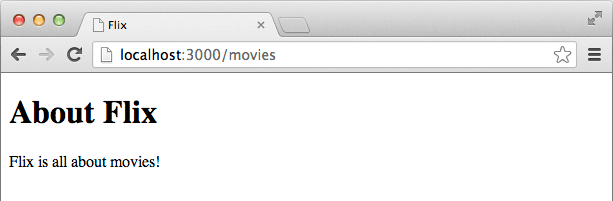
<h1>About Flix</h1>
<p>Flix is all about movies!</p>
That simple copy is all we need to test if our site is working. As you might have guessed, this file needs a really particular name and must be saved in a really particular place. Take care with typing the following step and double-check your work before saving.
Do a File > Save As.
Navigate to flix > app > views > movies.
Save the file as about.html.erb
Switch to the browser and reload localhost:3000/movies
Great! Our Flix site is up and working! The simple HTML we typed is displaying at the address we specified. We just created a non-resourceful route. Later on, we’ll learn how to create resourceful routes, which are more elegant and save you even more work.
The site is really plain at this point because we haven’t applied any styling. All Rails created was the bare-bones structure of the folders and files. In order to make this look like a professional website, we’ll need to implement a design. That will be the focus of the next exercise.
Back in Terminal, hit CTRL—C to stop the server.