April 1, 2026Noble Desktop Publishing Team/12 min read

Model Relationships: Free Ruby on Rails Tutorial

Master Rails Model Relationships and Database Associations

Key Learning Objectives

Model Relationships

Learn to create and manage complex database relationships between Rails models using foreign keys and associations.

Database Design

Understand how to structure data for one-to-many relationships and implement proper foreign key constraints.

Rails Console

Master Rails console commands for creating, querying, and managing model data efficiently.

Topics Covered in This Ruby on Rails Tutorial:

Creating a Model for Cast Members, Adding Objects to the Cast Members Model in Rails Console, Updating Views to Include the Cast Members Model, Creating a Genre Model, Adding a Genre Field to the Edit Form

Exercise Preview

preview model relationship

Exercise Overview

The Editorial Department at Flix has requested two critical enhancements to our movie database: cast member listings and genre categorization for every film. This isn't just about displaying data—it's about creating meaningful relationships between our models that reflect real-world content management needs.

For cast members, we need a flexible system that can accommodate any number of actors per film, from intimate character studies to ensemble blockbusters. The genre requirement is more sophisticated: each genre must be clickable, leading to dedicated pages that aggregate all films within that category. This creates a powerful content discovery system that mirrors how users naturally browse entertainment platforms.

While this seems like a complex undertaking, our deep understanding of Rails models and relationships makes it entirely manageable. We'll leverage Rails' built-in association patterns to create a robust, scalable solution.

  1. If you completed the previous exercises, you can skip the following sidebar. We strongly recommend completing the previous exercises before starting this one, as they build essential foundational knowledge. If you haven't finished them, follow the setup process below.

    Data Requirements Analysis

    Cast members require a one-to-many relationship (multiple cast per film), while genres need clickable navigation to filtered movie lists. This drives the database design decisions throughout the tutorial.

If You Did Not Do the Previous Exercises (3A–5A)

  1. Close any files you may have open.
  2. Open the Finder and navigate to Class Files > yourname-Rails Class
  3. Open Terminal.
  4. Type cd and a single space (do NOT press Return yet).
  5. Drag the yourname-Rails Class folder from the Finder to the Terminal window and press ENTER.
  6. Run rm -rf flix to delete your copy of the Flix site.
  7. Run Git clone https://bitbucket.org/Noble Desktop/flix.Git to copy the Flix Git repository.
  8. Type cd flix to enter the new directory.
  9. Type Git checkout 5A to bring the site up to the end of the previous exercise.
  10. Run bundle to install any necessary gems.
  11. Run yarn install—check-files to install JavaScript dependencies.

Getting Started

Let's establish our development environment and verify our Rails application is functioning properly before implementing our new features.

  1. Open the Finder and navigate to Class Files > yourname-Rails Class

  2. Open Terminal.

  3. Type cd and a single space (do NOT press Return yet).

  4. Drag the flix folder from the Finder to the Terminal window.

  5. Make sure you're in Terminal and hit Return to change into the new folder.

  6. Type the following in Terminal:

    rails server
  7. Let's verify everything is working properly on the site. Switch to a browser and navigate to localhost:3000 to confirm the application is running smoothly.

  8. Back in Terminal hit CTRL–C to shut down the server.

Environment Setup Checklist

0/3

Creating a Model for Cast Members

When dealing with variable-length data like cast members, creating a dedicated model is often the most elegant solution. This approach gives us maximum flexibility and maintains clean data relationships.

  1. The challenge of storing an unknown number of cast members per film requires careful architectural consideration. While we could store this as a text field or JSON array, creating a dedicated model provides the best long-term scalability and query flexibility. Switch to the Terminal.

  2. Type the following, making sure to double-check the code before hitting Return:

    rails generate model cast_member name:string movie:references

    This command creates our new cast_member model with all necessary fields. The references field type is Rails' way of establishing foreign key relationships—it automatically creates the database constraints and ActiveRecord associations we need for proper data integrity.

  3. We suggest opening the flix folder in your code editor if it allows you to (like Sublime Text does).

  4. In your code editor, open flix > db > migrate > #_create_cast_members.rb (the # stands for the unique 14-digit timestamp in the filename).

  5. Examine line 5 in this automatically generated file:

    t.references :movie, null: false, foreign_key: true

    While we specified the references type, Rails intelligently added foreign_key: true automatically. This line establishes the critical relationship between our movies and cast_members models. The foreign key constraint ensures referential integrity—preventing orphaned cast member records and maintaining consistent data relationships even as our database scales to thousands of records.

    The null: false constraint is equally important, ensuring that every cast member must be associated with a specific movie. This business rule makes logical sense and prevents data anomalies.

  6. Close the file, as we're done reviewing the migration structure.

  7. Switch to the Terminal and type the following to apply the migration:

    rails db:migrate
  8. Switch to your code editor.

  9. Open app > models > cast_member.rb

    Notice that this file contains more content than our original movie model did. Rails has automatically added belongs_to :movie, demonstrating how the framework leverages naming conventions to generate intelligent defaults.

  10. To complete the model relationship and unlock Rails' full ActiveRecord magic, we need to establish the reciprocal association in our existing movie model. Open app > models > movie.rb

  11. Add the following bold code around line 5, above the scope:

    validates :runtime, numericality: true
    
    has_many :cast_members
    
    scope :with_placement, -> (placement) { where(placement: placement) }

    This declaration tells the movie model that it can have multiple associated cast members, satisfying our business requirement for unlimited cast members per film. This bidirectional relationship enables powerful query capabilities and elegant data manipulation.

  12. Save the file.

Understanding References Field Type

The 'references' field type automatically creates foreign key relationships and adds 'foreign_key: true' to maintain database consistency between related models.

Model Generation Process

1

Generate Model

Use 'rails generate model cast_member name:string movie:references' to create the model with proper associations

2

Review Migration

Check the generated migration file for the foreign key constraint and null: false validation

3

Apply Migration

Run 'rails db:migrate' to create the database table with proper relationships

4

Update Models

Add 'has_many :cast_members' to the Movie model to complete the bidirectional relationship

Adding Records to the Cast Members Model in Rails Console

The Rails console provides a powerful interface for database manipulation and testing. While production applications would typically use web forms for data entry, the console is invaluable for rapid prototyping and data seeding.

  1. Switch to the Terminal.

  2. Type the following to start up the Rails console:

    rails console

    We could build forms for cast member management, but the Rails console offers immediate database access and serves as excellent practice for understanding ActiveRecord relationships. Let's start by retrieving a movie record.

  3. Type the following:

    movie = Movie.find(1)

    This will return Text M for Murder. Now let's populate it with cast members using Rails' association methods.

  4. Type:

    movie.cast_members.new(name: "John Jones")
    movie.cast_members.new(name: "Susan Shine")
    movie.cast_members.new(name: "Ed Kovac")
    movie.save

    Terminal will display SQL output confirming that three records have been inserted into cast_members, each properly associated with "movie_id": 1. This demonstrates Rails' relationship management in action.

  5. Type the following to verify which cast members belong to Text M for Murder:

    movie.cast_members

    This returns detailed ActiveRecord output for all three cast member records. For a cleaner view, let's count them.

  6. Type:

    movie.cast_members.count

    Terminal will print 3. We can also access individual cast members through the association.

  7. Type the following:

    movie.cast_members.first.name

    Terminal will print John Jones. Note that this retrieves the full name of the first cast member, not just the first name field. Array-style access also works seamlessly.

  8. Type:

    movie.cast_members[1].name

    Since array indexing starts at zero, this returns Susan Shine, our second cast member.

    NOTE: Rails' naming conventions can initially seem inconsistent, but they follow logical patterns. Capitalized class names like CastMember reference the model class directly, while lowercase, underscored versions like cast_members represent association methods and database tables. This duality becomes intuitive with practice and enables Rails' powerful convention-over-configuration philosophy.

  9. Try typing the following:

    susan = CastMember.find_by(name: "Susan Shine")

    Terminal will display Susan's complete record. This demonstrates Rails' flexible query methods—particularly useful when you don't know the specific ID.

  10. Type the following:

    susan.movie.title

    Terminal will print Text M for Murder. This illustrates the bidirectional nature of our association—we can navigate from cast member to movie just as easily as from movie to cast member.

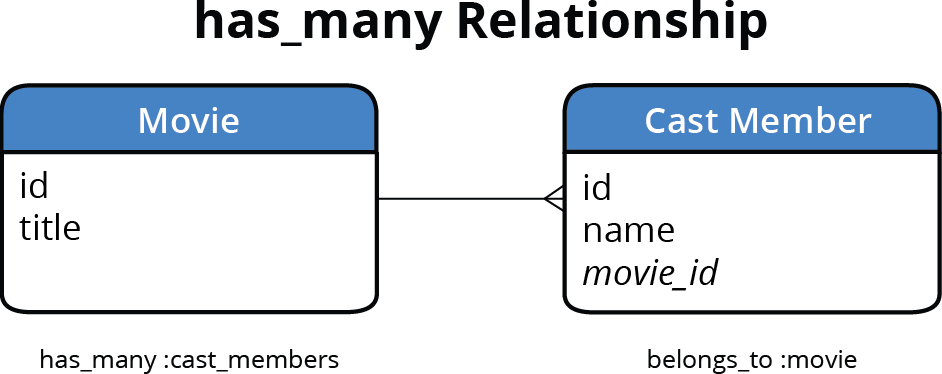
  11. The diagram below illustrates how Rails determines relationship directions. The model containing the reference field (shown in italic) uses belongs_to, while the referenced model uses has_many. Therefore, cast_member with its foreign key movie_id belongs to movie. Meanwhile, movie has many cast members. Understanding this pattern is crucial for designing scalable database relationships.

    relationship diagram has_many

    The foreign key originates from our model generation command:

    rails generate model cast_member name:string movie:references

    This created the movie_id field, which serves as our foreign key. It's "foreign" because it references another table's data, and a "key" because it points to that table's primary identifier (id).

  12. Rails enables bulk record creation through arrays of hashes, significantly streamlining data entry. Let's add cast members to Planet of the Apps (movie ID 2) using this more efficient approach:

    Movie.find(2).cast_members.create([{name: "Mark Wallburg"}, {name: "Hellova Carter"}, {name: "Tim Rath"}])

    The create method combines new and save into a single operation, and accepting an array of hashes allows multiple records to be created atomically.

  13. To expedite the remaining data entry, we've prepared cast member data for all movies. Switch to the Finder.

  14. Navigate to and open the following file, which will probably open in TextEdit: Class Files > yourname-Rails Class > flix snippets > cast_members.txt

  15. Hit Cmd–A to select all the contents of the file and copy them (Cmd–C).

  16. Close the file and switch to the Terminal.

  17. Paste (Cmd–V) the text, then press Return once to apply the command.

    Excellent! All cast members have been added successfully. Since we used create(), all records are automatically saved to the database.

  18. Type the following to exit Rails console:

    exit

Rails Console Data Creation Methods

Featurenew() + save()create()
Steps RequiredTwo stepsOne step
Memory UsageObjects in memoryDirect to database
Batch OperationsManual iterationArray of hashes
Error HandlingBefore saveImmediate
Recommended: Use create() for efficiency, especially with arrays of data
Rails Naming Conventions

Rails uses CastMember (capitalized) for class names and cast_members (lowercase, underscored) for method names. This convention switching is automatic and consistent throughout Rails.

Updating Views to Include the Cast Members Model

Now we'll integrate cast member display into our views using a custom model method. This approach keeps our view logic clean while providing reusable formatting functionality.

  1. Let's create a presentation method in our model to format cast member names consistently across all views. Switch to your code editor.

  2. Open app > models > movie.rb

  3. Add the following bold code at the bottom of your code:

    def cast
       cast_members.map { }
    end
    
    end
  4. This method framework will transform our cast member collection into a displayable format. Complete the implementation with the following bold code:

    cast_members.map { |c| c.name }.join(", ")

    This elegant one-liner extracts each cast member's name and joins them with commas, creating professional-looking cast lists regardless of the number of actors.

  5. To ensure robust error handling when cast members might be nil, add defensive coding with an unless condition:

    cast_members.map { |c| c.name }.join(", ") unless cast_members.nil?

  6. Save the file.

  7. Open app > views > movies > index.html.erb

  8. Find the following code, which should start around line 21:

    <h3><%= movie.title %></h3>
    <div><%= movie.mpaa_rating %>, <%= movie.runtime_hours %></div>
  9. Add the following bold code:

    <h3><%= movie.title %></h3>
    <div><%= movie.cast %></div>
    <div><%= movie.mpaa_rating %>, <%= movie.runtime_hours %></div>
  10. Save the file.

  11. Open app > views > movies > show.html.erb

  12. Add the following code around line 7:

    <h2><%= @movie.title %></h2>
    <p>Cast: <%= @movie.cast %></p>
    <p class="mpaa-rating">Rating: <%= @movie.mpaa_rating %></p>
  13. Save the file.

  14. Type the following in Terminal:

    rails server
  15. Switch to a browser and navigate to localhost:3000/movies

    Notice that cast members now appear beneath the movie posters, providing immediate context for each film. Click on any movie to view its detail page—cast information displays there as well, creating a consistent user experience.

  16. Switch back to Terminal and hit CTRL–C to shut down the server.

cast_members.map { |c| c.name }.join(', ') unless cast_members.nil?
This elegant Ruby method transforms a collection of cast member objects into a formatted string, demonstrating the power of Rails model methods for view logic.
Nil Value Protection

Always include nil checks when working with associations to prevent errors when records have no associated data.

Creating a Genre Model

The genre model presents a different relationship pattern: one-to-many rather than many-to-one. Understanding where to place foreign keys is crucial for proper database design and optimal query performance.

For genres, each category (Horror, Action, Drama) appears once in our genre table but applies to multiple movies. Conversely, each movie belongs to exactly one genre. This means the movie model should contain the foreign key reference to genre—following the principle that the "many" side of a one-to-many relationship holds the foreign key.

  1. In Terminal, create the genre model by typing the following:

    rails generate model genre name:string

    This model contains only the name field because the foreign key relationship will be established in the movies model. Let's add that reference now.

  2. Generate a migration to add the genre reference to movies:

    rails generate migration add_genre_id_to_movies genre:references
  3. Before applying this migration, we need to make a critical adjustment for our existing data. Open the newly-created migration file and modify this line:

    add_reference :movies, :genre, null: false, foreign_key: true

    Remove null: false, so it becomes:

    add_reference :movies, :genre, foreign_key: true

    This modification is essential because we have existing movie records that would violate the null constraint. In production systems, you'd typically populate these fields with default values, but for our development environment, allowing null values provides the necessary flexibility.

  4. Save the file.

  5. Type the following to apply the migration:

    rails db:migrate

    Now we need to establish the ActiveRecord associations in both models to enable Rails' relationship magic.

  6. Switch to your code editor.

  7. Open app > models > genre.rb

  8. Add the following bold code:

    class Genre < ActiveRecord::Base
       has_many :movies
    end
  9. Save the file.

  10. Open app > models > movie.rb

  11. Add the following code around line 7:

    has_many :cast_members
    belongs_to :genre, optional: true

    The optional: true parameter is crucial here—it allows existing movies without assigned genres to remain valid, preventing validation errors during the transition period.

The belongs_to relationship might seem counterintuitive—after all, genres don't "own" movies in any meaningful business sense. However, in Rails terminology, belongs_to simply identifies which model contains the foreign key. It's a technical relationship indicator rather than a semantic one, and this distinction becomes natural with experience.

  1. Save the file.

  2. Switch to Terminal.

  3. Let's populate our genre table using Rails console for speed and efficiency. Type the following:

    rails console
  4. Type the following to create our initial genre categories:

    Genre.create(name: "Horror")
    Genre.create(name: "Drama")
    Genre.create(name: "Sci-Fi")

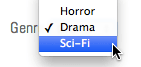
    This basic genre set covers our current film collection. In a production system, you'd likely have a more comprehensive taxonomy, potentially with subcategories and multiple genre assignments per film.

  5. Type the following to exit the Rails console:

    exit

Foreign Key Placement Decision

FeatureCast MembersGenres
Relationship TypeMany cast per movieOne genre per movie
Foreign Key Locationcast_members tablemovies table
Database EfficiencyMultiple recordsSingle reference
Recommended: Foreign key placement depends on the 'many' side of the relationship

Genre Implementation Steps

1

Create Genre Model

Generate model with only name field since foreign key goes in movies table

2

Add Foreign Key Migration

Use add_reference migration to add genre_id to existing movies table

3

Remove Null Constraint

Allow existing movies to have null genre_id to prevent migration errors

4

Update Model Associations

Add has_many to Genre and belongs_to with optional: true to Movie

Re-purposing the Play Trailer Button As an Edit Button

With our genre model established, we need an efficient way to assign genres to movies. Rather than manually navigating to each movie's edit URL, let's streamline the workflow by converting the existing trailer button into an edit button.

This modification demonstrates a common development pattern: repurposing UI elements as application requirements evolve, maintaining user familiarity while adding new functionality.

  1. Switch to your code editor.

  2. Open app > views > movies > show.html.erb

  3. Find the followi

Key Takeaways

1Model relationships in Rails require careful consideration of foreign key placement based on the one-to-many relationship structure
2The 'references' field type automatically creates foreign key constraints and maintains database integrity between related models
3Rails console provides powerful methods for data manipulation, with create() being more efficient than new() + save() for batch operations
4Model methods like map() and join() help keep view logic DRY by processing data at the model level rather than in templates
5Bidirectional relationships require both has_many and belongs_to declarations in their respective models to function properly
6Nil value protection is essential when working with associations to prevent runtime errors on records without related data
7Rails naming conventions automatically switch between CamelCase class names and snake_case method names throughout the framework
8Migration modifications may be necessary when adding foreign keys to existing data to prevent constraint violations

RELATED ARTICLES