April 1, 2026Dan Rodney/4 min read

Saving Photos for the Web as GIF/PNG

Master Photoshop GIF and PNG Web Optimization

Web Image Format Fundamentals

JPEG Optimization

Photographs and images with many colors optimize better as JPEGs due to their compression algorithm designed for continuous tone images.

GIF/PNG Optimization

Files with few colors or areas of flat solid color are ideal for GIF or PNG compression, providing superior results for graphics and logos.

Topics Covered in This Photoshop Tutorial:

Comparing GIF & PNG formats, implementing transparency for modern web design

Exercise Preview

save as gif

Exercise Overview

While photographs and complex imagery with thousands of colors perform best as JPEGs, graphics with limited color palettes—particularly logos, icons, and illustrations with areas of flat, solid color—achieve superior compression and crisp rendering when saved as GIF or PNG files. Understanding when and how to apply these formats will dramatically improve your web graphics' performance and visual quality.

Pre-Optimization Preparation

1

Verify Image Settings

Ensure your image is in RGB mode at 72 ppi for optimal web display and processing.

2

Trim Empty Pixels

Use Image > Trim to automatically remove empty pixels and reduce file size before optimization.

3

Access Save for Web

Navigate to File > Export > Save for Web (Legacy) to begin the optimization process.

Saving As GIF

  1. From the Photoshop Class folder, open the file corporate-logo.psd.

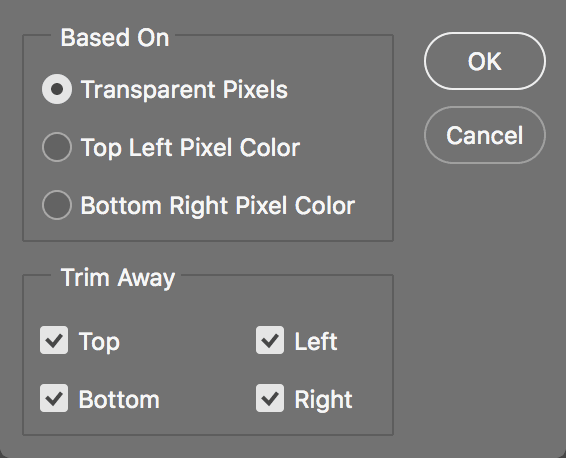
  2. Although this image is already in RGB mode at 72 ppi, we need to eliminate unnecessary transparent pixels to optimize file size. Rather than manually cropping with the Crop tool crop tool, Photoshop offers an automated solution. Navigate to Image > Trim and configure the following settings:

    trim logo

  3. Click OK, and Photoshop will automatically detect and remove all unnecessary transparent space with pixel-perfect precision.

  4. Navigate to File > Export > Save for Web (Legacy) to access Photoshop's comprehensive web optimization interface.

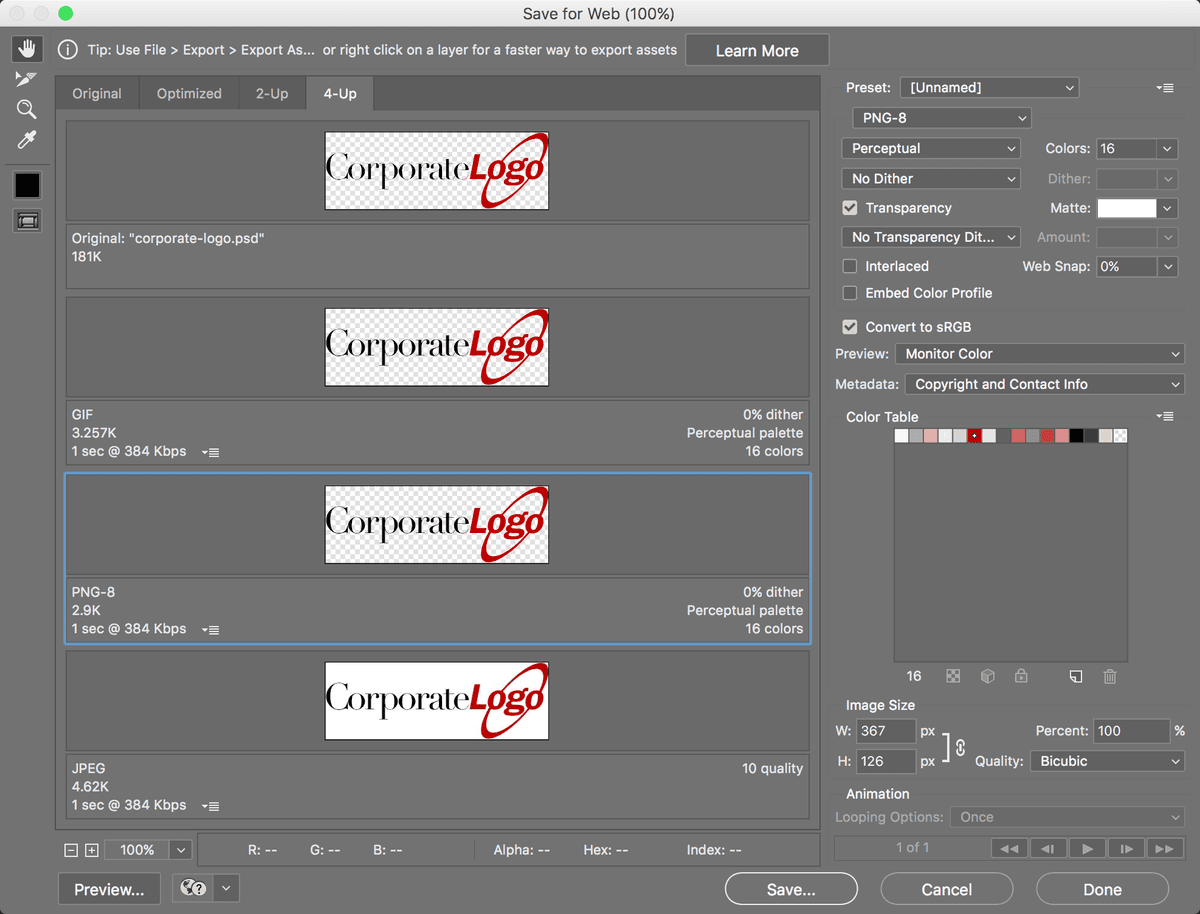
  5. In the export settings panel on the right, locate the format dropdown menu below Preset and select GIF.

    The GIF format achieves compression by intelligently reducing the total color palette of an image. While GIFs support up to 256 colors, most graphics require significantly fewer colors to maintain visual fidelity, resulting in smaller file sizes and faster load times—crucial factors for modern web performance.

  6. In the Colors field on the right panel, specify 16 colors. This aggressive color reduction typically provides excellent results for simple logos while maintaining crisp edges and solid color areas.

  7. From the color reduction algorithm dropdown menu to the left of Colors, select the Perceptual palette option.

    Adaptive, Selective, and Perceptual algorithms analyze your specific image content to determine the optimal color palette, making them superior to generic preset palettes. The Perceptual algorithm prioritizes colors that the human eye perceives as most important, often producing the best visual results at the smallest file sizes. In professional practice, test all three options and compare both visual quality and file size before making your final selection.

  8. The Dither option employs scattered pixel patterns to simulate intermediate colors, creating smoother gradients in images with limited palettes. Since our logo contains primarily solid colors without complex gradients, locate the dropdown menu immediately below Perceptual and select No Dither to maintain clean, sharp edges.

  9. From the Matte dropdown menu, select the background color of your target website (in this example, white works well for most modern web designs).

    Understanding GIF transparency limitations is crucial for professional web graphics. Unlike modern PNG format, GIF supports only binary transparency—pixels are either completely transparent or completely opaque. Any partially transparent pixels from your original design must be converted to fully opaque pixels. The Matte color serves as the background blend color for these edge pixels, allowing anti-aliased edges to seamlessly integrate with your webpage background. Choosing an inappropriate matte color will create visible halos around your graphics.

  10. Ensure the Transparency checkbox remains checked to preserve your logo's transparent background.

  11. Select the Zoom tool zoom tool from the toolbar on the left side of the Save for Web dialog.

  12. Click on the preview image to examine the edge treatment closely. Notice how the previously translucent anti-aliased pixels around the logo edges have been seamlessly blended with your chosen Matte color, creating clean, opaque edge pixels that will integrate smoothly with your web design.

GIF Color Limitation

Maximum GIF Colors
256
Typical Usage
16
Minimum Required
2

Color Palette Options

FeaturePalette TypeCharacteristics
AdaptiveBased on actual image colorsAnalyzes source image
SelectiveBased on actual image colorsPrioritizes common colors
PerceptualBased on actual image colorsOptimized for human perception
Preset PalettesFixed color setsNot recommended for most cases
Recommended: Choose Perceptual for smallest file size with minimal visual difference
GIF Transparency Limitation

GIF transparency does not allow for partial transparency. Any partially transparent pixels must become completely opaque, requiring careful matte color selection for smooth edge blending.

GIF Optimization Checklist

0/5

Comparing GIF to PNG-8

While GIF and PNG-8 employ similar indexed-color compression methods, PNG represents the more modern standard with several technical advantages. PNG files frequently achieve smaller file sizes than equivalent GIFs, though results vary by image content. Since both formats share identical optimization settings, we can perform a direct comparison to determine the optimal choice for this specific graphic.

  1. Note the current GIF file size displayed in the preview area for comparison purposes.

  2. In the export settings panel on the right, locate the format dropdown menu below the Preset section and change from GIF to PNG-8.

  3. Observe the file size reduction in the PNG version. In professional practice, PNG-8 files with identical settings typically achieve 5–25% smaller file sizes compared to GIF equivalents. However, for certain content types—particularly simple text graphics—GIF occasionally produces smaller files. The professional approach involves testing both formats and selecting whichever delivers superior compression for your specific image content.

  4. Click Save and export the file as yourname-logo.png to your Photoshop Class folder.

    For comprehensive technical details about color palette optimization strategies and detailed comparisons of GIF, PNG, and JPEG formats—including modern WebP considerations for contemporary web development—consult the Web File Formats reference section at the back of this workbook.

PNG vs GIF Performance

5%
Minimum size reduction with PNG
25%
Maximum size reduction with PNG

GIF vs PNG-8 Feature Comparison

FeatureGIFPNG-8
Compression MethodLZW compressionDeflate compression
Age/SupportOlder formatNewer format
File SizeLarger (typically)Smaller (5-25% reduction)
Text GraphicsSometimes smallerUsually larger
Color PaletteUp to 256 colorsUp to 256 colors
Recommended: Test both formats and choose based on actual file size results
Format Selection Strategy

Always test both GIF and PNG-8 with identical settings to determine which format yields the smaller file size for your specific graphic. PNG typically wins, but GIF can be smaller for certain text-based graphics.

Key Takeaways

1Images with few colors or flat solid color areas optimize best with GIF or PNG formats rather than JPEG
2Always trim empty pixels before optimization to reduce final file size using Image > Trim
3GIF files support up to 256 colors but typically need far fewer - 16 colors often sufficient for logos
4Perceptual color palette provides the best balance of small file size and visual quality
5GIF transparency is binary only - partially transparent pixels become opaque and blend with matte color
6PNG-8 files are typically 5-25% smaller than equivalent GIF files with same settings
7For text graphics, GIF can sometimes be smaller than PNG-8, requiring format testing
8Matte color should match website background color for seamless transparent edge blending

RELATED ARTICLES