Photo Filter Website: Creating an Exclusive Filter
What This Tutorial Covers
Single-Selection Logic
Show only items matching the current filter, hide all others.
Active State
Visual indication of the currently active filter.
Reset Button
Allow users to clear filters and see all items.
Noble Desktop's JavaScript Development Certificate teaches modern JavaScript and React.
Dive into this comprehensive tutorial and learn how to enhance a photo gallery webpage with JavaScript & jQuery by separating inclusive and exclusive filters, adding a checkbox to toggle exclusive filtering, and writing conditionals to select the appropriate filter.
Topics Covered in This JavaScript & JQuery Tutorial:
Adding a Checkbox to Toggle Exclusive Filtering On/off, Separating the Inclusive & Exclusive Filters, Writing a Conditional to Select the Appropriate Filter, Differentiating the Exclusive Filter, Rerunning the Filter When the Checkbox is Toggled
Exercise Preview
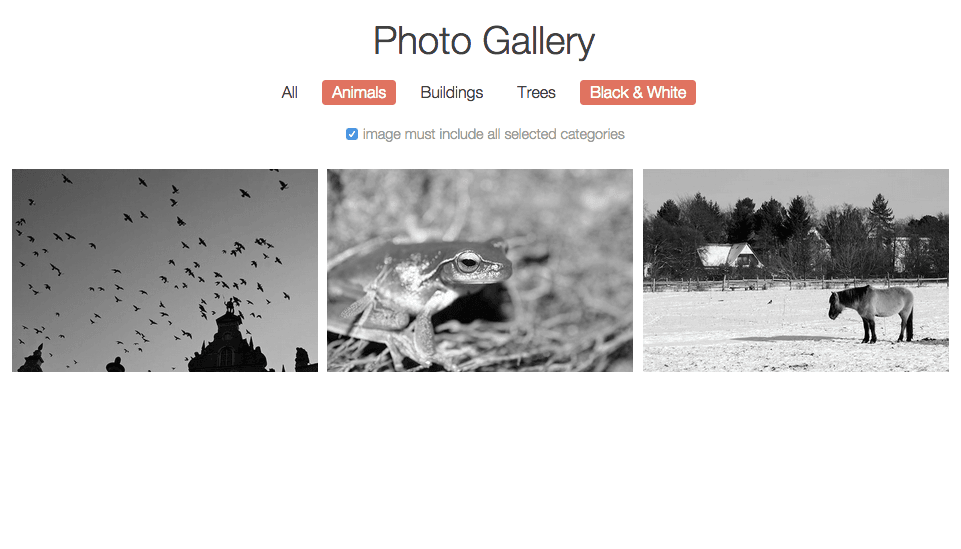
Exercise Overview
In the previous exercise, we programmed the ability to filter photos on a gallery webpage. The filters we created were additive/inclusive so that when applying multiple filters, they showed photos that matched any of the parameters.
In this exercise, we’ll learn how to build an exclusive filter feature that will allow a user to show images only if they match all chosen parameters.
Getting Started
Open your code editor if it isn’t already open.
Close any files you may have open.
For this exercise we’ll be working with the Photo-Filter-Exclusive folder located in Desktop > Class Files > yourname-JavaScript jQuery Class. You may want to open that folder in your code editor if it allows you to (like Visual Studio Code does).
Open index.html from the Photo-Filter-Exclusive folder.
Preview index.html in Chrome (we’ll be using its DevTools later).
Click the category links in the navigation at the top to see how the inclusive filtering function selects photos that match any of the selected categories.
Leave the page open in Chrome so we can come back to it later.
Adding a Checkbox to Toggle Exclusive Filtering On/Off
We will be adding an exclusive filtering option via a checkbox that users can click to exclude images if they do not match all selected categories.
In order to save time, we’ve provided the HTML code for the checkbox. Go to Photo-Filter-Exclusive > snippets and open checkbox-toggle.txt.
Check out the code to see that the checkbox includes an ID and label and some text, all contained inside a div. We have already styled these elements for you in the CSS.
Select all the code, copy it, and close the file.
Back in index.html, paste the code before the
</header>tag (around line 22):</nav> <div class="checkbox-toggle"> <input id="exclusive" name="exclusive" type="checkbox"> <label for="exclusive">image must include all selected categories</label> </div> </header> <div class="gallery">Save the file and reload index.html in Chrome to see the new checkbox under the nav and before the photos.
Separating the Inclusive & Exclusive Filters
Back in your code editor, find the filterPhotos() function that starts around line 212, and cut the var group; statement and any whitespace.
Around line 212, above the filterPhotos() function, create the following bold functions that will separate the filtering into inclusive and exclusive filters (paste the variable into both functions):
function filterInclusive() {
   var group;
}

function filterExclusive() {
   var group;
}

function filterPhotos() {
We coded the logic for the inclusive filter in the previous exercise. This means that all we need to do to flesh out the filterInclusive() function is move some code out of the filterPhotos() function. Around lines 222–227, select the for loop shown below:
for(var i = 0; i < selectedArray.length; i++) {
   group = document.querySelectorAll('.' + selectedArray[i]);
   for(var j = 0; j < group.length; j++) {
      group[j].style.display = 'inline-block';
   }
}
We can think of this as the inclusive for loop. Cut the loop code so we can move it into the inclusive filter.
Paste the code inside the filterInclusive() function as shown in bold:
function filterInclusive() {
   var group;
   for(var i = 0; i < selectedArray.length; i++) {
      group = document.querySelectorAll('.' + selectedArray[i]);
      for(var j = 0; j < group.length; j++) {
         group[j].style.display = 'inline-block';
      }
   }
}
Writing a Conditional to Select the Appropriate Filter
Currently the filterPhotos() function only hides all the photos or shows all the photos if the user deselects all options. Now we need write a conditional that figures out what kind of filter is needed, and provides two directions based on if the checkbox is checked or not. Let’s go sleuthing to figure out how to write this conditional statement.
The checkbox has an ID of exclusive so we’ll grab it and store it in a variable. Around line 159, add the following bold code to the end of the variable declarations:
var imageContainers = document.querySelectorAll('.gallery div');
var exclusive = document.getElementById('exclusive');

// functions
Save the file.
Go to index.html in Chrome and reload it.
To determine how to write our conditional, we’ll check the checkbox and see what its status is using the handy JavaScript Console. Open the Console by hitting Cmd–Opt–J (Mac) or CTRL–Shift–J (Windows).
Type the following, then hit Return (Mac) or Enter (Windows) to look inside the exclusive variable we just added (it references the checkbox that toggles the exclusive filter):
console.dir(exclusive);Click the arrow next to input#exclusive to expand it.
Scroll down to the checked value and notice that it is currently false.
To clear the Console, hit Cmd–K (Mac) or CTRL–L (Windows).
In the document, check the checkbox on under the nav.
Type
console.dir(exclusive);then hit Return (Mac) or Enter (Windows).Expand input#exclusive and scroll to see that checked is now true.
Now that we know that exclusive.checked will have a value of either true or false, we can tell the conditional to test for these. Switch back to your code editor.
Around line 230, add an if statement to the filterPhotos() function as shown:
function filterPhotos() {
   hideAllPics();
   noFilterSelection();
   if(exclusive.checked) {
      filterExclusive();
   } else {
      filterInclusive();
   }
}
NOTE: We could have alternately written line 220 (the first line we added) as if(exclusive.checked == true) but we instead wrote a shorthand for saying the same thing. In an if statement the function will only fire if the.checked condition in parentheses is true.
Differentiating the Exclusive Filter
The inclusive filter function is taken care of. Now we need to figure out how to differentiate the exclusive filter. We’ll need to place the user’s filter choices into the querySelectAll() method, but how?
Take a look at the following example of the code we might write for the inclusive filter if a user selected Animals and Buildings:
document.querySelectorAll('.animals');
document.querySelectorAll('.buildings');
In the above example, we’re grabbing filter values one at a time and adding on to what’s already there.
In contrast, look at an example of the code for the exclusive filter requiring images that contain both Animals and Buildings:
document.querySelectorAll('.animals.buildings');In this second example, we’re chaining together filter values so both must be present. In order to properly chain the values, we should store them in a string.
Before we do anything else, we need a way to be able to access the string for the chained values that will go inside the querySelectorAll() method. In the filterExclusive() function, add the following bold variable around line 225:
function filterExclusive() {
   var group;
   var queryString = '';
}
Next we want to loop through the categories the user selected so we can then store this as the value for the string. Add the bold code:
function filterExclusive() {
   var group;
   var queryString = '';
   for(var i = 0; i < selectedArray.length; i++) {

   }
}
Now we’ll take queryString and attach the item(s) in the selectedArray. Add:
function filterExclusive() {
   var group;
   var queryString = '';
   for(var i = 0; i < selectedArray.length; i++) {
      queryString += '.' + selectedArray[i];
   }
}
NOTE: += adds onto the string without deleting what was previously there.
We want to make sure our queryString variable is working as intended, so add the bold console.log() line so we can test this in the JavaScript Console:
for(var i = 0; i < selectedArray.length; i++) {
      queryString += '.' + selectedArray[i];
   }
   console.log(queryString);
}
Save the file.
Go to index.html in Chrome and reload it.
Open the Console if it isn’t already open.
Check the checkbox below the nav.
Click the Animals button. You should see .animals print to the Console.
Click the Buildings button. You should see .animals.buildings print to the Console. It’s attaching every filter we select. Perfect!
Finishing the Exclusive Filter
Next we need to grab the selectors in the queryString, cycle through them, and set them to display inline-block.
Back in your code editor, delete the console.log() code around line 229.
It’s a good idea to check whether queryString is empty to be sure it’s worth looping through what needs to be displayed. Around line 229, write the bold if statement in the case that selectors have been added to the queryString:
for(var i = 0; i < selectedArray.length; i++) {
      queryString += '.' + selectedArray[i];
   }
   if(queryString) {
      group = document.querySelectorAll(queryString);
      for(var j = 0; j < group.length; j++) {
         group[j].style.display = 'inline-block';
      }
   }
}
NOTE: if(queryString) is a simple check to see if queryString is equal to something as opposed to nothing. Additionally, we could have used i again as the index variable for the second loop because the first one has already run its course but we use j just for clarity here in the second loop.
Save the file.
Go to index.html in Chrome and reload it.
Feel free to close the Console if it’s open.
Right now, all the photos should be showing. Click the Animals button.
Check the checkbox below the nav.
Let’s filter for just black & white animal photos. Click the Black & White button. You should see three results.
Click the All button and it will show just the one photo that matches all four categories.
Try unchecking the checkbox. Hmm, nothing happens because at this point, we haven’t programmed it to rerun the filter when the box has been unchecked. We should fix this.
Rerunning the Filter When the Checkbox is Toggled
We need to specify that whenever the checkbox is checked or unchecked (toggled on or off), we want to populate the array, then filter the photos.
Switch back to your code editor.
Right under the // active code comment, around line 247, add the bold code:
// active code
exclusive.onchange = function() {
   populateArray();
   filterPhotos();
}

for(var i = 0; i < selectors.length; i++) {
   selectors[i].onclick = function() {
      toggleSelector(this);
      populateArray();
      filterPhotos();
   }
}
Save the file.
Go to index.html in Chrome and reload it.
As before, by default, all photos should be showing because it’s using the inclusive filter. Check on the checkbox.
It should now be showing the one photo that matches all the selectors because it’s using the exclusive filter.
Uncheck the checkbox and watch it go back to using the inclusive filter. Perfect!
NOTE: If you want to refer to our final code example, go to Desktop > Class Files > yourname-JavaScript jQuery Class > Done-Files > Photo-Filter-Exclusive.