April 1, 2026Dan Rodney/9 min read

jQuery Cycle: Adding Slideshow Controls

Master interactive slideshow controls with jQuery Cycle

jQuery Cycle Plugin Benefits

Built-in Controls

Automatic pager generation with cycle-pager class detection. No manual control creation required.

FOUC Prevention

CSS-based solution to prevent flash of unstyled content during plugin initialization.

Flexible Positioning

Supports both internal and external pager positioning for different content types.

Topics Covered in This JavaScript & jQuery Tutorial:

Master professional slideshow development by preventing the dreaded "flash of unstyled content" (FOUC), implementing smooth slideshow transitions, and creating intuitive user controls that enhance the browsing experience.

Exercise Preview

cycle controls done

Exercise Overview

Building on your foundation from the previous exercise where you created a basic slideshow using the jQuery Cycle plugin, you'll now elevate the user experience by implementing interactive navigation controls. These controls empower users to take command of the slideshow, allowing them to jump directly to specific slides rather than waiting for automatic transitions. This level of interactivity is essential for modern web applications where user agency and control significantly impact engagement metrics.

Building on Previous Knowledge

This tutorial assumes completion of the basic jQuery Cycle slideshow exercise. We'll enhance that foundation with interactive user controls.

Getting Started

  1. Launch your preferred code editor if it isn't already running.

  2. Close any open files to maintain a clean workspace.

  3. Navigate to the Cycle-Slideshow-Controls folder located in Desktop > Class Files > yourname-JavaScript jQuery Class. Consider opening this entire folder in your code editor (particularly if you're using Visual Studio Code or similar modern editors) to streamline file navigation.

  4. Open index.html from the Cycle-Slideshow-Controls folder.

  5. Preview the page in your browser to establish the current baseline user experience.

    Our objective is to transform the static main photo into a dynamic slideshow that showcases upcoming events. Currently, the additional slideshow images aren't integrated into the page structure, so we'll need to implement them first.

  6. Keep the browser tab open for easy testing as we iterate on our implementation.

  7. Return to your code editor to begin the development process.

  8. Locate the featuredShows div around line 66. Notice this container currently houses only a single image—we'll need to expand this.

  9. Add the following code to incorporate the complete slideshow image set:

    <div id="featuredShows">
       <img src="img/scroll-lustre.jpg" width="530" height="375">
       <img src="img/scroll-bugs.jpg" width="530" height="375">
       <img src="img/scroll-blast.jpg" width="530" height="375">
       <img src="img/scroll-battle.jpg" width="530" height="375">
    </div>
  10. Save the file and test your changes.

  11. Switch to your browser and reload index.html. You'll notice all four band photos (Low Lustre, Lightning Bug, etc.) are now visible, stacked vertically. This temporary visual issue will be resolved once we implement the Cycle plugin functionality.

Initial Setup Process

1

Open Project Files

Navigate to Cycle-Slideshow-Controls folder and open index.html in your code editor

2

Add Slideshow Images

Insert additional img tags for scroll-bugs.jpg, scroll-blast.jpg, and scroll-battle.jpg

3

Preview Changes

Reload browser to see all four images stacked vertically before applying fixes

Preventing a Possible "Flash of Unstyled Content"

Professional web development requires attention to the loading experience. Once the Cycle plugin activates, it will intelligently hide the additional slideshow photos and begin the transition cycle. However, there's a critical UX consideration: the cycle can't begin until all JavaScript files have downloaded and executed. During this brief window—which can vary significantly based on network conditions and device performance—users may see all four photos simultaneously. When the Cycle plugin finally initializes, the page will abruptly reorganize, creating a jarring visual shift known as a "flash of unstyled content" (FOUC).

This phenomenon can undermine the professional appearance of your application and negatively impact user perception. The solution lies in proactive CSS implementation that gracefully handles the loading state by initially hiding the supplementary photos. The Cycle plugin will then reveal them systematically when it's fully loaded and ready to orchestrate the slideshow experience.

  1. Return to your code editor to implement the FOUC prevention strategy.

  2. From the css folder, open main.css (ensure you're working within the Cycle-Slideshow-Controls folder).

  3. Below the existing #featuredShows rule (starting around line 87), add the following CSS rules:

    #featuredShows img {
       display: none;
    }
    #featuredShows img:first-child {
       display: block;
    }
  4. Save the file to apply the changes.

  5. Switch to your browser and reload index.html. You should now see only the first photo (Low Lustre) displayed cleanly. The remaining photos are strategically hidden and will be revealed once the Cycle plugin is operational.

FOUC Prevention Strategy

Hide additional slideshow images with CSS display: none, then show only first-child with display: block until jQuery Cycle loads.

CSS Display States

Hidden Images75%
Visible Image25%

Enabling the Slideshow

With the foundation properly established, it's time to activate the core slideshow functionality. This process involves configuring the jQuery Cycle plugin with appropriate timing and transition settings that align with modern user expectations for smooth, engaging interactions.

  1. Navigate back to your code editor to configure the slideshow behavior.

  2. The page already includes links to jQuery and the Cycle plugin JavaScript files from our previous exercise, which means we can immediately implement the slideshow logic. From the js folder, open main.js.

  3. Around lines 33–38, locate and select the existing subContent1 cycle configuration code.

  4. Copy this code block as our starting template.

  5. Paste the copied code below the last cycle implementation, ensuring it remains within the document ready function and above the final closing }); braces.

  6. The images we added are contained within a div with the ID featuredShows. Modify the copied code with these three key adjustments: target the featuredShows div, configure it to advance slides every 3 seconds (3000 millisecond timeout), and set no initial delay to ensure immediate slideshow activation:

    $('#featuredShows').cycle({ 
       fx: 'scrollHorz', 
       speed: 600, 
       timeout: 3000, 
       delay: 0
    });
  7. For a more elegant user experience, we'll implement a fade transition instead of horizontal scrolling. Remove the fx line entirely, allowing the plugin to use its default fade effect:

    $('#featuredShows').cycle({ 
       speed: 600, 
       timeout: 3000, 
       delay: 0
    });
  8. Save the file to activate the slideshow functionality.

  9. Switch to your browser and reload index.html. After a few seconds, you'll see the photos elegantly fade between one another in a smooth, professional transition cycle.

Slideshow Configuration Options

FeatureDefaultCustom
Transition EffectfadescrollHorz
Speed (ms)600600
Timeout (ms)40003000
Delay00
Recommended: Use 3000ms timeout for optimal user engagement with slideshow content

Adding & Customizing the Controls

While automatic slideshows serve their purpose, modern users expect interactive control over their browsing experience. Navigation controls are essential for accessibility and user agency, allowing visitors to revisit specific slides or control the pacing according to their preferences. The jQuery Cycle plugin provides robust built-in features for creating these controls through a simple class-based system.

To implement user controls, we need to create a container div with the cycle-pager class, which the plugin automatically detects and populates with interactive navigation elements.

  1. Switch to index.html in your code editor to add the control structure.

  2. Currently, we don't have a designated space for the navigation controls, so we'll create one. Before the #featuredShows closing div tag (around line 71), add the following code:

    <div id="content">
       <div id="featuredShows">
          <img src="img/scroll-lustre.jpg" width="530" height="375">
          <img src="img/scroll-bugs.jpg" width="530" height="375">
          <img src="img/scroll-blast.jpg" width="530" height="375">
          <img src="img/scroll-battle.jpg" width="530" height="375">
          <div class="cycle-pager"></div>
       </div>
    </div>

    NOTE: The Cycle plugin's intelligent design automatically detects divs with the cycle-pager class within slideshow containers and dynamically generates slide indicators. This seamless integration works perfectly when your slideshow content consists of images, as in our implementation. For div-based content, you would need to position the pager outside the slideshow container and configure it explicitly—refer to the sidebar at the end of this exercise for advanced implementation details.

  3. Save the file and test the initial control implementation.

  4. Switch to your browser and reload index.html.

    Look for four small white dots at the bottom left of the slideshow area. While functional, these default indicators are too small for comfortable interaction and lack visual feedback for the current slide state, requiring CSS enhancement for professional usability.

  5. Return to your code editor to improve the control styling.

  6. The navigation dots are rendered as bullet characters, allowing us to enhance their appearance through CSS font-size and other styling properties. To expedite development, we've prepared the styling code. In the snippets folder, open cycle-pager-style.css.

  7. Select and copy the complete styling code.

  8. From the css folder, open main.css.

  9. Around line 94, locate the #featuredShows img:first-child rule and paste the new styling below it.

    NOTE: The z-index: 200; property ensures the navigation controls remain at the top of the page's visual stacking order, preventing them from being obscured by other page elements. The remaining properties create a polished, professional appearance that you can customize for your specific design requirements.

  10. Save the file to apply the enhanced styling.

  11. Preview index.html in Chrome (we'll utilize Chrome DevTools for debugging and inspection).

  12. Test the functionality by clicking the bullet navigation to jump between specific slides.

  13. While the basic functionality works, observe these usability issues that require refinement:

    • No visual indication of the currently active slide
    • Mouse hover shows a text cursor instead of a pointer, reducing perceived interactivity
    • Double-clicking selects the bullet as text, creating unwanted visual behavior
    • Insufficient spacing between navigation elements affects touch usability
  14. Let's examine the plugin's dynamic HTML generation using developer tools. Ctrl+click (Mac) or Right-click (Windows) on any navigation bullet and select Inspect from the context menu.

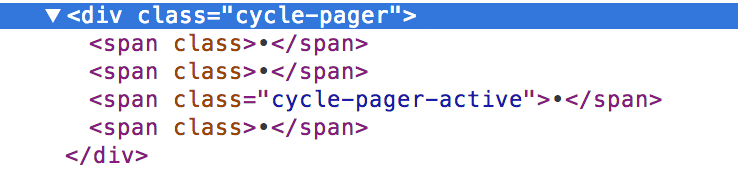
  15. In the DevTools panel, observe the generated span tags within the cycle-pager container. Watch as the cycle-pager-active class dynamically moves between span elements as the slideshow progresses. This plugin-generated class provides the hook we need to style the active slide indicator.

    cycle pager inspection

  16. Return to main.css in your code editor to address the usability issues.

  17. Below the .cycle-pager rule (starting around line 97), add the following enhanced styling:

    .cycle-pager span {
       margin-right: 5px;
       cursor: pointer;
       -webkit-user-select: none; 
       -moz-user-select: none; 
       -ms-user-select: none;
       user-select: none;
    }
  18. Save the file and test the improvements.

  19. Switch to your browser, reload index.html, and verify the enhanced user experience:
    • Improved spacing between navigation bullets for better touch targets
    • Proper pointer cursor on hover indicating interactive elements
    • Eliminated text selection behavior on double-click for cleaner interactions
  20. Complete the professional implementation by adding active state styling. Switch back to main.css in your code editor.

  21. Below the .cycle-pager span rule (starting around line 112), add the active state indicator:

    .cycle-pager span.cycle-pager-active {
       color: #fbc324;
    }
  22. Save the file to finalize the implementation.

  23. Switch to your browser and reload index.html. The active slide bullet should now display in yellow, providing clear visual feedback to users about their current position in the slideshow sequence.

  24. Test the complete functionality by clicking through the navigation controls and observing the smooth transitions and clear active states.

    NOTE: For reference implementation, you can examine our complete solution in Desktop > Class Files > yourname-JavaScript jQuery Class > Done-Files > Cycle-Slideshow-Controls.

Automatic Pager Generation

jQuery Cycle automatically detects divs with cycle-pager class and generates clickable indicators for each slide.

Internal vs External Pager Placement

Pros
Automatic detection within slideshow container
Works perfectly with image-based slideshows
No additional JavaScript configuration needed
Cons
May interfere with div-based slide content
Limited positioning flexibility
Requires manual positioning for complex layouts

Control Enhancement Checklist

0/6

Defining a Custom Pager Outside the Slideshow Container

While the Cycle plugin automatically detects cycle-pager class divs within slideshow containers—which works seamlessly with image-based slideshows—this approach requires modification when working with div-based slide content. In those scenarios, placing the pager inside the slideshow container would inadvertently make it part of the slide rotation itself.

For div-based slideshows, position the pager outside the slideshow container and assign it a unique class or ID. Then configure your JavaScript to explicitly reference the custom pager location:

$('#featuredShows').cycle({
   slides: '> div', 
   pager: '.your-custom-cycle-pager-name', 
   speed: 600, 
   timeout: 3000, 
   delay: 0
});

This approach provides greater flexibility for complex layouts while maintaining the same user experience and functionality.

If your slideshow content is div tags, putting the cycle-pager div inside the slideshow container would mean the pager becomes one of the slides. Oops!
Critical consideration when working with div-based slideshow content instead of images
Custom Pager Configuration

For div-based slideshows, place pager outside container and use the pager option in jQuery Cycle configuration to specify custom selector.

Key Takeaways

1jQuery Cycle plugin automatically generates slideshow controls when it detects a div with cycle-pager class within the slideshow container
2Prevent flash of unstyled content (FOUC) by hiding extra slideshow images with CSS display: none until the plugin loads
3Configure slideshow timing with timeout parameter - 3000ms provides optimal user engagement for most content
4Style pager controls with proper cursor, spacing, and user-select properties to improve user experience and prevent unwanted interactions
5Use cycle-pager-active class to provide visual feedback showing which slide is currently displayed
6For div-based slideshow content, place the pager outside the slideshow container and configure it manually using the pager option
7Set z-index: 200 on pager elements to ensure they appear above slideshow content in the visual stacking order
8Copy and modify existing cycle configurations to maintain consistency across multiple slideshows on the same page

RELATED ARTICLES