April 1, 2026Dan Rodney/2 min read

Apartment for Rent: Free InDesign Tutorial

Master InDesign apartment rental poster creation techniques

Tutorial Format

This tutorial uses concise instructions designed to encourage memorization of InDesign functions rather than step-by-step hand-holding.

Topics Covered in This InDesign Tutorial:

Advanced text formatting techniques, precise line tool implementation, and professional text rotation methods

Essential InDesign Skills You'll Learn

Text Formatting

Learn professional typography techniques for creating eye-catching rental advertisements with proper text hierarchy and styling.

Line Tool Mastery

Master the Line tool for creating clean geometric elements and dividers that enhance your poster's visual structure.

Text Rotation Techniques

Discover how to effectively rotate text elements to create dynamic layouts that grab attention and maximize space usage.

Required Tools and Resources

0/4

Exercise Preview

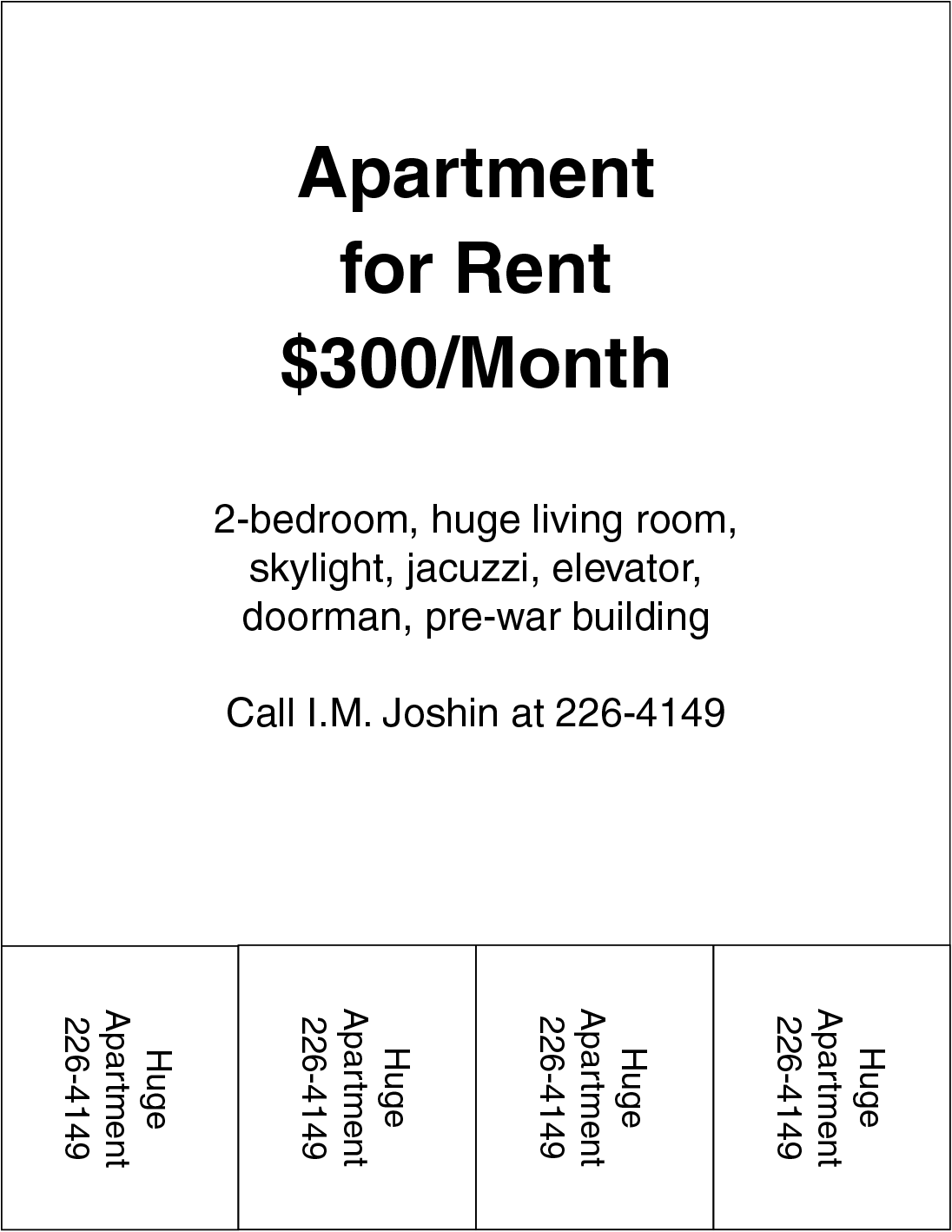
apt for rent ex prev

Creative Freedom Encouraged

Use the sample design only as a guide. You're encouraged to experiment with different typefaces, sizes, and colors to create a more compelling design.

Key Design Elements to Include

1

Import Main Content

Use the provided apt.txt file to populate the primary apartment listing information and details

2

Add Rotated Contact Info

Manually type and rotate the contact information: 'Huge Apartment 226-4149' for visual impact

3

Create Clean Lines

Use the Line tool with Shift key held down to ensure perfectly horizontal or vertical line elements

Exercise Overview

In this hands-on exercise, you'll create a professional rental sign that demonstrates essential InDesign layout principles. This project builds practical skills in typography hierarchy, geometric elements, and creative text positioning—techniques you'll use repeatedly in real-world design work. The instructions are intentionally streamlined to help you internalize InDesign's core functions and develop muscle memory for efficient workflow.

  1. To create this professional rental poster, follow these strategic steps:

    • Master three essential tools for this project: the Type tool type tool for typography control, the Line tool line tool for structural elements, and the Rotate tool rotate tool for dynamic text positioning. These tools form the foundation of most layout projects.
    • Import the primary content from the provided apt.txt file to practice working with external text sources—a common workflow in professional environments. You'll manually input the rotated contact information: Huge Apartment 226-4149. This combination of imported and manual text entry mirrors typical client projects where content comes from multiple sources.
    • Use the sample as your structural foundation, but elevate the design with contemporary typography choices, strategic sizing hierarchy, and purposeful color application. Consider current design trends while maintaining readability—your goal is creating a sign that stands out in today's competitive rental market while demonstrating professional design principles.
    • Apply precision techniques when creating linear elements: hold Shift while drawing to ensure perfectly horizontal or vertical lines. This constraint-based approach is fundamental to professional layout work and ensures visual consistency across your design elements.
    • Challenge yourself with advanced functionality by implementing a table structure for the tear-off phone number tabs at the bottom. This approach demonstrates InDesign's versatility beyond basic text and shapes, showcasing skills that separate professional designers from beginners in today's design landscape.
Line Drawing Pro Tip

Remember to hold Shift when drawing lines to constrain them to perfectly horizontal or vertical orientations for professional results.

Text Content Requirements

Main Listing Content

Import all primary apartment details and information from the provided apt.txt file for the body of your poster.

Contact Information

Manually type 'Huge Apartment 226-4149' as rotated text element to create visual interest and highlight contact details.

Advanced Challenge Option

For users seeking additional complexity, try implementing a table structure for the phone number tabs at the bottom of the poster design.

Design Enhancement Opportunities

0/4

Key Takeaways

1This InDesign tutorial focuses on creating professional apartment rental posters using essential design tools
2The exercise emphasizes memorization of InDesign functions through concise, practical instructions
3Three core tools are required: Type tool for text, Line tool for geometric elements, and Rotate tool for dynamic positioning
4Students must import content from apt.txt file while manually adding rotated contact information for visual impact
5Holding Shift while using the Line tool ensures perfectly horizontal or vertical lines for professional results
6Creative freedom is encouraged through experimentation with typefaces, sizes, and colors beyond the sample design
7Advanced users can challenge themselves by incorporating table structures for phone number organization
8The tutorial balances guided instruction with opportunities for personal creative expression and skill development

RELATED ARTICLES