2-Page Magazine Ad
What This Tutorial Covers
Spread Setup
Two facing pages with a center spine consideration.
Bleed & Trim
Extend artwork into the bleed for safe printing.
Image-Text Balance
Compose striking layouts that read across the gutter.
Noble Desktop's Graphic Design Certificate covers InDesign alongside Photoshop and Illustrator.
Master the art of creating 2-page spreads in InDesign with our detailed tutorial covering topics such as defining colors, facing pages, and color swatches.
Exercise Preview

Setting the Document up As a 2–Page Spread
- From the File menu, choose New > Document and set:
- Set Width to 8 in and Height to 10.75 in.
- Pages: 2
- Start #: 2
- Check on Facing Pages if it isn’t already.
- Expand the Margins section if needed, and make all Margins 0 in.
- Expand the Bleed and Slug section if needed, and make all Bleed options 0.125 in.
Click Create.
In the InDesign menu (Mac) or Edit menu (Windows), choose Preferences and then Units & Increments.
On the right, set the Ruler Units as follows:
Origin: Page (DON’T forget this option!) Horizontal: Picas Vertical: Picas Click OK.
Open the Pages panel (Window > Pages).
The pages should look like a spread as shown below, with a line in the middle that separates the left and right pages. If they are not a spread, you didn’t check Facing Pages when creating the document, or you didn’t enter 2 as the Start #. To fix it go into File > Document Setup, check Facing Pages, and enter 2 as the Start Page #. Then click OK.
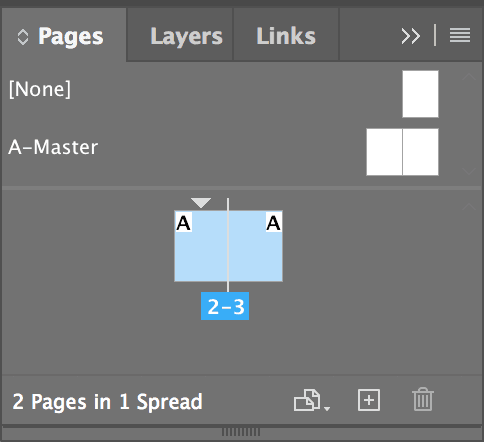
NOTE: The reason this worked is because even numbered pages are always on the left and odd pages on the right.
Bringing in the Picture
Go into File > Place.
From the InDesign Class folder, select time.tif and click Open.
The cursor should now be a loaded image icon
 with a preview of the photo.
Position the top left of this cursor at the red bleed guide (which is 1⁄8 in off the top left of the page) and click once to place the image.
Making the “Mini” Time Magazine Cover
We are going to put a box around the jeep and put some type in it to make it look like a mini Time magazine cover so your eye is drawn to the action.
Choose the Rectangle tool
 .
.On the right-hand page, draw a box around the jeep that is shaped somewhat like a magazine cover (with the jeep near the bottom). Don’t worry about being too exact. Next we’ll type in the exact measurements to perfect it.
In the Control panel, make sure the top left reference point
 is chosen, then enter the four values shown (X/Y and W/H):
When done, press Return (Mac) or Enter (Windows) to apply the change.
We want to make the frame a specific color, but before we go ahead and create the color, let’s make sure the stroke color is active. Open the Swatches panel (Window > Color > Swatches).
As shown below, at the top left of the Swatches panel, make sure the Stroke swatch is in front (active). If it’s not, click it to make it active.

Now we can create the color. From the Swatches panel menu
 at the top right, choose New Color Swatch.
Leave Name with Color Value checked and set the following:
Color Type: Process Color Mode: CMYK Color Values: 0% Cyan, 100% Magenta, 100% Yellow, 0% Black Add to CC Library: Uncheck this option if shown NOTE: If we did not uncheck Add to CC Library, this color would be saved into a shared library available for all documents. We only want to use the color in this document.
Click OK.
Although it’s hard to see, the stroke is already colored with that swatch!
Let’s make the line thicker. As shown below, in the Control panel, make the Stroke weight 4 pt.

Let’s put some type into this box. With the Type tool
 , click in the frame and type in TIME (in all caps!).
Select that text and make it 44 pt Adobe Caslon Pro Regular. (NOTE: This font is listed under C.)
As shown below, at the top left of the Swatches panel, make sure the type’s Fill swatch is in front (active). If it’s not, click it to make it active.

In the Swatches panel, click the red color you just created (it’s named C=0 M=100 Y=100 K=0). That’s how you color type.
Before we forget, center the text with the Align center button
 in the Control panel.
The type is too close to the top of the frame, so go into Object > Text Frame Options.
Under Inset Spacing, uncheck the link button
 so it looks like this:
Make the Inset Spacing, Top: 0p4
Click OK.
Setting the Tagline
For the type below the image, create a text frame in the white area at the bottom of the right page, making sure the frame sits entirely on the right page—no part of the frame should fall onto the left page!
Choose the Selection tool
 (make sure the text frame is selected) and enter the following specs. (Be sure to click the top left reference point in the Control panel):
X: 2p1 W: 28p6 Y: 52p1 H: 11p8 Using the Type tool
, type in the following three lines of text:If you think watching a volcano in a movie is frightening, (press Shift–Return (Mac) or Shift–Enter (Windows))
imagine watching one in a rearview mirror. (press Return (Mac) or Enter (Windows))
The world’s most interesting magazine.
Select the top two lines of type. Make them 14/20 Minion Pro Regular. (This specifies 14 pt size and 20 pt leading. See the sidebar for an explanation of typographic shorthand.)
Typographic Shorthand
In typography, a common shorthand is to put the font size and leading together.
For example, 9 pt size type with 12 pt leading may be written 9/12.
- Select the next line. Make it 11/20 Myriad Pro Bold Condensed.
- Also set the Space Before
 to 3p (that’s in the Paragraph panel).
 Go to File > Save As, name it yourname-timeMagazineAd.indd and save it into the InDesign Class folder.
Printing As a Spread
This file is a spread made up of two pages that are next to each other. If you want to print both pages together on the same sheet of paper, here’s how to do that.
Go into File > Print and set the following:
- Choose the appropriate printer at the top.
- Check on Spreads.
- On the left, click on the Setup section.
- Set Paper Size to US Letter (Mac) or Letter (Windows) or larger if your printer is capable.
- Set Orientation to Landscape
 (the second icon).
 - Check on Scale To Fit.
- Click the Print button.