April 1, 2026Dan Rodney/9 min read

Sending Tests & Email Fixes

Master HTML Email Testing and Cross-Client Compatibility

Essential HTML Email Skills Covered

CSS Inlining

Convert embedded CSS to inline styles using automated tools for maximum email client compatibility.

Multi-Client Testing

Test across Gmail, Outlook, Yahoo Mail, and mobile clients to ensure consistent rendering.

Client-Specific Fixes

Address common issues in Outlook 2007/2010, Gmail Promotions tab, and iOS Mail.

Topics Covered in This HTML Email Tutorial:

Streamlining your email development workflow with CSS inlining tools, comprehensive testing across major email clients, and targeted fixes for Outlook.com, Gmail, Yahoo! Mail, Apple's iOS Mail, and Outlook 2007/2010

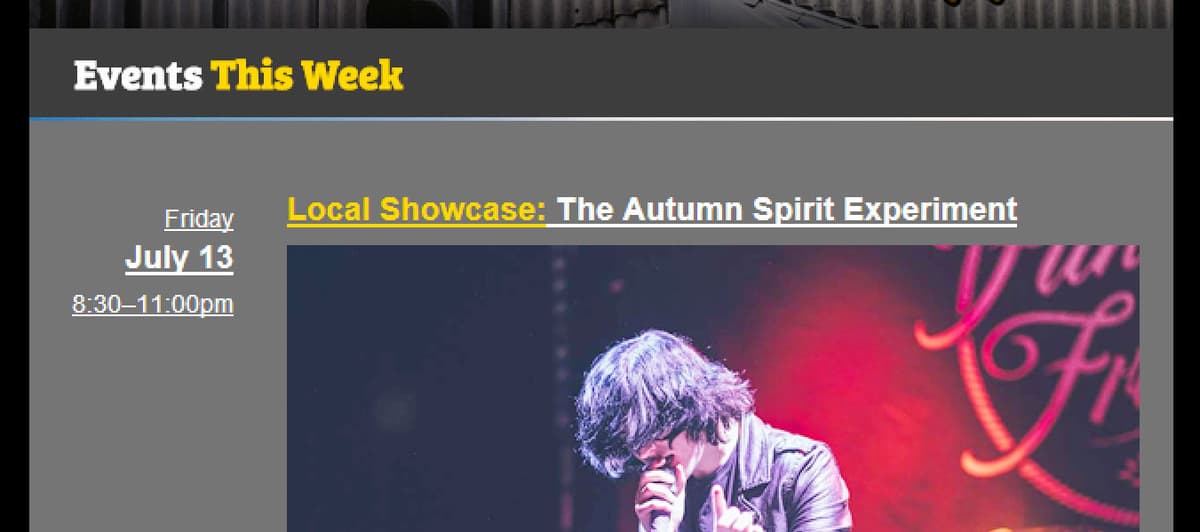
Exercise Preview

preview email fixes

Exercise Overview

Inline CSS represents the gold standard for HTML email development because of its universal support across email clients. While our first exercise demonstrated the power of this approach, it also revealed the tedious nature of writing extensive inline styles by hand. Our solution in the Jive Factory newsletter—utilizing embedded CSS during development—significantly accelerated our coding process, but these styles won't survive the rendering engines of many email clients.

The bridge between efficient development and reliable delivery lies in automated CSS inlining tools. Leading email marketing platforms like Mailchimp, Campaign Monitor, and Constant Contact now include sophisticated inlining engines in their standard workflows. For this exercise, we'll leverage Zurb's Foundation for Email Inliner, a robust script that transforms embedded CSS into inline styles—an absolute necessity for clients like Gmail that strip out embedded stylesheets entirely. This tool eliminates hours of manual work while maintaining the precision your designs demand.

Once our CSS is properly inlined, we'll implement a systematic testing protocol to identify and resolve rendering inconsistencies across the email ecosystem's most challenging environments.

Why Inline CSS Matters

Inline CSS is recommended for HTML email because it's supported across all email clients. While embedded CSS speeds up development, it won't work across all clients, particularly Gmail.

Converting to Inline Styles

Professional email development requires a methodical approach to CSS inlining. We'll use Zurb's battle-tested inliner to generate production-ready code from our development files. You'll be working with a new set of files for this exercise (Jive Factory Ready for Testing) that contains the completed Jive Factory email from previous exercises.

  1. Close any open files in your code editor to maintain a clean workspace.
  2. Open events-issue21-summer.html from the Jive Factory Ready for Testing folder in your code editor. Verify you're in the correct directory to avoid version confusion.
  3. Select all code using Cmd–A (Mac) or Ctrl–A (Windows).
  4. Copy the entire codebase with Cmd–C (Mac) or Ctrl–C (Windows).
  5. Navigate to get.foundation/emails/inliner.html in Chrome.
  6. Paste your code into the HTML input field using Cmd–V (Mac) or Ctrl–V (Windows).
  7. Locate and uncheck Compress HTML beside the Inline! button. Uncompressed code is essential for debugging and future modifications.
  8. Execute the inlining process by clicking Inline!
  9. Click Copy to Clipboard in the top-right corner of the Final Email HTML output field.
  10. Return to your code editor environment.
  11. Create a new document through File > New File (or your editor's equivalent).
  12. Paste the processed code into this new file.
  13. Save as inlined-events-issue21-summer.html within your Jive Factory Ready for Testing directory.

    Your email is now optimized for cross-client compatibility testing.

Using Zurb's Foundation Inliner

1

Prepare Your Code

Open events-issue21-summer.html and select all code using Cmd-A or CTRL-A, then copy it.

2

Access the Inliner

Navigate to get.foundation/emails/inliner.html in Chrome and paste your HTML code.

3

Configure and Process

Uncheck 'Compress HTML' option, click 'Inline!' button, then copy the processed result.

4

Save Inlined Version

Create a new file, paste the inlined code, and save as inlined-events-issue21-summer.html.

Sending a Test Email with Litmus PutsMail

Effective email testing requires real-world conditions that only live email clients can provide. PutsMail, developed by email testing pioneer Litmus, offers a streamlined solution for sending test campaigns without the overhead of a full email service provider. This approach gives you authentic rendering results across diverse email environments.

  1. With inlined-events-issue21-summer.html active, select all content using Cmd–A (Mac) or Ctrl–A (Windows).
  2. Copy the complete code with Cmd–C (Mac) or Ctrl–C (Windows).
  3. Open a new browser tab while keeping the Zurb Inliner accessible.
  4. Navigate to putsmail.com in your new tab.
  5. Click Create a New Test Email to begin the testing process.
  6. Complete the free account registration, or authenticate with existing Litmus credentials if available.
  7. Access the New Email Test interface. If redirected elsewhere, return to putsmail.com and select Create a New Test Email.
  8. Enter your Outlook.com (Hotmail), Yahoo Mail, and Gmail addresses in the Recipients field. These three clients represent the most challenging rendering environments you'll encounter.
  9. Save these addresses by clicking Add.
  10. Set the Subject Line to Jive Factory—First Test for easy identification in your inboxes.
  11. Paste your inlined code into the Body (HTML) field using Cmd–V (Mac) or Ctrl–V (Windows).
  12. Complete any reCAPTCHA verification if prompted.

    CRITICAL: Ensure the CSS inlining checkbox remains unchecked—you've already processed your styles with Zurb's superior inlining engine.

  13. Deploy your test by clicking Send Email.

PutsMail Test Setup Requirements

0/4

Opting in to Accept PutsMail Email Drafts

Email security protocols require explicit permission before PutsMail can deliver test messages to your accounts. This one-time verification process ensures legitimate testing while preventing spam abuse.

  1. Check all three email accounts for a message from putsmail@putsmail.litmus.com with the subject line Would you like to receive email drafts?
  2. Click Yes, I'm happy to accept email drafts in each message. You'll be redirected to PutsMail's confirmation page to verify your opt-in status. Complete this process for all three accounts—your test messages will deploy automatically upon final confirmation.

Previewing Tests & Addressing Common Cross-Client Issues

Real-world testing reveals the rendering quirks that can make or break your email campaigns. Each email client interprets HTML and CSS through its own lens, creating unique challenges that only systematic testing can uncover.

  1. Examine the Jive Factory test email across all three client accounts, noting any rendering differences.

    If images don't load automatically (common in security-conscious environments), observe how your styled ALT text maintains the design's visual hierarchy—this fallback strategy is crucial for accessibility and deliverability.

    Gmail users should check the Promotions or Updates tabs, where promotional content typically lands due to Google's sophisticated filtering algorithms.

Navigating Gmail's Promotional Filtering

Gmail's machine learning algorithms have become increasingly sophisticated at categorizing email content, making it nearly impossible to guarantee Primary inbox placement for promotional messages. While some practitioners advocate for personalized merge tags and minimal design approaches, extensive testing by major platforms like Mailchimp reveals inconsistent results. Even subscriber-initiated moves from Promotions to Primary don't guarantee future placement. The most effective strategy focuses on creating genuinely valuable content that subscribers actively seek out, regardless of tab placement.

  • Evaluate the newsletter's appearance in Yahoo Mail, noting any font rendering or spacing variations.
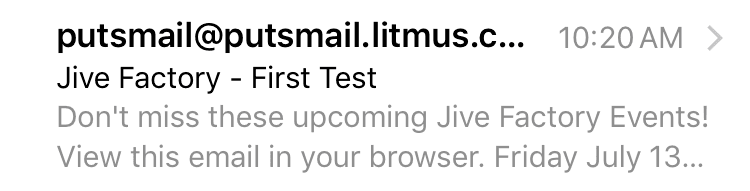
  • Examine the preheader text functionality in both Yahoo and Gmail interfaces. This often-overlooked element significantly impacts open rates by providing context before the email is opened:

    preheader text

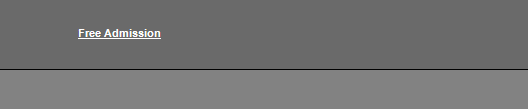
  • If Outlook 2007 or Outlook 2010 access is available, inspect for persistent link underlines (despite your CSS specifications) and subtle spacing irregularities between table elements:

    outlook before table border collapse

  • Test the email in Apple's Mail app on any available iOS device to evaluate mobile rendering performance.

    Having documented these cross-client variations, we'll now implement targeted fixes for the most critical issues.

  • Fixing the Table Spacing in Outlook 2007/2010

    Outlook's legacy rendering engine creates persistent spacing issues that can destroy carefully crafted layouts. These versions rely on Microsoft Word's HTML engine rather than modern web standards, resulting in unpredictable table border behavior. The solution involves explicitly collapsing table borders to override Outlook's default spacing calculations.

    1. Return to your code editor where you should have both events-issue21-summer.html and inlined-events-issue21-summer.html accessible.
    2. Focus on the original development file: events-issue21-summer.html. Double-check your file tab to ensure you're editing the embedded CSS version.
    3. Add this table rule immediately after your existing anchor tag styles:

      a {
         color: #ffffff!important;
         text-decoration: none!important;
      }
      table {
         border-collapse: collapse;
      }
    4. Save your changes to preserve this critical fix.

      PRO TIP: Outlook can also introduce unwanted horizontal spacing through the mso-table-lspace and mso-table-rspace properties. While not relevant to our current layout, side-by-side table designs may require setting these Microsoft-specific properties to zero values to prevent layout breaks.

    Understanding Outlook Table Spacing Issues

    Outlook 2007/2010 renders space for table borders even with zero width borders. The CSS border-collapse property defaults to 'separate', causing unsightly gaps between tables.

    Fix Table Spacing in Outlook

    1

    Open Original File

    Work with events-issue21-summer.html (the embedded CSS version, not the inlined version).

    2

    Add Border Collapse Rule

    Insert 'table { border-collapse: collapse; }' after the anchor tag rules in your CSS.

    3

    Save and Re-inline

    Save the file and run it through the Zurb inliner again to apply the fix to all tables.

    Inlining the Email Again

    Professional email development follows an iterative process of coding, inlining, testing, and refining. Since we've modified our source code, we need to regenerate our production-ready inlined version to ensure all fixes are properly applied across email clients.

    1. Select all code in your updated events-issue21-summer.html file.
    2. Copy the complete codebase to your clipboard.
    3. Switch to your Chrome browser and the Zurb Inliner tab.
    4. If you closed the inliner, navigate to get.foundation/emails/inliner.html to reopen it.
    5. Clear any existing content from the HTML input field.
    6. Paste your updated code using Cmd–V (Mac) or Ctrl–V (Windows).
    7. Verify that Compress HTML remains unchecked for maintainable output.
    8. Execute the inlining process with Inline!
    9. Copy the processed output using Copy to Clipboard in the results section.
    10. Return to your code editor environment.
    11. Open your inlined-events-issue21-summer.html file, confirming you're in the correct inlined version.
    12. Select all existing content using Cmd–A (Mac) or Ctrl–A (Windows).
    13. Replace the old code with your new inlined version using Cmd–V (Mac) or Ctrl–V (Windows).
    14. Save the updated file to preserve your improvements.

    Resolving Final Issues with Embedded CSS

    Some email clients require embedded CSS in the document head to properly handle dynamically generated links and override aggressive client-specific styling. Outlook 2010's persistent link underlining and various clients' automatic link detection (phone numbers, addresses, dates) necessitate embedded styles that can't be effectively inlined.

    1. Locate the head section of inlined-events-issue21-summer.html and add a style block:

      <title>Summer Events at The Jive Factory</title>
      <style>
      
      </style>
      </head>
    2. Insert this comprehensive link styling rule within your new style tags:

      a {
         color: #ffffff!important;
         text-decoration: none!important;
      }
    3. This embedded approach targets both your existing links and any links that email clients automatically generate after delivery—ensuring consistent styling regardless of client behavior.
    4. Save your final production file.

    Optional: Comprehensive Retesting

    Professional email development demands thorough validation before deployment. This second round of testing confirms that your fixes have resolved the identified issues without introducing new problems.

    1. Select all code from your completed inlined-events-issue21-summer.html using Cmd–A (Mac) or Ctrl–A (Windows).
    2. Copy the final codebase with Cmd–C (Mac) or Ctrl–C (Windows).
    3. Return to the PutsMail interface in Chrome, or navigate to putsmail.com if needed.
    4. Click New Test to create a fresh testing instance.
    5. Your previous email addresses should appear below the Recipients field. If not visible, re-enter your Outlook.com (Hotmail), Yahoo Mail, and Gmail addresses and click Add.
    6. Set the Subject Line to Jive Factory—Second Test for clear version tracking.
    7. Paste your final code into the Body (HTML) field using Cmd–V (Mac) or Ctrl–V (Windows).
    8. Deploy your validation test by clicking Send Email.
    9. Systematically review the email across all three client accounts, confirming that previous issues have been resolved.
    10. Outlook 2010 users should now see properly styled links without unwanted underlines.
    11. Your email should now render consistently across all major email environments. This production-ready version is suitable for deployment to your full subscriber base. Congratulations on completing a professional email development workflow! Close all files in your code editor to complete this exercise.

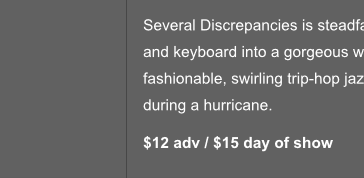
    TECHNICAL NOTE: iOS Mail users may observe subtle hairline borders between columns in event table layouts. This is a known rendering characteristic that occurs when background colors are applied to individual table cells or rows. These borders often appear and disappear at different zoom levels, making them difficult to predict or control.

    For designs where these hairline borders significantly impact visual quality, the most reliable solution involves nesting the problematic table within a wrapper table that shares the same background color. While this approach adds markup complexity, it effectively masks the border artifacts. For our current design, the borders fall within acceptable visual tolerance levels and don't warrant additional markup overhead.

    jive hairline

    Key Takeaways

    1Inline CSS is essential for HTML email compatibility across all email clients, especially Gmail, though it can be tedious to write manually.
    2Automated inlining tools like Zurb's Foundation Inliner save significant development time and ensure proper CSS conversion from embedded to inline styles.
    3PutsMail provides an efficient way to test HTML emails across multiple clients simultaneously, requiring opt-in verification for security.
    4Gmail's Promotions tab algorithm is nearly impossible to circumvent, and common tactics like merge tags and text-only formats don't consistently work.
    5Outlook 2007/2010 requires specific fixes for table spacing issues using border-collapse: collapse to eliminate unwanted gaps between tables.
    6Email clients often auto-generate links for phone numbers and addresses, requiring embedded CSS in the head tag to maintain consistent styling.
    7Multiple testing rounds are necessary to identify and resolve client-specific rendering issues before sending to large audiences.
    8iOS Mail may display hairline borders between table cells, which is a known issue that can be addressed by nesting tables with matching background colors if problematic.

    RELATED ARTICLES