Relational Selectors
What This Tutorial Covers
Descendant Selector
Match elements at any depth within a parent.
Child Selector
Match direct children only with >.
Adjacent & Sibling
+ and ~ for sibling-based selection.
Noble Desktop's Front-End Web Development Certificate teaches HTML, CSS, and JavaScript — the complete front-end foundation.
Enhance your web development skills with our comprehensive HTML & CSS tutorial, featuring practical exercises on CSS selectors such as adjacent selectors, first-child and last-child, first-of-type, nth-child, and direct child/descendant selectors.
Topics Covered in This HTML & CSS Tutorial:
Adjacent Selectors, Using First-child & Last-child, Using First-of-type, Using Nth-child, Direct Child/descendant Selectors
Exercise Preview
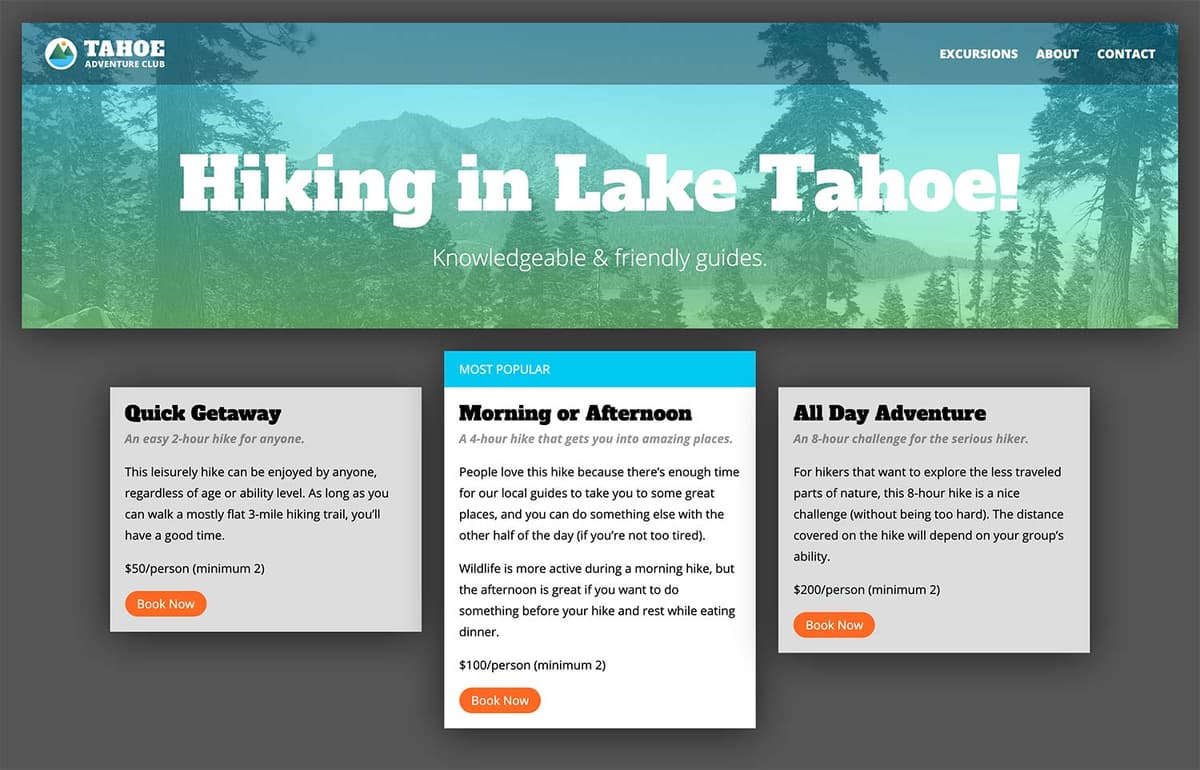
Exercise Overview
In this exercise, you’ll learn about CSS selectors that enable you to target elements based on the relationships between elements.
Getting Started
- We’ll be switching to a new folder of prepared files for this exercise. In your code editor, close all open files to avoid confusion.
- For this exercise we’ll be working with the Tahoe Relational Selectors folder located in Desktop > Class Files > Advanced HTML CSS Class. Open that folder in your code editor if it allows you to (like Visual Studio Code does).
- Open index.html from the Tahoe Relational Selectors folder.
Preview index.html in Chrome (we’ll be using its DevTools).
While this page is similar to the one you’ve worked on in previous exercises, there are some minor differences. A lot of styling has been done, but we’re going to add some final touches.
Leave the page open in Chrome.
Adjacent Selectors
- Return to index.html in your code editor.
In the first section tag, find the first paragraph below the h2:
<p>Hundreds of miles of scenic hiking trails.</p>Let’s make this first paragraph after each section’s h2 stand out from the others. We can target it with an adjacent selector, which targets a specific element only when it immediately follows another specific element. The elements must be siblings (next to each other, not nested), which is why this selector is sometimes referred to as an adjacent sibling selector.
- Open main.css from the css folder (in the Tahoe Relational Selectors folder).
Below the h2 rule (which is near the top of the file), add this new rule:
h2 + p {
   font-weight: 700;
   font-style: italic;
   opacity:.4;
   margin-top: 3px;
}
The h2 + p selector targets a paragraph that comes directly after an h2. Sometimes with CSS selectors, especially adjacent selectors, it may be easier to read them right to left.
- Save the file.
Return to Chrome, reload the page, and:
- In each of the 3 columns, the paragraph below the heading should now be italic, bold, gray, and closer to the heading above. It’s nice that we could do this without creating a new class name.
- At the bottom of each column are links. It’s hard to see that there are actually two different links, so let’s make the first link (Read More) stand out.
Using First-child & Last-child
- Return to your code editor.
- Switch to index.html.
- At the bottom of any of the three section tags, notice the last paragraph has a links class and contains the two links we just saw in the browser.
- Switch to main.css.
Below the section.text-wrapper rule, add the following new rule:
section.links a:first-child {
   color: #05b333;
   margin-right: 15px;
}
Save the file, reload the page in Chrome, and:
- Notice the Read More links are now green and have a bit more space between the link to their right.
- Notice there’s extra white space at the bottom of the 3 columns (more than on the sides). That’s because the links are in a paragraph which has bottom margin. Let’s remove that extra space.
- Return to your code editor.
Below the section.text-wrapper rule, add the following new rule:
section.text-wrapper :last-child {
   margin-bottom: 0;
}
NOTE: A few steps ago we attached :first-child to the link
<a>tag (a:fist-child) to find links that were a first child.The selector we’re writing in this step is not attached to any tag. Using :last-child by itself means it will target anything that is a last child of.text-wrapper. In other words, it acts like a wildcard.
- Save the file and reload the page in Chrome. That removed the extra space at the bottom of the 3 columns so the spacing around the text looks more even.
- In Chrome, at the bottom of the first column find the Download a Trail Guide link.
- CTRL–click (Mac) or Right–click (Windows) on the Download a Trail Guide link and choose Inspect.
In the DevTools Style panel you should see the section.text-wrapper :last-child rule is also applying to this element, even though we don’t want it to!
That’s because it too is a last child inside the .links paragraph (which is in .text-wrapper). We have to be very careful with selectors such as last-child!
There are multiple ways we could write a better selector that would not include this link. We could target .links but what if some columns wouldn’t have links? We still want to use a relational selector to remove the extra space from below anything that might be at the bottom of this column. Continue on to learn the solution.
In the DevTools Elements panel (where you see the HTML), notice that the links paragraph is inside a text-wrapper div. We only want to target immediate children of the text-wrapper div.
Direct Child/Descendant Selectors
The direct descendant selector (child combinator) lets us target only immediate children, rather than all descendants (which includes grandchildren, great-grandchildren, etc.).
- Return to your code editor.
In the rule you just wrote, add the
>character as shown below:section.text-wrapper > :last-child { margin-bottom: 0; }NOTE: Think of the
>as a pointing arrow rather than a “greater than” symbol.Save the file and reload the page in Chrome. In the Styles panel you should see that the Download a Trail Guide link no longer has the :last-child rule applied.
Using First-of-type
- Still in Chrome, CTRL–click (Mac) or Right–click (Windows) on any of the column headings (such as Take a Hike) and choose Inspect.
- Press your Delete key to remove it.
- Notice the first paragraph (which used to be just below the heading) lost its bold italic styling.
- Reload the page.
- Return to your code editor.
Find the h2 + p rule.
While this rule currently works, what if a column might not have a heading? There’s another way we can target this element. It’s the first paragraph in each section.
Change the h2 + p selector name to section p:first-of-type as shown below in bold:
section.text-wrapper p:first-of-type { font-weight: 700; font-style: italic; opacity:.4; margin-top: 3px; }- Save the file, and reload the page in Chrome. The first paragraphs should still have their bold italic formatting.
- Still in Chrome, CTRL–click (Mac) or Right–click (Windows) on any of the column headings (such as Take a Hike) and choose Inspect.
- Press your Delete key to remove it.
Notice that this time, the first paragraph (which used to be just below the heading) has kept its bold italic styling.
As you can see, there are many ways to target something with CSS. While relational selectors can be useful, they require that those relationships will not change. If you can’t be sure about the relationship, consider using a class instead.
Reload the page.
Using Last-of-type
All the links in the nav have right margin, which adds a little extra space to the right of the nav (when compared with the space to the left of the logo). Let’s remove that extra space.
- Return to your code editor.
In min-width: 600px media query, below the nav li rule add the following new rule:
nav li:last-of-type {
   margin-right: 0;
}
Save the file, and reload the page in Chrome. The space to the right of the nav should be less, which matches the space to the left of the logo.
Using Nth-child
- Return to your code editor.
- Let’s switch to another page in this site. In your code editor open hikes.html from the Tahoe Relational Selectors folder.
- Find the main tag and notice this page has a price-list class so we’ll be able to target content in this page, without affecting the other page.
Preview hikes.html in Chrome.
If we wanted to style the second column, how could we target it? It’s not the first or last-child or first or last-of-type. The nth-child selector allows us to specify the number of the child we want.
- Return to main.css in your code editor.
Before we target the second column, let’s perform a test of the nth-child selector. In min-width: 950px media query, below the section:not(:last-child) rule add the following new rule:
main.price-list :nth-child(2) {
   background: red;
   border: 5px solid black;
}
Within the parentheses of nth-child() we put the number of the child we want to target. We declared a background color and border so we’ll be able to easily see which elements have been selected.
Save the file and reload the page in Chrome. Wow, there are multiple red boxes! The second child of every element in the main part of the page got a red background with black border.
We have to be careful with the nth-child selector. As we saw with the last-child selector, if we’re not specific enough, nth-child can apply to children, grand-children, etc. It’s often a best practice to combine it with a direct descendant selector (which uses the > notation) to avoid applying it to unwanted elements.
- Return to main.css in your code editor.
Let’s target only the second element which is a direct descendant (child) of the main price-list. Add > to the selector name as follows:
main.price-list > :nth-child(2) { background: red; border: 5px solid black; }- Save the file and reload the page in Chrome. Now only the second column is red with a black border around it.
- Return to main.css in your code editor.
Let’s check out another cool feature of nth-child. It can target multiple children such as odd or even numbered children. Change the 2 to odd as shown below:
main.price-list > :nth-child(odd) { background: red; border: 5px solid black; }- Save the file and reload the page in Chrome. Now the first and third columns are red with a black border.
- Return to main.css in your code editor.
Now we can make the styling appropriate for this page. Delete the border, change the background color, and add some top margin so you end up with as follows:
main.price-list > :nth-child(odd) {
   background: #ddd;
   margin-top: 78px;
}
Save the file and reload the page in Chrome. The first and third columns should have more space above them and have a light gray background which helps the middle column to visually stand out more.