April 1, 2026Dan Rodney/7 min read

Floats & Images: Free HTML & CSS Tutorial

Master CSS floats and responsive image techniques

Core CSS Layout Concepts

CSS Float Property

Controls how elements wrap around other elements, essential for text-image layouts. Works by removing elements from normal document flow.

Class Selectors

Target specific elements with reusable styles using the dot notation. More flexible than tag selectors for selective styling.

Responsive Images

Images that scale appropriately across different screen sizes using CSS properties like max-width for fluid layouts.

Topics Covered in This HTML & CSS Tutorial:

Adding a Hero Image, Fluid Images, Floating Images, Class Selectors, Margins

Tutorial Prerequisites

0/4

Exercise Preview

floats and images

Exercise Overview

In this exercise, you'll master the fundamentals of image positioning in web layouts by implementing hero images and learning the float property—a cornerstone technique for text wrapping and visual hierarchy. While modern CSS Grid and Flexbox have largely superseded floats for layout, understanding floats remains essential for maintaining legacy code and grasping fundamental web design principles. You'll also deepen your understanding of CSS class selectors, which form the backbone of scalable, maintainable stylesheets.

  1. If you completed the previous exercise, sanfran.html should still be open, and you can skip the following sidebar. If you closed sanfran.html, re-open it now. We recommend you finish the previous exercises (3B–3C) before starting this one, as they establish the foundational HTML structure and basic styling we'll build upon. If you haven't finished them, do the following sidebar.

    Float Property Fundamentals

    The float property removes elements from normal document flow and positions them to the left or right of their container, allowing text and other content to wrap around them. This creates magazine-style layouts where images integrate seamlessly with text content.

If You Did Not Do the Previous Exercises (3A–3B)

  1. Close any files you may have open.
  2. On the Desktop, go to Class Files > Web Dev Class.
  3. Delete the Revolution Travel folder if it exists.
  4. Duplicate the Revolution Travel Ready for Floats folder.
  5. Rename the folder to Revolution Travel.

Adding a Hero Image

In web design, a hero image serves as your page's visual anchor—a large, prominent banner that immediately communicates your content's purpose and sets the emotional tone for visitors. Think of it as your webpage's opening statement. Hero images are particularly crucial in today's mobile-first world, where users make split-second decisions about whether to stay or leave. Let's implement a compelling hero image for our San Francisco travel page that will capture visitors' attention and reinforce the destination's appeal.

  1. In sanfran.html, add an image inside main, positioned strategically above the h1 tag to maximize visual impact:

    <main>
       <img src="images/san-fran-lombard.jpg" ALT="San Francisco Landmark: Lombard Street">
       <h1>Featured Location: San Francisco, California</h1>
  2. Save the file and preview it in a browser to see the image. Notice how it immediately establishes the page's geographic context and visual appeal.
  3. The image looks impressive, but there's a critical responsive design issue to address. Resize the window from wide to narrow and notice the image doesn't scale down to fit within the window—a problem that will frustrate mobile users and break your layout on smaller screens.
  4. Return to your code editor to implement a responsive solution.
  5. In the style tag at the top, below the body rule, add this essential responsive image rule:

    body {
      font-family: sans-serif;
    }
    img {
       max-width: 100%;
    }

    This max-width: 100% declaration is a fundamental responsive design technique that ensures images never exceed their container's width. It intelligently scales images down when necessary while preserving their original quality by never scaling them beyond their native dimensions. This approach prevents the common layout-breaking scenarios where large images overflow their containers on mobile devices. For optimal results, avoid using fixed width and height attributes on img tags that need to be responsive.

  6. Save the file and preview it in a browser.
  7. Resize the window to test the responsive behavior—the image should now scale gracefully to fit within any browser window width. This single line of CSS ensures your hero image works beautifully across all device sizes.

Implementing Responsive Hero Images

1

Add Image Element

Insert img tag inside main element above h1 with proper src and alt attributes for accessibility

2

Apply Responsive CSS

Add max-width: 100% rule to img selector ensuring images scale down but never exceed container width

3

Remove Fixed Dimensions

Remove width and height attributes from img tags to allow CSS-controlled responsive scaling

Hero Image Best Practice

Hero images should provide visual context for page content and be prominently placed at the top. The max-width: 100% property ensures they remain responsive without breaking layout on smaller screens.

Adding More Images

Now that we've established our hero image, let's enhance the content sections with supporting imagery. These smaller images will serve as visual cues and branding elements that help users quickly identify different attractions and services.

  1. Return to sanfran.html in your code editor.
  2. Navigate to the h2 heading for Things to Do—this section will benefit from visual elements that help users quickly scan and identify different activities.
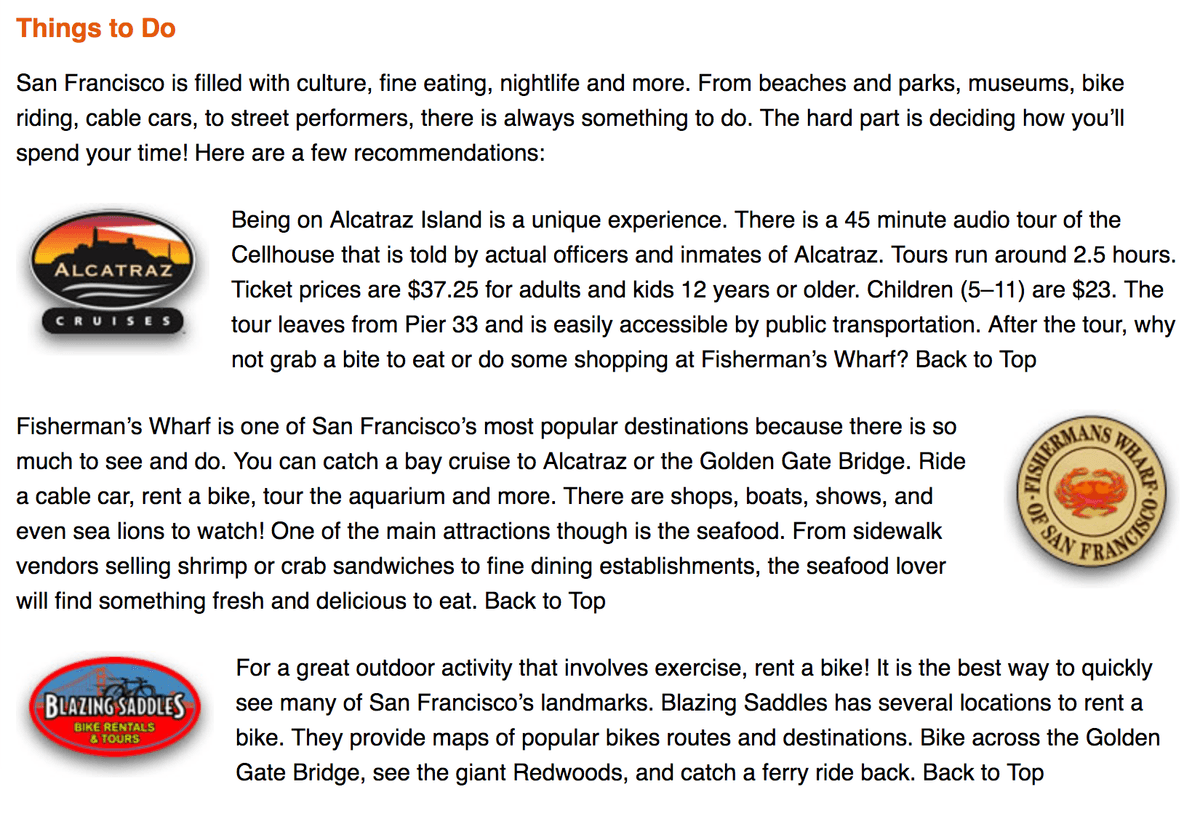
  3. Add the first image at the beginning of the paragraph that starts with Being on Alcatraz Island:

    <p><img src="images/logo-alcatraz.jpg" ALT="Alcatraz Cruises"> Being on Alcatraz Island is a unique experience…
  4. In the next paragraph (which begins with Fisherman's Wharf), add this complementary image:

    <p><img src="images/logo-fishermans-wharf.jpg" ALT="Fisherman's Wharf"> Fisherman's Wharf is one of San Francisco's most…
  5. In the final paragraph of this section (which begins with For a great outdoor activity), add the third image:

    <p><img src="images/logo-blazing-saddles.jpg" ALT="Blazing Saddles"> For a great outdoor activity that involves exercise, rent a bike!…
  6. Save the file, return to the browser, and reload the page.
  7. You'll notice three images now appear at the beginning of their respective paragraphs, but the alignment feels disjointed and unprofessional. The images stack vertically above the text, creating awkward whitespace and disrupting the reading flow. We need to implement CSS float properties to achieve elegant text wrapping—similar to how images wrap text in professional magazines and newspapers.

Image Placement Strategy

Step 1

Alcatraz Logo Addition

Insert first image in paragraph about Alcatraz Island experience

Step 2

Fisherman's Wharf Logo

Add second image to paragraph describing Fisherman's Wharf attractions

Step 3

Blazing Saddles Logo

Include third image in outdoor activity paragraph for visual balance

Floating the Images with Class Selectors

CSS floats allow us to position images alongside text, creating sophisticated magazine-style layouts where content flows naturally around visual elements. While modern layout methods like CSS Grid and Flexbox have largely replaced floats for complex layouts, floats remain the ideal solution for this specific use case: wrapping text around images within content blocks.

  1. Return to sanfran.html in your code editor.

    We could use a simple element selector (like img) if our goal was to apply the same float direction to every image on the page. However, our design requires more nuanced control: we want some images to float left, others to float right, and our hero image to remain unaffected. This is where CSS class selectors demonstrate their power—they provide the flexibility to apply specific styles to selected elements while maintaining reusable, semantic code.

    Class selectors are fundamental to professional CSS architecture. They enable component-based thinking, where you create reusable style patterns that can be applied strategically throughout your site. This approach scales beautifully from small websites to large enterprise applications.

  2. Right before the closing </style> tag, after the footer rule, add your first float class. Note that the dot before img-left defines it as a class selector:

    footer {
          width: 90%;
          max-width: 800px;
       }
       .img-left {
          float: left;
       }
    </style>
  3. Creating the CSS rule is only half the equation—now you must apply the class to specific HTML elements. Find the Alcatraz Cruises logo image tag and add the class attribute:

    <img src="images/logo-alcatraz.jpg" class="img-left" ALT="Alcatraz Cruises">
  4. Save the file, return to the browser, and reload the page.
  5. Scroll down to the Things to Do section and observe how the Alcatraz Cruises logo now floats elegantly to the left while text wraps around it. This creates visual hierarchy and improves readability. Let's add variety by floating the next image to the right.
  6. Return to sanfran.html in your code editor and add a complementary right-float class after the .img-left rule:

    .img-left {
          float: left;
       }
       .img-right {
          float: right;
       }
    </style>
  7. Apply the right-float class to the Fisherman's Wharf logo to create visual balance and rhythm in your layout:

    <img src="images/logo-fishermans-wharf.jpg" class="img-right" ALT="Fisherman's Wharf">
  8. For consistency with the first image, apply the left-float class to the final Blazing Saddles image:

    <img src="images/logo-blazing-saddles.jpg" class="img-left" ALT="Blazing Saddles">
  9. Save the file, return to the browser, and reload the page.
  10. Scroll down to examine all three images. They should now create an alternating visual rhythm—left, right, left—that guides the reader's eye through the content while maintaining professional typography standards. However, you'll notice the images sit too close to the text, creating cramped visual relationships that reduce readability.

Tag Selectors vs Class Selectors

FeatureTag SelectorsClass Selectors
TargetingAll elements of same typeSpecific selected elements
FlexibilityLimited controlPrecise control
ReusabilityOne style per tag typeReusable across elements
Syntaximg { }.img-left { }
Recommended: Use class selectors when you need different styles for the same element type, like floating some images left and others right.

Float Implementation Patterns

Left Float Pattern

float: left positions element to left side of container. Text flows around right side creating natural reading flow.

Right Float Pattern

float: right positions element to right side. Creates visual variety and prevents monotonous left-aligned layouts.

Adding Margin to the Floated Images

Proper spacing is crucial for professional web design. Margins create breathing room that improves readability, establishes visual hierarchy, and prevents your content from feeling cramped or overwhelming. Let's add strategic margins to our floated images to achieve optimal visual balance.

  1. Return to sanfran.html in your code editor.
  2. Add a right margin to the .img-left rule to create space between left-floated images and the text that wraps around them:

    .img-left {
       float: left;
       margin-right: 15px;
    }
  3. Similarly, add a left margin to the .img-right rule to ensure proper spacing for right-floated images:

    .img-right {
       float: right;
       margin-left: 15px;
    }
  4. Save the file, return to the browser, and reload the page to see the dramatically improved layout. The 15-pixel margins create comfortable reading distances while maintaining the visual connection between images and their related content. Notice how this subtle spacing transforms the overall professionalism and readability of your page—a perfect example of how attention to typography details separates amateur from professional web design.

Margin Considerations for Floated Images

Pros
Prevents text from touching image edges directly
Creates professional whitespace around images
Improves readability and visual hierarchy
Maintains consistent spacing across different screen sizes
Cons
Requires separate margin rules for left and right floated elements
Can create uneven spacing if not planned carefully
May need adjustment for different image sizes
Margin Direction Strategy

Apply margin-right to left-floated images and margin-left to right-floated images. This creates space between the image and the text that wraps around it, while avoiding unnecessary spacing on the opposite side.

Key Takeaways

1Hero images require max-width: 100% CSS rule to ensure responsive scaling without breaking layout on smaller screens
2The float property removes elements from normal document flow and allows text to wrap around images for magazine-style layouts
3Class selectors provide more flexibility than tag selectors when applying different styles to the same element types
4Left-floated images need margin-right while right-floated images need margin-left to create proper spacing with wrapped text
5Responsive image implementation requires removing fixed width and height attributes to allow CSS-controlled scaling
6Strategic image placement within content sections enhances visual appeal and breaks up large text blocks effectively
7Float property creates natural text flow around images but requires careful margin management for professional appearance
8Class selectors use dot notation and can be reused multiple times across different elements for consistent styling patterns

RELATED ARTICLES