April 1, 2026Dan Rodney/3 min read

Challenge: Building a Site from a Provided Design

Master HTML CSS Through Practical Design Implementation

Challenge-Based Learning Approach

This tutorial takes a practical approach by providing designs and assets while letting you figure out the implementation details independently.

Topics Covered in This HTML & CSS Tutorial:

Build a Complete Multi-Page Website Using Professional Design Assets and Real-World Workflow

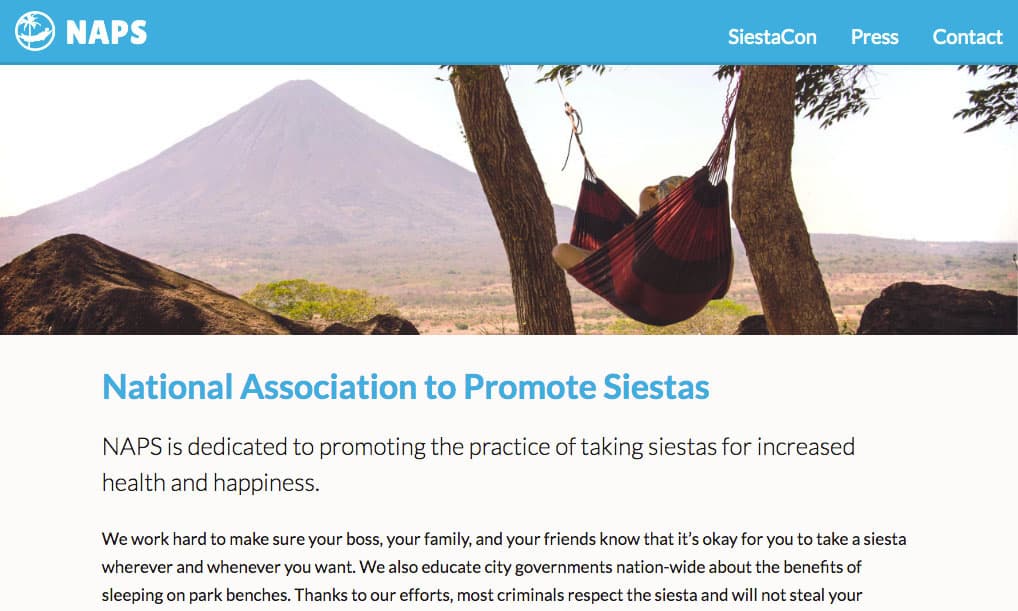
Exercise Preview

naps preview

Exercise Overview

Theory without practice is worthless in web development. This hands-on exercise challenges you to synthesize everything you've learned by building a complete website from professional design files—just like you would in a real development environment. No step-by-step hand-holding here; you'll work independently to solve problems and make decisions, building the critical thinking skills that separate professional developers from tutorial followers.

Independent Practice Benefits

Working without step-by-step instructions mirrors real-world development scenarios where you must interpret designs and make implementation decisions independently.

Getting to Know the Project

Your assignment is to code a complete website for NAPS (National Association to Promote Siestas)—a delightfully quirky project that will keep you engaged while you master essential web development workflows. In the Web Dev Class folder, you'll find a comprehensive NAPS project folder containing everything a professional developer needs:

  • images: Production-ready assets including high-resolution photos optimized for modern displays and the official NAPS logo. These files have been professionally processed and compressed for optimal web performance—no additional optimization required.
  • page-designs-psd: Editable Photoshop files for all four website pages. These industry-standard design files allow you to inspect layers, extract exact measurements, and copy precise color values—the same workflow used by professional front-end teams worldwide.
  • page-designs-jpg: Static reference images for each page, perfect if you're working without Photoshop access. While less flexible than PSDs, these provide clear visual targets for your implementation.
  • text: All written content organized by page, plus copyright information. Having content separated from design files mirrors real-world client projects where copy and visuals often come from different sources.

Project Assets Breakdown

Images Folder25%
PSD Designs25%
JPEG Designs25%
Text Content25%

NAPS Website Asset Structure

Images Folder

Contains hi-resolution Retina quality photos and the NAPS logo, pre-optimized for web use. Ready for direct implementation in your website.

Design Files

Both PSD and JPEG formats provided for maximum accessibility. Photoshop files allow detailed inspection of design specifications.

Content Package

Complete text content for all four pages plus copyright information. Eliminates content creation so you can focus on coding.

Getting Started

Approach this project strategically by building the homepage first—it typically contains the most complex layouts and sets the visual foundation for your entire site. Once you've established your CSS architecture and component patterns, the remaining pages will come together more efficiently.

If you have Photoshop access, leverage the PSD files fully. Use the eyedropper tool for precise colors, measure spacing with guides, and inspect text properties directly from the design layers. This workflow mirrors how professional developers collaborate with design teams and ensures pixel-perfect implementation.

Working without Photoshop? The JPEG references provide excellent visual guidance, and we've extracted the key specifications you'll need. While you'll need to estimate some measurements, this constraint actually builds valuable skills in visual estimation and CSS problem-solving that serve developers well in fast-paced environments.

  • Google Font: Lato
  • Blue for the Navigation and Headings: #00b0dc
  • Darker Blue for the Navigation's Bottom Border: #009bc2
  • Headings (h1): Lato Bold, 34px size, 41px line-height
  • Sub-Headings (h2): Lato Bold, 28px size, 34px line-height
  • Paragraphs: Lato Regular, 17px size, 29px line-height
  • Large Paragraphs: Lato Light, 24px size, 36px line-height

Development Workflow

1

Start with Homepage

Begin by building the homepage first as it typically contains the core design patterns and components you'll reuse across other pages.

2

Inspect Design Files

Open PSD files in Photoshop to examine element specifications, or refer to JPEG designs and use the provided style guide below.

3

Implement Typography System

Set up the Lato font family and establish the heading, paragraph, and navigation styles according to the specifications.

4

Build Remaining Pages

Apply learned patterns from the homepage to create consistent styling across all four pages of the NAPS website.

Typography Specifications

Navigation and Headings

Primary blue color (#00b0dc) with darker blue (#009bc2) for navigation borders. Creates visual hierarchy and brand consistency.

Heading Styles

H1 uses Lato Bold at 34px with 41px line-height. H2 uses Lato Bold at 28px with 34px line-height for proper scaling.

Body Text System

Regular paragraphs use Lato Regular 17px with 29px line-height. Large paragraphs use Lato Light 24px with 36px line-height.

Pre-Development Checklist

0/4

Key Takeaways

1Challenge-based learning helps develop real-world coding skills by requiring independent problem-solving and design interpretation
2Complete project assets including images, design files, and content allow focus on HTML and CSS implementation rather than content creation
3Starting with the homepage establishes core design patterns and components that can be reused across multiple pages
4Typography specifications including font families, sizes, and colors are crucial for maintaining design consistency and visual hierarchy
5Having both PSD and JPEG design files ensures accessibility regardless of available design software
6Pre-optimized images and assets streamline the development process and ensure proper web performance
7Working without step-by-step instructions mirrors professional development scenarios where developers interpret designs independently
8Systematic approach of homepage first, then additional pages, creates efficient workflow and consistent implementation across the entire site

RELATED ARTICLES