March 23, 2026/3 min read

Create a New Remote Repository on GitHub & Bitbucket

Master Git Repository Creation on Leading Platforms

Version Control Platform Usage

100M+
million repositories on GitHub
10M+
million developers use Bitbucket
2
major platforms covered

GitHub vs Bitbucket Overview

FeatureGitHubBitbucket
Account CreationFree availableFree available
NavigationTop navbar + buttonLeft navbar + button
Repository PrivacyCheck Private optionPrivate by default
README InitializationUncheck if local repo existsSet to No if local repo exists
Recommended: Both platforms offer similar functionality with slightly different interfaces

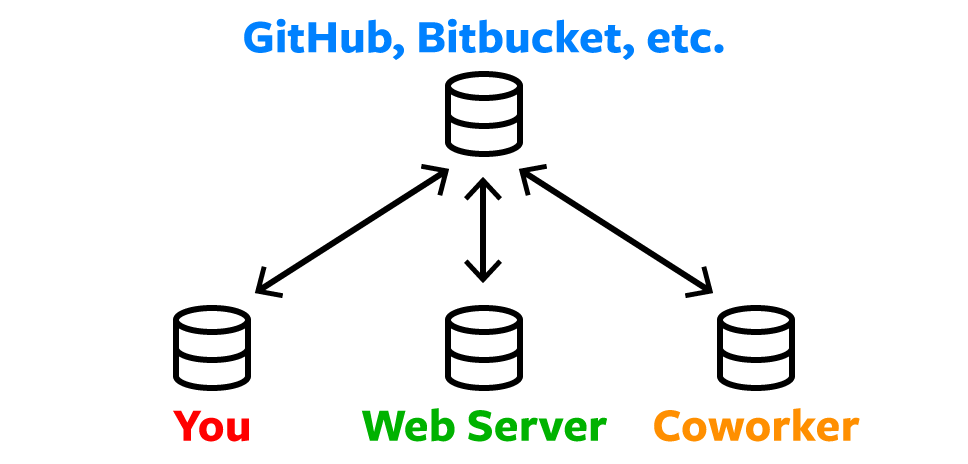
Git distributed workflow diagram showing collaboration between local and remote repositories

Create a New Repo on GitHub

GitHub remains the industry standard for hosting Git repositories, with over 100 million developers using the platform as of 2026. Setting up a new repository is straightforward, but the choices you make during creation can significantly impact your workflow and collaboration capabilities.

1. Navigate to GitHub.com and log in to your existing account or create a new one (GitHub offers robust free tiers for individual developers and small teams).

2. In the top navigation bar, click the + button and select New repository. This will direct you to GitHub.com/new, where you'll configure your repository settings.

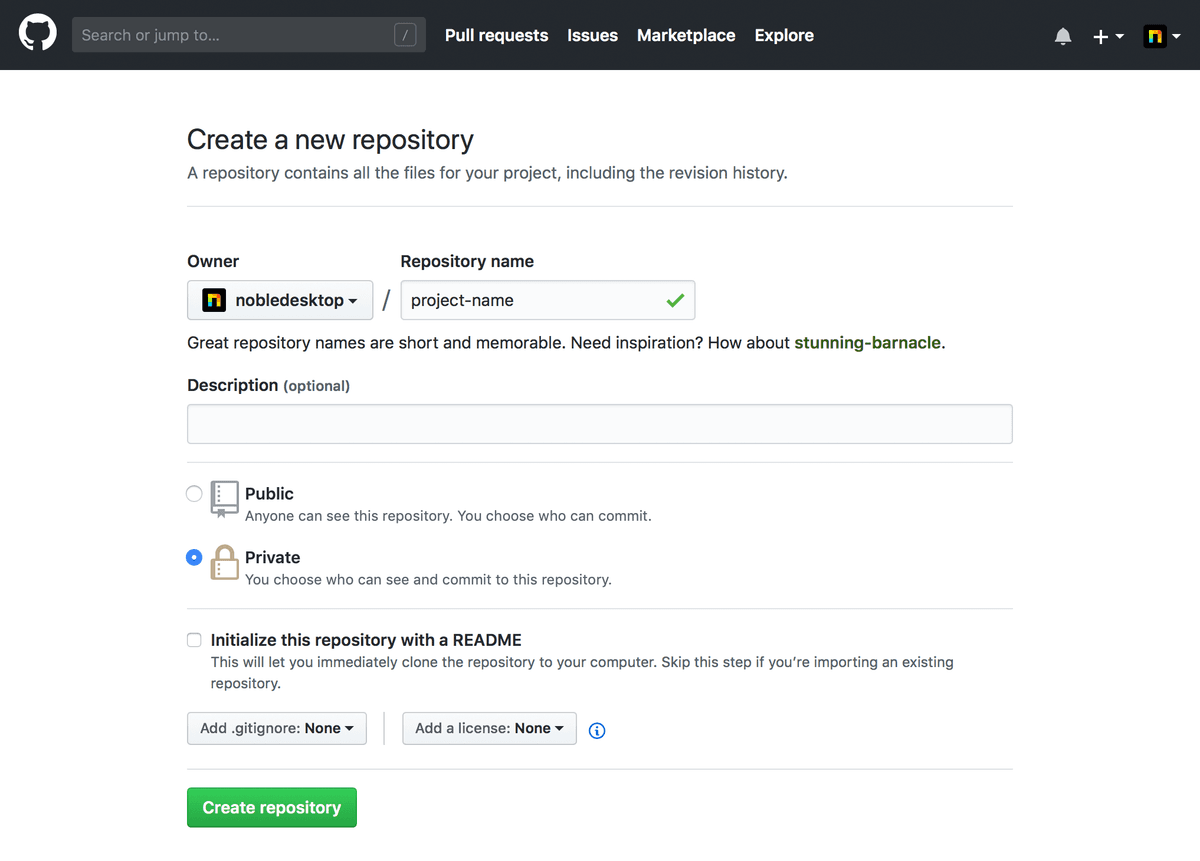
GitHub new repository creation interface showing form fields and options

3. Configure your repository with these essential settings:

  • Enter a descriptive Repository name that clearly identifies your project's purpose.
  • Consider visibility carefully: public repositories are visible to anyone and can enhance your professional profile, while Private repositories keep your code confidential until you're ready to share.
  • If you're planning to connect an existing local repository to this remote, leave "Initialize this repository with a README" unchecked to avoid merge conflicts during your first push.

4. Click Create repository. The subsequent page will display Git commands for connecting your local repository to this remote—keep this page accessible as you'll need these commands for the next steps in your workflow.

While GitHub dominates the market, many development teams also leverage Bitbucket for its tight integration with Atlassian's development ecosystem.

GitHub Repository Creation Process

1

Account Access

Navigate to GitHub.com and either log in to your existing account or create a new free account

2

Repository Initialization

Click the plus button in the top navigation bar and select New repository to access GitHub.com/new

3

Configuration Setup

Enter a repository name, set visibility to private if needed, and avoid README initialization if pushing existing local repository

4

Creation Completion

Click Create repository and keep the resulting page open for push commands in subsequent exercises

README Initialization Warning

Do not initialize with README if you already have a local repository to push, as this can create merge conflicts during the initial push process.

Create a New Repo on Bitbucket

Bitbucket, owned by Atlassian, offers compelling advantages for teams already using Jira, Confluence, or other Atlassian tools. Its seamless integration with these platforms makes it particularly attractive for enterprise development workflows.

1. Visit bitbucket.org and authenticate with your account credentials or register for a new account (Bitbucket provides generous free tiers with unlimited private repositories for small teams).

2. In the left sidebar navigation, click the + button, then select Repository under the Create section. This will take you to bitbucket.org/repo/create.

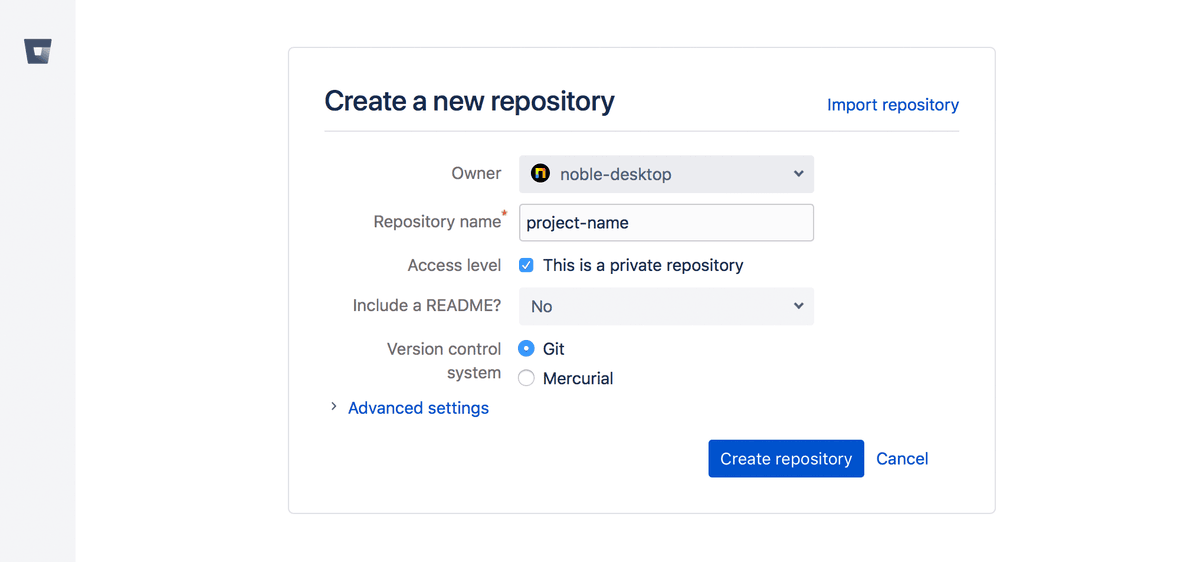
Bitbucket repository creation form with privacy and initialization options

3. Configure your repository parameters:

  • Choose a meaningful Repository name that follows your team's naming conventions.
  • Bitbucket defaults to private repositories—if you want public visibility for your project, uncheck This is a private repository.
  • When connecting an existing local repository, set "Include a README" to No to prevent initial commit conflicts.

4. Click Create repository to finalize the setup. Like GitHub, Bitbucket will present you with connection commands on the following page—bookmark this page for easy reference during your repository setup process.

With your remote repository established, you're now ready to connect your local development environment and begin collaborating with your team.

Bitbucket Repository Creation Process

1

Account Access

Navigate to bitbucket.org and either log in to your existing account or create a new free account

2

Repository Initialization

Click the plus button in the left navigation bar and select Repository under Create to access bitbucket.org/repo/create

3

Configuration Setup

Enter a repository name, keep private repository setting checked if desired, and leave README inclusion set to No for existing local repositories

4

Creation Completion

Click Create repository and maintain the resulting page for push commands covered in following exercises

Repository Setup Checklist

0/4

Grow Your Skills

Mastering version control is just one component of modern software development. To advance your career and tackle increasingly complex projects, consider expanding your technical expertise through structured learning programs designed for working professionals.

We offer a comprehensive curriculum of coding courses tailored for students at every career stage. Our project-based approach, led by industry veterans, ensures you gain practical experience with the tools and methodologies used in today's development teams. Explore our current offerings:

Available Learning Tracks

Web Development Courses NYC

Comprehensive full-stack development training covering modern frameworks and technologies. Build real-world applications with expert guidance.

Python Bootcamp NYC

Intensive Python programming bootcamp focusing on practical applications and industry best practices. Learn through hands-on projects.

Data Science Courses NYC

Advanced data science curriculum covering analytics, machine learning, and statistical modeling with real-world datasets.

Web Design Courses NYC

Professional web design training emphasizing user experience, visual design principles, and modern design tools.

Expert-Led Learning

All courses feature real-world projects guided by experienced industry professionals, ensuring practical skills that translate directly to professional environments.

Key Takeaways

1Both GitHub and Bitbucket offer free account creation and repository hosting services for developers
2GitHub uses top navigation bar access while Bitbucket uses left sidebar navigation for repository creation
3Private repositories are available on both platforms with different default settings and configuration approaches
4README file initialization should be skipped when planning to push existing local repositories to avoid merge conflicts
5Repository creation pages contain essential push commands that should be kept open for subsequent workflow steps
6Professional development courses are available across multiple programming disciplines including web development and data science
7Real-world project experience with expert instruction provides practical skills applicable to industry environments
8Version control setup is a fundamental skill that bridges into comprehensive development education opportunities

RELATED ARTICLES